[SOLVED] Proxmox VE web UI shows higher usage for SMB/CIFS storage than what is actually being used. Possible bug?

tchjntr

New Member
Oct 1, 2024
6
1
3
Proxmox VE 9.1.11

Separate mini PC with a 2TB SATA SSD mounted as SMB/CIFS for VM backups.

I've backed up the 3 VMs I am currently running on my Proxmox VE host and I have notice a 100GB usage discrepancy between Proxmox VE web UI and the actual space taken on the drive.

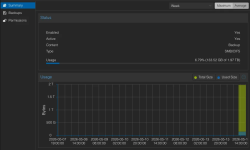
Proxmox VE web UI shows 133.52 GB of 1.97 TB used:
1778780567160.png

But it's only around 33GB actually used by VM backups:
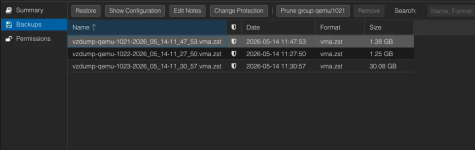
1778780599979.png

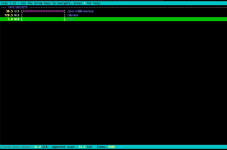
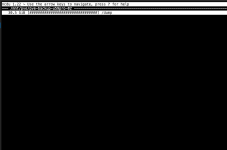
The ncdu command on the mini PC shows 31.2GiB used which is in fact correct considering that that mini PC also stores some Docker backups on that SSD:

1778780653688.png

The ncdu command on the Proxmox VE host itself shows 30.5GiB used:

1778780687137.png

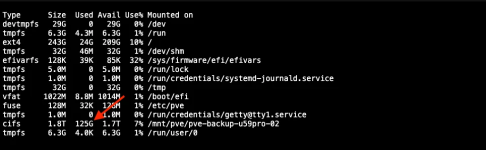
But surprisingly, the df -Th command on the Proxmox VE host itself shows 125GiB used:

1778780715479.png

Can't figure out why Proxmox VE is adding 100GB of used disk space for no apparent reason.

SOLVED: It turns out that those extra 100GB were nothing more that the default 5% reservation for root on EXT4 filesystem. A Reddit user suggested that so I ran sudo tune2fs -m 0 /dev/sda1 where /dev/sda1 is the disk partition that is used as a Samba share.
 
Last edited:
Hi, @tchjntr

There may be a few reasons. Hard to guess because we have no complete information.

One of the reasons can be mounting the current filesystem in not empty mount point.
Another can be running ncdu as a user lacking permissions to see all the files / directories. Especially that ncdu can hide errors - contrary to simpler du

Might be more.

Google for df vs du and you'll see possible reasons.

P.S. Please don't post screenshots of textual output. This

1) wastes the space in the forum and in the screens of readers,
2) disables searching,
3) disables quoting,
4) disables copying and pasting,
5) disables referring to the details,
6) makes it harder or even impossible to read (for people with vision disabilities).

Use CODE blocks instead (this </> icon in the composing menu).
 
  • Like
Reactions: UdoB
Sorry about the screenshots of textual output. I'll keep that in mind for the next time.

One of the reasons can be mounting the current filesystem in not empty mount point.

Definitely not the case. The SSD that is being used as a SMB share for VM backups has only three folders for a total usage of 32G, of which 31G are taken by the folder where VM backups are written:

Code:
/dev/sda1      ext4      1.8T   32G  1.7T   2% /mnt/data2tb

Another can be running ncdu as a user lacking permissions to see all the files / directories. Especially that ncdu can hide errors - contrary to simpler du

Also not the case. I ran all commands with sudo and I also tried with root user directly. Same results. Disk usage is fine on the Samba machine, whether I use ncdu, du or df. It's always around 32GB.

The issue seems to be related to the way Proxmox VE "sees" the SMB share. In fact:

- The web ui shows 133GB used on the share (first screenshot in my original post).

- The df -Th command on the Proxmox VE returns 125G (equivalent of 133GB expressed in GiB):

Code:
//192.168.178.12/data2tb/pve-x300-backup cifs      1.8T  125G  1.7T   7% /mnt/pve/pve-backup-u59pro-02

- The ncdu command on the Proxmox VE returns 30.5GiB:

Code:
Total disk usage:  30.5 GiB   Apparent size:  30.5 GiB   Items: 14

- The du command on the Proxmox VE returns 31G:

Code:
31G     /mnt/pve/pve-backup-u59pro-02/

Proxmox VE sees additional 100GB of data only in the web UI and when running df -Th.
 
Definitely not the case. The SSD that is being used as a SMB share for VM backups has only three folders for a total usage of 32G, of which 31G are taken by the folder where VM backups are written:

It still doesn't negate the possible reason I gave above.
That is, the mount point before mounting this SSD might be not empty.

If you can (temporarily) umount this drive, you will see whether there are some files/dirs in the directory in which you mounted the drive.

If you can't umount , you can use a nice trick with "bind" mounting.

Search for something like
linux access contents of directory mount bind

One example method is at https://superuser.com/questions/389255/is-it-possible-to-access-files-shadowed-by-a-mount
 
If you can (temporarily) umount this drive, you will see whether there are some files/dirs in the directory in which you mounted the drive.
Unmount the SMB drive in Proxmox VE or unmount the drive on the actual mini PC where Samba is running?
 
Disabling the storage should work too. It's a good idea anyways or it might just get mounted again.
 
I've marked the thread as Solved.

It turns out that those extra 100GB were nothing more that the default 5% reservation for root on EXT4 filesystem. A Reddit user suggested that so I ran
sudo tune2fs -m 0 /dev/sda1 where /dev/sda1 is the disk partition that is used as a Samba share.

Sorry for starting a thread for an issue that is not even related to Proxmox VE.
 
  • Like
Reactions: leesteken