

fresh VM not starting "Booting from Hard Disk..."

LightThiefs

Member
Nov 7, 2019
4
1
8
30
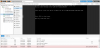
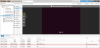
After a fresh install I am trying to create Ubuntu VM's, but can't do this. I download the .img file and create a VM directly from it, but then it will not boot into the installation setup. It goes into the steps shown below:

showing Ubuntu start install screen

Booting from Hard Disk...
Boot failed: not a bootable disk

Proxmox screen

What is happening and how can I solve it?
pveversion -v
Code:
proxmox-ve: 6.0-2 (running kernel: 5.0.21-4-pve)
pve-manager: 6.0-11 (running version: 6.0-11/2140ef37)
pve-kernel-helper: 6.0-11
pve-kernel-5.0: 6.0-10
pve-kernel-4.15: 5.4-9
pve-kernel-5.0.21-4-pve: 5.0.21-8
pve-kernel-4.15.18-21-pve: 4.15.18-48
pve-kernel-4.15.18-12-pve: 4.15.18-36
ceph-fuse: 12.2.11+dfsg1-2.1+b1
corosync: 3.0.2-pve4
criu: 3.11-3
glusterfs-client: 5.5-3
ksm-control-daemon: 1.3-1
libjs-extjs: 6.0.1-10
libknet1: 1.13-pve1
libpve-access-control: 6.0-3
libpve-apiclient-perl: 3.0-2
libpve-common-perl: 6.0-6
libpve-guest-common-perl: 3.0-2
libpve-http-server-perl: 3.0-3
libpve-storage-perl: 6.0-9
libqb0: 1.0.5-1
lvm2: 2.03.02-pve3
lxc-pve: 3.2.1-1
lxcfs: 3.0.3-pve60
novnc-pve: 1.1.0-1
proxmox-mini-journalreader: 1.1-1
proxmox-widget-toolkit: 2.0-8
pve-cluster: 6.0-7
pve-container: 3.0-10
pve-docs: 6.0-8
pve-edk2-firmware: 2.20190614-1
pve-firewall: 4.0-7
pve-firmware: 3.0-4
pve-ha-manager: 3.0-2
pve-i18n: 2.0-3
pve-qemu-kvm: 4.0.1-4
pve-xtermjs: 3.13.2-1
qemu-server: 6.0-13
smartmontools: 7.0-pve2
spiceterm: 3.1-1
vncterm: 1.6-1
zfsutils-linux: 0.8.2-pve2
 

Attachments

  • 3_crop.png
    3_crop.png
    137.1 KB · Views: 48
  • 0_crop.png
    0_crop.png
    114 KB · Views: 47
  • 2_crop.png
    2_crop.png
    103.9 KB · Views: 47
  • Like
Reactions: onegreyonewhite
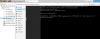
I confirm the problem. Moreover, the old virtual machine can not boot with the latest update.

YAML:
proxmox-ve: 6.0-2 (running kernel: 5.0.21-4-pve)
pve-manager: 6.0-11 (running version: 6.0-11/2140ef37)
pve-kernel-helper: 6.0-11
pve-kernel-5.0: 6.0-10
pve-kernel-5.0.21-4-pve: 5.0.21-8
pve-kernel-5.0.21-3-pve: 5.0.21-7
pve-kernel-5.0.15-1-pve: 5.0.15-1
ceph: 14.2.4-pve1
ceph-fuse: 14.2.4-pve1
corosync: 3.0.2-pve4
criu: 3.11-3
glusterfs-client: 5.5-3
ksm-control-daemon: 1.3-1
libjs-extjs: 6.0.1-10
libknet1: 1.13-pve1
libpve-access-control: 6.0-3
libpve-apiclient-perl: 3.0-2
libpve-common-perl: 6.0-6
libpve-guest-common-perl: 3.0-2
libpve-http-server-perl: 3.0-3
libpve-storage-perl: 6.0-9
libqb0: 1.0.5-1
lvm2: 2.03.02-pve3
lxc-pve: 3.2.1-1
lxcfs: 3.0.3-pve60
novnc-pve: 1.1.0-1
openvswitch-switch: 2.10.0+2018.08.28+git.8ca7c82b7d+ds1-12
proxmox-mini-journalreader: 1.1-1
proxmox-widget-toolkit: 2.0-8
pve-cluster: 6.0-7
pve-container: 3.0-10
pve-docs: 6.0-8
pve-edk2-firmware: 2.20190614-1
pve-firewall: 4.0-7
pve-firmware: 3.0-4
pve-ha-manager: 3.0-2
pve-i18n: 2.0-3
pve-qemu-kvm: 4.0.1-4
pve-xtermjs: 3.13.2-1
qemu-server: 6.0-13
smartmontools: 7.0-pve2
spiceterm: 3.1-1
vncterm: 1.6-1
zfsutils-linux: 0.8.2-pve2
 
  • Like
Reactions: LightThiefs
Since I'm the latest kernel too, I tried creating some VMs. One Ubuntu 18.04.3 LTS, one Ubuntu 19.10, Debian 10.1 and a FreeBSD VM.

The Ubuntu 18.04.3 LTS VM fails to start. It just appears to hang after checking for a clean/dirty shutdown.
The Ubuntu 19.10, Debian 10.1 and FreeBSD VMs have no problems booting.

I also don't have any issues booting other VMs that were created before the kernel upgrade.

I've not tried the testing 5.3 kernel since I compile my own ixgbe module and it looks like it fails on the testing kernel.

proxmox-ve: 6.0-2 (running kernel: 5.0.21-4-pve)
pve-manager: 6.0-11 (running version: 6.0-11/2140ef37)
pve-kernel-helper: 6.0-11
pve-kernel-5.0: 6.0-10
pve-kernel-4.15: 5.4-6
pve-kernel-5.0.21-4-pve: 5.0.21-8
pve-kernel-5.0.21-3-pve: 5.0.21-7
pve-kernel-5.0.21-2-pve: 5.0.21-7
pve-kernel-5.0.21-1-pve: 5.0.21-2
pve-kernel-5.0.18-1-pve: 5.0.18-3
pve-kernel-5.0.15-1-pve: 5.0.15-1
pve-kernel-4.15.18-18-pve: 4.15.18-44
pve-kernel-4.15.18-9-pve: 4.15.18-30
ceph: 14.2.4-pve1
ceph-fuse: 14.2.4-pve1
corosync: 3.0.2-pve4
criu: 3.11-3
glusterfs-client: 5.5-3
ksm-control-daemon: 1.3-1
libjs-extjs: 6.0.1-10
libknet1: 1.13-pve1
libpve-access-control: 6.0-3
libpve-apiclient-perl: 3.0-2
libpve-common-perl: 6.0-6
libpve-guest-common-perl: 3.0-2
libpve-http-server-perl: 3.0-3
libpve-storage-perl: 6.0-9
libqb0: 1.0.5-1
lvm2: 2.03.02-pve3
lxc-pve: 3.2.1-1
lxcfs: 3.0.3-pve60
novnc-pve: 1.1.0-1
proxmox-mini-journalreader: 1.1-1
proxmox-widget-toolkit: 2.0-8
pve-cluster: 6.0-7
pve-container: 3.0-10
pve-docs: 6.0-8
pve-edk2-firmware: 2.20190614-1
pve-firewall: 4.0-7
pve-firmware: 3.0-4
pve-ha-manager: 3.0-2
pve-i18n: 2.0-3
pve-qemu-kvm: 4.0.1-4
pve-xtermjs: 3.13.2-1
qemu-server: 6.0-13
smartmontools: 7.0-pve2
spiceterm: 3.1-1
vncterm: 1.6-1
zfsutils-linux: 0.8.2-pve2
 
Last edited:
I have since done a fresh install on a newer computer, a Dell 7010, which works splendidly. Luckily my backups were restored successfully as well. However, the problem on my older Toshiba A300 perseveres, but in another form after a second try at a fresh install of 6.0 directly (this time not through installing 5.4 and upgrading that). Whenever I'm trying to create a new VM (Ubuntu server 18.04 or 19.10) the following error shows:
Code:
modprobe: ERROR: ../libkmod/libkmod.c:586 kmod_search_moddep() could not open moddep file '/lib/modules/4.15.18-21-pve/modules.dep.bin'
modprobe: FATAL: Module dm-thin-pool not found in directory /lib/modules/4.15.18-21-pve
  /sbin/modprobe failed: 1
  thin: Required device-mapper target(s) not detected in your kernel.
TASK ERROR: unable to create VM 100 - lvcreate 'pve/vm-100-disk-0' error:   Run `lvcreate --help' for more information.

When creating a Debian 10 LXC, the following error is given:
Code:
modprobe: ERROR: ../libkmod/libkmod.c:586 kmod_search_moddep() could not open moddep file '/lib/modules/4.15.18-21-pve/modules.dep.bin'
modprobe: FATAL: Module dm-thin-pool not found in directory /lib/modules/4.15.18-21-pve
/sbin/modprobe failed: 1
thin: Required device-mapper target(s) not detected in your kernel.
TASK ERROR: unable to create CT 100 - lvcreate 'pve/vm-100-disk-0' error:   Run `lvcreate --help' for more information.
 
Unfortunately, that was not the fix for me. If it helps, currently the output of pverversion -v shows:
Code:
root@toshiba:~# pveversion -v
proxmox-ve: 6.0-2 (running kernel: 4.15.18-21-pve)
pve-manager: 6.0-11 (running version: 6.0-11/2140ef37)
pve-kernel-5.3: 6.0-11
pve-kernel-helper: 6.0-11
pve-kernel-5.0: 6.0-10
pve-kernel-5.3.7-1-pve: 5.3.7-1
pve-kernel-5.0.21-4-pve: 5.0.21-8
pve-kernel-5.0.15-1-pve: 5.0.15-1
ceph-fuse: 12.2.11+dfsg1-2.1+b1
corosync: 3.0.2-pve4
criu: 3.11-3
glusterfs-client: 5.5-3
ksm-control-daemon: 1.3-1
libjs-extjs: 6.0.1-10
libknet1: 1.13-pve1
libpve-access-control: 6.0-3
libpve-apiclient-perl: 3.0-2
libpve-common-perl: 6.0-6
libpve-guest-common-perl: 3.0-2
libpve-http-server-perl: 3.0-3
libpve-storage-perl: 6.0-9
libqb0: 1.0.5-1
lvm2: 2.03.02-pve3
lxc-pve: 3.2.1-1
lxcfs: 3.0.3-pve60
novnc-pve: 1.1.0-1
proxmox-mini-journalreader: 1.1-1
proxmox-widget-toolkit: 2.0-8
pve-cluster: 6.0-7
pve-container: 3.0-10
pve-docs: 6.0-8
pve-edk2-firmware: 2.20190614-1
pve-firewall: 4.0-7
pve-firmware: 3.0-4
pve-ha-manager: 3.0-2
pve-i18n: 2.0-3
pve-qemu-kvm: 4.0.1-4
pve-xtermjs: 3.13.2-1
qemu-server: 6.0-13
smartmontools: 7.0-pve2
spiceterm: 3.1-1
vncterm: 1.6-1
zfsutils-linux: 0.8.2-pve2
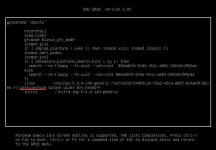
 
Removing console=hvc0 fixes the issue because the reason is quite "mechanical": that line forces the Linux primary console output (and even the login prompt) to the hvc0 virtual console device. Since the screen you are watching (PVE noVNC/QEMU display) is not hvc0, the system has actually finished booting, but you simply "cannot see" it displaying or waiting for login elsewhere. This leads you to believe the system is frozen.

What does​

The Linux kernel parameter console= specifies which device the kernel, systemd, and getty use for output and interactive terminals.

  • console=tty0: Uses the local monitor (VGA).
  • console=ttyS0: Uses the serial port (serial console).
  • console=hvc0: Uses the Hypervisor Virtual Console (common in Xen/KVM virtio console or certain cloud environments).

Why was​

Common Scenarios:​

  • The VM was migrated, cloned, or converted from a different virtualization platform (e.g., Xen → KVM, or a cloud image).
  • Previously, hvc0 was required to see the output on a cloud provider's console.
  • Currently, your PVE graphical console or serial console settings are different.
  • The PVE VM does not have the virtio console correctly enabled or mapped to hvc0.
  • The corresponding device was not created, or the console channel was not opened.
Essentially, console=hvc0 results in "output being sent to a place that does not exist or that you cannot see."
### After deleting the console=hvc0 line, press Ctrl + X to boot immediately. ###
You can update the Grub configuration to ensure the system boots normally every time.
 

Attachments

  • delete console-hvc0 string.jpg
    delete console-hvc0 string.jpg
    57.2 KB · Views: 1