Hi everyone, I've run into a serious issue while managing a Proxmox VE Ceph environment.
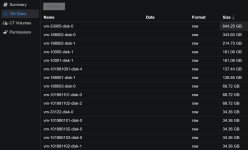
A user created a lot of VMs and ended up filling the entire Ceph cluster. The problem is, when I look at the RBD storage in the WebUI, I can only see the "Provisioned Size" of each disk. I can't tell which VMs are actually writing large amounts of data.
To make matters worse, deleting some large disks didn't seem to free up space as expected. It feels like the storage is consumed and never released.
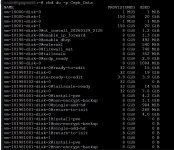
Is there a command or a way, similar to du on a regular filesystem, that allows me to see the "actual" disk usage so I can pinpoint exactly which VM is the space hog?
A user created a lot of VMs and ended up filling the entire Ceph cluster. The problem is, when I look at the RBD storage in the WebUI, I can only see the "Provisioned Size" of each disk. I can't tell which VMs are actually writing large amounts of data.
To make matters worse, deleting some large disks didn't seem to free up space as expected. It feels like the storage is consumed and never released.
Is there a command or a way, similar to du on a regular filesystem, that allows me to see the "actual" disk usage so I can pinpoint exactly which VM is the space hog?