PVE 9.1.5: Linux VM Freeze Randomly

jotha

New Member
Feb 14, 2026
14
0
1
Germany
Hello together,

currnetly I'm running PVE version 9.1.5 on two HPE DL360 G10 as a two node cluster without HA.
On host #1 I installed two VMs (IPfire 2.29 U199, Linux Kernel 6.12.58-ipfire #1 SMP PREEMPT_DYNAMIC) for testing an development and also one LXC and two other Linux (openSuSE 15.6) machines.
Host #2 is used for some further VMs (Win/Linux).

Now the problem I'm facing:
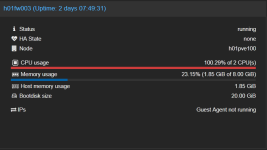
The two IPfire VMs (103, 104) are freezing randomly (between 10 Minutes and 5 Days) without any visible reason. The VM which fails uses >100% CPU and isn't responding to ping or any other type of access. The only possible solution to get it back on live is to hard reset the VM. All other VMs on the host are running as expected (console/network/web interface....).
During the freeze I checked all available logs on the PVE host as also on the VM. Unfortunately there isn't any hint about the reason of the failure. No scheduled tasks, no migration/backup or other administrative tasks running.
The same promlem with IPfire VM (103) has happend formerly on a single PVE host running on version 8.4.1.
The second VM (104) was installed from scratch with most of the recomended default settings for Linux VMs. This machine is also freezing randomly.
I tried to use different settings for the VM hardware like core/sockets/type for the CPU, used different virtual SCSI controllers, disabled ACPI support, moved the VM to second host, and many many more... I also stressed all available search functions in the www and tested lots of hints mentioned there.
Nothing has solved the issue until today.

I would appreciate any hint what else I can check / change / do to solve this annoying issue.

Many thanks in advance and happy virtualizing,
Jörg

Code:
Package Versions:

Header
Proxmox
Virtual Environment 9.1.5
Node 'h01pve100'
CPU usage
 
0.22% of 20 CPU(s)
    
IO delay
 
0.00%
Load average
 
0.13,0.12,0.09
RAM usage
 
24.97% (23.47 GiB of 93.98 GiB)
    
KSM sharing
 
0 B
/ HD space
 
0.14% (2.96 GiB of 2.09 TiB)
    
SWAP usage
 
N/A
CPU(s)
 
20 x Intel(R) Xeon(R) Gold 5115 CPU @ 2.40GHz (1 Socket)
Kernel Version
 
Linux 6.17.9-1-pve (2026-01-12T16:25Z)
Boot Mode
 
Legacy BIOS
Manager Version
 
pve-manager/9.1.5/80cf92a64bef6889
Repository Status
 
Proxmox VE updates Non production-ready repository enabled!
()
proxmox-ve: 9.1.0 (running kernel: 6.17.9-1-pve)
pve-manager: 9.1.5 (running version: 9.1.5/80cf92a64bef6889)
proxmox-kernel-helper: 9.0.4
proxmox-kernel-6.17.9-1-pve-signed: 6.17.9-1
proxmox-kernel-6.17: 6.17.9-1
proxmox-kernel-6.17.2-1-pve-signed: 6.17.2-1
ceph-fuse: 19.2.3-pve4
corosync: 3.1.9-pve2
criu: 4.1.1-1
frr-pythontools: 10.4.1-1+pve1
ifupdown2: 3.3.0-1+pmx12
intel-microcode: 3.20251111.1~deb13u1
ksm-control-daemon: 1.5-1
libjs-extjs: 7.0.0-5
libproxmox-acme-perl: 1.7.0
libproxmox-backup-qemu0: 2.0.2
libproxmox-rs-perl: 0.4.1
libpve-access-control: 9.0.5
libpve-apiclient-perl: 3.4.2
libpve-cluster-api-perl: 9.0.7
libpve-cluster-perl: 9.0.7
libpve-common-perl: 9.1.7
libpve-guest-common-perl: 6.0.2
libpve-http-server-perl: 6.0.5
libpve-network-perl: 1.2.5
libpve-rs-perl: 0.11.4
libpve-storage-perl: 9.1.0
libspice-server1: 0.15.2-1+b1
lvm2: 2.03.31-2+pmx1
lxc-pve: 6.0.5-4
lxcfs: 6.0.4-pve1
novnc-pve: 1.6.0-3
proxmox-backup-client: 4.1.2-1
proxmox-backup-file-restore: 4.1.2-1
proxmox-backup-restore-image: 1.0.0
proxmox-firewall: 1.2.1
proxmox-kernel-helper: 9.0.4
proxmox-mail-forward: 1.0.2
proxmox-mini-journalreader: 1.6
proxmox-offline-mirror-helper: 0.7.3
proxmox-widget-toolkit: 5.1.5
pve-cluster: 9.0.7
pve-container: 6.1.1
pve-docs: 9.1.2
pve-edk2-firmware: 4.2025.05-2
pve-esxi-import-tools: 1.0.1
pve-firewall: 6.0.4
pve-firmware: 3.17-2
pve-ha-manager: 5.1.0
pve-i18n: 3.6.6
pve-qemu-kvm: 10.1.2-6
pve-xtermjs: 5.5.0-3
qemu-server: 9.1.4
smartmontools: 7.4-pve1
spiceterm: 3.4.1
swtpm: 0.8.0+pve3
vncterm: 1.9.1
zfsutils-linux: 2.4.0-pve1
Code:
VM 103:

#[WAN] [LAN] [WLANs] IPFire - Test Firewall Guest Access
agent: 1
allow-ksm: 0
balloon: 0
boot: order=scsi0;ide2
cores: 2
cpu: x86-64-v2-AES
hotplug: 0
ide2: none,media=cdrom
memory: 4096
meta: creation-qemu=9.2.0,ctime=1768461064
name: h01fw003
net0: virtio=BC:24:11:05:1D:AC,bridge=vmbr2
net1: virtio=BC:24:11:35:E4:49,bridge=vmbondbr1,tag=312
net2: virtio=BC:24:11:81:84:E7,bridge=vmbondbr0,tag=10
numa: 0
ostype: l26
scsi0: vmdata1:vm-103-disk-0,size=20G
smbios1: uuid=00d0ee2c-922e-47a6-8b4b-c20ed3955b8d
sockets: 1
startup: order=5
tablet: 0
tags: lan;wlan;wan
vmgenid: 0beab8a8-ae6a-43d1-a4d5-1b03232b5beb
Code:
VM 104:

#[WAN] [LAN] [DMZ] IPFire - Test Firewall IT DMZ
agent: 1
allow-ksm: 0
balloon: 0
boot: order=scsi0;ide2;net0
cores: 2
cpu: x86-64-v2-AES
ide2: none,media=cdrom
memory: 4096
meta: creation-qemu=10.1.2,ctime=1771670010
name: h01fw004
net0: virtio=BC:24:11:F3:E8:DF,bridge=vmbondbr0,tag=10
net1: virtio=BC:24:11:31:18:C0,bridge=vmbr10,tag=500
net2: virtio=BC:24:11:9E:CC:E7,bridge=vmbr2
numa: 0
ostype: l26
scsi0: vmdata1:vm-104-disk-0,size=20G
smbios1: uuid=978b7e34-9f7c-4b9b-b36e-ad93aa2a1954
sockets: 1
tags: lan;dmz;wan
vmgenid: 95bd9ffd-3eee-4638-b0bf-d37ad58cbe14
 
During the freeze I checked all available logs on the PVE host as also on the VM. Unfortunately there isn't any hint about the reason of the failure. No scheduled tasks, no migration/backup or other administrative tasks running.
The same promlem with IPfire VM (103) has happend formerly on a single PVE host running on version 8.4.1.
I don't know IPfire itself, but are there any logs within the VMs themselves? As their website states that they are based on Linux, the VMs own syslog or other logs could give some hint what the reason for the freezes are.

I tried to use different settings for the VM hardware like core/sockets/type for the CPU, used different virtual SCSI controllers, disabled ACPI support, moved the VM to second host, and many many more... I also stressed all available search functions in the www and tested lots of hints mentioned there.
4 GiB seems good enough for such a use case, but might that be something to also change? I couldn't imagine the oom killer running for 5 whole days though...
 
Hello Daniel,

thanks for your reply!

I don't know IPfire itself, but are there any logs within the VMs themselves? As their website states that they are based on Linux, the VMs own syslog or other logs could give some hint what the reason for the freezes are.
Yes, the IPfire has also a lot of logs (most are "firewall" related, but also kernel and other logs are included) and I checked it already, but I can't find any hint about the reason of failure.

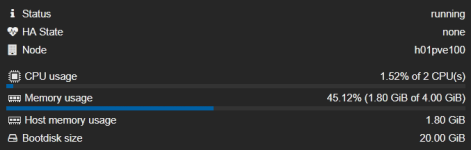
4 GiB seems good enough for such a use case, but might that be something to also change? I couldn't imagine the oom killer running for 5 whole days though...
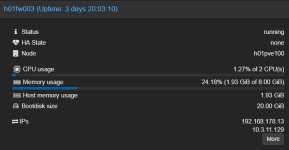
Currently this test machine is running with very low resources:
Screenshot 2026-02-24 124702.png
I assume this should be enough, but I can give it a try to add additional 4 GiB to the VM....

Thanks and regards,
Jörg
 
Some update:

after increasing the amount of RAM to 8 GiB the machine was running for 2.5 days. Unfortunately it freezed again:

1772135616145.png

Any hint appreciated....

Thanks and cheers,
Jörg
 
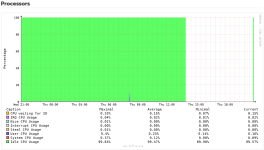
Interesting is, that on the VM the processor is doing nothing during the freeze:

1772136089634.png

Neither heavy I/O nor "idleling"...

Mysterious greets,
Jörg
 
Hi,
while the CPU is at 100%, what is the output of qm status ID --verbose and timeout 10 strace -c -p $(cat /run/qemu-server/ID.pid), both times with the numerical ID of the affected VM? Are there any tasks happening for the VM around the time of the issue, e.g. backup?
 
Just a shot-in-the-dark, as I don't use IPFire:

I note that in the VM's config's (103 & 104) you have the GA enabled, but in the above image you posted, it appears the GA is not running in the VM. It would appear (Google search) that the GA can be installed in IPFire via the IPFire Pakfire package manager as qemu-ga. Have you installed this? If not remove the agent setting for the VM/s.

If you have installed it - you need to check why it is not running/functioning.

Good luck.
 
Hm, then it could be a kernel panic inside the VM that is causing it and isn't written to the disk anymore if it doesn't show up in the syslog, e.g. journalctl -b -1... Maybe you can setup netconsole [0] [1] or some other log-persisting setup to capture the log when the freeze happens.

[0] https://pve.proxmox.com/wiki/Kernel_Crash_Trace_Log
[1] https://www.kernel.org/doc/Documentation/networking/netconsole.txt
Hi Daniel,

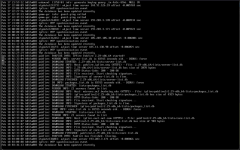
I already tried to verify the issue, but on console screen nothing is mentioned during the freeze. Normally the local console should show any panic screen or something similar, but in this case the machine freezes only.

Freeze event at 18th Feb., 03:38:16h:
1772264928162.png

Due to this circumstance, I assume also nothing will be logged externally during the event.

Regards,
Jörg
 
Hi,
while the CPU is at 100%, what is the output of qm status ID --verbose and timeout 10 strace -c -p $(cat /run/qemu-server/ID.pid), both times with the numerical ID of the affected VM? Are there any tasks happening for the VM around the time of the issue, e.g. backup?
Hello Fiona,

currently I don't have an actual output of qm status, but I'll provide it during the next freeze event. I checked it already some time ago, but I can't find any suspicious in it.
No task are running during the time of the event.

Regards,
Jörg
 
Just a shot-in-the-dark, as I don't use IPFire:

I note that in the VM's config's (103 & 104) you have the GA enabled, but in the above image you posted, it appears the GA is not running in the VM. It would appear (Google search) that the GA can be installed in IPFire via the IPFire Pakfire package manager as qemu-ga. Have you installed this? If not remove the agent setting for the VM/s.

If you have installed it - you need to check why it is not running/functioning.

Good luck.
Hi gfngfn256,

the qemu-ga agent is installed (via Pakfire) and running on the VM, currently used version is 10.1.0 (qemu-ga -V).
The problem with the Guest Agent not running is the fact, that the agent is not answering after the freeze event.

1772265761801.png

Regards,
Jörg
 
Last edited:
Hello Fiona,

currently I don't have an actual output of qm status, but I'll provide it during the next freeze event. I checked it already some time ago, but I can't find any suspicious in it.
No task are running during the time of the event.

Regards,
Jörg
Hello Fiona,

here's the output of the requested commands at the current freeze:

qm status 103 --verbose
Code:
blockstat:
        ide2:
                account_failed: 1
                account_invalid: 1
                failed_flush_operations: 0
                failed_rd_operations: 0
                failed_unmap_operations: 0
                failed_wr_operations: 0
                failed_zone_append_operations: 0
                flush_operations: 0
                flush_total_time_ns: 0
                invalid_flush_operations: 0
                invalid_rd_operations: 0
                invalid_unmap_operations: 0
                invalid_wr_operations: 0
                invalid_zone_append_operations: 0
                rd_bytes: 0
                rd_merged: 0
                rd_operations: 0
                rd_total_time_ns: 0
                timed_stats:
                unmap_bytes: 0
                unmap_merged: 0
                unmap_operations: 0
                unmap_total_time_ns: 0
                wr_bytes: 0
                wr_highest_offset: 0
                wr_merged: 0
                wr_operations: 0
                wr_total_time_ns: 0
                zone_append_bytes: 0
                zone_append_merged: 0
                zone_append_operations: 0
                zone_append_total_time_ns: 0
        scsi0:
                account_failed: 1
                account_invalid: 1
                failed_flush_operations: 0
                failed_rd_operations: 0
                failed_unmap_operations: 0
                failed_wr_operations: 0
                failed_zone_append_operations: 0
                flush_operations: 4645
                flush_total_time_ns: 42027146914
                idle_time_ns: 2598444576946
                invalid_flush_operations: 0
                invalid_rd_operations: 0
                invalid_unmap_operations: 0
                invalid_wr_operations: 0
                invalid_zone_append_operations: 0
                rd_bytes: 163840
                rd_merged: 0
                rd_operations: 27
                rd_total_time_ns: 44642308
                timed_stats:
                unmap_bytes: 0
                unmap_merged: 0
                unmap_operations: 0
                unmap_total_time_ns: 0
                wr_bytes: 1177276416
                wr_highest_offset: 18282375168
                wr_merged: 0
                wr_operations: 220048
                wr_total_time_ns: 70143229527
                zone_append_bytes: 0
                zone_append_merged: 0
                zone_append_operations: 0
                zone_append_total_time_ns: 0
cpus: 2
disk: 0
diskread: 163840
diskwrite: 1177276416
maxdisk: 21474836480
maxmem: 8589934592
mem: 1994059776
memhost: 1994059776
name: h01fw003
netin: 5077606
netout: 452830
nics:
        tap103i0:
                netin: 2928541
                netout: 200968
        tap103i1:
                netin: 1086862
                netout: 125470
        tap103i2:
                netin: 1062203
                netout: 126392
pid: 4724
pressurecpufull: 0
pressurecpusome: 0
pressureiofull: 0
pressureiosome: 0
pressurememoryfull: 0
pressurememorysome: 0
proxmox-support:
        backup-access-api: 1
        backup-fleecing: 1
        backup-max-workers: 1
        pbs-dirty-bitmap: 1
        pbs-dirty-bitmap-migration: 1
        pbs-dirty-bitmap-savevm: 1
        pbs-library-version: 2.0.2 (594183eab9fa275f45dfff5dd15b16f150abd503)
        pbs-masterkey: 1
        query-bitmap-info: 1
qmpstatus: running
running-machine: pc-i440fx-10.1+pve0
running-qemu: 10.1.2
status: running
tags: lan;wlan;wan
uptime: 28938
vmid: 103

timeout 10 strace -c -p $(cat /run/qemu-server/103.pid)
Code:
strace: Process 4724 attached
strace: Process 4724 detached
% time     seconds  usecs/call     calls    errors syscall
------ ----------- ----------- --------- --------- ----------------
 99.70    3.649545        7764       470           ppoll
  0.14    0.005063          11       457           read
  0.06    0.002348           2       909           write
  0.05    0.001865           3       471         2 futex
  0.05    0.001861           4       435           recvmsg
  0.00    0.000008           1         8           sendmsg
  0.00    0.000003           3         1           accept4
  0.00    0.000001           0         2           fcntl
  0.00    0.000000           0         1           close
  0.00    0.000000           0         1           getsockname
------ ----------- ----------- --------- --------- ----------------
100.00    3.660694        1328      2755         2 total

Thanks and regards,
Jörg
 
Maybe try disabling the GA (both in PVE & IPFire) & test for VM freeze.
yes, that's definite a choice to try.

Currently I've activated the netconsole kernel feature to see maybe more what happens during the failure.

I'll keep you all updated about the next findings....

Thanks and regards,
Jörg
 
Hello all,

with the activated netconsole no additional messages are shown. It seems the VM is loosing all hardware during the failure, so no message can be written, neither to console, nor to disk or network.
My next try will be to disable the qemu-ga on VM and host side.

I'll keep you updated soon....

Regards,
Jörg
 
Hello again,

just for info: Removing guest agent from VM and host settings hasn't changed the situation. VM is still freezing.

Currently I don't have any further idea what could be tested next....

I'm now trusting a bit on the swarm intelligence and hope anyone can support in this case. ;)

Many thanks and kind regards,
Jörg
 
qm status 103 --verbose
The output here looks fine, so at least we can rule out a deadlock in the QEMU process.
timeout 10 strace -c -p $(cat /run/qemu-server/103.pid)
Code:
strace: Process 4724 attached
strace: Process 4724 detached
% time     seconds  usecs/call     calls    errors syscall
------ ----------- ----------- --------- --------- ----------------
 99.70    3.649545        7764       470           ppoll
  0.14    0.005063          11       457           read
  0.06    0.002348           2       909           write
  0.05    0.001865           3       471         2 futex
  0.05    0.001861           4       435           recvmsg
  0.00    0.000008           1         8           sendmsg
  0.00    0.000003           3         1           accept4
  0.00    0.000001           0         2           fcntl
  0.00    0.000000           0         1           close
  0.00    0.000000           0         1           getsockname
------ ----------- ----------- --------- --------- ----------------
100.00    3.660694        1328      2755         2 total
It's noticeable that the poll syscalls take quite a while. Might be related to the storage or something else, not sure.

It seems that you do not have IO Thread setting enabled for the disks. Doing so is highly recommended. You also need to select the VirtIO SCSI single controller for that.
 
The output here looks fine, so at least we can rule out a deadlock in the QEMU process.

It's noticeable that the poll syscalls take quite a while. Might be related to the storage or something else, not sure.

It seems that you do not have IO Thread setting enabled for the disks. Doing so is highly recommended. You also need to select the VirtIO SCSI single controller for that.
Hello Fiona,

I've activated IO Thread for the disk and configured VirtIO SCSI single as machines controller now for both affected VMs. Let's see if something changes...

Thanks and regards,
Jörg