VM connection issues after subnet change. What am I missing? Real time problem.

Bikersmurf

New Member
Jan 25, 2026
12
0
1
I setup two of my proxmox servers while connected to one subnet, and then moved them to a different subnet. For simplicity we changed from 192.168.'A'.1 to 192.168.'B'.1. Accessing the GUI is working and the VMs all have IPs on the B subnet.

The Issue im having is that the different VMs won't talk to each other or allow files to be shared. I have used nano /etc/network/interfaces and nano /etc/hosts to change the IP and Gateway to the correct new settings. I have also checked /etc/resolv.conf.

Any ideas of which other config files need to be edited?

From within the node, RDP tries to connect, but it will not accept the username and password for the VM. It also won't allow file sharing within the Node between VMs. If connecting from outside the node everything works as it should. I configured a couple of other Proxmox servers to double check and by default everything I'm trying to do works.

The two servers I changed subnets on both have the exact same issues. Unfortunately, I installed Proxmox on the same hard drive as the VMs are stored on so it's complicated to start fresh with Proxmox. I'd prefer to fix the configs and then move Proxmox onto a different SSD drive after migrating all the VMs (15+) onto a different drive.

Second issue I created while trying to resolve the main issue is that I can now only connect to the GUI from a computer on that subnet. I have a few other proxmox servers and I'm not having either of these issues with any of them.

BTW, turning off firewalls in the GUI made no difference. Ping tests work but not connections using VM credentials.

If there was an etc file that had a list of VM IPs and credentials, that would be where ID think the problem was.

Excuse the NOOB questions... My computer science background is not very current and this problem is well outside of my education and experience.

I searched and haven't been able to find a solution. After posting here ===> https://forum.proxmox.com/threads/ip-address-change.153469/#post-835354 the recomendation was made that I start a new thread.

I have now learned that I should have had Debian and Proxmox on it's own ssd drive and the VMs on a different drive. If I can resolve this issue I'll be moving the most used VM onto a NVME drive on a PCIE card.

Server running it is a Lenovo TD340 running 2X 10 core 20 thread Xeon processors and 196 GB ram. The use is not particularly demanding and if I can resolve this Issue I'm going to guggle things to reduce some of the bottlenecks I'm currently having.

I have tried to simply have it boot off a different drive with Proxmox on it, but Proxmox kind of freaked and wouldn't let me access anything on the 2 TB SSD drive that had all the VMs and OS on it.

Thoughts anyone? @mram @sw-omit @0xcircuitbreaker
 
PROXMOX VE 9.0.3 running on debian Trixie

I'm new to this forum, but if you poke around, you'll find @Bikersmurf on many other forums. I greatly appreciate the knowledge and expertise here.
 
Last edited:
How does your host network configuration look like?

Code:
cat /etc/network/interfaces
cat /etc/network/interfaces.d/sdn

ip a
ip r

Can you post the configuration of a affected VM?

Code:
qm config <VMID>

Could you also post the network configuration from an affected VM?
 
  • Like
Reactions: Bikersmurf
Thanks for your reply. I’ll post up once I’m back on the computer.
All the VMs are affected. There’s no access between them and RDP won’t accept credentials for connections between them,

Once outside the node, suddenly no problems. Connecting with RDP works to any VM and file sharing works as it should. I have no problem at all!
 
BTW - 'root@server' is a name I substituted for the nodes name.

Proxmox was originally configured with the GUI being 192.168.8.120:8006

After switching to a different router I changed it to 192.168.3.120:8006


root@server:~# cat /etc/network/interfaces
# network interface settings; autogenerated
# Please do NOT modify this file directly, unless you know what
# you're doing.
#
# If you want to manage parts of the network configuration manually,
# please utilize the 'source' or 'source-directory' directives to do
# so.
# PVE will preserve these directives, but will NOT read its network
# configuration from sourced files, so do not attempt to move any of
# the PVE managed interfaces into external files!

auto lo
iface lo inet loopback

auto nic0
iface nic0 inet manual

auto nic1
iface nic1 inet manual

auto vmbr0
iface vmbr0 inet static
address 192.168.3.120/24
gateway 192.168.3.1
bridge-ports nic0
bridge-stp off
bridge-fd 0
bridge-vlan-aware yes
bridge-vids 2-4094

source /etc/network/interfaces.d/*

root@server:~# cat /etc/network/interfaces.d/sdn
#version:3

auto Shamrock
iface Shamrock
bridge_ports none
bridge_stp off
bridge_fd 0
alias S

root@server:~# ip a
1: lo: <LOOPBACK,UP,LOWER_UP> mtu 65536 qdisc noqueue state UNKNOWN group default qlen 1000
link/loopback 00:00:00:00:00:00 brd 00:00:00:00:00:00
inet 127.0.0.1/8 scope host lo
valid_lft forever preferred_lft forever
inet6 ::1/128 scope host noprefixroute
valid_lft forever preferred_lft forever
2: nic0: <BROADCAST,MULTICAST,UP,LOWER_UP> mtu 1500 qdisc fq_codel master vmbr0 state UP group default qlen 1000
link/ether 70:e2:84:05:73:9d brd ff:ff:ff:ff:ff:ff
altname enx70e28405739d
3: nic1: <BROADCAST,MULTICAST,UP,LOWER_UP> mtu 1500 qdisc fq_codel state UP group default qlen 1000
link/ether 70:e2:84:05:73:9e brd ff:ff:ff:ff:ff:ff
altname enx70e28405739e
inet6 fe80::72e2:84ff:fe05:739e/64 scope link proto kernel_ll
valid_lft forever preferred_lft forever
4: vmbr0: <BROADCAST,MULTICAST,UP,LOWER_UP> mtu 1500 qdisc noqueue state UP group default qlen 1000
link/ether 70:e2:84:05:73:9d brd ff:ff:ff:ff:ff:ff
inet 192.168.3.120/24 scope global vmbr0
valid_lft forever preferred_lft forever
inet6 fe80::72e2:84ff:fe05:739d/64 scope link proto kernel_ll
valid_lft forever preferred_lft forever
5: Shamrock: <BROADCAST,MULTICAST,UP,LOWER_UP> mtu 1500 qdisc noqueue state UNKNOWN group default qlen 1000
link/ether 9e:1c:b6:82:57:c4 brd ff:ff:ff:ff:ff:ff
inet6 fe80::9c1c:b6ff:fe82:57c4/64 scope link proto kernel_ll
valid_lft forever preferred_lft forever
6: tap141i0: <BROADCAST,MULTICAST,PROMISC,UP,LOWER_UP> mtu 1500 qdisc fq_codel master vmbr0 state UNKNOWN group default qlen 1000
link/ether de:43:8b:c6:c9:78 brd ff:ff:ff:ff:ff:ff
7: tap141i1: <BROADCAST,MULTICAST,PROMISC,UP,LOWER_UP> mtu 1500 qdisc fq_codel master fwbr141i1 state UNKNOWN group default qlen 1000
link/ether 66:ce:e8:06:e9:e4 brd ff:ff:ff:ff:ff:ff
8: fwbr141i1: <BROADCAST,MULTICAST,UP,LOWER_UP> mtu 1500 qdisc noqueue state UP group default qlen 1000
link/ether be:93:99:a7:e4:a2 brd ff:ff:ff:ff:ff:ff
9: fwpr141p1@fwln141i1: <BROADCAST,MULTICAST,UP,LOWER_UP> mtu 1500 qdisc noqueue master vmbr0 state UP group default qlen 1000
link/ether ae:ea:ea:bc:d3:3f brd ff:ff:ff:ff:ff:ff
10: fwln141i1@fwpr141p1: <BROADCAST,MULTICAST,UP,LOWER_UP> mtu 1500 qdisc noqueue master fwbr141i1 state UP group default qlen 1000
link/ether be:93:99:a7:e4:a2 brd ff:ff:ff:ff:ff:ff
11: tap150i0: <BROADCAST,MULTICAST,PROMISC,UP,LOWER_UP> mtu 1500 qdisc fq_codel master fwbr150i0 state UNKNOWN group default qlen 1000
link/ether 02:75:99:4e:ff:93 brd ff:ff:ff:ff:ff:ff
12: fwbr150i0: <BROADCAST,MULTICAST,UP,LOWER_UP> mtu 1500 qdisc noqueue state UP group default qlen 1000
link/ether 0e:cb:d9:8a:e9:ab brd ff:ff:ff:ff:ff:ff
13: fwpr150p0@fwln150i0: <BROADCAST,MULTICAST,UP,LOWER_UP> mtu 1500 qdisc noqueue master vmbr0 state UP group default qlen 1000
link/ether b6:5f:ee:ad:5d:1f brd ff:ff:ff:ff:ff:ff
14: fwln150i0@fwpr150p0: <BROADCAST,MULTICAST,UP,LOWER_UP> mtu 1500 qdisc noqueue master fwbr150i0 state UP group default qlen 1000
link/ether 0e:cb:d9:8a:e9:ab brd ff:ff:ff:ff:ff:ff
15: tap151i0: <BROADCAST,MULTICAST,PROMISC,UP,LOWER_UP> mtu 1500 qdisc fq_codel master fwbr151i0 state UNKNOWN group default qlen 1000
link/ether 12:9e:b5:8e:36:b1 brd ff:ff:ff:ff:ff:ff
16: fwbr151i0: <BROADCAST,MULTICAST,UP,LOWER_UP> mtu 1500 qdisc noqueue state UP group default qlen 1000
link/ether f2:38:3a:dd:06:cb brd ff:ff:ff:ff:ff:ff
17: fwpr151p0@fwln151i0: <BROADCAST,MULTICAST,UP,LOWER_UP> mtu 1500 qdisc noqueue master vmbr0 state UP group default qlen 1000
link/ether ea:27:c0:20:79:2d brd ff:ff:ff:ff:ff:ff
18: fwln151i0@fwpr151p0: <BROADCAST,MULTICAST,UP,LOWER_UP> mtu 1500 qdisc noqueue master fwbr151i0 state UP group default qlen 1000
link/ether f2:38:3a:dd:06:cb brd ff:ff:ff:ff:ff:ff
19: tap204i0: <BROADCAST,MULTICAST,PROMISC,UP,LOWER_UP> mtu 1500 qdisc fq_codel master fwbr204i0 state UNKNOWN group default qlen 1000
link/ether e6:ba:79:52:c8:34 brd ff:ff:ff:ff:ff:ff
20: fwbr204i0: <BROADCAST,MULTICAST,UP,LOWER_UP> mtu 1500 qdisc noqueue state UP group default qlen 1000
link/ether 16:12:cf:de:ce:13 brd ff:ff:ff:ff:ff:ff
21: fwpr204p0@fwln204i0: <BROADCAST,MULTICAST,UP,LOWER_UP> mtu 1500 qdisc noqueue master vmbr0 state UP group default qlen 1000
link/ether 4e:de:a9:7b:2b:05 brd ff:ff:ff:ff:ff:ff
22: fwln204i0@fwpr204p0: <BROADCAST,MULTICAST,UP,LOWER_UP> mtu 1500 qdisc noqueue master fwbr204i0 state UP group default qlen 1000
link/ether 16:12:cf:de:ce:13 brd ff:ff:ff:ff:ff:ff
23: tap241i0: <BROADCAST,MULTICAST,PROMISC,UP,LOWER_UP> mtu 1500 qdisc fq_codel master fwbr241i0 state UNKNOWN group default qlen 1000
link/ether fa:48:a6:9a:33:ba brd ff:ff:ff:ff:ff:ff
24: fwbr241i0: <BROADCAST,MULTICAST,UP,LOWER_UP> mtu 1500 qdisc noqueue state UP group default qlen 1000
link/ether 3a:1e:d7:0a:1b:b0 brd ff:ff:ff:ff:ff:ff
25: fwpr241p0@fwln241i0: <BROADCAST,MULTICAST,UP,LOWER_UP> mtu 1500 qdisc noqueue master vmbr0 state UP group default qlen 1000
link/ether ba:6a:1b:38:37:1f brd ff:ff:ff:ff:ff:ff
26: fwln241i0@fwpr241p0: <BROADCAST,MULTICAST,UP,LOWER_UP> mtu 1500 qdisc noqueue master fwbr241i0 state UP group default qlen 1000
link/ether 3a:1e:d7:0a:1b:b0 brd ff:ff:ff:ff:ff:ff

root@server:~# ip r
default via 192.168.3.1 dev vmbr0 proto kernel onlink
192.168.3.0/24 dev vmbr0 proto kernel scope link src 192.168.3.120


root@server:~# qm config 154
bios: ovmf
boot: order=virtio0;ide2;ide0;net0
cores: 12
cpu: x86-64-v2-AES
description: 3.111
efidisk0: local-lvm:vm-154-disk-0,efitype=4m,pre-enrolled-keys=1,size=4M
ide0: local:iso/virtio-win-0.1.285.iso,media=cdrom,size=771138K
ide2: local:iso/Win11_24H2_English_x64.iso,media=cdrom,size=5683090K
machine: pc-q35-10.0
memory: 16320
meta: creation-qemu=10.0.2,ctime=1759352764
name: Tiffanie.3.111
net0: virtio=BC:24:11:98:97:1F,bridge=vmbr0,firewall=1
numa: 0
ostype: win11
scsihw: virtio-scsi-pci
smbios1: uuid=cc10ba26-92e4-4be0-a8f2-dbdaac562942
sockets: 1
tpmstate0: local-lvm:vm-154-disk-1,size=4M,version=v2.0
unused0: local-lvm:vm-154-disk-2
virtio0: MSD:154/vm-154-disk-0.qcow2,iothread=1,size=250G
vmgenid: c2f5a0b2-a44c-424e-ab2e-a6f27b21d8c0

and another

root@server:~# qm config 153
bios: ovmf
boot: order=virtio0;ide2;ide0;net0
cores: 12
cpu: x86-64-v2-AES
description: 3.115
efidisk0: local-lvm:vm-153-disk-0,efitype=4m,pre-enrolled-keys=1,size=4M
ide0: local:iso/virtio-win-0.1.285.iso,media=cdrom,size=771138K
ide2: local:iso/Win11_24H2_English_x64.iso,media=cdrom,size=5683090K
machine: pc-q35-10.0
memory: 16320
meta: creation-qemu=10.0.2,ctime=1759352764
name: Judith.3.115
net0: virtio=BC:24:11:9C:D9:F2,bridge=vmbr0,firewall=1
numa: 0
ostype: win11
scsihw: virtio-scsi-pci
smbios1: uuid=195b0e96-b6cd-4a72-96f3-55718450c7a9
sockets: 1
tpmstate0: local-lvm:vm-153-disk-1,size=4M,version=v2.0
virtio0: local-lvm:vm-153-disk-2,iothread=1,size=250G
vmgenid: b395bce2-e66b-491a-8afc-bb9274364235
 
Hi, @Bikersmurf

1) Just in case, execute in the PVE hosts:

grep -rF 192.168. /etc

and search for any leftovers of the old addressing.

2) Double check the network configurations of the VMs (you failed to deliver them here).
 
Do any of your VMs still have 192.168.8.x addresses statically assigned in them?
Did you check your Proxmox firewalls? Try disabling the Proxmox firewalls.
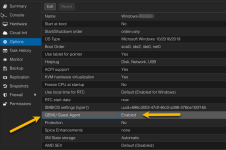
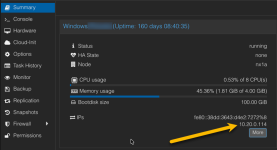
Do you have the KVM guest tools installed in the VMs? I assume they are Windows since you want to RDP. https://pve.proxmox.com/wiki/Qemu-guest-agent
The IPs of the VMs should be visible like the pictures below, except they should be 192.168.3.x addresses now. Note: you will have to power down each vm for a moment to enabled the QEMU guest agent.

2026-02-15_21-48-33.png2026-02-15_21-47-46.png
 
Last edited:
  • Like
Reactions: IsThisThingOn
Do any of your VMs still have 192.168.8.x addresses statically assigned in them?
Did you check your Proxmox firewalls? Try disabling the Proxmox firewalls.
Do you have the KVM guest tools installed in the VMs? I assume they are Windows since you want to RDP. https://pve.proxmox.com/wiki/Qemu-guest-agent
The IPs of the VMs should be visible like the pictures below, except they should be 192.168.3.x addresses now. Note: you will have to power down each vm for a moment to enabled the QEMU guest agent.

View attachment 95853View attachment 95852
I'm going to check the other things, but quick answer, turning off the ProxMox firewalls made no difference. Prior to changing subnets, and for another test Proxmox I installed, there were no communication issues (even with the firewalls on).
 
Hi, @Bikersmurf

1) Just in case, execute in the PVE hosts:

grep -rF 192.168. /etc

and search for any leftovers of the old addressing.

2) Double check the network configurations of the VMs (you failed to deliver them here).

root@server:~# grep -rF 192.168. /etc
/etc/network/interfaces: address 192.168.3.120/24
/etc/network/interfaces: gateway 192.168.3.1
/etc/ssl/openssl.cnf:# proxy = # set this as far as needed, e.g., http://192.168.1.1:8080
/etc/hosts:192.168.3.120 Server.lan Server
/etc/pve/.members: "Server": { "id": 1, "online": 1, "ip": "192.168.3.120"}
/etc/pve/priv/known_hosts:192.168.3.120 ssh-rsa AAAAB3NzaC1yc2EAAAADA/KWSsJUDVz2zFcrW83i+SgC/+H/tYQMwyb1Geyc262hTj2G9YatmlSv1f1SMmAXs44NkI2+I4FKf8x2rSz0YcdXzfDcbhoTk5H0tyaU7VbX257RObPQjcvloRPBAGxU6lHDKmY7Gwozd9XcPUrIVnVnPuVw+Yi2hNcOLBRUvipeXKQHd3NyaJwyedn1Kllb1+Y/TOkt3XaRXHN84ol7ukjQABAAABgQCuxGZo3Tlsp0LKShsJVsggiK4LnXdspqRHY36QBrbLAuDu9H6EKt2nlGAdTlAgV9yCxnIs2OQn3kT4z1KBzyoOVu/io/yVZwO5fTlqbHRJJujkgkxaQepqDs6xsjhNxDVpBSnI4iYMHohUY+wWYL7inEYuhJkMW+S6yiSB8b91MbVGHdmBVCeQCGxGj6UGFq6Rtl/Arej1SPVYe6gqEvNWY8vSnKxzeHzGy1ET1UMu6/tCMa++wWiFGfnDALyNugo0tRshEYj5EJH0dPh37ggS4CJLilV+utflVORY0E=
/etc/pve/datacenter.cfg:migration: secure,network=192.168.3.120/24
/etc/pve/datacenter.cfg:replication: network=192.168.3.120/24,type=secure
/etc/pve/corosync.conf: ring1_addr: 192.168.3.120
/etc/corosync/corosync.conf: ring1_addr: 192.168.3.120
/etc/security/access.conf:#+:root:192.168.200.1 192.168.200.4 192.168.200.9
/etc/security/access.conf:# User "root" should get access from network 192.168.201.
/etc/security/access.conf:# The same is 192.168.201.0/24 or 192.168.201.0/255.255.255.0
/etc/security/access.conf:#+:root:192.168.201.
/etc/issue: https://192.168.3.120:8006/
/etc/resolv.conf:nameserver 192.168.3.1
root@server:~#


Network Configuration Copied from the previous reply. If there's a different way to get them please let me know. Otherwise this is what they are.

root@server:~# cat /etc/network/interfaces
# network interface settings; autogenerated
# Please do NOT modify this file directly, unless you know what
# you're doing.
#
# If you want to manage parts of the network configuration manually,
# please utilize the 'source' or 'source-directory' directives to do
# so.
# PVE will preserve these directives, but will NOT read its network
# configuration from sourced files, so do not attempt to move any of
# the PVE managed interfaces into external files!

auto lo
iface lo inet loopback

auto nic0
iface nic0 inet manual

auto nic1
iface nic1 inet manual

auto vmbr0
iface vmbr0 inet static
address 192.168.3.120/24
gateway 192.168.3.1
bridge-ports nic0
bridge-stp off
bridge-fd 0
bridge-vlan-aware yes
bridge-vids 2-4094

source /etc/network/interfaces.d/*

root@server:~# cat /etc/network/interfaces.d/sdn
#version:3

auto Shamrock
iface Shamrock
bridge_ports none
bridge_stp off
bridge_fd 0
alias S
 
Do any of your VMs still have 192.168.8.x addresses statically assigned in them?
Did you check your Proxmox firewalls? Try disabling the Proxmox firewalls.
Do you have the KVM guest tools installed in the VMs? I assume they are Windows since you want to RDP. https://pve.proxmox.com/wiki/Qemu-guest-agent
The IPs of the VMs should be visible like the pictures below, except they should be 192.168.3.x addresses now. Note: you will have to power down each vm for a moment to enabled the QEMU guest agent.

View attachment 95853View attachment 95852
QEM Guest agent was disabled on all, but one that was "Default". IP Addresses were not showing.

I Have enabled all the QEM Guest Agents, Shutdown and Restarted them, and now have IPs showing in all the Summary views.

No change in the Issue after rebooting the VMs. Rebooting the Node to see if that changes anything.

All the VM configurations have an IP address in the correct Subnet (Range of IP Addresses). Still can only connect to the GUI from a computer on the same Subnet.

File sharing to computers outside of the node and even from a different subnet connected by a VPN. RDP works flawlessly from outside of the node (both different computer and different network).
 
Network Configuration Copied from the previous reply. If there's a different way to get them please let me know. Otherwise this is what they are.
I mean network configuration as seen from inside of the VMs.
Also pay attention to which addresses are their gateways configured.
 
I mean network configuration as seen from inside of the VMs.
Also pay attention to which addresses are their gateways configured.
Inside is the same as seen from outside. They all received new IPs when I switched Subnets.

Windows IP Configuration

Ethernet adapter Ethernet:

Connection-specific DNS Suffix . : lan
Link-local IPv6 Address . . . . . . . . : fe80::64c6:9246:fa93:76f3%13
IPv4 Address . . . . . . . . . . . . . . . . . : 192.166.3.118
Subnet Mask . . . . . . . . . . . . . . . . . : 255.255.255.0
Default Gateway . . . . . . . . . . . . . . : 192.168.3.1

Keep in mind that I can mapped drives from any other computer on the network work fine. I can also remote in from any computer on the network outside of the node, and also any other network connected to this network by a VPN.
For example if I'm on VM 101 and try to map to a drive on VM 102, it will ask for Username and Password, and then the wheel spins and it will ask for Username and Password again. However If I sit down at my Dell desk top, I have no problem mapping a drive on VM 102. I can also remote into both machines from my desktop.
From a networking perspective, it shouldn't matter if the machine connecting to it is a VM or a desktop. The IP addresses don't care.
Which leads me to believe it's something related to either Proxmox or Debian.

Both networks are attached to matching TP Link routers. They are connected to each other with VPN networks. No other computers on the network have any difficulty with mapped drives or RDP.

Only the VMs can't communicate with each other or RDP to each other... They can however connect (RDP or Mapped) to any other physical computer on the network.
 
if creds are asked, then this is within guest problem or wrong/duplicate ip or wrong/duplicate hostname
Credentials are asked for but not accepted. No error is given, and if it's outside of the node it works fine. RDP and Mapped drives won't accept the credentials to other VMs within the Proxmox node, but work fine outside of the node.

How would I check this or fix it if that's the problem?
 
Credentials are asked for but not accepted. No error is given, and if it's outside of the node it works fine. RDP and Mapped drives won't accept the credentials to other VMs within the Proxmox node, but work fine outside of the node.

How would I check this or fix it if that's the problem?
If ping tests work from VM to VM, and you don't have the Proxmox firewall configured, then there is nothing in Proxmox blocking the networking. Now you are looking at specific Windows version specific SMB & RDP capabilities. Have you installed new copies of VMs and tested their functionality? Have you backed those VMs up and restored them on another host and they work as expected and vice versa?

If it's Windows related it may be out of scope for this forum but here are some pointers to check:

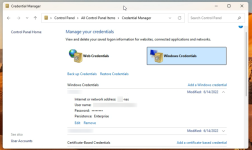
Have you checked the Control Panel / Credential Manager / Windows Credentials for old passwords?
Have you checked the machine for old hosts entries that still might be pointing to a 192.168.8.x address? C:\Windows\System32\Drivers\Etc\Hosts

For example when suppling credentials now you might have to specify the user name preceded by the server for example: "Server1\Alice" or "192.168.3.111\Alice" instead of just "Alice".

RDP to EntraID joined machines may need some extra params in the .rdp file: "enablecredsspsupport:i:0" & "authentication level:i:2"
https://bradleyschacht.com/remote-desktop-to-azure-ad-joined-computer

2026-02-17_00-01-41.png
 
Inside is the same as seen from outside.
No. The gateway is not visible from the PVE GUI, AFAIR.

They all received new IPs when I switched Subnets.

Windows IP Configuration

Ethernet adapter Ethernet:

Connection-specific DNS Suffix . : lan
Link-local IPv6 Address . . . . . . . . : fe80::64c6:9246:fa93:76f3%13
IPv4 Address . . . . . . . . . . . . . . . . . : 192.166.3.118
Subnet Mask . . . . . . . . . . . . . . . . . : 255.255.255.0
Default Gateway . . . . . . . . . . . . . . : 192.168.3.1

The own address 192.166.3.118/24 (see SIX) is in other network than the gateway 192.168.3.1 (see EIGHT).
No wonder it can't access other networks.