Proxmox x Hyper-V storage performance.

fdcastel

Active Member
Sep 28, 2021
45
9
28
I’m evaluating Proxmox for potential use in a professional environment to host Windows VMs. Current production setup runs on Microsoft Hyper-V Server.

Results follow:


1) Using
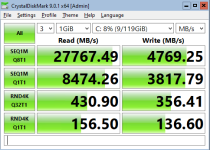
--scsi0 "$VM_STORAGE:$VM_DISKSIZE,discard=on,iothread=1,ssd=1":

Code:
C:\> fsutil fsinfo sectorInfo C:
LogicalBytesPerSector :                                 512
PhysicalBytesPerSectorForAtomicity :                    512
PhysicalBytesPerSectorForPerformance :                  512
FileSystemEffectivePhysicalBytesPerSectorForAtomicity : 512
Device Alignment :                                      Aligned (0x000)
Partition alignment on device :                         Aligned (0x000)
No Seek Penalty
Trim Supported
Not DAX capable
Is Thinly-Provisioned, SlabSize :                       4,096 bytes (4.0 KB)

Code:
------------------------------------------------------------------------------
CrystalDiskMark 9.0.1 x64 (C) 2007-2025 hiyohiyo
                                  Crystal Dew World: https://crystalmark.info/
------------------------------------------------------------------------------
* MB/s = 1,000,000 bytes/s [SATA/600 = 600,000,000 bytes/s]
* KB = 1000 bytes, KiB = 1024 bytes

[Read]
  SEQ    1MiB (Q=  8, T= 1): 27767.491 MB/s [  26481.1 IOPS] <   261.24 us>
  SEQ    1MiB (Q=  1, T= 1):  8474.260 MB/s [   8081.7 IOPS] <   123.38 us>
  RND    4KiB (Q= 32, T= 1):   430.900 MB/s [ 105200.2 IOPS] <    32.57 us>
  RND    4KiB (Q=  1, T= 1):   156.498 MB/s [  38207.5 IOPS] <    25.86 us>

[Write]
  SEQ    1MiB (Q=  8, T= 1):  4769.246 MB/s [   4548.3 IOPS] <  1744.31 us>
  SEQ    1MiB (Q=  1, T= 1):  3817.791 MB/s [   3640.9 IOPS] <   272.73 us>
  RND    4KiB (Q= 32, T= 1):   356.408 MB/s [  87013.7 IOPS] <    48.21 us>
  RND    4KiB (Q=  1, T= 1):   136.599 MB/s [  33349.4 IOPS] <    29.65 us>

Profile: Default
   Test: 1 GiB (x3) [C: 8% (9/119GiB)]
   Mode: [Admin]
   Time: Measure 5 sec / Interval 5 sec
   Date: 2025/12/04 21:29:04
     OS: Windows Server 2022 Server Standard 21H2 [10.0 Build 20348] (x64)

1764933272639.png


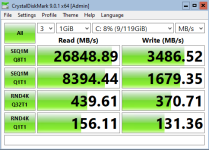
2) Using
--scsi0 "$VM_STORAGE:$VM_DISKSIZE,discard=on,iothread=1,ssd=1" \
--args "-global scsi-hd.physical_block_size=4096 -global scsi-hd.logical_block_size=4096"

Code:
C:\> fsutil fsinfo sectorInfo C:
LogicalBytesPerSector :                                 4096
PhysicalBytesPerSectorForAtomicity :                    4096
PhysicalBytesPerSectorForPerformance :                  4096
FileSystemEffectivePhysicalBytesPerSectorForAtomicity : 4096
Device Alignment :                                      Aligned (0x000)
Partition alignment on device :                         Aligned (0x000)
No Seek Penalty
Trim Supported
Not DAX capable
Is Thinly-Provisioned, SlabSize :                       4,096 bytes (4.0 KB)

Code:
------------------------------------------------------------------------------
CrystalDiskMark 9.0.1 x64 (C) 2007-2025 hiyohiyo
                                  Crystal Dew World: https://crystalmark.info/
------------------------------------------------------------------------------
* MB/s = 1,000,000 bytes/s [SATA/600 = 600,000,000 bytes/s]
* KB = 1000 bytes, KiB = 1024 bytes

[Read]
  SEQ    1MiB (Q=  8, T= 1): 26848.890 MB/s [  25605.1 IOPS] <   273.71 us>
  SEQ    1MiB (Q=  1, T= 1):  8394.444 MB/s [   8005.6 IOPS] <   124.57 us>
  RND    4KiB (Q= 32, T= 1):   439.610 MB/s [ 107326.7 IOPS] <    32.42 us>
  RND    4KiB (Q=  1, T= 1):   156.111 MB/s [  38113.0 IOPS] <    25.93 us>

[Write]
  SEQ    1MiB (Q=  8, T= 1):  3486.522 MB/s [   3325.0 IOPS] <  1777.70 us>
  SEQ    1MiB (Q=  1, T= 1):  1679.348 MB/s [   1601.6 IOPS] <   623.50 us>
  RND    4KiB (Q= 32, T= 1):   370.713 MB/s [  90506.1 IOPS] <    50.52 us>
  RND    4KiB (Q=  1, T= 1):   131.360 MB/s [  32070.3 IOPS] <    30.85 us>

Profile: Default
   Test: 1 GiB (x3) [C: 8% (9/119GiB)]
   Mode: [Admin]
   Time: Measure 5 sec / Interval 5 sec
   Date: 2025/12/04 21:42:41
     OS: Windows Server 2022 Server Standard 21H2 [10.0 Build 20348] (x64)

1764933297373.png


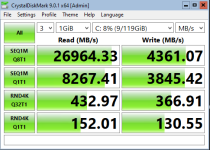
3) Using
--scsi0 "$VM_STORAGE:$VM_DISKSIZE,discard=on,iothread=1,ssd=1" \
--args "-global scsi-hd.physical_block_size=4096 -global scsi-hd.logical_block_size=512"

Code:
C:\> fsutil fsinfo sectorInfo C:
LogicalBytesPerSector :                                 512
PhysicalBytesPerSectorForAtomicity :                    4096
PhysicalBytesPerSectorForPerformance :                  4096
FileSystemEffectivePhysicalBytesPerSectorForAtomicity : 4096
Device Alignment :                                      Aligned (0x000)
Partition alignment on device :                         Aligned (0x000)
No Seek Penalty
Trim Supported
Not DAX capable
Is Thinly-Provisioned, SlabSize :                       4,096 bytes (4.0 KB)

Code:
------------------------------------------------------------------------------
CrystalDiskMark 9.0.1 x64 (C) 2007-2025 hiyohiyo
                                  Crystal Dew World: https://crystalmark.info/
------------------------------------------------------------------------------
* MB/s = 1,000,000 bytes/s [SATA/600 = 600,000,000 bytes/s]
* KB = 1000 bytes, KiB = 1024 bytes

[Read]
  SEQ    1MiB (Q=  8, T= 1): 26964.330 MB/s [  25715.2 IOPS] <   272.93 us>
  SEQ    1MiB (Q=  1, T= 1):  8267.413 MB/s [   7884.4 IOPS] <   126.46 us>
  RND    4KiB (Q= 32, T= 1):   432.969 MB/s [ 105705.3 IOPS] <    32.67 us>
  RND    4KiB (Q=  1, T= 1):   152.006 MB/s [  37110.8 IOPS] <    26.63 us>

[Write]
  SEQ    1MiB (Q=  8, T= 1):  4361.074 MB/s [   4159.0 IOPS] <  1144.96 us>
  SEQ    1MiB (Q=  1, T= 1):  3845.416 MB/s [   3667.3 IOPS] <   271.88 us>
  RND    4KiB (Q= 32, T= 1):   366.912 MB/s [  89578.1 IOPS] <    47.63 us>
  RND    4KiB (Q=  1, T= 1):   130.553 MB/s [  31873.3 IOPS] <    31.05 us>

Profile: Default
   Test: 1 GiB (x3) [C: 8% (9/119GiB)]
   Mode: [Admin]
   Time: Measure 5 sec / Interval 5 sec
   Date: 2025/12/04 21:56:48
     OS: Windows Server 2022 Server Standard 21H2 [10.0 Build 20348] (x64)

1764933317836.png


Test system:
- Proxmox 9.1.1 running on AMD EPYC 4585PX / 256 GB RAM
- Storage: 4x1.92TB Samsung PM9A3
Code:
# lsblk -o NAME,FSTYPE,LABEL,MOUNTPOINT,SIZE,MODEL,ALIGNMENT,STATE,OPT-IO,PHY-SEC,LOG-SEC,MIN-IO,OPT-IO
NAME        FSTYPE            LABEL          MOUNTPOINT   SIZE MODEL                      ALIGNMENT STATE   OPT-IO PHY-SEC LOG-SEC MIN-IO   OPT-IO
nvme3n1                                                   1.7T SAMSUNG MZQL21T9HCJR-00A07         0 live    131072    4096     512 131072   131072
├─nvme3n1p1 linux_raid_member                             511M                                    0         131072    4096     512 131072   131072
│ └─md1     vfat              EFI_SYSPART    /boot/efi  510.9M                                    0         131072    4096     512 131072   131072
├─nvme3n1p2 linux_raid_member md2                           1G                                    0         131072    4096     512 131072   131072
│ └─md2     ext4              boot           /boot       1022M                                    0         131072    4096     512 131072   131072
├─nvme3n1p3 linux_raid_member md3                          20G                                    0         131072    4096     512 131072   131072
│ └─md3     ext4              root           /             20G                                    0         131072    4096     512 131072   131072
├─nvme3n1p4 swap              swap-nvme1n1p4 [SWAP]         1G                                    0         131072    4096     512 131072   131072
└─nvme3n1p5 zfs_member        data                        1.7T                                    0         131072    4096     512 131072   131072
nvme1n1                                                   1.7T SAMSUNG MZQL21T9HCJR-00A07         0 live    131072    4096     512 131072   131072
├─nvme1n1p1 zfs_member        spool                       1.7T                                    0         131072    4096     512 131072   131072
└─nvme1n1p9                                                 8M                                    0         131072    4096     512 131072   131072
nvme2n1                                                   1.7T SAMSUNG MZQL21T9HCJR-00A07         0 live    131072    4096     512 131072   131072
├─nvme2n1p1 zfs_member        spool                       1.7T                                    0         131072    4096     512 131072   131072
└─nvme2n1p9                                                 8M                                    0         131072    4096     512 131072   131072
nvme0n1                                                   1.7T SAMSUNG MZQL21T9HCJR-00A07         0 live    131072    4096     512 131072   131072
├─nvme0n1p1 linux_raid_member                             511M                                    0         131072    4096     512 131072   131072
│ └─md1     vfat              EFI_SYSPART    /boot/efi  510.9M                                    0         131072    4096     512 131072   131072
├─nvme0n1p2 linux_raid_member md2                           1G                                    0         131072    4096     512 131072   131072
│ └─md2     ext4              boot           /boot       1022M                                    0         131072    4096     512 131072   131072
├─nvme0n1p3 linux_raid_member md3                          20G                                    0         131072    4096     512 131072   131072
│ └─md3     ext4              root           /             20G                                    0         131072    4096     512 131072   131072
├─nvme0n1p4 swap              swap-nvme0n1p4 [SWAP]         1G                                    0         131072    4096     512 131072   131072
├─nvme0n1p5 zfs_member        data                        1.7T                                    0         131072    4096     512 131072   131072
└─nvme0n1p6 iso9660           config-2                      2M                                40960         131072    4096     512 131072   131072

Code:
zpool list -o name,size,alloc,free,ckpoint,expandsz,frag,cap,dedup,health,altroot,ashift
NAME    SIZE  ALLOC   FREE  CKPOINT  EXPANDSZ   FRAG    CAP  DEDUP    HEALTH  ALTROOT  ASHIFT
data   1.72T  21.5G  1.70T        -         -     0%     1%  1.00x    ONLINE  -            12
spool  1.73T  20.5G  1.71T        -         -     1%     1%  1.00x    ONLINE  -            12

The data zpool is a 2-disk mirror used for the operating system, and the spool zpool is a 2-disk mirror dedicated to the VMs.

According to the SSD specifications, the drive physical page size is 16 KB. I plan to rerun the tests tomorrow using ashift=13 and ashift=14.

Any comments are welcome.
 
Last edited:
  • Like
Reactions: ucholak
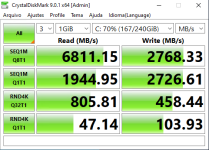
For reference, the existing Hyper-V Server deployment (on identical hardware) yields the following results:

Code:
C:\> fsutil fsinfo sectorInfo C:
LogicalBytesPerSector :                                 512
PhysicalBytesPerSectorForAtomicity :                    4096
PhysicalBytesPerSectorForPerformance :                  4096
FileSystemEffectivePhysicalBytesPerSectorForAtomicity : 4096
Device Alignment :                                      Aligned (0x000)
Partition alignment on device :                         Aligned (0x000)
Performs Normal Seeks
Trim Supported
Not DAX capable
Is Thinly-Provisioned, SlabSize :                       1.048.576 bytes (1,0 MB)

Code:
------------------------------------------------------------------------------
CrystalDiskMark 9.0.1 x64 (C) 2007-2025 hiyohiyo
                                  Crystal Dew World: https://crystalmark.info/
------------------------------------------------------------------------------
* MB/s = 1,000,000 bytes/s [SATA/600 = 600,000,000 bytes/s]
* KB = 1000 bytes, KiB = 1024 bytes

[Read]
  SEQ    1MiB (Q=  8, T= 1):  6811.150 MB/s [   6495.6 IOPS] <  1230.51 us>
  SEQ    1MiB (Q=  1, T= 1):  1944.947 MB/s [   1854.8 IOPS] <   538.76 us>
  RND    4KiB (Q= 32, T= 1):   805.810 MB/s [ 196731.0 IOPS] <   148.90 us>
  RND    4KiB (Q=  1, T= 1):    47.140 MB/s [  11508.8 IOPS] <    86.79 us>

[Write]
  SEQ    1MiB (Q=  8, T= 1):  2768.327 MB/s [   2640.1 IOPS] <  3026.41 us>
  SEQ    1MiB (Q=  1, T= 1):  2726.607 MB/s [   2600.3 IOPS] <   384.29 us>
  RND    4KiB (Q= 32, T= 1):   458.443 MB/s [ 111924.6 IOPS] <   274.98 us>
  RND    4KiB (Q=  1, T= 1):   103.928 MB/s [  25373.0 IOPS] <    39.33 us>

Profile: Default
   Test: 1 GiB (x3) [C: 70% (167/240GiB)]
   Mode: [Admin]
   Time: Measure 5 sec / Interval 5 sec
   Date: 2025/12/04 22:17:20
     OS: Windows Server 2022 Server Standard 21H2 [10.0 Build 20348] (x64)

1764933340446.png
 
Last edited:
At first glance, Proxmox appears to offer substantial improvements over the old setup, with a few important observations:

1) According to Samsung’s official specifications this model is rated for 6800 MB/s sequential read and 2700 MB/s sequential write -- both numbers closely matching the Hyper-V results.

2) I can’t account for the large performance difference shown in the Proxmox results, especially considering I’m using cache=None. Given the manufacturer’s specs, I’m starting to think the results aren’t telling the whole story -- or I’m doing something blatantly wrong.

3) I also don’t yet understand why Hyper-V delivers significantly better performance in the RND4K Q32T1 test.

4) Using scsi-hd.logical_block_size=4096 had a measurable (negative) impact on sequential write performance.
The remaining differences (regarding the impact of different block sizes on Proxmox) appear to be within statistical tolerance.
 
Last edited:
  • Like
Reactions: FrankList80
What exactly are you asking? The read speeds would be affected by the ZFS read cache which is in RAM, writes would be affected by the fact you are mirroring, so it can only go as fast as the slowest drive can respond and that is based on an IOPS measure.

You should really test with deeper queue depths and more threads and larger sizes if you want to measure full performance, according to the spec sheet a single die will only go as fast as the above numbers indicate.

Manufacturers typically speak about peak performance when you can spread the load to multiple chips, with large block sizes to minimize overhead.

HyperV I am assuming is directly talking to 1 drive. NTFS doesn’t come from an era where large RAM caches or fast drives were feasible.
 
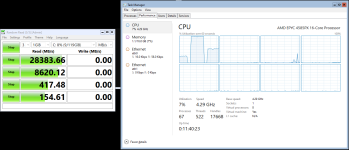
I believe @spirit has nailed the issue of RND4K Q32T1 performance:

what is your cpu usage during the bench ? currently iothread use only 1core, so you could be cpu limited in rand4k. (I'm working on it to add support for the new multithreading feature ). It could explain the difference, if hyper-v is able to use multiple cores by disk.


Windows guest on Proxmox:
1764936147007.png
During the RND4K Q32T1 test, cpu went to 12% (100% of 1 core on a 8-vcpu)


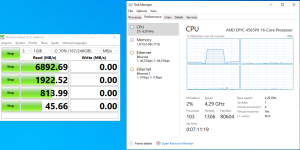
Windows guest on Hyper-V Server:
1764936154974.png
During the RND4K Q32T1 test, CPU usage reached about 15% (equivalent to roughly 50–60% of a single core on a 4-vCPU system).

I also just realized this guest has only 4 vCPUs, compared to 8 on the other system. Sorry for the confusion -- but the results are still meaningful.

The Hyper-V implementation also seems to operate on a single core, although it delivers significantly better performance while using less cpu.
 
Last edited:
@spirit I’m available to run any additional tests you’d like. These systems are up solely for testing, and I can rebuild them as needed.
 
What exactly are you asking?

- why identical tests on identical hardware are producing significantly different results?

- why the Hyper-V benchmarks seem to align more closely with the manufacturer’s published performance? (It might simply be coincidence)

- why Hyper-V appears to perform better in one specific case of random reads? (probably already answered by @spirit)

The Proxmox numbers seem “too good to be true” unless some additional caching is happening -- as you said, ZFS caching may be another factor -- which could be masking the real performance.


Please don’t misunderstand me: I’m just trying to understand what’s actually going on before making a final decision. That’s why I’m testing both systems right now. I intend to run application-level tests later, but for now I'm restricting the tests to raw storage performance.

This is also why I’m using CrystalDiskMark with its limited settings. This is just an initial benchmark. I understand your suggestion to use different parameters to extract the full potential of the hardware, but that’s not the goal at this stage.


For now, I simply want to reproduce the same test faithfully on both hypervisors and identify any pros and cons. So far, I’ve noticed:
- ZFS caching makes everything extremely fast
- Hyper-V seems to outperform in certain random-access tests, with less cpu usage.
 
Last edited:
HyperV I am assuming is directly talking to 1 drive. NTFS doesn’t come from an era where large RAM caches or fast drives were feasible.

No. Both servers are configured identically: 2x1.92 TB drives (mirrored, "RAID 1") for the operating system, and another 2x1.92 TB drives (mirrored, "RAID 1") for the VMs.
 
Last edited:
2) I can’t account for the large performance difference shown in the Proxmox results, especially considering I’m using cache=None. Given the manufacturer’s specs, I’m starting to think the results aren’t telling the whole story -- or I’m doing something blatantly wrong.

cache=none leaves the cache of the storage system enabled, use directsync instead. See here for comparision of caching modes https://pve.proxmox.com/wiki/Performance_Tweaks#Disk_Cache
 
You are not comparing apples to apples though. HyperV does RAID1 how exactly? Software RAID, Intel VROC, Hardware RAID, at a higher data distribution layer?

Windows is closer to what expected benchmark? Because a proper benchmark has a range of inputs and outputs, what the vendor is testing for marketing materials will be the optimal setting for best numbers, that doesn’t mean it is realistic for your workload. Windows will get close to a synthetic benchmark exactly because it doesn’t do much optimization. ZFS is a volume manager with features like CoW, ZIL, ARC and L2ARC, encryption, compression, checksums which is not what NTFS does which is much closer to raw writing of blocks (which works until the power goes out)
 
  • Like
Reactions: Johannes S
hi, very nice, tnx.
how about test with virtio disks (+drivers)?


Code:
---virtio0 "$VM_STORAGE:$VM_DISKSIZE,discard=on,iothread=1,ssd=1":

and appropriate qm vm args :
Code:
--args "-global virtio-blk-device.physical_block_size=4096 -global virtio-blk-device.logical_block_size=4096"
 
Last edited:
only checking: is it also formatted like this. or better for 4kN?
for example:

Code:
nvme id-ns /dev/nvmeXn0 -H | grep LBA
nvme format /dev/nvmeXn0 -l 3
Thanks, @ucholak! I wasn't aware of this command.

It appears it's not:

Code:
# nvme list
Node                  Generic               SN                   Model                                    Namespace  Usage                      Format           FW Rev 
--------------------- --------------------- -------------------- ---------------------------------------- ---------- -------------------------- ---------------- --------
/dev/nvme0n1          /dev/ng0n1            ..............       SAMSUNG MZQL21T9HCJR-00A07               0x1        820.62  GB /   1.92  TB    512   B +  0 B   GDC5902Q
/dev/nvme1n1          /dev/ng1n1            ..............       SAMSUNG MZQL21T9HCJR-00A07               0x1        821.48  GB /   1.92  TB    512   B +  0 B   GDC5902Q
/dev/nvme2n1          /dev/ng2n1            ..............       SAMSUNG MZQL21T9HCJR-00A07               0x1          1.37  TB /   1.92  TB    512   B +  0 B   GDC5902Q
/dev/nvme3n1          /dev/ng3n1            ..............       SAMSUNG MZQL21T9HCJR-00A07               0x1          1.38  TB /   1.92  TB    512   B +  0 B   GDC5902Q

Code:
# nvme id-ns /dev/nvme0n1 -H
NVME Identify Namespace 1:
nsze    : 0xdf8fe2b0    Total size in logical blocks
ncap    : 0xdf8fe2b0    Maximum size in logical blocks
nuse    : 0x5f887c98    Current size in logical blocks
nsfeat  : 0x1a
  [7:7] : 0     NPRG, NPRA and NORS are Not Supported
  [6:6] : 0     Single Atomicity Mode applies to write operations
  [5:4] : 0x1   NPWG, NPWA, NPDG, NPDA, and NOWS are Supported
  [3:3] : 0x1   NGUID and EUI64 fields if non-zero, Never Reused
  [2:2] : 0     Deallocated or Unwritten Logical Block error Not Supported
  [1:1] : 0x1   Namespace uses NAWUN, NAWUPF, and NACWU
  [0:0] : 0     Thin Provisioning Not Supported

nlbaf   : 1
flbas   : 0
  [6:5] : 0     Most significant 2 bits of Current LBA Format Selected
  [4:4] : 0     Metadata Transferred in Separate Contiguous Buffer
  [3:0] : 0     Least significant 4 bits of Current LBA Format Selected

mc      : 0
  [1:1] : 0     Metadata Pointer Not Supported
  [0:0] : 0     Metadata as Part of Extended Data LBA Not Supported

dpc     : 0
  [4:4] : 0     Protection Information Transferred as Last Bytes of Metadata Not Supported
  [3:3] : 0     Protection Information Transferred as First Bytes of Metadata Not Supported
  [2:2] : 0     Protection Information Type 3 Not Supported
  [1:1] : 0     Protection Information Type 2 Not Supported
  [0:0] : 0     Protection Information Type 1 Not Supported

dps     : 0
  [3:3] : 0     Protection Information is Transferred as Last Bytes of Metadata
  [2:0] : 0     Protection Information Disabled

nmic    : 0
  [1:1] : 0     Namespace is Not a Dispersed Namespace
  [0:0] : 0     Namespace Multipath Not Capable

rescap  : 0
  [7:7] : 0     Ignore Existing Key - Used as defined in revision 1.2.1 or earlier
  [6:6] : 0     Exclusive Access - All Registrants Not Supported
  [5:5] : 0     Write Exclusive - All Registrants Not Supported
  [4:4] : 0     Exclusive Access - Registrants Only Not Supported
  [3:3] : 0     Write Exclusive - Registrants Only Not Supported
  [2:2] : 0     Exclusive Access Not Supported
  [1:1] : 0     Write Exclusive Not Supported
  [0:0] : 0     Persist Through Power Loss Not Supported

fpi     : 0x80
  [7:7] : 0x1   Format Progress Indicator Supported
  [6:0] : 0     Format Progress Indicator (Remaining 0%)

dlfeat  : 9
  [4:4] : 0     Guard Field of Deallocated Logical Blocks is set to 0xFFFF
  [3:3] : 0x1   Deallocate Bit in the Write Zeroes Command is Supported
  [2:0] : 0x1   Bytes Read From a Deallocated Logical Block and its Metadata are 0x00

nawun   : 1023
nawupf  : 7
nacwu   : 0
nabsn   : 1023
nabo    : 0
nabspf  : 7
noiob   : 0
nvmcap  : 1920383410176
npwg    : 255
npwa    : 7
npdg    : 255
npda    : 7
nows    : 255
mssrl   : 0
mcl     : 0
msrc    : 0
kpios   : 0
  [1:1] : 0     Key Per I/O Capability Not Supported
  [0:0] : 0     Key Per I/O Capability Disabled

nulbaf  : 0
kpiodaag: 0
anagrpid: 0
nsattr  : 0
  [0:0] : 0     Namespace Not Write Protected

nvmsetid: 0
endgid  : 0
nguid   : 36344730598179190025384e00000001
eui64   : 0000000000000000
LBA Format  0 : Metadata Size: 0   bytes - Data Size: 512 bytes - Relative Performance: 0 Best (in use)
LBA Format  1 : Metadata Size: 0   bytes - Data Size: 4096 bytes - Relative Performance: 0 Best

I was under the impression that ZFS would take care of this for me (with ashift= parameter). But I will make some other attempts in the next few days changing the device to 4k using the `nvme format` command you suggested.
 
  • Like
Reactions: ucholak
But for now, no matter what I try, Hyper-V often delivers about 20%~25% better random I/O performance than Proxmox, and this has a direct impact on my application’s database response times.

And, believe me, I tried EVERYTHING: cache={none,directsync,writeback} x aio={default,native} x ashift={12,14}.

I eventually stopped reporting results here simply because of the sheer number of permutations. The bottom line is that none of them yielded meaningful improvements. While sequential benchmark results may fluctuate greatly (from 10GB/s to 30GB/s), random access performance -- which is what matters most in my case -- is consistently worse (with figures approximately consistent with the screenshots from my original posts).
 
Last edited:
I didn't even try. According to Proxmox VE documentation:
  • The VirtIO Block controller, often just called VirtIO or virtio-blk, is an older type of paravirtualized controller. It has been superseded by the VirtIO SCSI Controller, in terms of features.

I think this is maybe bug or analyze of older state (blk missing queues?).

In beginning of chapter, you have:
" It is highly recommended to use the VirtIO SCSI or VirtIO Block controller for performance reasons and because they are better maintained."

From my study and usage:
scsi translates scsi commands to virtio (virtqueues) layer (overhead, ~10-15%), and has NOW only compatibility name sdX advantage (names devices using the standard SCSI device naming scheme.).

  • "If your goal is to minimize overhead for performance-critical virtual machines, virtio-blk can sometimes be a better choice. it uses virtio message queues but avoids the SCSI protocol layer, resulting in lower latency and slightly higher throughput in some workloads" (1)
  • "As of QEMU 9, virtio-blk supports multiple queues, leveling the playing field with virtio-scsi." (2, 4)
  • "Prefer virtio-blk in performance-critical use cases. " (1,2)
  • "virtio iothread-vq-mapping: 5 TIMES iops improvment on NVME!" first in virtio_block qemu v9 (3)

definitely worth trying. i am personally 3+ years using:
  • 4kn formated disk
  • zfs with ashift=12
  • virtio_blk devices
  • and qm args with global parameters for 4kn.

  1. https://www.qemu.org/2021/01/19/virtio-blk-scsi-configuration/
  2. https://forum.proxmox.com/threads/virtio-scsi-but-for-nvme.172819/#post-804400 @bbgeek17 storage expert
  3. https://forum.proxmox.com/threads/f...x-9-0-iothread-vq-mapping.166919/#post-821321
  4. https://www.qemu.org/2024/04/23/qemu-9-0-0/
 
Last edited:
Thank you, @ucholak, for sharing your experience and expertise -- I really appreciated it.

You gave me a glimpse of hope, but unfortunately it faded rather quickly :)

I reformatted my NVMe drives to 4K using:

Code:
nvme format /dev/nvme2n1 --block-size=4096 --verbose --force
nvme format /dev/nvme3n1 --block-size=4096 --verbose --force

They now correctly appear as 4K devices:

Code:
# nvme list
Node                  Generic               SN                   Model                                    Namespace  Usage                      Format           FW Rev
--------------------- --------------------- -------------------- ---------------------------------------- ---------- -------------------------- ---------------- --------
/dev/nvme0n1          /dev/ng0n1            ..............       SAMSUNG MZQL21T9HCJR-00A07               0x1        835.42  GB /   1.92  TB    512   B +  0 B   GDC5902Q
/dev/nvme1n1          /dev/ng1n1            ..............       SAMSUNG MZQL21T9HCJR-00A07               0x1        827.24  GB /   1.92  TB    512   B +  0 B   GDC5902Q
/dev/nvme2n1          /dev/ng2n1            ..............       SAMSUNG MZQL21T9HCJR-00A07               0x1        170.96  GB /   1.92  TB      4 KiB +  0 B   GDC5902Q
/dev/nvme3n1          /dev/ng3n1            ..............       SAMSUNG MZQL21T9HCJR-00A07               0x1        170.96  GB /   1.92  TB      4 KiB +  0 B   GDC5902Q

I then rebuilt my ZFS pool:

Code:
ZPOOL=spool
zpool destroy $ZPOOL
zpool create -o ashift=12 -O atime=off -O xattr=sa $ZPOOL mirror /dev/nvme2n1 /dev/nvme3n1
zpool export $ZPOOL
sleep 1s
zpool import -d /dev/disk/by-id $ZPOOL

Next, I created two new VMs using VirtIO Block (--virtio0) instead of VirtIO SCSI (--scsi0):

- VM 04: no extra arguments
- VM 06: with --args "-global virtio-blk-device.physical_block_size=4096 -global virtio-blk-device.logical_block_size=4096"

Unfortunately, the results with VirtIO Block devices were worse than with VirtIO SCSI devices.

The performance gap was already clearly noticeable during the Windows Server 2022 installation.

Running CrystalDiskMark later confirmed this, with random access performance (RND4K Q32T1) showing roughly a 50% (!) decrease.

It’s great that VirtIO block devices work well in your use case, but for mine, unfortunately, they performed significantly worse. :-/
 
  • Like
Reactions: ucholak
Update: I rebuilt the VMs using Virtio SCSI, and performance again reached roughly double that of Virtio Block (matching the results seen when the drives were formatted with 512-byte blocks).

This indicates that switching the NVMe block size from 512 to 4096 has minimal impact, or at least an effect that is statistically negligible.

That seems reasonable to me, as modern NVMe controllers likely handle most of the complexity of managing the underlying physical page sizes internally (which are -- actually -- larger than 4K).
 
Unfortunately, the results with VirtIO Block devices were worse than with VirtIO SCSI devices.
Running CrystalDiskMark later confirmed this, with random access performance (RND4K Q32T1) showing roughly a 50% (!) decrease.
It’s great that VirtIO block devices work well in your use case, but for mine, unfortunately, they performed significantly worse. :-/

:(

you are welcome.
i forget to mentioned that all my hosts are linux OS (non-windows). i was really curious how windows will stand.

thanks much for quick check/benchmark, it will be helpful for many people.
Virtio SCSI should be used for windows OS.
 
Last edited:
  • Like
Reactions: Johannes S