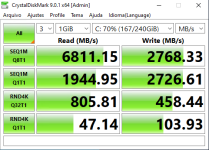
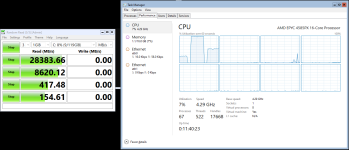
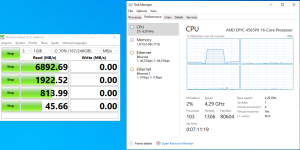
I’m evaluating Proxmox for potential use in a professional environment to host Windows VMs. Current production setup runs on Microsoft Hyper-V Server.
Results follow:
1) Using
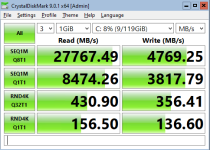
2) Using
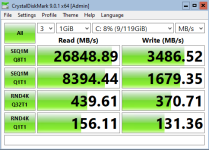
3) Using
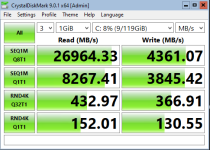
Test system:
- Proxmox 9.1.1 running on AMD EPYC 4585PX / 256 GB RAM
- Storage: 4x1.92TB Samsung PM9A3
The
According to the SSD specifications, the drive physical page size is 16 KB. I plan to rerun the tests tomorrow using
Any comments are welcome.
Results follow:
1) Using
--scsi0 "$VM_STORAGE:$VM_DISKSIZE,discard=on,iothread=1,ssd=1":
Code:
C:\> fsutil fsinfo sectorInfo C:
LogicalBytesPerSector :                                 512
PhysicalBytesPerSectorForAtomicity :                    512
PhysicalBytesPerSectorForPerformance :                  512
FileSystemEffectivePhysicalBytesPerSectorForAtomicity : 512
Device Alignment :                                      Aligned (0x000)
Partition alignment on device :                         Aligned (0x000)
No Seek Penalty
Trim Supported
Not DAX capable
Is Thinly-Provisioned, SlabSize :                       4,096 bytes (4.0 KB)
Code:
------------------------------------------------------------------------------
CrystalDiskMark 9.0.1 x64 (C) 2007-2025 hiyohiyo
                                  Crystal Dew World: https://crystalmark.info/
------------------------------------------------------------------------------
* MB/s = 1,000,000 bytes/s [SATA/600 = 600,000,000 bytes/s]
* KB = 1000 bytes, KiB = 1024 bytes

[Read]
  SEQ    1MiB (Q=  8, T= 1): 27767.491 MB/s [  26481.1 IOPS] <   261.24 us>
  SEQ    1MiB (Q=  1, T= 1):  8474.260 MB/s [   8081.7 IOPS] <   123.38 us>
  RND    4KiB (Q= 32, T= 1):   430.900 MB/s [ 105200.2 IOPS] <    32.57 us>
  RND    4KiB (Q=  1, T= 1):   156.498 MB/s [  38207.5 IOPS] <    25.86 us>

[Write]
  SEQ    1MiB (Q=  8, T= 1):  4769.246 MB/s [   4548.3 IOPS] <  1744.31 us>
  SEQ    1MiB (Q=  1, T= 1):  3817.791 MB/s [   3640.9 IOPS] <   272.73 us>
  RND    4KiB (Q= 32, T= 1):   356.408 MB/s [  87013.7 IOPS] <    48.21 us>
  RND    4KiB (Q=  1, T= 1):   136.599 MB/s [  33349.4 IOPS] <    29.65 us>

Profile: Default
   Test: 1 GiB (x3) [C: 8% (9/119GiB)]
   Mode: [Admin]
   Time: Measure 5 sec / Interval 5 sec
   Date: 2025/12/04 21:29:04
     OS: Windows Server 2022 Server Standard 21H2 [10.0 Build 20348] (x64)
2) Using
--scsi0 "$VM_STORAGE:$VM_DISKSIZE,discard=on,iothread=1,ssd=1" \--args "-global scsi-hd.physical_block_size=4096 -global scsi-hd.logical_block_size=4096"
Code:
C:\> fsutil fsinfo sectorInfo C:
LogicalBytesPerSector :                                 4096
PhysicalBytesPerSectorForAtomicity :                    4096
PhysicalBytesPerSectorForPerformance :                  4096
FileSystemEffectivePhysicalBytesPerSectorForAtomicity : 4096
Device Alignment :                                      Aligned (0x000)
Partition alignment on device :                         Aligned (0x000)
No Seek Penalty
Trim Supported
Not DAX capable
Is Thinly-Provisioned, SlabSize :                       4,096 bytes (4.0 KB)
Code:
------------------------------------------------------------------------------
CrystalDiskMark 9.0.1 x64 (C) 2007-2025 hiyohiyo
                                  Crystal Dew World: https://crystalmark.info/
------------------------------------------------------------------------------
* MB/s = 1,000,000 bytes/s [SATA/600 = 600,000,000 bytes/s]
* KB = 1000 bytes, KiB = 1024 bytes

[Read]
  SEQ    1MiB (Q=  8, T= 1): 26848.890 MB/s [  25605.1 IOPS] <   273.71 us>
  SEQ    1MiB (Q=  1, T= 1):  8394.444 MB/s [   8005.6 IOPS] <   124.57 us>
  RND    4KiB (Q= 32, T= 1):   439.610 MB/s [ 107326.7 IOPS] <    32.42 us>
  RND    4KiB (Q=  1, T= 1):   156.111 MB/s [  38113.0 IOPS] <    25.93 us>

[Write]
  SEQ    1MiB (Q=  8, T= 1):  3486.522 MB/s [   3325.0 IOPS] <  1777.70 us>
  SEQ    1MiB (Q=  1, T= 1):  1679.348 MB/s [   1601.6 IOPS] <   623.50 us>
  RND    4KiB (Q= 32, T= 1):   370.713 MB/s [  90506.1 IOPS] <    50.52 us>
  RND    4KiB (Q=  1, T= 1):   131.360 MB/s [  32070.3 IOPS] <    30.85 us>

Profile: Default
   Test: 1 GiB (x3) [C: 8% (9/119GiB)]
   Mode: [Admin]
   Time: Measure 5 sec / Interval 5 sec
   Date: 2025/12/04 21:42:41
     OS: Windows Server 2022 Server Standard 21H2 [10.0 Build 20348] (x64)
3) Using
--scsi0 "$VM_STORAGE:$VM_DISKSIZE,discard=on,iothread=1,ssd=1" \--args "-global scsi-hd.physical_block_size=4096 -global scsi-hd.logical_block_size=512"
Code:
C:\> fsutil fsinfo sectorInfo C:
LogicalBytesPerSector :                                 512
PhysicalBytesPerSectorForAtomicity :                    4096
PhysicalBytesPerSectorForPerformance :                  4096
FileSystemEffectivePhysicalBytesPerSectorForAtomicity : 4096
Device Alignment :                                      Aligned (0x000)
Partition alignment on device :                         Aligned (0x000)
No Seek Penalty
Trim Supported
Not DAX capable
Is Thinly-Provisioned, SlabSize :                       4,096 bytes (4.0 KB)
Code:
------------------------------------------------------------------------------
CrystalDiskMark 9.0.1 x64 (C) 2007-2025 hiyohiyo
                                  Crystal Dew World: https://crystalmark.info/
------------------------------------------------------------------------------
* MB/s = 1,000,000 bytes/s [SATA/600 = 600,000,000 bytes/s]
* KB = 1000 bytes, KiB = 1024 bytes

[Read]
  SEQ    1MiB (Q=  8, T= 1): 26964.330 MB/s [  25715.2 IOPS] <   272.93 us>
  SEQ    1MiB (Q=  1, T= 1):  8267.413 MB/s [   7884.4 IOPS] <   126.46 us>
  RND    4KiB (Q= 32, T= 1):   432.969 MB/s [ 105705.3 IOPS] <    32.67 us>
  RND    4KiB (Q=  1, T= 1):   152.006 MB/s [  37110.8 IOPS] <    26.63 us>

[Write]
  SEQ    1MiB (Q=  8, T= 1):  4361.074 MB/s [   4159.0 IOPS] <  1144.96 us>
  SEQ    1MiB (Q=  1, T= 1):  3845.416 MB/s [   3667.3 IOPS] <   271.88 us>
  RND    4KiB (Q= 32, T= 1):   366.912 MB/s [  89578.1 IOPS] <    47.63 us>
  RND    4KiB (Q=  1, T= 1):   130.553 MB/s [  31873.3 IOPS] <    31.05 us>

Profile: Default
   Test: 1 GiB (x3) [C: 8% (9/119GiB)]
   Mode: [Admin]
   Time: Measure 5 sec / Interval 5 sec
   Date: 2025/12/04 21:56:48
     OS: Windows Server 2022 Server Standard 21H2 [10.0 Build 20348] (x64)
Test system:
- Proxmox 9.1.1 running on AMD EPYC 4585PX / 256 GB RAM
- Storage: 4x1.92TB Samsung PM9A3
Code:
# lsblk -o NAME,FSTYPE,LABEL,MOUNTPOINT,SIZE,MODEL,ALIGNMENT,STATE,OPT-IO,PHY-SEC,LOG-SEC,MIN-IO,OPT-IO
NAME        FSTYPE            LABEL          MOUNTPOINT   SIZE MODEL                      ALIGNMENT STATE   OPT-IO PHY-SEC LOG-SEC MIN-IO   OPT-IO
nvme3n1                                                   1.7T SAMSUNG MZQL21T9HCJR-00A07         0 live    131072    4096     512 131072   131072
├─nvme3n1p1 linux_raid_member                             511M                                    0         131072    4096     512 131072   131072
│ └─md1     vfat              EFI_SYSPART    /boot/efi  510.9M                                    0         131072    4096     512 131072   131072
├─nvme3n1p2 linux_raid_member md2                           1G                                    0         131072    4096     512 131072   131072
│ └─md2     ext4              boot           /boot       1022M                                    0         131072    4096     512 131072   131072
├─nvme3n1p3 linux_raid_member md3                          20G                                    0         131072    4096     512 131072   131072
│ └─md3     ext4              root           /             20G                                    0         131072    4096     512 131072   131072
├─nvme3n1p4 swap              swap-nvme1n1p4 [SWAP]         1G                                    0         131072    4096     512 131072   131072
└─nvme3n1p5 zfs_member        data                        1.7T                                    0         131072    4096     512 131072   131072
nvme1n1                                                   1.7T SAMSUNG MZQL21T9HCJR-00A07         0 live    131072    4096     512 131072   131072
├─nvme1n1p1 zfs_member        spool                       1.7T                                    0         131072    4096     512 131072   131072
└─nvme1n1p9                                                 8M                                    0         131072    4096     512 131072   131072
nvme2n1                                                   1.7T SAMSUNG MZQL21T9HCJR-00A07         0 live    131072    4096     512 131072   131072
├─nvme2n1p1 zfs_member        spool                       1.7T                                    0         131072    4096     512 131072   131072
└─nvme2n1p9                                                 8M                                    0         131072    4096     512 131072   131072
nvme0n1                                                   1.7T SAMSUNG MZQL21T9HCJR-00A07         0 live    131072    4096     512 131072   131072
├─nvme0n1p1 linux_raid_member                             511M                                    0         131072    4096     512 131072   131072
│ └─md1     vfat              EFI_SYSPART    /boot/efi  510.9M                                    0         131072    4096     512 131072   131072
├─nvme0n1p2 linux_raid_member md2                           1G                                    0         131072    4096     512 131072   131072
│ └─md2     ext4              boot           /boot       1022M                                    0         131072    4096     512 131072   131072
├─nvme0n1p3 linux_raid_member md3                          20G                                    0         131072    4096     512 131072   131072
│ └─md3     ext4              root           /             20G                                    0         131072    4096     512 131072   131072
├─nvme0n1p4 swap              swap-nvme0n1p4 [SWAP]         1G                                    0         131072    4096     512 131072   131072
├─nvme0n1p5 zfs_member        data                        1.7T                                    0         131072    4096     512 131072   131072
└─nvme0n1p6 iso9660           config-2                      2M                                40960         131072    4096     512 131072   131072
Code:
zpool list -o name,size,alloc,free,ckpoint,expandsz,frag,cap,dedup,health,altroot,ashift
NAME    SIZE  ALLOC   FREE  CKPOINT  EXPANDSZ   FRAG    CAP  DEDUP    HEALTH  ALTROOT  ASHIFT
data   1.72T  21.5G  1.70T        -         -     0%     1%  1.00x    ONLINE  -            12
spool  1.73T  20.5G  1.71T        -         -     1%     1%  1.00x    ONLINE  -            12
The
data zpool is a 2-disk mirror used for the operating system, and the spool zpool is a 2-disk mirror dedicated to the VMs.According to the SSD specifications, the drive physical page size is 16 KB. I plan to rerun the tests tomorrow using
ashift=13 and ashift=14.Any comments are welcome.
Last edited: