oldfart's latest activity
-
Ooldfart reacted to _gabriel's post in the thread Couldn't find EFI system partition. It is recommended to mount it to /boot or /efi. with
 Like.
It's just message , not error. /etc/kernel/proxmox-boot-uuids is used for ZFS install Couldn't find EFI system partition is excepted if install is Legacy BIOS.
Like.
It's just message , not error. /etc/kernel/proxmox-boot-uuids is used for ZFS install Couldn't find EFI system partition is excepted if install is Legacy BIOS. -
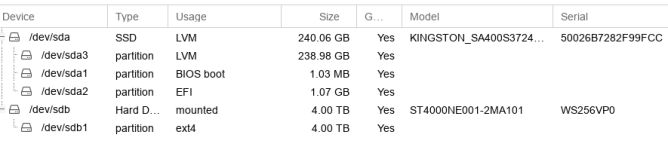
Ooldfart replied to the thread Couldn't find EFI system partition. It is recommended to mount it to /boot or /efi..I have the same problem, unsure what to add in /etc/kernel/proxmox-boot-uuids cat /etc/kernel/proxmox-boot-uuids cat: /etc/kernel/proxmox-boot-uuids: No such file or directory root@pbs:~# lsblk -f NAME FSTYPE FSVER LABEL UUID...
-