Opt-in Linux 7.3 Kernel for Proxmox VE 9 available

Confirmed that the rtl8159u works with in-tree driver on my N100 minipc but lack of firmware causes failure to up nic at 10gbe. It will negotiate 5gbe when asked.

Worked at 10gbe, achieved ~8.3gbe on usb3 Gen 2x1, which is better than the 7.5gbe I got with v2.22.1 dkms on the warm boot from 7.0 w/ dkms, but failed after cold boot.

[ 1.548550] usb 2-4: New USB device strings: Mfr=1, Product=2, SerialNumber=7
[ 1.548552] usb 2-4: Product: USB 10/100/1G/2.5G/5G/10G LAN
[ 1.548553] usb 2-4: Manufacturer: CMI
[ 1.548554] usb 2-4: SerialNumber: xxxx
[ 1.559689] r8152: unknown parameter 'rss' ignored
[ 1.559745] usbcore: registered new device driver r8152-cfgselector
[ 1.675173] r8152-cfgselector 2-4: reset SuperSpeed Plus Gen 2x1 USB device number 2 using xhci_hcd
[ 1.692641] r8152 2-4:1.0: Direct firmware load for rtl_nic/rtl8159-1.fw failed with error -2
[ 1.692645] r8152 2-4:1.0: unable to load firmware patch rtl_nic/rtl8159-1.fw (-2)
[ 1.739890] usbcore: registered new interface driver r8152
[ 1.746372] r8152 2-4:1.0 usbnet0: renamed from eth0
[ 3.722338] r8152-cfgselector 2-4: reset SuperSpeed Plus Gen 2x1 USB device number 2 using xhci_hcd
[ 3.755894] r8152 2-4:1.0: Direct firmware load for rtl_nic/rtl8159-1.fw failed with error -2
[ 3.755901] r8152 2-4:1.0: unable to load firmware patch rtl_nic/rtl8159-1.fw (-2)
[ 3.929203] r8152 2-4:1.0 usbnet0: renamed from eth0
[ 5.845390] r8152 2-4:1.0 usbnet0: entered allmulticast mode
[ 5.845441] r8152 2-4:1.0 usbnet0: entered promiscuous mode

...
root@pve06:~# ip -br addr
usbnet0 DOWN

root@pve06:~# ethtool -s usbnet0 speed 5000 duplex full autoneg on
sleep 10; ethtool usbnet0 | grep -E 'Speed|Link detected'
Speed: 5000Mb/s
Link detected: yes

root@pve06:~# ip -br addr
usbnet0 UP


root@pve06:~# ethtool -i usbnet0
driver: r8152
version: 7.3.5-1-pve
firmware-version:
expansion-rom-version:
bus-info: usb-0000:00:14.0-4
supports-statistics: yes
supports-test: no
supports-eeprom-access: no
supports-register-dump: no
supports-priv-flags: no
 
Last edited:
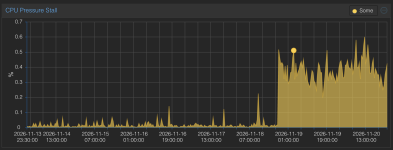
Bildschirmfoto 2026-11-20 um 23.22.58.png

You can clearly see the difference for the new Kernel 7.3.5-1.
CPU: 128 x AMD EPYC 9554 64-Core Processor (1 Socket)
 
I've been testing the new 7.3 kernel and wanted to share my results, as I've been experiencing an Intel Arc GPU power consumption issue with the previous 7.0 kernel series.

Hardware and configuration

  • Proxmox VE 9.2
  • Motherboard: ASRock B850 Pro-A
  • CPU: AMD Ryzen 5 9600X
  • RAM: 32 GB Kingston FURY Beast DDR5-6000
  • GPU: Intel Arc A580 (i915 driver)
Storage configuration:

  • 2 × 1 TB WD Blue SN5100 NVMe drives in a ZFS mirror (rpool), used for Proxmox and VM/LXC storage.
  • 4 × 8 TB Dell SATA HDDs in a ZFS RAIDZ2 pool (tank), used for bulk storage.
ZFS is used for the root filesystem.

Issue: Intel Arc A580 idle power consumption

I've been investigating an issue where my Intel Arc A580 draws approximately 40–44 W while idle, instead of its normal idle consumption of around 6 W.

The issue first appeared when moving from kernel 7.0.14-16-pve to 7.0.14-17-pve.

I've subsequently reproduced it on several 7.0 kernels, including -20, -22 and -23.

I was particularly interested in testing the new upstream-based 7.3 kernel to see whether moving away from the previous Ubuntu-based kernel would make a difference.

Unfortunately, the issue persists.

With 7.3.5-1-pve, I measured the GPU's energy counter directly:

  • Initial reading: 8,373,104,492 µJ
  • Reading after approximately 60 seconds: 11,039,770,996 µJ
  • Calculated power consumption: approximately 44.4 W
For comparison, kernel 7.0.14-16-pve consistently gives me approximately 6 W at idle.

During the original investigation, another forum user compared PCI information from the working and problematic kernels and noticed that ASPM L1 was enabled on the working kernel but not on the problematic one. This may be relevant, although I haven't established the cause.

Test results:

KernelArc A580 idle power
7.0.14-16-pve~6 W
7.0.14-17-pve~44 W
7.0.14-20-pveElevated
7.0.14-22-pveElevated
7.0.14-23-pve~42 W
7.3.5-1-pve~44.4 W
For now, I've returned to 7.0.14-16-pve, which remains the only tested kernel that gives me normal idle power consumption.

I wanted to share this because the issue also reproduces with the new upstream-based kernel. Hopefully this information is useful to the Proxmox team or anyone investigating similar Intel GPU power management issues.

i originally brought this up in a thread:
 
  • Like
Reactions: atomek
Thank you to Proxmox Team for such a quick adoption of 7.3 kernel! You are the best!

Here is report of my homelab proxmox (Intel N100) . I've run attached script on 7.0.14 and 7.3.5 kernels (with --bench), and compared the outputs.

I've noticed one regression in performance:

# egrep 'rmw enabled' pve-kernel-*
pve-kernel-7.0.14-30-pve-20261120T195549Z.txt:2026-11-20T20:25:45,172975+01:00 raid6: .... xor() 14633 MB/s, rmw enabled
pve-kernel-7.3.5-1-pve-20261121T045049Z.txt:2026-11-21T05:20:45,081884+01:00 raid6: .... xor() 6541 MB/s, rmw enabled

And some small performance improvements (1-thread event latency looks like significant!)

Matched active benchmark7.0.14-30-pve7.3.5-1-pve
Sysbench CPU, 1 thread1,260.95 events/s1,280.12 events/s
1-thread event latency, p950.90 ms0.81 ms
Sysbench CPU, 4 threads4,299.02 events/s4,311.76 events/s
4-thread event latency, p950.97 ms0.97 ms
Sysbench memory, 1 MiB block writes23,858.12 MiB/s23,866.18 MiB/s
perf bench sched pipe, 100,000 operations4.972 µs/op4.764 µs/op
 

Attachments

Last edited:
I've been testing the new 7.3 kernel and wanted to share my results, as I've been experiencing an Intel Arc GPU power consumption issue with the previous 7.0 kernel series.

Hardware and configuration

  • Proxmox VE 9.2
  • Motherboard: ASRock B850 Pro-A
  • CPU: AMD Ryzen 5 9600X
  • RAM: 32 GB Kingston FURY Beast DDR5-6000
  • GPU: Intel Arc A580 (i915 driver)
Storage configuration:

  • 2 × 1 TB WD Blue SN5100 NVMe drives in a ZFS mirror (rpool), used for Proxmox and VM/LXC storage.
  • 4 × 8 TB Dell SATA HDDs in a ZFS RAIDZ2 pool (tank), used for bulk storage.
ZFS is used for the root filesystem.

Issue: Intel Arc A580 idle power consumption

I've been investigating an issue where my Intel Arc A580 draws approximately 40–44 W while idle, instead of its normal idle consumption of around 6 W.

The issue first appeared when moving from kernel 7.0.14-16-pve to 7.0.14-17-pve.

I've subsequently reproduced it on several 7.0 kernels, including -20, -22 and -23.

I was particularly interested in testing the new upstream-based 7.3 kernel to see whether moving away from the previous Ubuntu-based kernel would make a difference.

Unfortunately, the issue persists.

With 7.3.5-1-pve, I measured the GPU's energy counter directly:

  • Initial reading: 8,373,104,492 µJ
  • Reading after approximately 60 seconds: 11,039,770,996 µJ
  • Calculated power consumption: approximately 44.4 W
For comparison, kernel 7.0.14-16-pve consistently gives me approximately 6 W at idle.

During the original investigation, another forum user compared PCI information from the working and problematic kernels and noticed that ASPM L1 was enabled on the working kernel but not on the problematic one. This may be relevant, although I haven't established the cause.

Test results:

KernelArc A580 idle power
7.0.14-16-pve~6 W
7.0.14-17-pve~44 W
7.0.14-20-pveElevated
7.0.14-22-pveElevated
7.0.14-23-pve~42 W
7.3.5-1-pve~44.4 W
For now, I've returned to 7.0.14-16-pve, which remains the only tested kernel that gives me normal idle power consumption.

I wanted to share this because the issue also reproduces with the new upstream-based kernel. Hopefully this information is useful to the Proxmox team or anyone investigating similar Intel GPU power management issues.

i originally brought this up in a thread:

Test results: 7.3.5-1-pve still affected, but PCIe ASPM L1 workaround works​

I've now tested 7.3.5-1-pve with my Intel Arc A580.

Unfortunately, the high idle-power issue is still present by default.

My previous measurement on this kernel was approximately 44.4 W at GPU idle.

However, I can confirm that manually enabling standard PCIe ASPM L1 on the upstream PCIe link reduces idle consumption to approximately 5.6 W.

The same commands used on the earlier 7.0 kernels work:

setpci -s 01:00.0 CAP_EXP+10.w=0002:0003
setpci -s 00:01.1 CAP_EXP+10.w=0002:0003
The affected link partners are:

  • 00:01.1 — AMD PCIe root port
  • 01:00.0 — Intel PCIe switch upstream port
After applying the commands, both report:

LnkCtl: ASPM L1 Enabled
GPU idle power drops to approximately 5–6 W.

Persistent workaround tested​

I have also created a systemd oneshot service which applies these settings automatically during boot.

After rebooting on 7.3.5-1-pve, I confirmed:

  • Kernel: 7.3.5-1-pve
  • arc-aspm-fix.service: active (exited), successful
  • AMD root port: ASPM L1 enabled
  • Intel switch upstream port: ASPM L1 enabled
  • GPU idle power: approximately 5.1–5.9 W
The service therefore successfully restores the required ASPM state after reboot.

Conclusion​

The issue is still present in 7.3.5-1-pve, but manually enabling standard ASPM L1 resolves the high idle-power consumption on my hardware.

This is the same behaviour I previously observed on 7.0.14-30-pve.

I have not yet repeated the Immich and Jellyfin workload tests on 7.3.5; those were performed successfully on 7.0.14-30.

Hopefully this additional information helps narrow down the PCIe ASPM regression.
 
I have reservations about this decision. When a distribution like Ubuntu LTS selects a specific kernel version—for example, 7.0—it commits to maintaining it for at least five years (or even longer). This means that even if the developers at kernel.org move on to a newer kernel version (e.g., 7.3), the Ubuntu developers will backport fixes and security patches to version 7.0. If Proxmox chooses to use a kernel directly from kernel.org, then the Proxmox developers must either a) backport the necessary fixes and patches to the current kernel themselves, or b) adopt a newer kernel version.
This is the fundamental difference. For home use, having the option to run the latest kernel version is great, as stability is not the primary concern. In an enterprise environment, however, the situation is entirely different; stability is the top priority.
 
Even when I use the AMD Radeon RX 9070 XT on Proxmox VE (without PCIe passthrough) and put it under load, it doesn't seem to reach its maximum clock speed with the default auto setting.
Here is what happens when I check the DPM states (all taken while under load)


After setting it to “high” again and then switching it back to “auto,” it worked properly, so I'm withdrawing this post.
 
Last edited:
In an enterprise environment, however, the situation is entirely different; stability is the top priority.
Stability doesn't get you anything if your stable system gets hacked due to a non-patched CVE. And a so-called distributions LTS kernel plus fixes isn't the original kernel anymore too since it still has new codepaths and might introduce new potential breakage. In an age where any new kernel release contains hundreds if not thousands fixes for CVEs it's not really feasible anymore to expect that you can backport any of this fixes without breaking something.

And imho in an enterprise environment security is more important for stability than "Never change a running system". Wiping and rebuilding your complete infrastructure plus restoring all of your data from backups after an ransomware attack will cause a way longer and more problematic downtime than any breakage due to a security update.
 
  • Like
Reactions: proxuser77 and UdoB
Stability doesn't get you anything if your stable system gets hacked due to a non-patched CVE. And a so-called distributions LTS kernel plus fixes isn't the original kernel anymore too since it still has new codepaths and might introduce new potential breakage. In an age where any new kernel release contains hundreds if not thousands fixes for CVEs it's not really feasible anymore to expect that you can backport any of this fixes without breaking something.

And imho in an enterprise environment security is more important for stability than "Never change a running system". Wiping and rebuilding your complete infrastructure plus restoring all of your data from backups after an ransomware attack will cause a way longer and more problematic downtime than any breakage due to a security update.
I think you misunderstood my words. When I mentioned stability, I didn't mean "without security updates." LTS kernels include the necessary security fixes. They simply don't introduce new features or removed drivers—things that typically happen in newer kernel versions. In this day and age, it is inconceivable to have a system in an enterprise environment that lacks security updates.
 
LTS kernels include the necessary security fixes. They simply don't introduce new features or removed drivers—things that typically happen in newer kernel versions. In this day and age, it is inconceivable to have a system in an enterprise environment that lacks security updates.
My point is that if the LTS supplier need to backport all security fixes from the last version you have also a large potential for breakage so it doesn't matter except that for some compilance reason your kernel can't have a higher major release version number. In the end if the update needs to include multiple hundreds of patches even if they are just for security issues you still would need to check for potential breakage anyhow.
 
My point is that if the LTS supplier need to backport all security fixes from the last version you have also a large potential for breakage so it doesn't matter except that for some compilance reason your kernel can't have a higher major release version number. In the end if the update needs to include multiple hundreds of patches even if they are just for security issues you still would need to check for potential breakage anyhow.
I don’t think backporting security fixes is an issue. In the many years I’ve worked with RHEL-based distributions—which offer ten-year support—I have never encountered any kernel-related problems. Furthermore, now that I use Oracle Linux with Oracle’s own kernel (UEK), the support is even better; security updates are integrated almost immediately.
 
I don’t think backporting security fixes is an issue. In the many years I’ve worked with RHEL-based distributions—which offer ten-year support—I have never encountered any kernel-related problems. Furthermore, now that I use Oracle Linux with Oracle’s own kernel (UEK), the support is even better; security updates are integrated almost immediately.
Spoken as someone who has found two Linux Kernel bugs which have CVE numbers in the last few months, and submitted backports for them, and investigated a few other issues...

I agree with @Johannes S

We are living in a different world now. The pace of CVE's nowadays is 10X what it was before, and the trend is only accelerating.

Also, while some backports apply cleanly to older versions, others require specific changes to deal with older kernel code.

Also ... I highly suspect that the actual reality of how the patches are done in almost every case is: The test is checked against the current code (ie: 7.4-RC nowadays), and once it's actually confirmed good/fixed/stable, it's checked "does the patch apply to older versions, and does it still compile". If yes, it's applied.

I know of at least one recent issue where such a patch cleanly applied and was released ... and led to a new bug introduced into older kernel versions but not the newer versions.


Kernel developers are already drowning in the pace of patches, so asking them to 'do better' on testing old versions is really not an option, either. If you're concerned about security, you need to be using an official Linux Kernel LTS, ideally the most recent LTS [which has the highest likelihood of actually being tested in production other than 'does it compile']
 
  • Like
Reactions: Johannes S
Spoken as someone who has found two Linux Kernel bugs which have CVE numbers in the last few months, and submitted backports for them, and investigated a few other issues...

I agree with @Johannes S

We are living in a different world now. The pace of CVE's nowadays is 10X what it was before, and the trend is only accelerating.

Also, while some backports apply cleanly to older versions, others require specific changes to deal with older kernel code.

Also ... I highly suspect that the actual reality of how the patches are done in almost every case is: The test is checked against the current code (ie: 7.4-RC nowadays), and once it's actually confirmed good/fixed/stable, it's checked "does the patch apply to older versions, and does it still compile". If yes, it's applied.

I know of at least one recent issue where such a patch cleanly applied and was released ... and led to a new bug introduced into older kernel versions but not the newer versions.


Kernel developers are already drowning in the pace of patches, so asking them to 'do better' on testing old versions is really not an option, either. If you're concerned about security, you need to be using an official Linux Kernel LTS, ideally the most recent LTS [which has the highest likelihood of actually being tested in production other than 'does it compile']
I understand that each side has its own valid points. (kernel developers vs system admins of enteprises virtualization installations). Kernel developers prefer to work on current kernel versions and not deal with older versions and system admins wants an updated virtualization installation that does not break in each upgrade. I reckon things will land somewhere in the middle :)
 
In the many years I’ve worked with RHEL-based distributions—which offer ten-year support—I have never encountered any kernel-related problems
This is also my experience with Debian Stable and Ubuntu LTS. It doesn't matter though due to the changed cirtumcances mentioned by @someguyinfl so personal experience doesn't tell much in the end since our personal experiences comes from more innocent times
 
I have reservations about this decision. When a distribution like Ubuntu LTS selects a specific kernel version—for example, 7.0—it commits to maintaining it for at least five years (or even longer). This means that even if the developers at kernel.org move on to a newer kernel version (e.g., 7.3), the Ubuntu developers will backport fixes and security patches to version 7.0. If Proxmox chooses to use a kernel directly from kernel.org, then the Proxmox developers must either a) backport the necessary fixes and patches to the current kernel themselves, or b) adopt a newer kernel version.
This is the fundamental difference. For home use, having the option to run the latest kernel version is great, as stability is not the primary concern. In an enterprise environment, however, the situation is entirely different; stability is the top priority.
We are more than capable of maintaining our kernel ourselves. We also already have to do this with Ubuntu as base, like the recent release had no newer Ubuntu version available while we still managed to have released out before any public CVE assignment.
Note also that Ubuntus kernel selection has changed dramatically in recent times, allowing also releasing with still RC kernels. This is not something we decided on a whim, this was years in coming. Note also that we target latest current upstream stable LTS – a kernel maintain for multiple years and the base for most major enterprise distributions. If we additionally provide an opt-in kernel that is closer trailing the latest (non-LTS) kernel is not yet fully decided, but as said, that will be opt-in.
 
Two more hardware ok with 7.3 so far :


https://frame.work laptop mainboard gen11 FRANBMCP0B / 11th Gen Intel(R) Core(TM) i7-1165G7 @ 2.80GHz / 64 GB RAM / USB-ethernet ASIX Electronics Corp. AX88179 Gigabit Ethernet / root on ZFS (1 NVME)


Intel NUC NUC8i5BEH / Intel(R) Core(TM) i5-8259U CPU @ 2.30GHz / 32 GB RAM / Intel Corporation Ethernet Connection (6) I219-V (rev 30) / root on ZFS (1 NVME)
 
Last edited:
3 node cluster on Beelink EQi12 (i3-1220p, 24gb ram) working fine after upgrade. Standalone Beelink S12 Pro (N100, 16gb ram) also working fine. Using USB to Gigabit adapters (AX88179) on all three of the EQi12 are also stable.
 
  • Like
Reactions: Johannes S
I am running the opt-in 7.3.5-1-pve kernel on a B650 board with a Navi 21 (RX 6800 XT, 0000:03:00.0) for VFIO passthrough. A few differences compared to 7.0.14 that affected my existing recovery hook:

GPU rebind after VM stop​

On the older kernel a simple sequence was enough after a clean guest shutdown:
  1. Clear driver_override
  2. Unbind both functions from vfio-pci
  3. Bind the graphics function to amdgpu
On kernel 7.3.5, that stopped working. After a remove + rescan the card is immediately reclaimed by vfio-pci (even with the override cleared), and a direct bind then fails with “Device or resource busy”. I also saw PSP memory-training timeouts (-62) and later discovery failures when the card was not fully re-enumerated. It then cause a Kernel Panic.

The sequence that works reliably on 7.3.5 is:
  1. Unbind both functions and clear driver_override
  2. Set driver_override to amdgpu on the graphics function
  3. echo 1 > .../remove , then echo 1 > /sys/bus/pci/rescan
  4. If vfio-pci still claims it after the rescan, unbind it again
  5. Clear driver_override and bind to amdgpu
Minimal working snippet (the important part of the post-stop hook):
Bash:
# after detecting the GPU device
echo "" > /sys/bus/pci/devices/$GPU/driver_override 2>/dev/null || true
echo "$GPU" > /sys/bus/pci/drivers/vfio-pci/unbind 2>/dev/null || true
# same for the audio function if present

echo amdgpu > /sys/bus/pci/devices/$GPU/driver_override
echo 1 > /sys/bus/pci/devices/$GPU/remove
sleep 2
echo 1 > /sys/bus/pci/rescan
sleep 3

if [[ -L /sys/bus/pci/devices/$GPU/driver ]] && \
   [[ "$(basename "$(readlink -f /sys/bus/pci/devices/$GPU/driver)")" == "vfio-pci" ]]; then
    echo "$GPU" > /sys/bus/pci/drivers/vfio-pci/unbind
    sleep 1
fi

echo "" > /sys/bus/pci/devices/$GPU/driver_override 2>/dev/null || true
echo "$GPU" > /sys/bus/pci/drivers/amdgpu/bind
The bus reset via /sys/bus/pci/devices/$GPU/reset is denied on this kernel, so I dropped it. The remove/rescan path is what actually clears the state now.

USB side note​

Controller enumeration also shifted. On the older kernel the chipset xHCI showed up under the generic xhci_hcd; on 7.3.5 the Promontory 21 controllers are claimed by the new xhci-pci-prom21 glue (same USB behavior, just a different driver name and bus numbers). Any USB passthrough that relies on a fixed bus-port path (host=1-5 etc.) needs updating on the new kernel. Vendor/product ID passthrough is unaffected.

I am happy to share the full hookscript if anyone wants it. The key change versus the 7.0-era version is the “set override to amdgpu → remove/rescan → re-unbind vfio-pci if needed” dance. I also use my GPU in Containers, so I don't want to keep it locked up on the vfio-pci driver.
 
Thanks a lot for this kernel and all the work in general!
I like the skipping of the additional Ubuntu-layer.

Running it 24/7 since the release without issues on:
  • Two identical Ice Lake-D Xeons with E823-L (ice), E610-XT2 (ixgbe), I350 and I210 (igb) NICs using ZFS for root and the vDisks, replication, backups to PBS, PCIe-passthrough and PBS installed alongside.
  • A small Hyper-V-VM with PBS using ZFS for root and the datastore.


If we additionally provide an opt-in kernel that is closer trailing the latest (non-LTS) kernel is not yet fully decided, but as said, that will be opt-in.

I really really (literally begging ;)) hope there will still be opt-in kernels! Only one kernel-series for the whole year would not only be boring, but... :eek:
 
  • Like
Reactions: Johannes S
Any issue with me upgrading just one node on my 2-node cluster? How long/can they run at different kernel versions? (I do have a qdevice so no need to warn me of split-brain lol)