

download.proxmox.com Not Reachable

MadEyeMody

New Member
Nov 9, 2026
1
0
0
Hello everyone,

I'm a new Proxmox user, just started setting it up a 2 hours ago and I'm facing an issue with download.proxmox.com it keeps failing not sure why. Some times it works but sometimes not.

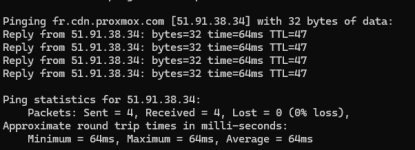
When I ping it it works just fine:
1794205145384.png

When I was trying to download the ISO a few hours ago it wasn't working and I wasn't able to download the torrent file either. It worked from a different computer though not sure why but that other PC has a corporate VPN running (work computer) so I was able just to download the torrent file and move it to my PC to download the ISO.

I looked at a few posts here and it seems that it's not just me a few people are facing issues with this site temporarily going down and up.
 
Please share (part of) the public IP you try to reach the CDN from - and a exact timeframe.

Currently we are not aware of a large-scale outage - 2 hours ago a few nodes in our CDN were rebooted (but that was a downtime of ~5 minutes).

I hope this helps!
 
I'm having trouble reaching 66.70.154.82 / 2607:5300:400:7d00::8 (ca.na.cdn.proxmox.com). Started yesterday; took a day to download the latest PVE ISO on my PC. Can't apt update on my Proxmox server using the no-subscription repositories.

I actually switched to 95.133.229.241 / 2a0b:7140:8:100::90 (us.na.cdn.proxmox.com) using a VPN and finished the ISO download -- instantly; I have 3 Gb/s FTTH. That doesn't help my Proxmox server, though.
 
I'm having trouble reaching 66.70.154.82 / 2607:5300:400:7d00::8 (ca.na.cdn.proxmox.com). Started yesterday; took a day to download the latest PVE ISO on my PC. Can't apt update on my Proxmox server using the no-subscription repositories.

I actually switched to 95.133.229.241 / 2a0b:7140:8:100::90 (us.na.cdn.proxmox.com) using a VPN and finished the ISO download -- instantly; I have 3 Gb/s FTTH. That doesn't help my Proxmox server, though.
again - please share (part of) your public ip-address so we can check and compare the logs - additionally - if you can provide a traceroute/mtr output to the affected node that would also help in finding issues on your path to our CDN

Thanks!
 
Same issue here today, 2026-11-18 ~21:50 EST (UTC-5), from Verizon Fios (US East), public IP 71.164.x.x.
download.proxmox.com / enterprise.proxmox.com resolve to both 66.70.154.82 (ca.na.cdn) and 95.133.229.241 (us.na.cdn) depending on resolver. Both answer ping (~20 ms), but TCP 443 and 80 time out on both. www.proxmox.com (45.144.208.39) works fine. A connection from an outside network to 66.70.154.82:443 was refused, too.
traceroute to 66.70.154.82 (route looks clean, reaches the host in 18 hops):

1 192.168.1.1 <1 ms
2 71.162.x.x 3 ms
3 100.41.x.x 6 ms
5 152.179.x.x 5 ms
6 64.125.28.154 11 ms
8 64.125.19.219 11 ms
10 38.104.74.179 14 ms
14 192.99.146.138 20 ms
18 66.70.154.82 18 ms
 
Last edited:
Same issue here today, 2026-11-18 ~21:50 EST (UTC-5), from Verizon Fios (US East), public IP 71.164.x.x.
we have some requests matching that address range (71.164.X.X) - at ~02:23-02:25 UTC - those ran into the rate-limit for downloading isos and were limited for a time.
Sometimes this gets triggered by certain download-helper tools - please try downloading with a regular browser or wget/curl, without too much parallelism - if you've used a tool.
The ban should be dropped in a short while

I hope this helps!