Dell r7725 clean installation with Broadcom 57504 Quad Port 10/25GbE

rubikon

New Member
Nov 8, 2026
4
0
0
I had install new VE 9.2 on subj, and after installation i don't have vmbr0 and can't access web interface.

manually i can fix it by console:
ip link add name vmbr0 type bridge
ip link set nic0 master vmbr0
ip addr add *.*.*.123/24 dev vmbr0
ip link set nic0 up
ip link set vmbr0 up
ip route add default via *.*.*.254


and save configuration in /etc/network/interfaces
auto lo
iface lo inet loopback

iface nic0 inet manual

auto vmbr0
iface vmbr0 inet static
address *.*.*.123/24
gateway *.*.*.254
bridge-ports nic0
bridge-stp off
bridge-fd 0

iface nic1 inet manual
iface nic2 inet manual
iface nic3 inet manual
iface nic4 inet manual
iface nic5 inet manual

source /etc/network/interfaces.d/*


but after reboot - clean as before
Why it's not work from the box???
 
HI rubikon,
Check if you can see the interfaces using these commands:

ip -br link
lsmod | grep bnxt -----> bnxt_en
lspci | grep -Ei 'ethernet|network' ---- > Broadcom Inc. BCM57504

ip link show
ls -l /sys/class/net
ethtool -i nic0
 
Hi @rubikon , welcome to the forum.

Your network configuration looks correct at first glance.

There a few things you can check and also supply here :
- output of "ip a" after "bad" boot, capture it into the file and provide as text in CODE tags
- output of "ip a" after you "fixed" it
- before reboot: ls -la /etc/network/interfaces*
- before reboot: cat /etc/network/interfaces.new
- after reboot, cat /etc/network/interfaces
- before reboot after saving your changes: ifreload -a -d

Cheers


Blockbridge : Ultra low latency all-NVME shared storage for Proxmox - https://www.blockbridge.com/proxmox
 
Hi @rubikon , welcome to the forum.

Your network configuration looks correct at first glance.

There a few things you can check and also supply here :
- output of "ip a" after "bad" boot, capture it into the file and provide as text in CODE tags
- output of "ip a" after you "fixed" it
- before reboot: ls -la /etc/network/interfaces*
- before reboot: cat /etc/network/interfaces.new
- after reboot, cat /etc/network/interfaces
- before reboot after saving your changes: ifreload -a -d

Cheers


Blockbridge : Ultra low latency all-NVME shared storage for Proxmox - https://www.blockbridge.com/proxmox
Thanks


And i forget about detail on booting:

[ 0.004955] No irq handler for 85.55
Found volume group "pve" using metadata type lvm2
3 logical volume(s) in volume group "pve" now active
/dev/mapper/pve-root: clean, 60408/6291456 files, 1583520/25165824 blocks
here - it's freezing for 1+minute and out:

[FAILED] Failed to start ifupdown2-pre.service - Helper to synchronize boot up for ifupdown.
[DEPEND] Dependency failed for networking.service - Network initialization.


Code:
root@bi-thhi-prx:~# ip link show
1: lo: <LOOPBACK,UP,LOWER_UP> mtu 65536 qdisc noqueue state UNKNOWN mode DEFAULT group default qlen 1000
    link/loopback 00:00:00:00:00:00 brd 00:00:00:00:00:00
2: nic0: <BROADCAST,MULTICAST,UP,LOWER_UP> mtu 1500 qdisc mq master vmbr0 state UP mode DEFAULT group default qlen 1000
    link/ether 6c:83:75:d6:cf:a0 brd ff:ff:ff:ff:ff:ff
    altname enP1p137s0f0np0
    altname enP1s4f0np0
    altname enx6c8375d6cfa0
3: nic1: <BROADCAST,MULTICAST> mtu 1500 qdisc noop state DOWN mode DEFAULT group default qlen 1000
    link/ether 6c:83:75:d6:cf:a1 brd ff:ff:ff:ff:ff:ff
    altname enP1p137s0f1np1
    altname enP1s4f1np1
    altname enx6c8375d6cfa1
4: nic2: <BROADCAST,MULTICAST> mtu 1500 qdisc noop state DOWN mode DEFAULT group default qlen 1000
    link/ether 6c:83:75:d6:cf:a2 brd ff:ff:ff:ff:ff:ff
    altname enP1p137s0f2np2
    altname enP1s4f2np2
    altname enx6c8375d6cfa2
5: nic3: <BROADCAST,MULTICAST> mtu 1500 qdisc noop state DOWN mode DEFAULT group default qlen 1000
    link/ether 6c:83:75:d6:cf:a3 brd ff:ff:ff:ff:ff:ff
    altname enP1p137s0f3np3
    altname enP1s4f3np3
    altname enx6c8375d6cfa3
6: nic4: <BROADCAST,MULTICAST> mtu 1500 qdisc noop state DOWN mode DEFAULT group default qlen 1000
    link/ether 20:3a:43:21:27:20 brd ff:ff:ff:ff:ff:ff
    altname enp1s0f0
    altname ens10f0
    altname enx203a43212720
7: nic5: <BROADCAST,MULTICAST> mtu 1500 qdisc noop state DOWN mode DEFAULT group default qlen 1000
    link/ether 20:3a:43:21:27:21 brd ff:ff:ff:ff:ff:ff
    altname enp1s0f1
    altname ens10f1
    altname enx203a43212721
8: vmbr0: <BROADCAST,MULTICAST,UP,LOWER_UP> mtu 1500 qdisc noqueue state UP mode DEFAULT group default qlen 1000
    link/ether 6c:83:75:d6:cf:a0 brd ff:ff:ff:ff:ff:ff
root@bi-thhi-prx:~# ls -l /sys/class/net
total 0
lrwxrwxrwx 1 root root 0 Nov  5 19:38 lo -> ../../devices/virtual/net/lo
lrwxrwxrwx 1 root root 0 Nov  5 19:38 nic0 -> ../../devices/pci0001:88/0001:88:01.1/0001:89:00.0/net/nic0
lrwxrwxrwx 1 root root 0 Nov  5 19:38 nic1 -> ../../devices/pci0001:88/0001:88:01.1/0001:89:00.1/net/nic1
lrwxrwxrwx 1 root root 0 Nov  5 19:38 nic2 -> ../../devices/pci0001:88/0001:88:01.1/0001:89:00.2/net/nic2
lrwxrwxrwx 1 root root 0 Nov  5 19:38 nic3 -> ../../devices/pci0001:88/0001:88:01.1/0001:89:00.3/net/nic3
lrwxrwxrwx 1 root root 0 Nov  5 19:38 nic4 -> ../../devices/pci0000:00/0000:00:01.1/0000:01:00.0/net/nic4
lrwxrwxrwx 1 root root 0 Nov  5 19:38 nic5 -> ../../devices/pci0000:00/0000:00:01.1/0000:01:00.1/net/nic5
lrwxrwxrwx 1 root root 0 Nov  9 19:32 vmbr0 -> ../../devices/virtual/net/vmbr0


Code:
root@bi-thhi-prx:~# ip a
1: lo: <LOOPBACK,UP,LOWER_UP> mtu 65536 qdisc noqueue state UNKNOWN group default qlen 1000
    link/loopback 00:00:00:00:00:00 brd 00:00:00:00:00:00
    inet 127.0.0.1/8 scope host lo
       valid_lft forever preferred_lft forever
    inet6 ::1/128 scope host noprefixroute
       valid_lft forever preferred_lft forever
2: nic0: <BROADCAST,MULTICAST,UP,LOWER_UP> mtu 1500 qdisc mq master vmbr0 state UP group default qlen 1000
    link/ether 6c:83:75:d6:cf:a0 brd ff:ff:ff:ff:ff:ff
    altname enP1p137s0f0np0
    altname enP1s4f0np0
    altname enx6c8375d6cfa0
    inet6 fe80::6e83:75ff:fed6:cfa0/64 scope link proto kernel_ll
       valid_lft forever preferred_lft forever
3: nic1: <BROADCAST,MULTICAST> mtu 1500 qdisc noop state DOWN group default qlen 1000
    link/ether 6c:83:75:d6:cf:a1 brd ff:ff:ff:ff:ff:ff
    altname enP1p137s0f1np1
    altname enP1s4f1np1
    altname enx6c8375d6cfa1
4: nic2: <BROADCAST,MULTICAST> mtu 1500 qdisc noop state DOWN group default qlen 1000
    link/ether 6c:83:75:d6:cf:a2 brd ff:ff:ff:ff:ff:ff
    altname enP1p137s0f2np2
    altname enP1s4f2np2
    altname enx6c8375d6cfa2
5: nic3: <BROADCAST,MULTICAST> mtu 1500 qdisc noop state DOWN group default qlen 1000
    link/ether 6c:83:75:d6:cf:a3 brd ff:ff:ff:ff:ff:ff
    altname enP1p137s0f3np3
    altname enP1s4f3np3
    altname enx6c8375d6cfa3
6: nic4: <BROADCAST,MULTICAST> mtu 1500 qdisc noop state DOWN group default qlen 1000
    link/ether 20:3a:43:21:27:20 brd ff:ff:ff:ff:ff:ff
    altname enp1s0f0
    altname ens10f0
    altname enx203a43212720
7: nic5: <BROADCAST,MULTICAST> mtu 1500 qdisc noop state DOWN group default qlen 1000
    link/ether 20:3a:43:21:27:21 brd ff:ff:ff:ff:ff:ff
    altname enp1s0f1
    altname ens10f1
    altname enx203a43212721
8: vmbr0: <BROADCAST,MULTICAST,UP,LOWER_UP> mtu 1500 qdisc noqueue state UP group default qlen 1000
    link/ether 6c:83:75:d6:cf:a0 brd ff:ff:ff:ff:ff:ff
    inet *.*.*.123/24 scope global vmbr0
       valid_lft forever preferred_lft forever
    inet6 fe80::6e83:75ff:fed6:cfa0/64 scope link proto kernel_ll
       valid_lft forever preferred_lft forever


Code:
root@bi-thhi-prx:~# ls -la /etc/network/interfaces*
-rw-r--r-- 1 root root 814 Nov  5 19:24 /etc/network/interfaces


/etc/network/interfaces.d:
total 8
drwxr-xr-x 2 root root 4096 Jan 22  2026 .
drwxr-xr-x 8 root root 4096 Nov  9 19:22 ..
root@bi-thhi-prx:~#

after booting:
Code:
root@bi-thhi-prx:~# ip a
1: lo: <LOOPBACK,UP,LOWER_UP> mtu 65536 qdisc noqueue state UNKNOWN group default qlen 1000
    link/loopback 00:00:00:00:00:00 brd 00:00:00:00:00:00
    inet 127.0.0.1/8 scope host lo
       valid_lft forever preferred_lft forever
    inet6 ::1/128 scope host noprefixroute
       valid_lft forever preferred_lft forever
2: nic0: <BROADCAST,MULTICAST> mtu 1500 qdisc noop state DOWN group default qlen 1000
    link/ether 6c:83:75:d6:cf:a0 brd ff:ff:ff:ff:ff:ff
    altname enP1p137s0f0np0
    altname enP1s4f0np0
    altname enx6c8375d6cfa0
3: nic1: <BROADCAST,MULTICAST> mtu 1500 qdisc noop state DOWN group default qlen 1000
    link/ether 6c:83:75:d6:cf:a1 brd ff:ff:ff:ff:ff:ff
    altname enP1p137s0f1np1
    altname enP1s4f1np1
    altname enx6c8375d6cfa1
4: nic2: <BROADCAST,MULTICAST> mtu 1500 qdisc noop state DOWN group default qlen 1000
    link/ether 6c:83:75:d6:cf:a2 brd ff:ff:ff:ff:ff:ff
    altname enP1p137s0f2np2
    altname enP1s4f2np2
    altname enx6c8375d6cfa2
5: nic3: <BROADCAST,MULTICAST> mtu 1500 qdisc noop state DOWN group default qlen 1000
    link/ether 6c:83:75:d6:cf:a3 brd ff:ff:ff:ff:ff:ff
    altname enP1p137s0f3np3
    altname enP1s4f3np3
    altname enx6c8375d6cfa3
6: nic4: <BROADCAST,MULTICAST> mtu 1500 qdisc noop state DOWN group default qlen 1000
    link/ether 20:3a:43:21:27:20 brd ff:ff:ff:ff:ff:ff
    altname enp1s0f0
    altname ens10f0
    altname enx203a43212720
7: nic5: <BROADCAST,MULTICAST> mtu 1500 qdisc noop state DOWN group default qlen 1000
    link/ether 20:3a:43:21:27:21 brd ff:ff:ff:ff:ff:ff
    altname enp1s0f1
    altname ens10f1
    altname enx203a43212721


ifreload -a -d
not allow me - another instance already running


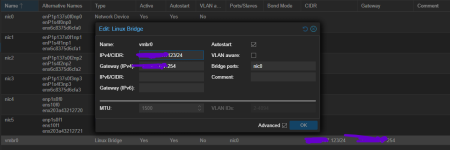
after fixing, on web, before reboot:

1794239172518.png
 
The logs clearly show a boot time network configuration error. There could be more than a few things causing it.

A very simple test : after the boot and when your network is broken, run : systemctl restart networking
Does that bring things up?

Other than that, is there anything interesting, after "bad" boot, in:
journalctl -b -u systemd-udev-settle.service --no-pager
journalctl -b -u ifupdown2-pre.service --no-pager
journalctl -b -u networking.service --no-pager

Note that none of this is PVE specific, but rather is standard Linux network troubleshooting.


Blockbridge : Ultra low latency all-NVME shared storage for Proxmox - https://www.blockbridge.com/proxmox
 
A very simple test : after the boot and when your network is broken, run :systemctl restart networking
Does that bring things up?
Very strange, but: now it's working, i tried that before - it gives me no effect. It's looks like was some long timeout and than networking able to initialize..
 
journalctl -b -u systemd-udev-settle.service --no-pager
journalctl -b -u ifupdown2-pre.service --no-pager
journalctl -b -u networking.service --no-pager
root@bi-thhi-prx:~# journalctl -b -u systemd-udev-settle.service --no-pager
-- No entries --
root@bi-thhi-prx:~# journalctl -b -u ifupdown2-pre.service --no-pager
Nov 09 19:48:34 bi-thhi-prx systemd[1]: Starting ifupdown2-pre.service - Helper to synchronize boot up for ifupdown...
Nov 09 19:50:34 bi-thhi-prx udevadm[3029]: Timed out while waiting for udev queue to empty.
Nov 09 19:50:34 bi-thhi-prx systemd[1]: ifupdown2-pre.service: Main process exited, code=exited, status=1/FAILURE
Nov 09 19:50:34 bi-thhi-prx systemd[1]: ifupdown2-pre.service: Failed with result 'exit-code'.
Nov 09 19:50:34 bi-thhi-prx systemd[1]: Failed to start ifupdown2-pre.service - Helper to synchronize boot up for ifupdown.
Nov 10 10:25:38 bi-thhi-prx systemd[1]: Starting ifupdown2-pre.service - Helper to synchronize boot up for ifupdown...
Nov 10 10:25:38 bi-thhi-prx systemd[1]: Finished ifupdown2-pre.service - Helper to synchronize boot up for ifupdown.
root@bi-thhi-prx:~# journalctl -b -u networking.service --no-pager
Nov 09 19:50:34 bi-thhi-prx systemd[1]: Dependency failed for networking.service - Network initialization.
Nov 09 19:50:34 bi-thhi-prx systemd[1]: networking.service: Job networking.service/start failed with result 'dependency'.
Nov 10 10:25:38 bi-thhi-prx systemd[1]: Starting networking.service - Network initialization...
Nov 10 10:25:38 bi-thhi-prx networking[141994]: networking: Configuring network interfaces
Nov 10 10:25:45 bi-thhi-prx systemd[1]: Finished networking.service - Network initialization.
root@bi-thhi-prx:~#
```[cite: 12]