

1st time proxmox installation

bfox2261

New Member
Oct 23, 2026
3
0
1
I'm attempting to create my 1st proxmox server for home labing and not making it very far looking for some assistance, hopefully its something simple I'm overlooking. essentially after a successful install my server is unable to boot, stating no boot device detected, even when trying the recover boot from the ISO it also states no bootable device.

Details:
USB Image loaded using Rufus.
- ISO: proxmox-ve_9.2-1

Server: HP proliant DL360 Gen9; ROM is up-to-date: P89 v3.40
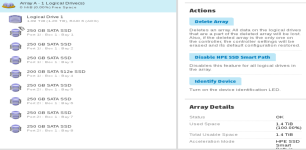
Using a Raid 6: the logical drive appears to be good.
raid.PNG
Boot options:
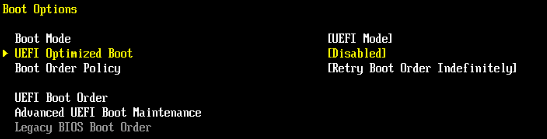
-mode is UEFI
-I have tried optimized boot both enabled/disabled
boot.PNG
-I have also tried turning off secure boot:

secure boot.PNG

Installation options:
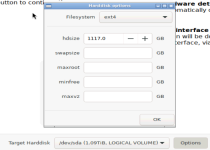
my Logical drive is being seen; using the ext4 filesystem
install 1.PNG

Issue:
failure to boot
fail to boot.PNG

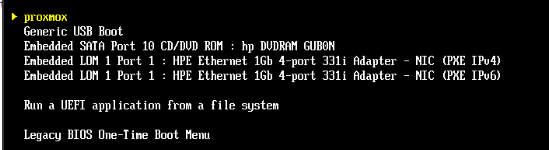
proxmox is listed as 1st bootable options, when trying to select it; just boots to the HP system configurations
boot order.PNG

when trying to do the recover boot from the ISO
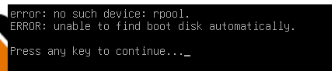
recover boot.PNG

only thing else I feel like its important, I did get this to pop up once:
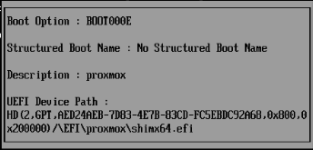
boot error.PNG

when trying to file the boot loader; I see nothing but the flash drive
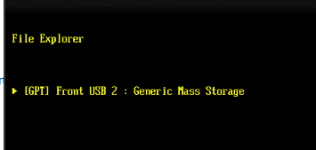
file system.PNG

any help would be greatly appreciated
 
Last edited:
Hi bfox2261

As far as i know on older HPE servers you can't boot linux based os from a logical drive on the raid controller.

You can try to directly connect a sata ssd to the mainboard, install pve on that and use the raid controller logical volume exclusively for vm's and containers.

For VM and container workloads you should consider using a raid 10 array for better performance / more iops.

Seems like a similar issue: https://forum.proxmox.com/threads/installation-failed-on-dl580-gen9.187123/
 
  • Like
Reactions: bfox2261
It looks like one of your SSDs is smaller than the others (200 where the rest are 250). If you include that in a raid, it will limit the usable space on the other drives to 200GB. So you are losing a total of 350GB (before raid erasure coding) of 7 drives to get 200 of one more drive in the raid because of how raid-6 works.

You might be able to make that raid bootable by switching from EFI to BIOS mode, or using some other setting in the CMOS, but I don't think that's worth the effort. I think it would make a lot more sense to break that raid, and configure the raid controller to pass through the drives without a RAID (sometimes called JBOD or IT mode). On the crappy old HP server I used to have, that was the easiest way to make booting work, and it let me use ZFS to make a RAID instead.

Raid cards tend to break ZFS, so make sure to verify that the raid card isn't doing anything problematic. Generally for VM workloads RAID1 or RAID10 has better performance than RAID5 or 6, but you can do whatever config you like. I think I would do a ZFS RAID1 (mirror) pair with the 200G and a 250G for the OS, and ZFS RAID-10 of the remaining for VMs. That's going to be smaller than your RAID-6, but much faster.
 
Hi bfox2261

As far as i know on older HPE servers you can't boot linux based os from a logical drive on the raid controller.

You can try to directly connect a sata ssd to the mainboard, install pve on that and use the raid controller logical volume exclusively for vm's and containers.

For VM and container workloads you should consider using a raid 10 array for better performance / more iops.

Seems like a similar issue: https://forum.proxmox.com/threads/installation-failed-on-dl580-gen9.187123/
Thanks, I hooked a a SSD drive to a USB port and loaded the ISO on that and was able to load it and boot it that way; may need to invest into a PCI slot with a M.2 drive later on. Raid 10 was initial my 1st choice but wasn't an option when I went to created it, but thanks to Tomservo pointing out a drive with a different size I now got that fixed too.

Appreciate the help!
 
It looks like one of your SSDs is smaller than the others (200 where the rest are 250). If you include that in a raid, it will limit the usable space on the other drives to 200GB. So you are losing a total of 350GB (before raid erasure coding) of 7 drives to get 200 of one more drive in the raid because of how raid-6 works.

You might be able to make that raid bootable by switching from EFI to BIOS mode, or using some other setting in the CMOS, but I don't think that's worth the effort. I think it would make a lot more sense to break that raid, and configure the raid controller to pass through the drives without a RAID (sometimes called JBOD or IT mode). On the crappy old HP server I used to have, that was the easiest way to make booting work, and it let me use ZFS to make a RAID instead.

Raid cards tend to break ZFS, so make sure to verify that the raid card isn't doing anything problematic. Generally for VM workloads RAID1 or RAID10 has better performance than RAID5 or 6, but you can do whatever config you like. I think I would do a ZFS RAID1 (mirror) pair with the 200G and a 250G for the OS, and ZFS RAID-10 of the remaining for VMs. That's going to be smaller than your RAID-6, but much faster.
Thanks for pointing out the drive mismatach, I got that fixed!
