Cephx Key Migration Procedure and Ceph 19.2 Squid Going EOL Soon

You do not need to reboot the nodes, and NEVER use apt upgrade -> it can break your system. use dist-upgrade or full-upgrade
OK. Thank you very much for your input. Understood to never use simple apt upgrade

But the kernel would be also updated, so I think we have to restart the nodes on some point?

If I understood you correctly:
1) Install ALL updates directly on all three nodes with apt full-upgrade
2) Do the rolling restart of Ceph services
3) Do the key exchange
4) Let go all the errors and warnings regarding CephX authentication
5) Then I would restart the nodes? (because of the kernel updates from step 1)

Honestly, we're running PVE since years (12-13?) now and as I can remember we never bricked our systems with the simple apt upgrade but if you had bad experiences in the past then we should avoid that in the future. Thank you
:)
 
OK. Thank you very much for your input. Understood to never use simple apt upgrade

But the kernel would be also updated, so I think we have to restart the nodes on some point?

If I understood you correctly:
1) Install ALL updates directly on all three nodes with apt full-upgrade
2) Do the rolling restart of Ceph services
3) Do the key exchange
4) Let go all the errors and warnings regarding CephX authentication
5) Then I would restart the nodes? (because of the kernel updates from step 1)

Honestly, we're running PVE since years (12-13?) now and as I can remember we never bricked our systems with the simple apt upgrade but if you had bad experiences in the past then we should avoid that in the future. Thank you
:)

Theoretically apt upgrade might refuse to install, remove, or replace package dependencies that Proxmox requires to function. Yes you can reboot at a different time. You also might need to move around some vms between hosts to "refresh" clients as the docs state.
 
I don't remember the commands but following the upstream docs worked for me. Remember to make sure the client is recent enough for the new key.
 
  • Like
Reactions: shfp79
Thank you very much. So we followed upstream docs to rotate the external CephFS client:
Code:
ceph auth rotate --key-type=aes256k client.client_name | tee ./client.client_name.keyring

Then ran again the helper script which led to:
Code:
INFO: This is a dry run. No Ceph key, cipher setting, or daemon will be changed. Session observations can update the migration journal.
WARN: the key of 'client.client_name' changed outside this script; retaining recorded instances and observed sessions not identified with the target key
PASS: Every service key uses 'aes256k', and so do the service tickets.

Client keys awaiting action:
  'client.client_name': the first complete client measurement is pending. After refreshing every
    client, run '--confirm-clients-refreshed client.client_name --apply'; the first attempt records the
    measurement without committing the key.

So we ran /usr/share/pve-manager/migrations/pve-cephx-rotate-service-keys --confirm-clients-refreshed client.client_name --apply

which led to:
Code:
INFO: Recovery and confirmations may run before the remaining plan can be shown.

Apply this run, including recovery and any requested key confirmations? (y/N) y
INFO: Collecting cluster info.
WARN: the key of 'client.client_name' changed outside this script; retaining recorded instances and observed sessions not identified with the target key
FAIL: not accepting '--confirm-clients-refreshed client.client_name' yet: its rotation needed a first complete measurement; no possibly stale session is currently visible, and that complete measurement is now recorded. Repeat the confirmation after refreshing any recorded clients; it then covers only clients this run cannot see.

Another dry-run with
/usr/share/pve-manager/migrations/pve-cephx-rotate-service-keys led to the following output:

Code:
INFO: This is a dry run. No Ceph key, cipher setting, or daemon will be changed. Session observations can update the migration journal.
PASS: Every service key uses 'aes256k', and so do the service tickets.

Ready for confirmation: client.client_name
Confirm only after refreshing every client, including disconnected ones and external key copies:
  /usr/share/pve-manager/migrations/pve-cephx-rotate-service-keys --apply --confirm-all-clients-refreshed --restrict-ciphers

OK, here we go:
/usr/share/pve-manager/migrations/pve-cephx-rotate-service-keys --apply --confirm-all-clients-refreshed --restrict-ciphers

Output:
Code:
INFO: Recovery and confirmations may run before the remaining plan can be shown.

Apply this run, including recovery and any requested key confirmations? (y/N) y
INFO: Collecting cluster info.
WARN: accepting '--confirm-all-clients-refreshed' for client.client_name: every client of them that this run can see is refreshed, and you confirm the same for those it cannot see

Plan
Step 1: allow only the 'aes256k' cipher for authentication, which clears the remaining insecure-key warnings. A key or client on the old cipher is refused from then on. This causes brief monitor elections.

Restricting the allowed ciphers
PASS: only the 'aes256k' cipher is allowed for authentication now; a key or client on the old cipher is refused from here on

What is left
No authentication check is an error: the service keys and the tickets they hand out are migrated.

Ceph still reports these authentication health checks:
  AUTH_INSECURE_KEYS_ALLOWED: Monitors are configured to allow auth using insecure key types (cleared by this run, not recomputed yet)
  AUTH_INSECURE_KEYS_CREATABLE: Monitors are configured to allow creation of insecure key types (cleared by this run, not recomputed yet)
These recompute on the monitors' next tick.
PASS: Cephx migration is complete. Authentication and new keys use only 'aes256k'.
WARN: Keep /etc/pve/priv/cephx-key-migration.json until access verification. It contains secret keys needed to recover a daemon left behind ('ceph auth import'), so protect it like a keyring.

Done


I think, the information to rotate external clients as in our example could also be provided by the official docs or in the Proxmox Wiki.
 
  • Like
Reactions: wech
WARN: the key of 'client.client_name' changed outside this script; retaining recorded instances and observed sessions not identified with the target key

I had the same warning with an key created for an external client on my test system after I had manually rotated the key because I could not figure out what do do otherwise and was not completely sure if this is a problem or just an information.

It would really be good to have some guidance in the official documentation how to handle keys which where created for external clients.

The script is doing a great job to make the whole process a bit less frightning, but it still is not something for the fainthearted :-D
 
Guys maybe stupid question - but - we have several older clients (deb11/deb12) running on our PVE infra that we can't simply upgrade and their functionality requires direct access to specific CephFS folder - I guess we are stucked now and can't upgrade aes -> aes256k (due to kernel?) for them.. I'm OK living with Ceph warnings because of this but is this show-stopper when upgrading Ceph from 19.2.6 -> 20.?
 
Guys maybe stupid question - but - we have several older clients (deb11/deb12) running on our PVE infra that we can't simply upgrade and their functionality requires direct access to specific CephFS folder - I guess we are stucked now and can't upgrade aes -> aes256k (due to kernel?) for them.. I'm OK living with Ceph warnings because of this but is this show-stopper when upgrading Ceph from 19.2.6 -> 20.?

I think you could use the userspace implementation (ceph-fuse). As I understood, the key exchange has impact on kernel clients.
 
I think you could use the userspace implementation (ceph-fuse). As I understood, the key exchange has impact on kernel clients.
I will look into it - thanks, but even without that step - can I upgrade to Ceph 20.2 while having those warnings triggered?
 
I will look into it - thanks, but even without that step - can I upgrade to Ceph 20.2 while having those warnings triggered?
I'm pretty confident Ceph 20 will work as this change has been introcued in ceph 19 and 20 after the initial release of ceph 20.
https://ceph.io/en/news/blog/2026/v20-2-4-v19-2-6-combo-released/

Accoring to the Rook project, aes keys are still allowed in Ceph 21 https://rook.github.io/docs/rook/latest/Storage-Configuration/Advanced/cephx-key-rotation/

And on https://medium.com/rook-io/rook-advisory-for-ceph-cve-2025-30156-cc1f8dee6da3 there is a note
> Rook and Ceph anticipate that most users will need to continue using older AES authentication keys for non-core clients during a transition period in order to avoid storage service outages. This transition period may last years for organizations with large or complex environments.

And while being deprecated, I could not find a date for removal of the support of AES keys.
 
I'm pretty confident Ceph 20 will work as this change has been introcued in ceph 19 and 20 after the initial release of ceph 20.
https://ceph.io/en/news/blog/2026/v20-2-4-v19-2-6-combo-released/

Accoring to the Rook project, aes keys are still allowed in Ceph 21 https://rook.github.io/docs/rook/latest/Storage-Configuration/Advanced/cephx-key-rotation/

And on https://medium.com/rook-io/rook-advisory-for-ceph-cve-2025-30156-cc1f8dee6da3 there is a note
> Rook and Ceph anticipate that most users will need to continue using older AES authentication keys for non-core clients during a transition period in order to avoid storage service outages. This transition period may last years for organizations with large or complex environments.

And while being deprecated, I could not find a date for removal of the support of AES keys.
OK that is exactly what I wanted to hear.. that I'm not the only one "using old and weak keys for internal infrastructure"
:cool:
 
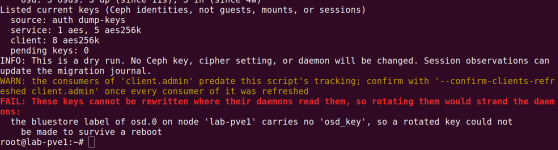
So it looks like these OSDs simply never had osd_key written into their bluestore label, which blocks the whole migration.

Hi @lucacosmo,

I could reproduce this in a test cluster. The FAIL shows up when an OSD still has an old aes key and its bluestore label has no osd_key. Updating to pve-manager 9.2.21 alone didn't change it.

1792962993161.png

What worked for me: write the OSD's current key into the label, then run the helper again. One OSD at a time, on the node that holds it, with the cluster healthy.

Please note: this is a manual workaround that I only tested in a lab, not an official procedure, so use it at your own risk.

Bash:
ceph osd set noout
systemctl stop ceph-osd@<ID>
KEY=$(ceph-authtool /var/lib/ceph/osd/ceph-<ID>/keyring -n osd.<ID> --print-key)
[ "$KEY" = "$(ceph auth get-key osd.<ID>)" ] && echo "match" || echo "MISMATCH, stop here"
ceph-bluestore-tool set-label-key --dev /var/lib/ceph/osd/ceph-<ID>/block -k osd_key -v "$KEY"
systemctl start ceph-osd@<ID>
ceph osd unset noout

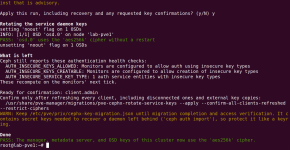
After that the dry run passed, --rotate-cluster-keys --apply rotated the key and wrote the new one into the label too:

1792963007351.png

Label, keyring and Ceph then all held the same new key:

1792963017887.png

and the OSD came back fine after rebooting the node.

A few things to watch:
  • Only write the label if the key matches ceph auth get-key. A wrong key in the label would lock the OSD out at the next reboot.
  • systemd allows only 3 starts of the same OSD within 30 minutes. If a start fails with start-limit-hit, run systemctl reset-failed ceph-osd@<ID> and start it again.
  • My test OSD was created with a recent ceph-volume, and I don't know why your labels have no osd_key. So please try it on one OSD first, reboot that node, and check that the OSD comes back before doing the rest.

Hope this helps!
Lubos