VM starts slow in Proxmox cluster

Rayrox_

New Member
Oct 7, 2026
3
0
1
Hi everyone,
I have an VM start issue with our VM in proxmox cluster,
VM starts slow and timed out because of ram fills up slow. How can we fix it?
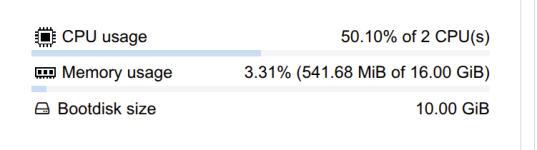
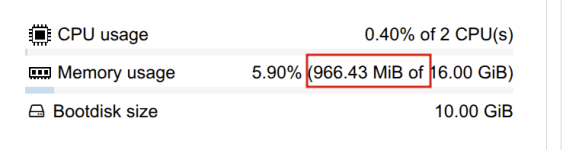
From the screenshot, the VM fills up RAm 900Mb within 2 minutes and normally it would be fully start a 16G RAM VM within 30minutes. It's not the same in another proxmox cluster hosts.
I already checked hugepage or zfs cache, but's the settings are the same as other hosts
Any suggestions on what might be causing this or how to fix it? Thanks.

1791350337582.png
 

Attachments

  • 1791350122007.png
    1791350122007.png
    25.3 KB · Views: 8
More information about your hardware and system logs would probably be a good starting point if you want anyone to be able to help here. Otherwise, this is just going to turn into a wild guessing game.

I'll throw out a wild guess and say a failing SSD. I recently had something similar on a host where everything suddenly became slow. File operations, VM starts/reboots, etc. The VMs were running on a ZFS mirror, and one of the SSDs was reporting errors. After I removed the faulty SSD, everything went back to normal speed.

But yeah, as I said, just a wild guess. It could be all sorts of things. ;-)
 
Last edited:
  • Like
Reactions: Rayrox_ and UdoB
More information about your hardware and system logs would probably be a good starting point if you want anyone to be able to help here. Otherwise, this is just going to turn into a wild guessing game.

I'll throw out a wild guess and say a failing SSD. I recently had something similar on a host where everything suddenly became slow. File operations, VM starts/reboots, etc. The VMs were running on a ZFS mirror, and one of the SSDs was reporting errors. After I removed the faulty SSD, everything went back to normal speed.

But yeah, as I said, just a wild guess. It could be all sorts of things. ;-)
I checked the logs and saw the VM timing out on boot, so we increased the timeout threshold. We're on an SSD ZFS pool and disk health checks came back clean, so unfortunately, that's not the root cause.
Could you please advise if which logs i can check more?

​

 
Last edited:
is balooning active? If yes, have you tried to set minimum RAM to something like 4GB?
We tested with memory ballooning enabled, the VM will be faster if we set minimum 4G (takes 2 seconds). However, this is a production environment, so memory ballooning must remain disabled per customer requirements.
Startup duration scales directly with the allocated RAM size. While VMs with smaller RAM allocations boot faster, the boot time is still significantly slower than normal. As checked with ballooning disable, a 4 GB VM takes under 1 minute but 8G RAM takes 3 minutes.
For 256G, it took 60 min to be started :(
Any ideas on why memory pre-allocation is scaling so slowly? Thank you.
The screenshot is the 8G RAM VM took 3 min with ballooning disable
1791527388293.png
 
I have a 36GB VM with passthrough (so all memory must be pinned in actual RAM) and it allocates the (host) memory very slowly (half a minute at least) before showing the 3-second Proxmox boot menu. This coincided with my switch from ZFS to BTRFS.Other similar VMs without passthrough start much faster (and allocate host memory only when they actually use it).
 
Last edited: