

No Disk Space Available (Very Confused)
- Thread starter ITCowboy
- Start date
You are using an out of date browser. It may not display this or other websites correctly.
You should upgrade or use an alternative browser.
You should upgrade or use an alternative browser.
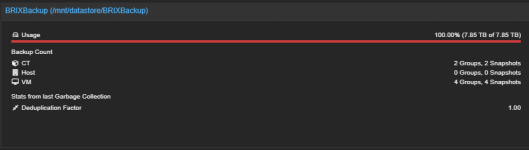
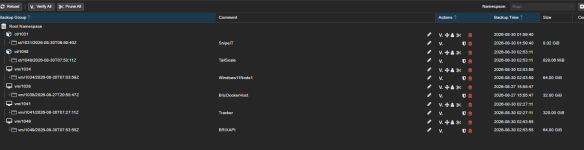

Looks like you never ran a prune/GC job (based on deduplication factor) . Your backups don't seem to be the issue here though so give this a try
Or if you have enough space on the root path
This would also be of interest
Bash:
du -shc /* | sort -h
# Go deeper
du -shc /bigdirectory/* | sort -h
# And so on...
du -shc /bigdirectory/.../* | sort -h
Bash:
apt -yU install gdu
gdu /
Bash:
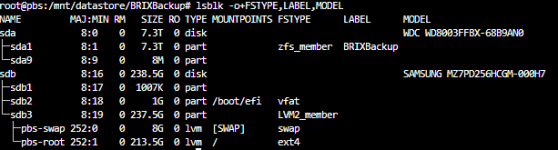
lsblk -o+FSTYPE,LABEL,MODEL
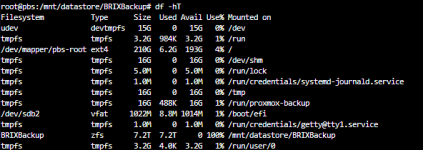
df -hT
zfs list -tall -ospace,refreservation
Last edited:
du -shc /* | sort -h
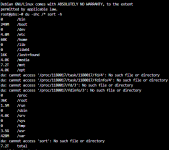
du -shc /mnt/* | sort -
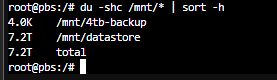
du -shc /mnt/datastore/* | sort -h
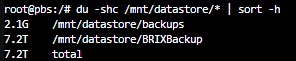
du -shc /mnt/datastore/BRIXBackup/* | sort -h

du -shc /mnt/datastore/BRIXBackup/ct/* | sort -h

so Where is the 7Tb coming from ??????
this shows me nothing that would explain
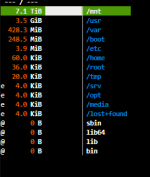
GDU shows me and in the .chunks there are a gazillion files (exagerated)

lsblk -o+FSTYPE,LABEL,MODEL
df -hT
du -shc /mnt/* | sort -
du -shc /mnt/datastore/* | sort -h
du -shc /mnt/datastore/BRIXBackup/* | sort -h
du -shc /mnt/datastore/BRIXBackup/ct/* | sort -h
so Where is the 7Tb coming from ??????
this shows me nothing that would explain
GDU shows me and in the .chunks there are a gazillion files (exagerated)
lsblk -o+FSTYPE,LABEL,MODEL
df -hT
Attachments


Can you show that? I tried to keep it simple but forgot about hidden paths. Try thisGDU shows me and in the .chunks there are a gazillion files (exagerated)
Bash:
find /mnt/datastore/BRIXBackup/* -maxdepth 1 -mindepth 1 -exec du -shc {} + 2>/dev/null | sort -h.chunks then, as mentioned earlier, you probably didn't run a GC so make sure you have a job for it and run/schedule that.
Last edited:

Like this but give these a read too (in your case a bit redundant, but still)
- https://gist.github.com/Impact123/3dbd7e0ddaf47c5539708a9cbcaab9e3#fixing-a-full-storage
- https://gist.github.com/Impact123/3dbd7e0ddaf47c5539708a9cbcaab9e3#preventing-a-full-storage
- https://gist.github.com/Impact123/3dbd7e0ddaf47c5539708a9cbcaab9e3#fixing-a-full-storage
- https://gist.github.com/Impact123/3dbd7e0ddaf47c5539708a9cbcaab9e3#preventing-a-full-storage
Last edited:
so update.....wiped the datastore for backup (essentially started over again) and it ran great for about 2 weeks and now I am at the point again that the drive is full and I am unable to perform a garbage collection WTF am I doing wrong.
I have been checking this everyday (except for the weekend and it has been pruning and GC
I have been checking this everyday (except for the weekend and it has been pruning and GC

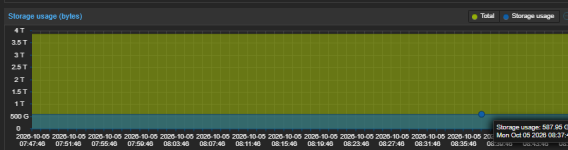
How do I fix the chunks issue....right now the system wont let me run a GC because I have no disk spave available
Relax. Take a deep breath. I just recently had this issue. It is easy to fix. But you need a clear mind to not destroy anything.I am unable to perform a garbage collection WTF am I doing wrong.
Like you said, you are not able to run GC, because you have no disk space left. Let us change that.
Get another disk. Does not matter if USB or SATA. Probably even a usb stick would work. Move some chunks off the pool, run Garbage Collect, move them back onto the pool. Easy.
- replace
poolBackup with your pool name- replace
/mnt/datastore/poolBackup/.chunks/aaa* with the path to your chunk files- replace
/tmp with the path to your external disk or wherever you move your files.This is how it is done:
- move some chunk file folders (names starting with aaa) off the pool, onto your external disk. This should only take a few seconds, since it is only a few hundred MB.
mv /mnt/datastore/poolBackup/.chunks/aaa* /tmp/- run the Garbage Collect Job. Don't worry about the errors, it will detect that you moved some files.
- move the folders back onto the pool
mv /tmp/aaa* /mnt/datastore/poolBackup/.chunks/- run Garbage Collect again. This time there should not be any errors
- create a yearly verify job that does not skip already verfied chunks
- run that verfy job
- delete that job
- set a zfs quota by
zfs set quota=1.8T poolBackup
Last edited:
Or just follow this: https://forum.proxmox.com/threads/p...ot-become-completely-full.166768/#post-774198
For EXT4 you can try to reduce the reserved blocks instead.
For EXT4 you can try to reduce the reserved blocks instead.
Last edited: