Passing a second SATA controller through to a VM

GreyAreaUK

New Member
Sep 11, 2026
7
0
1
East Yorkshire, England
Hi - sorry, I know this has been asked before but I can't seem to find a definitive solution.

Aim: to install under a Debian (probably) VM the Docker container 'Automatic Ripping Machine'.

My understanding is that for this to work I have to pass the optical drive through to the VM. But not just the drive - the controller it's attached to.

To that end I've purchased a second SATA controller and attached the optical drive to it. Here is the output for my IOMMU groups with the card in question highlighted:
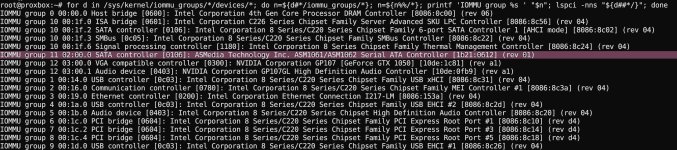

iommu.jpg

As you can see it's in its own group, which I believe is required.

Here are the modules in use for the two SATA controllers:

modules.jpg

Here is the current contents of my /etc/modprobe.d/vfio.conf file:

vfio.jpg

(this is to pass through a GTX1050 card, and seems to be working)


However, if I add the SATA controller as a raw PCI device (with 'All functions' ticked):
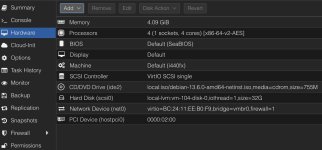

VM Config.jpg

Proxmox goes unresponsive, in exactly the same way as it did when I passed the 'main' SATA controller through (which makes perfect sense because suddenly it had no disk drives)

IOMMU is enabled via the Grub config. I tried making /etc/modprobe.d/vfio.conf read:

Code:
options vfio-pci ids=10de:1c81,10de:0fb9 disable_vga=1
options vfio-pci ids=1b21:0612

to no avail.

I'm probably missing something obvious, but I've no idea what.

Any assistance would be welcome. It's not urgent in any way - it's purely a hobby project.

Many thanks.

PS - version 9.2.10
 
Last edited:
does 'lspci -nnk' after a reboot show 'vfio-pci' as a driver? if not you might need to order vfio-pci before ahci fot it to work
excerpt from our docs:

https://pve.proxmox.com/wiki/PCI(e)_Passthrough

For example, if you are using drivers named <some-module>:

# echo "softdep <some-module> pre: vfio-pci" >> /etc/modprobe.d/<some-module>.conf

so in your case there should be a file that contains:

Code:
softdep ahci pre: vfio-pci

if that also does not work, please post the full 'dmesg' output here
 
Many thanks, and my apologies for the delay in replying - Real Life has been a bit...well.

I've altered /etc/modprobe.d/vfio.conf to read:

Code:
root@proxbox:~# cat /etc/modprobe.d/vfio.conf
options vfio-pci ids=10de:1c81,10de:0fb9 disable_vga=1
options vfio-pci ids=1b21:0612                    <=== SATA controler
softdep ahci pre: vfio-pci

and re-ran
Code:
update-initramfs -u -k all

Not sure if that was needed, but I assume it would do no harm.


And that seems to have worked. From lspci-nnk:

Code:
02:00.0 SATA controller [0106]: ASMedia Technology Inc. ASM1061/ASM1062 Serial ATA Controller [1b21:0612] (rev 01)
    Subsystem: ASMedia Technology Inc. Device [1b21:1060]
    Kernel driver in use: vfio-pci
    Kernel modules: ahci

Still might be early days, but I'm making progress :)

Thank you very much.
 
Last edited:
so did the passthrough now work with that setting ? it wasn't really clear from the post ;)
 
so did the passthrough now work with that setting ? it wasn't really clear from the post ;)
I *was* about to post '"yep, it's fine" but I spoke too soon. I swear I was able to boot the VM yesterday just fine, but now it's back to hanging the Proxmox box when I try.

lspci -nnk shows:
Code:
02:00.0 SATA controller [0106]: ASMedia Technology Inc. ASM1061/ASM1062 Serial ATA Controller [1b21:0612] (rev 01)
        Subsystem: ASMedia Technology Inc. Device [1b21:1060]
        Kernel driver in use: vfio-pci
        Kernel modules: ahci

which I *think* is right?

I've changed my /etc/modprobe.d/vfio.conf file back to:
Code:
options vfio-pci ids=10de:1c81,10de:0fb9 disable_vga=1
options vfio-pci ids=1b21:0612
softdep ahci pre: vfio-pci

but no luck. The VM still hangs the host when launched.

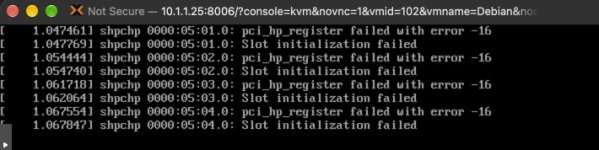
FWIW, the VM only displays this:


VM.jpg

The only thing attached to the new SATA card is the optical drive. The eventual aim of this is to get ARM running on it.
 
Last edited:
mhmm can you try to open a `journalctl -f` or `dmesg -w` on the host while trying to boot the vm so you can see the messages live when it starts to hang (could also work over ssh, but directly on the machine would be best) maybe there can be seen something
 
Hmmm...maybe hold off on this for now. I think the problem runs a little deeper than Proxmox configs. I'm starting to suspect the SATA card itself is giving the machine issues.

I just tried booting a bare-bones Linux (so removing Proxmox from the equation) and it hung with a message along the lines of '02:00.0 AHCI Controller unavailable', which seems to indicate a conflict somewhere.

Unfortunately, if I move the card to the only other slot available it joins an already occupied IOMMU group, so that's a non-starter.

I may have to shelve this for now.

Many thanks, everyone.
 
Just an addendum to this - I may have solved this by using a different method.

I followed a guide here which involves creating a new Container, then adding the following to its .conf file:

Code:
lxc.apparmor.profile: unconfined
lxc.cap.drop:
lxc.autodev: 1
lxc.mount.auto: sys:rw

lxc.cgroup2.devices.allow: b 11:0 rwm
lxc.mount.entry: /dev/sr0 dev/sr0 none bind,create=file,optional 0 0
lxc.cgroup2.devices.allow: c 21:0 rwm
lxc.mount.entry: /dev/sg0 dev/sg0 none bind,create=file,optional 0 0

replacing the 11 and 21 with values appropriate for your system.

And it seems to work. I can't explain why, as I'm really new at this and I'm just copy/pasting configs.


I've got _other_ issues now with ARM, but they're to do with the current MakeMKV having, shall we say, issues.

Many thanks, and hopefully the above will be of use to someone.