

Can't update - No space left on device

jawt

New Member
Jan 30, 2025
14
0
1
Hello,

I'm trying to update my Proxmox node but keep getting the below error message when running an update check (Datacenter > pve (node name) > Updates tab > Refresh button).
Code:
Error writing to file - write (28: No space left on device) [IP: 66.70.154.82 80]

Can you please help figure out how to solve this, whether how to expand or clear up the storage?

I am running on PVE 9.2.5 on this proxmox server. Another off-site updated proxmox server I run is on version 9.2.11.

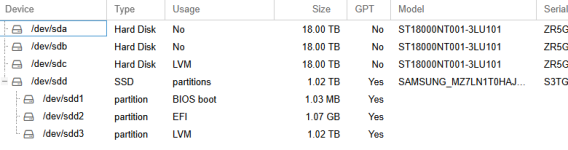
I've attached a screenshot of the Disks and LVM tabs under (pve (node name) > Disks / pve (node name) > Disks > LVM)

Thank you!
 

Attachments

  • disks screenshot.png
    disks screenshot.png
    22.8 KB · Views: 18
  • LVM screenshot.png
    LVM screenshot.png
    14.6 KB · Views: 18
Hi!

Could you please post the outputs of df -h, df -i, lvs, and vgs?
 
Last edited:
Yessir:

df -h output:
Code:
Filesystem            Size  Used Avail Use% Mounted on
udev                  126G     0  126G   0% /dev
tmpfs                  26G  6.8M   26G   1% /run
/dev/mapper/pve-root   94G   90G     0 100% /
tmpfs                 126G   32M  126G   1% /dev/shm
efivarfs              246K  179K   63K  74% /sys/firmware/efi/efivars
tmpfs                 5.0M     0  5.0M   0% /run/lock
tmpfs                 1.0M     0  1.0M   0% /run/credentials/systemd-journald.service
tmpfs                 126G   28K  126G   1% /tmp
/dev/sdd2            1022M 1022M     0 100% /boot/efi
/dev/fuse             128M   60K  128M   1% /etc/pve
tmpfs                 1.0M     0  1.0M   0% /run/credentials/getty@tty1.service
tmpfs                  26G   12K   26G   1% /run/user/0

df -i output:
Code:
Filesystem             Inodes  IUsed    IFree IUse% Mounted on
udev                 32834691   1231 32833460    1% /dev
tmpfs                32844876   2294 32842582    1% /run
/dev/mapper/pve-root  6291456 566366  5725090   10% /
tmpfs                32844876    117 32844759    1% /dev/shm
efivarfs                    0      0        0     - /sys/firmware/efi/efivars
tmpfs                32844876     37 32844839    1% /run/lock
tmpfs                    1024      1     1023    1% /run/credentials/systemd-journald.service
tmpfs                 1048576     17  1048559    1% /tmp
/dev/sdd2                   0      0        0     - /boot/efi
/dev/fuse              262144     65   262079    1% /etc/pve
tmpfs                    1024      1     1023    1% /run/credentials/getty@tty1.service
tmpfs                 6568975     34  6568941    1% /run/user/0

lvs output:
Code:
  LV                                                     VG          Attr       LSize    Pool        Origin        Data%  Meta%  Move Log Cpy%Sync Convert
  base-105-disk-0                                        local-lvm01 Vri---tz-k   50.00g local-lvm01                                                     
  base-105-disk-1                                        local-lvm01 Vri---tz-k    4.00m local-lvm01                                                     
  base-109-disk-0                                        local-lvm01 Vri---tz-k    4.00m local-lvm01                                                     
  base-109-disk-1                                        local-lvm01 Vri---tz-k 1000.00g local-lvm01                                                     
  base-109-disk-2                                        local-lvm01 Vri---tz-k    4.00m local-lvm01                                                     
  local-lvm01                                            local-lvm01 twi-aotz--  <16.34t                           4.85   1.28                           
  snap_vm-119-disk-0_Backup-before-v2-7-5-update         local-lvm01 Vri---tz-k    1.00t local-lvm01 vm-119-disk-0                                       
  snap_vm-119-disk-0_Backup-v1-136-0                     local-lvm01 Vri---tz-k    1.00t local-lvm01 vm-119-disk-0                                       
  snap_vm-119-disk-0_Backup-v2-7-5--before-v3-0-0-update local-lvm01 Vri---tz-k    1.00t local-lvm01 vm-119-disk-0                                       
  snap_vm-119-disk-0_Bakcup-v2-4-1--2025-12-27           local-lvm01 Vri---tz-k    1.00t local-lvm01 vm-119-disk-0                                       
  snap_vm-121-disk-0_snapshot-2025-08-28                 local-lvm01 Vri---tz-k   10.00g local-lvm01 vm-121-disk-0                                       
  vm-100-disk-0                                          local-lvm01 Vwi-aotz--   12.00g local-lvm01               89.83                                 
  vm-101-disk-0                                          local-lvm01 Vwi-a-tz--    4.00m local-lvm01               15.62                                 
  vm-101-disk-1                                          local-lvm01 Vwi-a-tz-- 1000.00g local-lvm01               5.62                                   
  vm-101-disk-2                                          local-lvm01 Vwi-a-tz--    4.00m local-lvm01               3.12                                   
  vm-102-disk-0                                          local-lvm01 Vwi-a-tz--   50.00g local-lvm01               45.70                                 
  vm-103-disk-0                                          local-lvm01 Vwi-aotz--  100.00g local-lvm01               14.32                                 
  vm-104-disk-0                                          local-lvm01 Vwi-aotz--  300.00g local-lvm01               17.04                                 
  vm-106-disk-0                                          local-lvm01 Vwi-a-tz--  100.00g local-lvm01               49.21                                 
  vm-106-disk-1                                          local-lvm01 Vwi-a-tz--    4.00m local-lvm01               3.12                                   
  vm-107-disk-0                                          local-lvm01 Vwi-a-tz--    4.00m local-lvm01               15.62                                 
  vm-107-disk-1                                          local-lvm01 Vwi-a-tz-- 1000.00g local-lvm01               5.52                                   
  vm-107-disk-2                                          local-lvm01 Vwi-a-tz--    4.00m local-lvm01               3.12                                   
  vm-108-disk-0                                          local-lvm01 Vwi-aotz--   10.00g local-lvm01               60.13                                 
  vm-110-disk-0                                          local-lvm01 Vwi-aotz--    2.00g local-lvm01               92.60                                 
  vm-111-disk-0                                          local-lvm01 Vwi-aotz--   10.00g local-lvm01               75.28                                 
  vm-112-disk-0                                          local-lvm01 Vwi-a-tz--    4.00m local-lvm01               0.00                                   
  vm-112-disk-1                                          local-lvm01 Vwi-aotz-- 1000.00g local-lvm01               9.78                                   
  vm-112-disk-2                                          local-lvm01 Vwi-aotz--  828.00m local-lvm01               99.52                                 
  vm-113-disk-0                                          local-lvm01 Vwi-aotz--   10.00g local-lvm01               54.57                                 
  vm-114-disk-0                                          local-lvm01 Vwi-aotz--    4.00g local-lvm01               47.56                                 
  vm-115-disk-0                                          local-lvm01 Vwi-aotz--   50.00g local-lvm01               7.02                                   
  vm-116-disk-0                                          local-lvm01 Vwi-aotz--   10.00g local-lvm01               83.21                                 
  vm-117-disk-0                                          local-lvm01 Vwi-aotz--    8.00g local-lvm01               27.18                                 
  vm-118-disk-0                                          local-lvm01 Vwi-a-tz--    4.00g local-lvm01               88.35                                 
  vm-119-disk-0                                          local-lvm01 Vwi-aotz--    1.00t local-lvm01               23.02                                 
  vm-120-disk-0                                          local-lvm01 Vwi-aotz--    4.00m local-lvm01               0.00                                   
  vm-120-disk-1                                          local-lvm01 Vwi-aotz--   32.00g local-lvm01               32.21                                 
  vm-121-disk-0                                          local-lvm01 Vwi-aotz--   10.00g local-lvm01               45.53                                 
  vm-122-disk-0                                          local-lvm01 Vwi-aotz--   10.00g local-lvm01               47.65                                 
  vm-123-disk-0                                          local-lvm01 Vwi-aotz--   10.00g local-lvm01               41.15                                 
  vm-124-disk-0                                          local-lvm01 Vwi-aotz--   10.00g local-lvm01               43.90                                 
  vm-125-disk-0                                          local-lvm01 Vwi-aotz--    4.00g local-lvm01               97.89                                 
  vm-126-disk-0                                          local-lvm01 Vwi-aotz--    4.00g local-lvm01               81.44                                 
  vm-127-disk-0                                          local-lvm01 Vwi---tz--   20.00g local-lvm01                                                     
  vm-128-disk-0                                          local-lvm01 Vwi-aotz--   10.00g local-lvm01               15.67                                 
  vm-129-disk-0                                          local-lvm01 Vwi-aotz--   40.00g local-lvm01               37.08                                 
  data                                                   pve         twi-aotz-- <816.21g                           0.00   0.23                           
  root                                                   pve         -wi-ao----   96.00g                                                                 
  swap                                                   pve         -wi-ao----    8.00g

vgs output:
Code:
  VG          #PV #LV #SN Attr   VSize    VFree 
  local-lvm01   1  47   0 wz--n-   16.37t 376.00m
  pve           1   3   0 wz--n- <952.87g  16.00g
 
Both / and /boot are at 100%. Could you check if

a) There are lots of old kernel versions installed: proxmox-boot-tool kernel list or dpkg --list | grep proxmox-kernel.You need to remove old kernels from time to time.
b) There's anything else using your disk space on /: du -a / --exclude=/proc 2>/dev/null | sort -n -r | head -30

If there are many old kernel versions installed, that might already be the problem.
 
Last edited:
  • Like
Reactions: Kingneutron
Thank you. Here are the outputs:

proxmox-boot-tool kernel list output:
Code:
Manually selected kernels:
None.

Automatically selected kernels:
6.17.13-19-pve
6.17.2-2-pve
7.0.14-4-pve
7.0.14-6-pve

du -a / --exclude=/proc 2>/dev/null | sort -n -r | head -30 ouput:
Code:
95237021        /
47252844        /var
41219800        /usr
38512036        /usr/lib
37334060        /var/lib
36852312        /var/lib/vz
36852300        /var/lib/vz/template
36335676        /var/lib/vz/template/iso
34821596        /usr/lib/modules
8294384 /var/cache
8220156 /var/cache/apt
8124048 /var/cache/apt/archives
6316408 /boot
6057968 /var/lib/vz/template/iso/ubuntu-24.04.1-desktop-amd64.iso
5683096 /var/lib/vz/template/iso/Win11_24H2_English_x64.iso
5427184 /var/lib/vz/template/iso/Win11_22H2_English_x64v1.iso
4697796 /var/lib/vz/template/iso/windows-10-22h2-build-19041.iso
4271152 /var/lib/vz/template/iso/kali-linux-2024.4-installer-amd64.iso
3768116 /var/lib/vz/template/iso/Windows_10_Pro_en-US_v1909_x64.iso
1937376 /usr/lib/x86_64-linux-gnu
1677668 /var/lib/vz/template/iso/Nixos-minimal-25.05-x86_64-linux.iso
1620864 /var/log
1527428 /var/log/journal
1527424 /var/log/journal/47aa25beaf2e4e0b824e1ece7dca8ae2
1474576 /var/lib/vz/template/iso/HexOS-TrueNAS-SCALE-24.10.0.iso
1203260 /usr/share
1146328 /usr/lib/modules/6.17.2-2-pve
1144368 /var/lib/vz/template/iso/WinStartUpCD.iso
1046508 /boot/efi
1037160 /boot/efi/47aa25beaf2e4e0b824e1ece7dca8ae2
 
You're out of space. delete things.

This is also a prime example why you dont comingle OS and data on the same partition. various services besides just not being able to update will not work now as they dont have room to operate.
 
I fixed it for you. I comingle stuff all the time, but I have a robust monitoring system that alerts me if I were to fill my drives more than 75% full. Even without comingling, old kernels and logs could easily fill your drive if you are not careful. I think the better point to make is to make sure you are properly monitoring your server, not to avoid comingling stuff.

This is also a prime example why you don't comingle OS and data on the same partition, unless you carefully monitor the environment and know what you are doing.
 
The fact that YOU do something doesnt make it a good idea or rationalize it as best practices.

I think the better point to make is to make sure you are properly monitoring your server, not to avoid comingling stuff.
Its not a "better" point. its a different point. Yes, you should monitor your environment.

A hypervisor's function should not have its operating space shared by anything. Thats just bad practice.
 
  • Like
Reactions: janus57
Thank you. Can anyone help me fix this issue?
Regarding comingling, to the best of my knowledge, OS is on one drive (Samsung 1TB) and data is on another 18TB drive.
 
Emergency free-up-space (ext4 only) - ' tune2fs -m2 /dev/mapper/pve-root ' -- make sure to put it back to -m5 after cleanup!

' apt autopurge ' # - delete old kernels
' df -hT ' # - check free space

apt update
apt-get -f install # if needed to fix any broken packages
 
Of course a side conversation... Over the decades I have been part of debates on the "comingling" topic, but actually it's even a larger discussion that includes whether to manually split out a lot more of the install, such as /home, /var, /opt, /tmp and of course swap.

For an install where you have a lot of active users, it's almost universally agreed that you'll put /home somewhere else, even if you're leveraging quotas.

But otherwise, there can be pain points with dividing everything up and then having to later add more space to a random partition, so you need to either have separate physical/virtual disks for each, or use LVM and add extents later when needed plus leave spare space unused for future growth.

My preference is everything as a VM, then only split out large data storage into separate virtual disks. Then growing the virtual disk then the filesystem inside is trivial.
 
  • Like
Reactions: Johannes S
but actually it's even a larger discussion that includes whether to manually split out a lot more of the install, such as /home, /var, /opt, /tmp and of course swap.
Scope is the relevent point.

Best practices always stipulates that the OPERATING SYSTEM should have no other claimants on its space, since it serves as the underpinning of the rest of the system. In a general purpose Linux server, It has long been understood that you should move user content out of the root filesystem AT THE VERY LEAST. Some will move all dynamic content (eg, logs) out as well since it is the most proximate cause for an overrun condition- when you're responsible for uptime it is the simplest and cheapest form of insurance you have available. Since the discussion we're having is specific to PVE, the implication is that NO USER CONTENT should be present on the root partition to begin with.
 
That's nice in theory or in an enterprise environment, but in a home lab, people don't always have the resources to follow best practices.
 
  • Like
Reactions: Johannes S
people don't always have the resources to follow best practices.
that changes nothing. When you operate your own environment you weigh the tradeoffs and make decisions accordingly. there is nothing in a "home environment" that stops you from partitioning; if you cant be bothered thats your decision. best practices are "best" because the people writing them have already bled on the sharp edges and are trying to tell you how to avoid them.
 
  • Like
Reactions: Johannes S
