I cant download win25 in proxmox server

p074t

New Member
Mar 17, 2026
3
0
1
I can download Windows 2022 or any other ISO, but when it comes to Windows 2025, I cannot boot.

My Proxmox server is running inside another virtualization program environment,

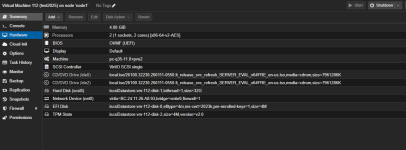
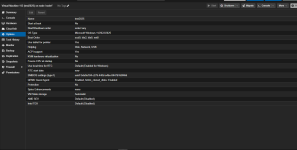
and these are my options on the Windows device: any help?
1788433265939.png


1788433318913.png
 

Attachments

  • 1788433079067.png
    1788433079067.png
    21.6 KB · Views: 8
1) What hypervisor is Proxmox itself installed inside?
2) What exactly happens when you try to boot?
3) Under options, have you tried setting KVM hardware virtualization to "YES"?
 
1) What hypervisor is Proxmox itself installed inside?
2) What exactly happens when you try to boot?
3) Under options, have you tried setting KVM hardware virtualization to "YES"?
  • My Proxmox is installed inside VMware.
  • When I try to boot, I only see the Proxmox screen. I attached the screenshot in the first comment.
  • Only the KVM inside Proxmox is enabled; I didn't enable KVM when installing it on top of VMware, it is turned off.
 
VMware hasn't exposed VT-x/EPT to the Proxmox VM. Proxmox's boot process is failing to get hardware accelerated CPU access.

- Enable "Virtualize Intel VT-x/EPT or AMD-V/RVI" or "Expose hardware assisted virtualization to the guest OS" on the Proxmox VM's CPU settings.
- Power cycle the VM.
- Then set KVM hardware virtualization to "YES" under options.
- Try to boot 2025 again.
 
  • Like
Reactions: Johannes S