DSLicSrv anyone move this to Proxmox Successfully? Specifically from Nutanix

jestep

New Member
Aug 26, 2026
7
0
1
I have tried all combinations of host cpu hidden=2 etc. Nothing has worked.

I am using the same MAC Address from when it was an actual physical machine. Moving it to Nutanix was simple, just assign the MAC and it worked.

Any help would be appreciated.

Thanks!
 
Maybe it would help people to help you if you were to explain what isn't working.
As a VM it starts windows and that works.

But, It recognizes it as Virtual and causes the DSLicSrv server service to not start, thus making it a useless license server.

Now it should only require the MAC Address to be correct, which it is. It runs as a Nutanix VM currently without issues.

I didn't really explain it thoroughly as anyone who has done this knows exactly what I mean ;)
 
Admiteddly, I have not installed/used this service. That said, can you export VM configuration in huma-readable format from Nutanix? It may be useful to compare that to the PVE VM config. So if you can include both - perhaps someone can spot something.
Have you confirmed the MAC address match in Windows VMs? Is NIC type the same? Driver?

Cheers


Blockbridge : Ultra low latency all-NVME shared storage for Proxmox - https://www.blockbridge.com/proxmox
 
Admiteddly, I have not installed/used this service. That said, can you export VM configuration in huma-readable format from Nutanix? It may be useful to compare that to the PVE VM config. So if you can include both - perhaps someone can spot something.
Have you confirmed the MAC address match in Windows VMs? Is NIC type the same? Driver?

Cheers


Blockbridge : Ultra low latency all-NVME shared storage for Proxmox - https://www.blockbridge.com/proxmox
Yes, same mac address. I have tried it many times. I am going to try again after finding some more info. The biggest difference is that Nutanix I can set the IP address. So I have now set it hard in the Nutanix VM and I will try and move that over.

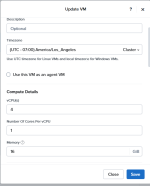
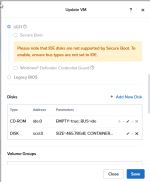
The VM Config in Nutanix is much different than Proxmox as it is just giving it CPUs, Hard Drives, and an IP Address typically. Not as detailed as proxmox.

1787757937755.png

1787757968960.png

Going from P2V required Nutanix VM and then setting the MAC Address via the CLI

So I had been stumped as that was the only thing I need to have set in Nutanix to start.

Currently I set like this in proxmox, this is my new test I have yet to try and no scsi disk yet as I need to import

args: -cpu host,-hypervisor,kvm=off,hv_vendor_id=null
bios: ovmf
boot: order=ide2;ide0;net0
cores: 1
cpu: host,hidden=1,flags=+pcid
efidisk0: cephpool:vm-106-disk-0,efitype=4m,ms-cert=2023k,pre-enrolled-keys=1,size=1M
ide0: none,media=cdrom
ide2: none,media=cdrom
machine: pc-i440fx-11.0+pve2
memory: 8192
meta: creation-qemu=11.0.3,ctime=1787700092
name: TEST
net0: virtio=<HIDDEN>,bridge=vmbr0,firewall=1
numa: 0
ostype: win11
scsihw: virtio-scsi-single
smbios1: uuid=76A1EA9F-B606-4010-BECA-E1A7ACD5B59B,manufacturer=RGVsbCBJbmMu,product=UG93ZXJFZGdlIFI3NDA=,serial=RFNMU1ZNQllQQVNTMTIz,base64=1
sockets: 4
tpmstate0: cephpool:vm-106-disk-1,size=4M,version=v2.0
vmgenid: d108b9df-2319-4f5d-9669-eb86c68db5e2
 
I am not a Nutanix expert, and I am aware that is more blackbox type of a solution. That said, it is running QEMU/KVM, similar to PVE. There could be a way to get more data on how the VM is started via CLI. There has to be a way to backup/export VM config in a better representation than a screenshot of UI.

Of course, I could be completely wrong
:)


Blockbridge : Ultra low latency all-NVME shared storage for Proxmox - https://www.blockbridge.com/proxmox
 
I am not a Nutanix expert, and I am aware that is more blackbox type of a solution. That said, it is running QEMU/KVM, similar to PVE. There could be a way to get more data on how the VM is started via CLI. There has to be a way to backup/export VM config in a better representation than a screenshot of UI.

Of course, I could be completely wrong
:)


Blockbridge : Ultra low latency all-NVME shared storage for Proxmox - https://www.blockbridge.com/proxmox
Yep


TEST {
can_clear_removed_from_host_uuid: True
config {
agent_vm: False
allow_live_migrate: True
apc_config {
apc_enabled: False
}
bios_uuid: "76a1ea9f-b606-4010-beca-e1a7acd5b59b"
boot {
boot_device_order: "kCdrom"
boot_device_order: "kDisk"
boot_device_order: "kNetwork"
firmware_config {
nvram_device_uuid: "dbad92cd-de55-41cf-ac9d-884e5dbf3c2a"
nvram_disk_spec {
create {
container_id: 466
container_uuid: "66c81c29-3db3-4036-80fe-1feb39183c01"
size: 540672
}
}
nvram_disk_uuid: "9c23943d-1375-490f-bb55-8844991bc921"
nvram_storage_vdisk_uuid: "72561cbe-df97-4b44-a206-f15570f92b65"
}
hardware_virtualization: False
secure_boot: False
uefi_boot: True
}
colocated_storage: True
cpu_hotplug_enabled: True
cpu_passthrough: False
disable_branding: False
disk_list {
addr {
bus: "ide"
index: 0
}
cdrom: True
device_uuid: "642b480d-9b32-4ba4-920b-9992289bfe91"
empty: True
iso_type: "kOther"
}
disk_list {
addr {
bus: "scsi"
index: 0
}
cdrom: False
container_id: 9
container_uuid: "d8dd2fb6-3cb8-4eb0-91ba-0d07178eb974"
device_uuid: "52300823-2f94-466f-b5d9-f8a80d6f79c7"
naa_id: "naa.6506b8d5281cf53ddb04186d89a972b4"
source_nfs_path: "/default-container-26721662569363/.snapshot/34/66896-1705380755283312-2234/.acropolis/vmdisk/9f0e1a1a-7ba8-46de-8a1f-c56ca89348d9"
storage_vdisk_uuid: "991a69cb-081d-4fed-ba33-ec699950f94c"
vmdisk_nfs_path: "/default-container-26721662569363/.acropolis/vmdisk/9aec4d41-1081-4cbc-928c-c9d7e0e255ee"
vmdisk_size: 500116729856
vmdisk_uuid: "9aec4d41-1081-4cbc-928c-c9d7e0e255ee"
}
flash_mode: False
generation_uuid: "1344c3fd-564f-47de-b026-0f171d8ec1bd"
gpu_console: False
hwclock_timezone: "America/Los_Angeles"
machine_type: "pc"
memory_mb: 16384
memory_overcommit: False
name: "TEST"
ngt_enable_script_exec: False
ngt_fail_on_script_failure: False
nic_list {
connected: True
ip_address: "192.168.219.44"
mac_addr: "<HIDDEN>"
network_name: "Internal Network 23 Range"
network_type: "kNativeNetwork"
network_uuid: "5a807d31-08d2-4e22-b9fa-1248c92b154e"
queues: 1
rx_queue_size: 256
type: "kNormalNic"
uuid: "4acfc76e-86f5-439f-a0b6-63dfebb10ac1"
vlan_mode: "kAccess"
}
num_cores_per_vcpu: 1
num_threads_per_core: 1
num_vcpus: 4
num_vnuma_nodes: 0
power_state_mechanism: "kHard"
scsi_controller_enabled: True
vcpu_hard_pin: False
vga_console: True
vm_type: "kGuestVM"
vtpm_config {
is_enabled: True
model: "kCRB"
version: "2.0"
vtpm_device_uuid: "cccd43a1-5950-438a-aaf0-0331c914643f"
vtpm_disk_spec {
create {
container_id: 466
container_uuid: "66c81c29-3db3-4036-80fe-1feb39183c01"
size: 68157440
}
}
vtpm_disk_uuid: "46eac95b-d621-43bf-8c91-8002b5c6d7dd"
vtpm_storage_vdisk_uuid: "0dc0d89b-f64b-467e-8d21-c70ed17f2e79"
vtpm_vmdisk_nfs_path: "/SelfServiceContainer/.acropolis/vmdisk/46eac95b-d621-43bf-8c91-8002b5c6d7dd"
}
}
cpu_model {
name: "Intel Cascadelake"
uuid: "3de0461e-6313-5e1e-b576-976f5a5308d4"
vendor: "Intel"
}
cpu_model_minor_version_uuid: "12256c24-534a-4779-90fc-cf456908babc"
host_name: "192.168.10.10"
host_uuid: "b203ae27-a6ba-47a9-91e2-3fa5863a3957"
is_ngt_ipless_reserved_sp_ready: True
is_rf1_vm: False
logical_timestamp: 104
protected_memory_mb: 16384
state: "kOn"
uuid: "76a1ea9f-b606-4010-beca-e1a7acd5b59b"
}

 
There are a number of different threads to pull here. Nutanix had the benefit of original physical host, and as you can see from the config, it is also obfuscating that the OS is now virtualized. The MAC address may have been the last piece for the license check, but there could be more than that originally.

Frankly, at this point I'd feed both configs to AI and continue changing one value at a time to try to match the Nutanix config.
If you can get the actual KVM arguments (on PVE you can use "qm showcmd [id]" or psgrep), that would give you the exact information on what Nutanix does.

Good luck!


Blockbridge : Ultra low latency all-NVME shared storage for Proxmox - https://www.blockbridge.com/proxmox
 
There are a number of different threads to pull here. Nutanix had the benefit of original physical host, and as you can see from the config, it is also obfuscating that the OS is now virtualized. The MAC address may have been the last piece for the license check, but there could be more than that originally.

Frankly, at this point I'd feed both configs to AI and continue changing one value at a time to try to match the Nutanix config.
If you can get the actual KVM arguments (on PVE you can use "qm showcmd [id]" or psgrep), that would give you the exact information on what Nutanix does.

Good luck!


Blockbridge : Ultra low latency all-NVME shared storage for Proxmox - https://www.blockbridge.com/proxmox
Yea, that is what I am doing
 
I have change it to Dell, Not sure that has anything to do with it though.
I do not condone trying to circumvent vendor's protection put in place to prevent what you are trying to do.
That said, I'd be somewhat surprised if MAC was the only thing that they go by.


Blockbridge : Ultra low latency all-NVME shared storage for Proxmox - https://www.blockbridge.com/proxmox
 
If you have the possibility to set up a test VM, try the following:

Windows Server 2022/2025 VM
Machine: q35
BIOS: OVMF (UEFI)
TPM State: v2.0
CPU: host
static VM UUID
static MAC-address

Then install DSLS and check

DS License Administration Tool → Computer ID / Target ID

If both IDs are identical after a VM reboot it‘s possible to check how DSLS generates these IDs.