Kernel 7.0.x - Windows VMs freezing with cpu high 60-70%, newer cpus?

glaeken2

Member
Jun 7, 2023
43
3
13
Hello!

I encountered a problem with kernels 7.0.x

Windows VMs (mostly win10, but also win11) can randomly freeze, with cpu usage about 60-70%.
This happens only on newer (faster?) cpus, to be exact: i7-13 gen and i9-12 gen
I don't observe this behavior on any older hardware which spans from multiple types of xeons to i5-7400, i7-6700, etc etc.

What is troubling - there is nothing in logs, like it never happened. Only guest agent ping timeouts.
Can't strace kvm process for now because I have to revert to kernel 6.17.

I used cpu-affinity on those machines to place vms on p-cored and e-cores respectively, so I removed it - didn't help.
Qemu machine versions are set to 10.1, all virtio drivers are the newest possible - didn't help.
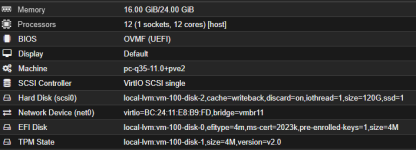
Machine type set to i440fx, i don't know if it happens on q35.

This is a preliminary report because I can't reproduce this on demand to strace the kvm process.
 
Hi @glaeken2

Did you ever find the solution to this one? I have exactly the same issue.
Nope.
I tried some tracing, but nothing conclusive. One variable is 100% sure: kernel 6.x works, kernel 7.x doesn't.
Looks like a spinlock in windows kernel maybe?

Current verdict: inconclusive

Probable vectors: p-cores + e-cores, iommu, hugepages?
Gen 12 and gen 13 affected. Gen 7 not affected. Older xeons not affected.
Nothing in logs anywhere. I suspect only heavy kvm tracing will reveal anything (can't trace there unfortunately)


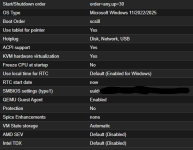
Factors NOT having any influence so far: machine type (i440fx and q35 both behave the same), cpu type (host/emulated), memory amount, windows version, updates
 
Last edited:
I just now had to downgrade on production from 7.x to 6.x
I tested q35, ver 11.0+pve2, cpu qemu x86-64 v3 - still freezes, this time at 80% cpu (so the range is now 40% - 80%)

So this is not related:
"The patch is already included in QEMU Server 9.2.0 (pve-test repository [0]). However, this requires upgrading the machine version to 11.0+pve2 for affected VMs."
(https://bugzilla.proxmox.com/show_bug.cgi?id=7825)

And I am aware about nested virt and windows problem - this is not it or there are issues in descriptions/understanding.
What bothers me more - there is a very low amount of people with this problem, so this leads me to a conclusion, that maybe some very specific setup is in play?
 
This is a side-topic, not related to the problem directly:

Qemu has a watchdog, called i6300esb - which should reboot a frozen vm.
config:
watchdog: model=i6300esb,action=reset
(not officially supported in proxmox)

But don't bother, it doesn't work with windows, even though windows does see the device and has drivers for it.
So either the watchdog if being fed even if windows is frozen or it's implementation is dead.
 
1785930288394.png

Confirming 2 days of stable/behaving CPU activity. Previously getting 3-4 hours before issues was a problem. I will monitor and report back if the issue reoccurs.

1785930385878.png1785930477849.png
 
I have an strace of a locked up kvm, it seems the problem is with a locked-up io_uring (I can't post the whole strace, because I can't sanitize it properly, go and thank law enforcement for destroying privacy and attacking people for no reason. what a clown world.)

Also, somehow one windows got "unstuck" when poking in /proc, and I catched a "storahci" problem resetting \Device\RaidPort0 (there is no raid and there is no sata/ahci, except an unused cd-rom) on windows side - frozen drive/controler?

Most of it is io_uring polling stuck in some kind of loop:


Code:
[pid [REMOVED]] io_uring_enter(21, 2, 0, 0, NULL, 8) = 2
[pid [REMOVED]] io_uring_enter(21, 0, 1, IORING_ENTER_GETEVENTS, NULL, 8) = 0
[pid [REMOVED]] read(165, "\1\0\0\0\0\0\0\0", 512) = 8
[pid [REMOVED]] io_uring_enter(21, 2, 0, 0, NULL, 8) = 2
[pid [REMOVED]] write(148, "\1\0\0\0\0\0\0\0", 8) = 8
[pid [REMOVED]] io_uring_enter(21, 0, 1, IORING_ENTER_GETEVENTS, NULL, 8) = 0
[pid [REMOVED]] write(154, "\1\0\0\0\0\0\0\0", 8) = 8
[pid [REMOVED]] io_uring_enter(21, 0, 1, IORING_ENTER_GETEVENTS, NULL, 8) = 0
[pid [REMOVED]] write(159, "\1\0\0\0\0\0\0\0", 8) = 8
[pid [REMOVED]] io_uring_enter(21, 0, 1, IORING_ENTER_GETEVENTS|0x80, NULL, 8) = 0
[pid [REMOVED]] read(165, "\1\0\0\0\0\0\0\0", 512) = 8
[pid [REMOVED]] io_uring_enter(21, 2, 0, 0, NULL, 8) = 2
[pid [REMOVED]] read(171, "\1\0\0\0\0\0\0\0", 512) = 8
[pid [REMOVED]] io_uring_enter(21, 2, 0, 0, NULL, 8) = 2
[pid [REMOVED]] io_uring_enter(21, 1, 0, 0, NULL, 8) = 1
[pid [REMOVED]] write(154, "\1\0\0\0\0\0\0\0", 8) = 8
[pid [REMOVED]] read(175, "\1\0\0\0\0\0\0\0", 512) = 8
[pid [REMOVED]] io_uring_enter(21, 1, 0, 0, NULL, 8) = 1
[pid [REMOVED]] write(158, "\1\0\0\0\0\0\0\0", 8) = 8
[pid [REMOVED]] io_uring_enter(21, 0, 1, IORING_ENTER_GETEVENTS, NULL, 8) = 0
[pid [REMOVED]] read(171, "\1\0\0\0\0\0\0\0", 512) = 8
[pid [REMOVED]] io_uring_enter(21, 2, 0, 0, NULL, 8) = 2
[pid [REMOVED]] write(154, "\1\0\0\0\0\0\0\0", 8) = 8
[pid [REMOVED]] write(148, "\1\0\0\0\0\0\0\0", 8) = 8
[pid [REMOVED]] io_uring_enter(21, 0, 1, IORING_ENTER_GETEVENTS|0x80, NULL, 8) = 0
[pid [REMOVED]] read(176, "\1\0\0\0\0\0\0\0", 512) = 8
[pid [REMOVED]] io_uring_enter(21, 2, 0, 0, NULL, 8) = 2

Also a lot of this:

Code:
[pid [REMOVED]] recvmsg(254, {msg_name=NULL, msg_namelen=0, msg_iov=[{iov_base="[REMOVED]", iov_len=1}], msg_iovlen=1, msg_controllen=0, msg_flags=MSG_CMSG_CLOEXEC}, MSG_CMSG_CLOEXEC) = 1
[pid [REMOVED]] write(13, "\1\0\0\0\0\0\0\0", 8) = 8
[pid [REMOVED]] ppoll([{fd=4, events=POLLIN}, {fd=12, events=POLLIN}, {fd=13, events=POLLIN}, {fd=24, events=POLLIN}, {fd=25, events=POLLIN}, {fd=71, events=POLLIN}, {fd=254, events=POLLIN}], 7
, {tv_sec=1, tv_nsec=[REMOVED]}, NULL, 8) = 2 ([{fd=13, revents=POLLIN}, {fd=254, revents=POLLIN}], left {tv_sec=1, tv_nsec=[REMOVED]})
[pid [REMOVED]] read(13, "\2\0\0\0\0\0\0\0", 8) = 8
[pid [REMOVED]] write(13, "\1\0\0\0\0\0\0\0", 8) = 8
[pid [REMOVED]] recvmsg(254, {msg_name=NULL, msg_namelen=0, msg_iov=[{iov_base="9", iov_len=1}], msg_iovlen=1, msg_controllen=0, msg_flags=MSG_CMSG_CLOEXEC}, MSG_CMSG_CLOEXEC) = 1
[pid [REMOVED]] write(13, "\1\0\0\0\0\0\0\0", 8) = 8
[pid [REMOVED]] ppoll([{fd=4, events=POLLIN}, {fd=12, events=POLLIN}, {fd=13, events=POLLIN}, {fd=24, events=POLLIN}, {fd=25, events=POLLIN}, {fd=71, events=POLLIN}, {fd=254, events=POLLIN}], 7
, {tv_sec=1, tv_nsec=[REMOVED]}, NULL, 8) = 2 ([{fd=13, revents=POLLIN}, {fd=254, revents=POLLIN}], left {tv_sec=1, tv_nsec=[REMOVED]})
 
There is a known bug for quite a long time with "virtio-disk + windows":
https://forum.proxmox.com/threads/r...i-reset-to-device-system-unresponsive.139160/

I did not checked the latest status, but I doubt that they solved/fixed it.
I don't think it's related. It's about vioscsi in general, and my problem is strictly about kernel 7.x

For now, it seems switching to aio=native stops the freezes (seems = probability 80%). But I also encountered one identical freeze on an older xeon cpu (with io-uring), which leads me to a conclusion, that the problem is probably buried in the io_uring code (or it triggers it), but it's also not limited to newer cpus, it's just much much more frequent on them, which again points to some kind of spinlock caused probably by microsecond differences, this would explain why cpus with e-cores + p-cores are affected the most.

Earlier I said, one of the vms got "unstuck", when i poked in /proc - this is probably a false statement. It probably got unstuck because of ptrace() as someone mentioned in one of the other threads.
 
Unfortunately switching to aio=native DOES NOT stop the freezes. First freeze after 5 days and 12 hours using "native". It seems to delay it, but not stop it.
 
I'm sorry i stopped replying to comments like this. Thank you, but this is NOT RELATED. As I already stated, this is not related to the cpu type chosen.

THIS IS NOT THE BUG WITH WINDOWS NESTED VIRT OR WINDOWS APPLYING MITIGATIONS
Then read again, its about Windows VBS ( Virtualisation Based Security ) which enabled by default NOW.
If you expose the host CPU, Windows will use nested virt. for Security.
 
Then read again, its about Windows VBS ( Virtualisation Based Security ) which enabled by default NOW.
If you expose the host CPU, Windows will use nested virt. for Security.
I don't use cpu type host on windows.
Cpu is not stuck at 100%
All types of windows freeze, different versions of 10, different versions of 11, older, newer, doesn't matter.
It affects at least a few machines with different hardware, but all with intel Gen 12 or higher, and all with kernel 7.x
Poking at ptrace() can unfreeze the vm.
Errors may or may not indicate a problem with storage driver and/or spinlock
Proxmox itself doesn't even notice what is happening, other vms are not affected, not a single linux vm is affected.
Not a single windows or linux vm is affected on older hardware (older rack dual xeons, in general anything below Gen 10 runs kernel 7.x with A LOT of windows without a problem).
There are no storage errors in linux vms, none. No hiccups, no freezes. If I didn't have windows VMs I would say kernel 7.x is perfect and faster than 6.x

This is exactly the same problem:

And someone is pushing the windows VBS theory there the same way, which is not related.
 
So to be clear, a specific combination is needed to trigger this bug:
- Intel Gen 12 or higher (any)
- Kernel 7.x
- A windows VM (any win10 or higher, cpu type set doesn't matter)

Not many people have this combination right now, but when more will switch to kernel 7.x and upgrade their hardware they will start hitting it, and it's very sneaky, because it's almost random. A windows vm on one machine can run 3 weeks without a problem and suddenly freeze, on another it will freeze after 5 hours.
And I would really like to have a test Gen 13 in a server setup, but it costs the same as a used car in good condition. High ram prices are literally destroying everything around.
 
Do the freezes match the time where a guest-fsfreeze-freeze command is done? This can happen, for example when making backups.

Please take a look at [1] for a list of operations that trigger a qemu-guest-agent filesystem freeze via the guest-fsfreeze-freeze command.

Can you think of anything else that the affected affected guests have in common?

[1] https://pve.proxmox.com/pve-docs/pve-admin-guide.html#qm_qga_fsfreeze
 
Last edited: