I installed a script proxmox VE and it broke my networking

pk0

New Member
Aug 12, 2026
7
0
1
I installed the script for pbs for some backups it didn't fully install it said dns issues. I though weird so I just kinda left it, it made everything I had set up IP6 witch consisted mostly of ipv4 dockerapps and dockage installs. So I spent hours trying to fix it and its gotten to the point were I fixed the dns thing for main proxmox but its completely broken my containers and the bridge somehow. When I do a ping in the main shell it works properly but when I do a ping in the container it simply either says "Temporary failure in name resolution" or it says unable to reach host. The containers do not show up in my router and when pinged form my pc they simply say the same thing unable to reach host. Though trying to repair there was varying stages of working, one time the container showed up in my router but couldn't be ping anther it could be pinged from proxmox but not the other way around. The only thing that has stayed true is the fact the container could not ping anything outside. Its been soo infuriating I want to reinstall but one of my services is a bit larger than I can fit on my pc though a backup.

 
Last edited:
Code:
# network interface settings; autogenerated
# Please do NOT modify this file directly, unless you know what
# you're doing.
#
# If you want to manage parts of the network configuration manually,
# please utilize the 'source' or 'source-directory' directives to do
# so.
# PVE will preserve these directives, but will NOT read its network
# configuration from sourced files, so do not attempt to move any of
# the PVE managed interfaces into external files!

auto lo
iface lo inet loopback

iface nic0 inet manual

auto vmbr0
iface vmbr0 inet static
        address 192.168.1.2/24
        gateway 192.168.1.1
        bridge-ports nic0
        bridge-stp off
        bridge-fd 0

source /etc/network/interfaces.d/*
Code:
arch: amd64
cores: 3
description: <div align='center'>%0A  <a href='https%3A//Helper-Scripts.com' target='_blank' rel='noopener noreferrer'>%0A    <img src='https%3A//raw.githubusercontent.com/community-scripts/ProxmoxVE/main/misc/images/logo-81x112.png' alt='Logo' style='width%3A81px;height%3A112px;'/>%0A  </a>%0A%0A  <h2 style='font-size%3A 24px; margin%3A 20px 0;'>Dockge LXC</h2>%0A%0A  <p style='margin%3A 16px 0;'>%0A    <a href='https%3A//ko-fi.com/community_scripts' target='_blank' rel='noopener noreferrer'>%0A      <img src='https%3A//img.shields.io/badge/&#x2615;-Buy us a coffee-blue' alt='spend Coffee' />%0A    </a>%0A  </p>%0A%0A  <span style='margin%3A 0 10px;'>%0A    <i class="fa fa-github fa-fw" style="color%3A #f5f5f5;"></i>%0A    <a href='https%3A//github.com/community-scripts/ProxmoxVE' target='_blank' rel='noopener noreferrer' style='text-decoration%3A none; color%3A #00617f;'>GitHub</a>%0A  </span>%0A  <span style='margin%3A 0 10px;'>%0A    <i class="fa fa-comments fa-fw" style="color%3A #f5f5f5;"></i>%0A    <a href='https%3A//github.com/community-scripts/ProxmoxVE/discussions' target='_blank' rel='noopener noreferrer' style='text-decoration%3A none; color%3A #00617f;'>Discussions</a>%0A  </span>%0A  <span style='margin%3A 0 10px;'>%0A    <i class="fa fa-exclamation-circle fa-fw" style="color%3A #f5f5f5;"></i>%0A    <a href='https%3A//github.com/community-scripts/ProxmoxVE/issues' target='_blank' rel='noopener noreferrer' style='text-decoration%3A none; color%3A #00617f;'>Issues</a>%0A  </span>%0A</div>%0A
features: nesting=1
hostname: dockge
memory: 1000
nameserver: 1.1.1.1
net0: name=eth0,bridge=vmbr0,hwaddr=BC:24:11:74:28:EB,type=veth
onboot: 1
ostype: debian
protection: 1
rootfs: Wd-4tb:vm-101-disk-0,size=20G
swap: 1500
tags: community-script;docker
lxc.cgroup2.devices.allow: a
lxc.cap.drop: 
lxc.cgroup2.devices.allow: c 188:* rwm
lxc.cgroup2.devices.allow: c 189:* rwm
lxc.mount.entry: /dev/serial/by-id  dev/serial/by-id  none bind,optional,create=dir
lxc.mount.entry: /dev/ttyUSB0       dev/ttyUSB0       none bind,optional,create=file
lxc.mount.entry: /dev/ttyUSB1       dev/ttyUSB1       none bind,optional,create=file
lxc.mount.entry: /dev/ttyACM0       dev/ttyACM0       none bind,optional,create=file
lxc.mount.entry: /dev/ttyACM1       dev/ttyACM1       none bind,optional,create=file
lxc.cgroup2.devices.allow: c 226:128 rwm
lxc.mount.entry: /dev/dri/renderD128 dev/dri/renderD128 none bind,optional,create=file
lxc.cgroup2.devices.allow: c 29:0 rwm
lxc.mount.entry: /dev/fb0 dev/fb0 none bind,optional,create=file
lxc.mount.entry: /dev/dri dev/dri none bind,optional,create=dir
 
Last edited:
net0: name=eth0,bridge=vmbr0,hwaddr=BC:24:11:74:28:EB,type=veth
Your container doesn't have an IP net0 has no 'ip=' set, so it never asks for one. That's also why everything looked like it turned IPv6: with no IPv4 configured, SLAAC from your router is the only address it picks up.

In the WebUI: your container > Network > select net0 > set either DHCP or your previous static IP. Restart the container afterwards.

Worth checking your other containers for the same blank field.
 
Your container doesn't have an IP net0 has no 'ip=' set, so it never asks for one. That's also why everything looked like it turned IPv6: with no IPv4 configured, SLAAC from your router is the only address it picks up.

In the WebUI: your container > Network > select net0 > set either DHCP or your previous static IP. Restart the container afterwards.

Worth checking your other containers for the same blank field.
I set it to dhcp I observed no real, I set it to static no real change also its called eth0 not net0 despite what it says. Oddly it displays no network information on dhcp and on static it seams to be missing everything but the out and the in in network not for the other vm I tested though. They do show up in the router with a static ip but lack their names and info and they simply time out when tried to connect to unlike before when they said unreachable host. Before I noticed that that dhcp was giving 170.1.0.1 ranges and that was totaly out of the bridges range. Another thing is with a static ip they can be sucessfuly pinged by just proxmox just not the other way around.
 
Last edited:
I dont know why but the one of the dockage ones just doesn't seam to be starting docker since theres no networks (it seams to have started). so I'll take form the other one they are very similar
ip a
Code:
1: lo: <LOOPBACK,UP,LOWER_UP> mtu 65536 qdisc noqueue state UNKNOWN group default qlen 1000
    link/loopback 00:00:00:00:00:00 brd 00:00:00:00:00:00
    inet 127.0.0.1/8 scope host lo
       valid_lft forever preferred_lft forever
    inet6 ::1/128 scope host noprefixroute
       valid_lft forever preferred_lft forever
2: enth0@if36: <BROADCAST,MULTICAST,UP,LOWER_UP> mtu 1500 qdisc noqueue state UP group default qlen 1000
    link/ether bc:24:11:92:9b:c7 brd ff:ff:ff:ff:ff:ff link-netnsid 0
    inet 192.168.1.96/24 scope global enth0
       valid_lft forever preferred_lft forever
    inet6 2601:207:81:2e79:be24:11ff:fe92:9bc7/64 scope global dynamic mngtmpaddr proto kernel_ra
       valid_lft 231240sec preferred_lft 231240sec
    inet6 fe80::be24:11ff:fe92:9bc7/64 scope link proto kernel_ll
       valid_lft forever preferred_lft forever
3: br-f30073f78e35: <BROADCAST,MULTICAST,UP,LOWER_UP> mtu 1500 qdisc noqueue state UP group default
    link/ether 5e:42:2e:70:ac:11 brd ff:ff:ff:ff:ff:ff
    inet 172.18.0.1/16 brd 172.18.255.255 scope global br-f30073f78e35
       valid_lft forever preferred_lft forever
    inet6 fe80::5c42:2eff:fe70:ac11/64 scope link proto kernel_ll
       valid_lft forever preferred_lft forever
4: br-f7a1f4928fda: <BROADCAST,MULTICAST,UP,LOWER_UP> mtu 1500 qdisc noqueue state UP group default
    link/ether 16:91:6a:4d:a0:12 brd ff:ff:ff:ff:ff:ff
    inet 172.19.0.1/16 brd 172.19.255.255 scope global br-f7a1f4928fda
       valid_lft forever preferred_lft forever
    inet6 fe80::1491:6aff:fe4d:a012/64 scope link proto kernel_ll
       valid_lft forever preferred_lft forever
5: br-aa9e2358ea5f: <BROADCAST,MULTICAST,UP,LOWER_UP> mtu 1500 qdisc noqueue state UP group default
    link/ether fe:7d:69:c3:76:22 brd ff:ff:ff:ff:ff:ff
    inet 172.20.0.1/16 brd 172.20.255.255 scope global br-aa9e2358ea5f
       valid_lft forever preferred_lft forever
    inet6 fe80::fc7d:69ff:fec3:7622/64 scope link proto kernel_ll
       valid_lft forever preferred_lft forever
6: docker0: <NO-CARRIER,BROADCAST,MULTICAST,UP> mtu 1500 qdisc noqueue state DOWN group default
    link/ether ee:da:ca:37:4d:b1 brd ff:ff:ff:ff:ff:ff
    inet 172.17.0.1/16 brd 172.17.255.255 scope global docker0
       valid_lft forever preferred_lft forever
7: veth3739019@if2: <BROADCAST,MULTICAST,UP,LOWER_UP> mtu 1500 qdisc noqueue master br-aa9e2358ea5f state UP group default
    link/ether 9e:b0:9a:3d:da:6a brd ff:ff:ff:ff:ff:ff link-netnsid 1
    inet6 fe80::9cb0:9aff:fe3d:da6a/64 scope link proto kernel_ll
       valid_lft forever preferred_lft forever
8: veth606fb89@if2: <BROADCAST,MULTICAST,UP,LOWER_UP> mtu 1500 qdisc noqueue master br-f30073f78e35 state UP group default
    link/ether 0a:17:85:a9:86:89 brd ff:ff:ff:ff:ff:ff link-netnsid 2
    inet6 fe80::817:85ff:fea9:8689/64 scope link proto kernel_ll
       valid_lft forever preferred_lft forever
9: vethebf8d59@if2: <BROADCAST,MULTICAST,UP,LOWER_UP> mtu 1500 qdisc noqueue master br-f7a1f4928fda state UP group default
    link/ether 32:6e:87:7a:10:15 brd ff:ff:ff:ff:ff:ff link-netnsid 3
    inet6 fe80::306e:87ff:fe7a:1015/64 scope link proto kernel_ll
       valid_lft forever preferred_lft forever
12: veth48cb800@if2: <BROADCAST,MULTICAST,UP,LOWER_UP> mtu 1500 qdisc noqueue master br-f7a1f4928fda state UP group default
    link/ether 6a:48:34:1e:83:07 brd ff:ff:ff:ff:ff:ff link-netnsid 6
    inet6 fe80::6848:34ff:fe1e:8307/64 scope link proto kernel_ll
       valid_lft forever preferred_lft forever
137: veth4435f44@if2: <BROADCAST,MULTICAST,UP,LOWER_UP> mtu 1500 qdisc noqueue master br-f7a1f4928fda state UP group default
    link/ether 82:7e:be:1e:a2:b7 brd ff:ff:ff:ff:ff:ff link-netnsid 4
    inet6 fe80::807e:beff:fe1e:a2b7/64 scope link tentative proto kernel_ll
       valid_lft forever preferred_lft forever
138: veth18ce782@veth20883b4: <NO-CARRIER,BROADCAST,MULTICAST,UP,M-DOWN> mtu 1500 qdisc noqueue master br-aa9e2358ea5f state DOWN group default
    link/ether f2:35:16:e7:06:9d brd ff:ff:ff:ff:ff:ff
    inet6 fe80::f035:16ff:fee7:69d/64 scope link tentative proto kernel_ll
       valid_lft forever preferred_lft forever
139: veth20883b4@veth18ce782: <BROADCAST,MULTICAST> mtu 1500 qdisc noop state DOWN group default
    link/ether 16:59:12:4e:1c:b9 brd ff:ff:ff:ff:ff:ff
ip r
Code:
172.17.0.0/16 dev docker0 proto kernel scope link src 172.17.0.1 linkdown
172.18.0.0/16 dev br-f30073f78e35 proto kernel scope link src 172.18.0.1
172.19.0.0/16 dev br-f7a1f4928fda proto kernel scope link src 172.19.0.1
172.20.0.0/16 dev br-aa9e2358ea5f proto kernel scope link src 172.20.0.1
192.168.1.0/24 dev enth0 proto kernel scope link src 192.168.1.96
net0 is just a name applied to eth0 for better clarity, this doesn't have an impact on the device your container sees.

Can you check these on your container:
ip a
ip r
 
Last edited:
192.168.1.0/24 dev enth0 proto kernel scope link src 192.168.1.96

This line is just a connected route; it tells the container how to talk to the local subnet - because there is no default gateway listed, the container has no idea how to route traffic outside of 192.168.1.0/24.

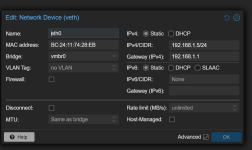
Can you post a screenshot of your container's Network settings from the Proxmox WebUI so we can see exactly how it is configured?
 
1786568331586.png so I put a default gateway and now it shows this in my router TWO of them with different ip's the mac address for the one
that's right doesn't show up anywhere ip a for both the container and the main.
I also tried to put a bridge in to see what would happen and that happened. Another intesting thing is that pinging google form inside the contain doesnt work anymore it just freezes though pinging it form my computer still times out.
This line is just a connected route; it tells the container how to talk to the local subnet - because there is no default gateway listed, the container has no idea how to route traffic outside of 192.168.1.0/24.

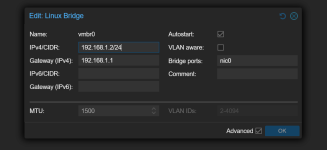
Can you post a screenshot of your container's Network settings from the Proxmox WebUI so we can see exactly how it is configured?
1786568389896.png1786568401641.png
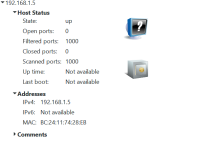
I downloaded nmap and this is what it said about that 1786569725917.png
it says its up. The other mac address seams to be a ghost to the most part. nmap on the proxmox machine seams to show some ports outside of the container.
 
Last edited:
Okay so now you've got a conflict which is why they can't communicate, try looking in your router to see what IPs aren't being used and set your container to use that (e.g. 192.168.1.6)
I changed it too 192.168.1.7 and It still doesn't work the way I would think it should (though that "ghost" one dispersed). I did notice that the dhcp server isnt spiting a ip out for it if I set it to dhcp. But idk how thats working. I also noticed that theres this "zone" called local network that only showed up while I was trying to install that script but its a new tab thats sitting there. Its almost as if its working but none of the ports are...
 
Last edited:
something I noticed after looking into it alot is the net0 wasnt showing up anywhere on the ip lists. I found out the /etc/network/interfaces was a bit broken so I made a new vm to fix it with a referance. something to note is the new vm also cant connect to the interenet.
 
Last edited: