Can NUMA node be a reason for ESXi vs Proxmox Performance differences?

grass127

New Member
Jun 29, 2026
4
2
3
Hi everyone,

I'm benchmarking two virtualization hosts:
  • Host 1: VMware ESXi
  • Host 2: Proxmox VE
The hardware is effectively identical (same CPU model, core count, memory configuration, etc.), and I'm trying to compare virtualization performance.

One thing I noticed is that inside the guest VM:
  • On the ESXi VM, lscpu reports 1 NUMA node.
  • On the Proxmox VM, lscpu reports 2 NUMA nodes, matching the physical host.
This made me wonder:
  1. Is this expected behavior? Does ESXi intentionally expose a single virtual NUMA node by default?
  2. Can the number of virtual NUMA nodes exposed to a VM be configured in VMware?
  3. Could this difference alone explain a significant performance gap in benchmarks between the two hypervisors, or is it unlikely unless the workload is very NUMA-sensitive?
For context, both VMs have the same vCPU count, RAM allocation, and are running the same benchmark workload. The performance difference I'm seeing is quite large, so I'm trying to determine whether the virtual NUMA topology could be a contributing factor or whether I should be looking elsewhere.

I'd appreciate any insights, especially from anyone who has benchmarked ESXi against Proxmox or has experience with VMware's vNUMA behavior.
 
VMware has or had sophisticated NUMA scheduling for many years, afaik. In many cases it intentionally hides NUMA from smaller VMs because the VM can be kept entirely within one physical NUMA node. Once a VM exceeds certain thresholds, ESXi automatically exposes vNUMA to the guest.

KVM/QEMU, on the other hand, exposes whatever virtual topology the hypervisor is configured to present. That is independent of whether the host can actually keep the VM’s memory local.
 
  • Like
Reactions: carles89
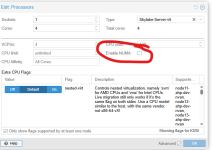
I'm curious if on the PVE VM you have the NUMA checkbox checked or not?

1786125800141.png

This is what the docs say about that:

You can also optionally emulate a NUMA [7] architecture in your VMs. The basics of the NUMA architecture mean that instead of having a global memory pool available to all your cores, the memory is spread into local banks close to each socket. This can bring speed improvements as the memory bus is not a bottleneck anymore. If your system has a NUMA architecture [8] we recommend to activate the option, as this will allow proper distribution of the VM resources on the host system. This option is also required to hot-plug cores or RAM in a VM.
If the NUMA option is used, it is recommended to set the number of sockets to the number of nodes of the host system.


On my VMs I dont have this checked but I'm thinking it this might be why we are seeing some strange performance issues on some of our higher use VMs.
Way back in Vmware this was always a topic of conversation about what is the best way to config a VM CPU ( do we need to match cores? Need to match sockets? etc )....at some point Vmware just made it a set and forget thing where it does the work behind the scenes. I guess now with Proxmox we need to go back to this topic and figure out the optimal CPU socket/cores to match the hardware?
 
Regarding „NUMA or not“ please see also this thread:

 
  • Like
Reactions: grass127
To provide more context: This is my lscpu data for both the machines:

Field
ProxmoxVMware
Hostnamepmx_host-1vmw_host-1
Architecturex86_64x86_64
CPU op-mode(s)32-bit, 64-bit32-bit, 64-bit
Address sizes46 bits physical, 48 bits virtual45 bits physical, 48 bits virtual
Byte OrderLittle EndianLittle Endian
CPU(s)1616
On-line CPU(s) list0-150-15
Vendor IDGenuineIntelGenuineIntel
BIOS Vendor IDQEMUGenuineIntel
Model nameIntel(R) Xeon(R) Gold 6258R CPU @ 2.70GHzIntel(R) Xeon(R) Gold 6258R CPU @ 2.70GHz
BIOS Model namepc-i440fx-10.1Intel(R) Xeon(R) Gold 6258R CPU @ 2.70GHz
CPU family66
Model8585
Thread(s) per core11
Core(s) per socket88
Socket(s)22
Stepping77
BogoMIPS5387.355387.34
VirtualizationVT-x
Hypervisor vendorKVMVMware
Virtualization typefullfull
L1d cache512 KiB (16 instances)512 KiB (16 instances)
L1i cache512 KiB (16 instances)512 KiB (16 instances)
L2 cache64 MiB (16 instances)16 MiB (16 instances)
L3 cache32 MiB (2 instances)77 MiB (2 instances)
NUMA node(s)21
NUMA node0 CPU(s)0-70-15
NUMA node1 CPU(s)8-15


VMware has or had sophisticated NUMA scheduling for many years, afaik. In many cases it intentionally hides NUMA from smaller VMs because the VM can be kept entirely within one physical NUMA node. Once a VM exceeds certain thresholds, ESXi automatically exposes vNUMA to the guest.

KVM/QEMU, on the other hand, exposes whatever virtual topology the hypervisor is configured to present. That is independent of whether the host can actually keep the VM’s memory local.
Yes agree, I did spend some time to read VMware's way of assigning NUMA nodes from here: https://weestro.wordpress.com/2016/04/01/vsphere-design-for-numa-architecture-and-alignment/
 
Last edited:
VMware has or had sophisticated NUMA scheduling for many years, afaik. In many cases it intentionally hides NUMA from smaller VMs because the VM can be kept entirely within one physical NUMA node. Once a VM exceeds certain thresholds, ESXi automatically exposes vNUMA to the guest.

KVM/QEMU, on the other hand, exposes whatever virtual topology the hypervisor is configured to present. That is independent of whether the host can actually keep the VM’s memory local.
yep, I did had NUMA enabled in proxmox, the vmware logic was very nicely explained, from https://weestro.wordpress.com/2016/04/01/vsphere-design-for-numa-architecture-and-alignment/:

When the NUMA topology is exposed to a guest VM, one of two things happen via the ESXi NUMA scheduler:
  1. If a VM is assigned a vCPU value less than or equal to the number of total logical cores in a physical NUMA node, then this VM will be assigned to a single physical NUMA node and consume memory/ cores local to that node (ideal). This remains true until that VM is configured to access more memory than what is available in the single physical NUMA node, which would result in the VM spanning to the remote NUMA node (less than ideal).
  2. If a VM is assigned more vCPUs than cores that exist in a single physical NUMA node, it will be assigned to at least 2 physical NUMA nodes. This will satisfy the resource requirements of the VM but will come with a performance penalty as the VM spans local and remote NUMA nodes (less than ideal).
But as much as I checked, there are no such rules for Proxmox. So I was wondering, I understand I will also reduce NUMA on proxmox host and re run, but based on what results I got, I had to investigate implications of NUMA.
 
I wouldn’t conclude that there are “no such rules for Proxmox”. There are just different layers involved here.

Linux itself is NUMA-aware: the scheduler and memory allocator try to maintain CPU/memory locality. QEMU can additionally expose a virtual NUMA topology to the guest and provides mechanisms for NUMA-aware memory placement. Proxmox just doesn’t abstract and automate all of this in the same way ESXi does.

The important distinction is:

- physical NUMA topology of the host
-actual placement of QEMU vCPU threads and memory on the host
- virtual NUMA topology exposed to the guest

Seeing 1 NUMA node in the ESXi guest and 2 in the PVE guest only tells you about the last point. It does not tell you where the VM is actually executing or where its memory resides.

Therefore I wouldn’t disable NUMA in PVE just to make lscpu look identical. First check the actual placement during the benchmark, e.g. with:

numastat -p <qemu-pid>

and

/proc/<pid>/numa_maps

and post the host topology, qm config, VM size and benchmark results.

Also, the common assumption that a VM which “fits into one NUMA node” will always remain there is too simplistic on a consolidated host. Other running VMs already consume CPU and memory on the nodes, so the scheduler may have to distribute resources.

And NUMA is not necessarily tied to CPU sockets either: a single-socket EPYC system with NPS=2/4 can already have multiple physical NUMA nodes.

So I would measure the actual host-side NUMA placement first before attributing the performance difference to the guest-visible vNUMA topology.

:)
 
  • Like
Reactions: ITT