[SOLVED] cannot create VMs

ParasiticTwin

Active Member
Aug 30, 2018
19
0
41
Pittsburgh, Pennsylvania USA
Greetings,

I recently lost my system drive. not seen by the system gone gone gone. So, I decided to install pve 9.2 using the lates iso. Well that didn't go well at all. kernel modules missing and such. So I went back to faithful 8.4.2. I created the installation using 4 2tb disks in a raid10? installed a couple of community scripts. I made sure it was updated then followed steps outlined here in several posts regarding upgrading 8to9 and let it fly. Rebooted and system is up web interface is up. The link to the screenshots hopefully describe my predicament.

I cannot create vms: no unused disks
I cannot create directories: no unused disks.

However, as I have noted I was able to successfully install some community scrips that set up container storage.

How can I resolve this. I have plenty of disk space. Just my config is not right somehow.

Thanks In Advance.


Screen shots in no particular order.
 
Last edited:
Well all disks are used so you can't use the node > Disks wizards to create new things and why would you want to? ZFS is perfectly fine and better than Directory.

I cannot create vms: no unused disks
Can you share where you see this?

Please share this
Bash:
lsblk -o+FSTYPE,LABEL,MODEL
zpool import
zpool status -vtLP
 
Last edited:
Well all disks are used so you can't use the node > Disks wizards to create new things and why would you want to? ZFS is perfectly fine and better than Directory.
Well at that moment I was just trying to do something.
Can you share where you see this?
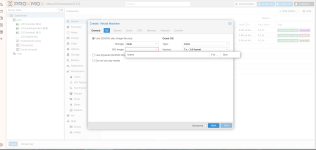
Currently, I can create a VM but cannot use storage. Just a blank pulldown
Please share this
Bash:
lsblk -o+FSTYPE,LABEL,MODEL
zpool import
zpool status -vtLP
Code:
root@pve:~# lsblk -o+FSTYPE,LABEL,MODEL
NAME   MAJ:MIN RM   SIZE RO TYPE MOUNTPOINTS FSTYPE     LABEL MODEL
sda      8:0    0 931.5G  0 disk                              ST1000LM035-1RK172
└─sda1   8:1    0 931.5G  0 part             btrfs      huge 
sdb      8:16   0   1.8T  0 disk             zfs_member rpool WDC WD2002FYPS-01U1B0
├─sdb1   8:17   0  1007K  0 part                             
├─sdb2   8:18   0     1G  0 part             vfat             
└─sdb3   8:19   0   1.8T  0 part             zfs_member rpool
sdc      8:32   0   1.8T  0 disk             zfs_member rpool TOSHIBA DT01ACA200
├─sdc1   8:33   0  1007K  0 part                             
├─sdc2   8:34   0     1G  0 part             vfat             
└─sdc3   8:35   0   1.8T  0 part             zfs_member rpool
sdd      8:48   0   1.8T  0 disk             zfs_member rpool WDC WD2003FYYS-18W0B0
├─sdd1   8:49   0  1007K  0 part                             
├─sdd2   8:50   0     1G  0 part             vfat             
└─sdd3   8:51   0   1.8T  0 part             zfs_member rpool
sde      8:64   0   1.8T  0 disk             zfs_member rpool Hitachi HUA722020ALA331
├─sde1   8:65   0  1007K  0 part                             
├─sde2   8:66   0     1G  0 part             vfat             
└─sde3   8:67   0   1.8T  0 part             zfs_member rpool
sr0     11:0    1  1024M  0 rom                               HL-DT-ST DVD+/-RW GTA0N
zd0    230:0    0     4M  0 disk                             
root@pve:~# zpool import

no pools available to import
root@pve:~# zpool status -vtLP

  pool: rpool
 state: ONLINE
status: Some supported and requested features are not enabled on the pool.
        The pool can still be used, but some features are unavailable.
action: Enable all features using 'zpool upgrade'. Once this is done,
        the pool may no longer be accessible by software that does not support
        the features. See zpool-features(7) for details.
config:

        NAME           STATE     READ WRITE CKSUM
        rpool          ONLINE       0     0     0
          mirror-0     ONLINE       0     0     0
            /dev/sdb3  ONLINE       0     0     0  (trim unsupported)
            /dev/sdc3  ONLINE       0     0     0  (trim unsupported)
          mirror-1     ONLINE       0     0     0
            /dev/sdd3  ONLINE       0     0     0  (trim unsupported)
            /dev/sde3  ONLINE       0     0     0  (trim unsupported)

errors: No known data errors
root@pve:~#

The first drive listed /dev/sda1 is a usb drive. I have attached a screen shot of blank iso field.VM_storage_na_2026-07-31_18-42.png

If I am now beginning to understand (there are alot of moving pieces :)) local is for iso images. So I don't know what I don't know. Thanks for your reply.
 
Ah, I see. All the physical drives belong to the ZFS pool and are accounted for. Aside from BTRFS (tech preview) and this being all HDDs (at least the main vdisk of your guests should be on a SSD storage) this is not necessarily a bad setup. I would NOT fiddle around with the node > Disks tab/section at this point.

Go to local > ISO Images in the sidebar and make sure you actually have a ISO image there. Otherwise upload/download one. If the tab is missing make sure the Content Type in Datacenter > Storage > local includes it.

I can create a VM but cannot use storage. Just a blank pulldown
Can you share a picture of this as well?

I'd like to verify this too just for good measure
Bash:
cat /etc/pve/storage.cfg
 
Last edited:
Well I'd like to be able to use the storage on my install. Adding an external ssd via usb when I don't necessarily need it doesn't appeal to me unless I have nas container, but I don't.

Code:
# cat /etc/pve/storage.cfg
dir: local
        path /var/lib/vz
        content backup,iso,vztmpl

zfspool: local-zfs
        pool rpool/data
        content rootdir,images
        nodes pve
        sparse 1

I have iso's:

Code:
root@pve:~# ls /var/lib/vz
dump  images  template
root@pve:~# ls /var/lib/vz/images
systemrescue-13.01-amd64.iso  ubuntu-26.04-live-server-amd64.iso
root@pve:~#
 
I'm not aware when or if that ever changed. Does everything work now?