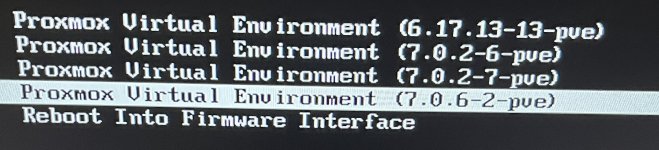
Grub starts the old kernel

frankz

Renowned Member
Nov 16, 2020
474
32
68
Hello everyone, I don't understand why even the kernel institutes the latest version at boot starts with the old one. How do I get it started with the new ??


Code:
proxmox-ve: 9.2.0 (running kernel: 7.0.6-2-pve)
pve-manager: 9.2.5 (running version: 9.2.5/20242970da7fbcef)
proxmox-kernel-helper: 9.2.0
proxmox-kernel-7.0.14-6-pve-signed: 7.0.14-6
proxmox-kernel-7.0: 7.0.14-6
proxmox-kernel-7.0.14-4-pve-signed: 7.0.14-4
proxmox-kernel-7.0.6-2-pve-signed: 7.0.6-2
proxmox-kernel-7.0.2-7-pve-signed: 7.0.2-7
proxmox-kernel-6.17.13-19-pve-signed: 6.17.13-19
proxmox-kernel-6.17: 6.17.13-19
pve-kernel-5.0: 6.0-11
pve-kernel-5.13.19-2-pve: 5.13.19-4
pve-kernel-5.0.21-5-pve: 5.0.21-10
pve-kernel-5.0.15-1-pve: 5.0.15-1
ceph-fuse: 19.2.3-pve1
corosync: 3.1.10-pve3
criu: 4.1.1-1
frr-pythontools: 10.6.1-1+pve2
ifupdown: not correctly installed
ifupdown2: 3.3.0-1+pmx12
intel-microcode: 3.20251111.1~deb13u1
ksm-control-daemon: 1.5-1
libjs-extjs: 7.0.0-5
libproxmox-acme-perl: 1.7.1
libproxmox-backup-qemu0: 2.0.2
libproxmox-rs-perl: 0.4.1
libpve-access-control: 9.1.1
libpve-apiclient-perl: 3.4.2
libpve-cluster-api-perl: 9.1.6
libpve-cluster-perl: 9.1.6
libpve-common-perl: 9.1.19
libpve-guest-common-perl: 6.0.5
libpve-http-server-perl: 6.0.5
libpve-network-perl: 1.6.7
libpve-notify-perl: 9.1.6
libpve-rs-perl: 0.15.3
libpve-storage-perl: 9.1.6
libqb0: 1.0.5-1
libspice-server1: 0.15.2-1+b1
lvm2: 2.03.31-2+pmx1
lxc-pve: 7.0.0-2
lxcfs: 7.0.0-pve1
novnc-pve: 1.7.0-2
proxmox-backup-client: 4.2.3-1
proxmox-backup-file-restore: 4.2.3-1
proxmox-backup-restore-image: 1.0.0
proxmox-firewall: 1.2.3
proxmox-kernel-helper: 9.2.0
proxmox-mail-forward: 1.0.3
proxmox-mini-journalreader: 1.7
proxmox-offline-mirror-helper: 0.7.4
proxmox-widget-toolkit: 5.2.6
pve-cluster: 9.1.6
pve-container: 6.1.12
pve-docs: 9.2.3
pve-edk2-firmware: 4.2025.05-2
pve-esxi-import-tools: 1.0.1
pve-firewall: 6.0.5
pve-firmware: 3.18-5
pve-ha-manager: 5.2.4
pve-i18n: 3.9.0
pve-qemu-kvm: 11.0.2-2
pve-xtermjs: 6.0.0-2
qemu-server: 9.2.1
smartmontools: 7.5-pve2
spiceterm: 3.4.2
swtpm: 0.8.0+pve3
vncterm: 1.9.2
zfsutils-linux: 2.4.3-pve1

Code:
root@pve:~# uname -a
Linux pve 7.0.6-2-pve #1 SMP PREEMPT_DYNAMIC PMX 7.0.6-2 (2026-05-29T11:08Z) x86_64 GNU/Linux
root@pve:~#
Code:
oot@pve:/boot# ls
config-5.0.15-1-pve    config-7.0.14-6-pve  initrd.img-5.0.15-1-pve    initrd.img-7.0.14-6-pve    memtest86+x64.bin     System.map-5.13.19-2-pve   System.map-7.0.6-2-pve  vmlinuz-7.0.14-4-pve
config-5.0.21-5-pve    config-7.0.2-7-pve   initrd.img-5.0.21-5-pve    initrd.img-7.0.2-7-pve    memtest86+x64.efi     System.map-6.17.13-19-pve  vmlinuz-5.0.15-1-pve    vmlinuz-7.0.14-6-pve
config-5.13.19-2-pve   config-7.0.6-2-pve   initrd.img-5.13.19-2-pve   initrd.img-7.0.6-2-pve    pve             System.map-7.0.14-4-pve    vmlinuz-5.0.21-5-pve    vmlinuz-7.0.2-7-pve
config-6.17.13-19-pve  efi            initrd.img-6.17.13-19-pve  memtest86+ia32.bin    System.map-5.0.15-1-pve  System.map-7.0.14-6-pve    vmlinuz-5.13.19-2-pve   vmlinuz-7.0.6-2-pve
config-7.0.14-4-pve    grub            initrd.img-7.0.14-4-pve    memtest86+ia32.efi    System.map-5.0.21-5-pve  System.map-7.0.2-7-pve     vmlinuz-6.17.13-19-pve
root@pve:/boot#

Code:
# If you change this file, run 'update-grub' afterwards to update
# /boot/grub/grub.cfg.
# For full documentation of the options in this file, see:
#   info -f grub -n 'Simple configuration'

GRUB_DEFAULT=0
GRUB_TIMEOUT=5
GRUB_DISTRIBUTOR="Proxmox Virtual Environment"
GRUB_CMDLINE_LINUX_DEFAULT="quiet"
GRUB_CMDLINE_LINUX="root=ZFS=rpool/ROOT/pve-1 boot=zfs"

# Disable os-prober, it might add menu entries for each guest
#GRUB_DISABLE_OS_PROBER=false

# Uncomment to enable BadRAM filtering, modify to suit your needs
# This works with Linux (no patch required) and with any kernel that obtains
# the memory map information from GRUB (GNU Mach, kernel of FreeBSD ...)
#GRUB_BADRAM="0x01234567,0xfefefefe,0x89abcdef,0xefefefef"

# Uncomment to disable graphical terminal (grub-pc only)
#GRUB_TERMINAL=console

# The resolution used on graphical terminal
# note that you can use only modes which your graphic card supports via VBE
# you can see them in real GRUB with the command `vbeinfo'
#GRUB_GFXMODE=640x480

# Uncomment if you don't want GRUB to pass "root=UUID=xxx" parameter to Linux
#GRUB_DISABLE_LINUX_UUID=true

# Disable generation of recovery mode menu entries
GRUB_DISABLE_RECOVERY="true"

# Uncomment to get a beep at grub start
#GRUB_INIT_TUNE="480 440 1"
grub (END)
 
Last edited:
What does proxmox-boot-tool kernel list say?
Code:
root@pve:/etc/default# proxmox-boot-tool kernel list
Manually selected kernels:
None.

Automatically selected kernels:
6.17.13-19-pve
7.0.14-4-pve
7.0.14-6-pve
7.0.6-2-pve
root@pve:/etc/default#
 
Possibly your actual (EFI/ESP) partition has no room with all those 8/9 kernels installed/used?
I had the same problem: the kernel update did not go on because proxmox-boot-tool continued to synchronize old kernels in the ESP, filling it and blocking dpkg.In addition, even if the most recent kernel was installed, the order of kernels in the ESP was wrong, so the system still tried to start previous versions.


Procedure performed to complete the update:


I manually mounted the ESP (/dev/sdb2)

I had to manually delete the old kernel directories in EFI/proxmox with rm -rf to free up space

I ran apt-get -f install to unlock dpkg

Only after the update he was able to complete himself

Finally proxmox-boot-tool refresh properly regenerated the ESP and fixed the order of the kernels

So the update finally went on.


I ask: is there an official procedure to avoid having to manually intervene in the ESP when proxmox-boot-tool tries to synchronize old kernels and the partition fills up, also causing an incorrect order of the kernels at startup? Do you need a specific cleanup or a dedicated command?
 
Is your boot under the control for proxmox-boot-tool at all: https://pve.proxmox.com/pve-docs/pve-admin-guide.html#sysboot_proxmox_boot_tool ?
Did you install Debian first maybe? What drive/partition is selected for boot in the motherboard BIOS/UEFI?
Il node is a native Proxmox installation, I have never installed Debian before.It has been in production for about 5 years and has always used proxmox-boot-tool without problems.I simply performed the upgrade proposed by Proxmox, but the update did not go on because the ESP had filled up while proxmox-boot-tool continued to synchronize old kernels.I had to manually mount the ESP
 
Is your boot under the control for proxmox-boot-tool at all: https://pve.proxmox.com/pve-docs/pve-admin-guide.html#sysboot_proxmox_boot_tool ?
Did you install Debian first maybe? What drive/partition is selected for boot in the motherboard BIOS/UEFI?
If I now execute these commands:

Code:
proxmox-boot-tool kernel list
(
Automatically selected kernels:
6.17.13-19-pve
7.0.14-4-pve
7.0.14-6-pve
7.0.6-2-pve
)

proxmox-boot-tool kernel add 7.0.14-6-pve

proxmox-boot-tool kernel add 6.17.13-15-pve

proxmox-boot-tool refresh
Is it a safe and supported procedure or a risk that the node will no longer start? I would like to understand whether using kernel add to force kernel order in the ESP is correct or if it can create boot problems.
 
You could do a new proxmox-boot-tool format and init (see the manual) to make the ESP fresh and working again (I think you need to remove the old ID manually). But this will only work if there are not too many kernels, which appears to be the initial problem?
I don't think the kernel add commands do anything helpful here. Maybe better to remove some of the old kernels (apt autoremove or apt purge manually), instead of adding them and overfilling the ESP again. You cannot force an order this way. The highest version is selected by default unless you pin one of the others.
Do you have more than one ESP in case fixing one goes wrong? This being a production system and all.
 
Code:
oot@pve:/boot# ls
config-5.0.15-1-pve config-7.0.14-6-pve initrd.img-5.0.15-1-pve initrd.img-7.0.14-6-pve memtest86+x64.bin System.map-5.13.19-2-pve System.map-7.0.6-2-pve vmlinuz-7.0.14-4-pve config-5.0.21-5-pve config-7.0.2-7-pve initrd.img-5.0.21-5-pve initrd.img-7.0.2-7-pve memtest86+x64.efi System.map-6.17.13-19-pve vmlinuz-5.0.15-1-pve vmlinuz-7.0.14-6-pve config-5.13.19-2-pve config-7.0.6-2-pve initrd.img-5.13.19-2-pve initrd.img-7.0.6-2-pve pve System.map-7.0.14-4-pve vmlinuz-5.0.21-5-pve vmlinuz-7.0.2-7-pve config-6.17.13-19-pve efi initrd.img-6.17.13-19-pve memtest86+ia32.bin System.map-5.0.15-1-pve System.map-7.0.14-6-pve vmlinuz-5.13.19-2-pve vmlinuz-7.0.6-2-pve config-7.0.14-4-pve grub initrd.img-7.0.14-4-pve memtest86+ia32.efi System.map-5.0.21-5-pve System.map-7.0.2-7-pve vmlinuz-6.17.13-19-pve
root@pve:/boot#

Code:
root@pve:/etc/default# proxmox-boot-tool kernel list
Manually selected kernels:
None.

Automatically selected kernels:
6.17.13-19-pve
7.0.14-4-pve
7.0.14-6-pve
7.0.6-2-pve
root@pve:/etc/default#
Looks good, only the last few kernels are considered for the actual bootloader/ESP, as it should. A lot of older kernels are nicely omitted.

You could purge the old/unincluded kernels from your system as good housekeeping:
apt purge proxmox-kernel-5* proxmox-kernel-7.0.2-7*

Can you also post cat /boot/grub/grub.cfg?
 
Looks good, only the last few kernels are considered for the actual bootloader/ESP, as it should. A lot of older kernels are nicely omitted.

You could purge the old/unincluded kernels from your system as good housekeeping:
apt purge proxmox-kernel-5* proxmox-kernel-7.0.2-7*

Can you also post cat /boot/grub/grub.cfg?
Thank you, but if I run out the purge not the autoremove because it tries to copy on esp the kernels and after it becomes saturated going into error ,if I execute as you say apt purge proxmox-kernel-5* proxmox-kernel-7.0.2-7* do I solve the problem ?
there is a grub.cfg

Code:
#
# DO NOT EDIT THIS FILE
#
# It is automatically generated by grub-mkconfig using templates
# from /etc/grub.d and settings from /etc/default/grub
#

### BEGIN /etc/grub.d/000_proxmox_boot_header ###
#
# This system is booted via proxmox-boot-tool! The grub-config used when
# booting from the disks configured with proxmox-boot-tool resides on the vfat
# partitions with UUIDs listed in /etc/kernel/proxmox-boot-uuids.
# /boot/grub/grub.cfg is NOT read when booting from those disk!
### END /etc/grub.d/000_proxmox_boot_header ###

### BEGIN /etc/grub.d/00_header ###
if [ -s $prefix/grubenv ]; then
  set have_grubenv=true
  load_env
fi
if [ "${next_entry}" ] ; then
   set default="${next_entry}"
   set next_entry=
   save_env next_entry
   set boot_once=true
else
   set default="0"
fi

if [ x"${feature_menuentry_id}" = xy ]; then
  menuentry_id_option="--id"
else
  menuentry_id_option=""
fi

export menuentry_id_option

if [ "${prev_saved_entry}" ]; then
  set saved_entry="${prev_saved_entry}"
  save_env saved_entry
  set prev_saved_entry=
  save_env prev_saved_entry
  set boot_once=true
fi

function savedefault {
  if [ -z "${boot_once}" ]; then
    saved_entry="${chosen}"
    save_env saved_entry
  fi
}
function load_video {
  if [ x$feature_all_video_module = xy ]; then
    insmod all_video
  else
    insmod efi_gop
    insmod efi_uga
    insmod ieee1275_fb
    insmod vbe
    insmod vga
    insmod video_bochs
    insmod video_cirrus
  fi
}

if loadfont unicode ; then
  set gfxmode=auto
  load_video
  insmod gfxterm
  set locale_dir=$prefix/locale
  set lang=en_US
  insmod gettext
fi
terminal_output gfxterm
if [ "${recordfail}" = 1 ] ; then
  set timeout=30
else
  if [ x$feature_timeout_style = xy ] ; then
    set timeout_style=menu
    set timeout=5
  # Fallback normal timeout code in case the timeout_style feature is
  # unavailable.
  else
    set timeout=5
  fi
fi
### END /etc/grub.d/00_header ###

### BEGIN /etc/grub.d/05_debian_theme ###
set menu_color_normal=cyan/blue
set menu_color_highlight=white/blue
### END /etc/grub.d/05_debian_theme ###

### BEGIN /etc/grub.d/10_linux ###
function gfxmode {
    set gfxpayload="${1}"
}
set linux_gfx_mode=
export linux_gfx_mode
menuentry 'Proxmox VE GNU/Linux' --class proxmox --class gnu-linux --class gnu --class os $menuentry_id_option 'gnulinux-simple-/dev/sda3_/dev/sdb3' {
    load_video
    insmod gzio
    if [ x$grub_platform = xxen ]; then insmod xzio; insmod lzopio; fi
    insmod part_gpt
    insmod part_gpt
    echo    'Loading Linux 7.0.14-6-pve ...'
    linux    /ROOT/pve-1@/boot/vmlinuz-7.0.14-6-pve root=ZFS=/ROOT/pve-1 ro root=ZFS=rpool/ROOT/pve-1 boot=zfs quiet
    echo    'Loading initial ramdisk ...'
    initrd    /ROOT/pve-1@/boot/initrd.img-7.0.14-6-pve
}
submenu 'Advanced options for Proxmox VE GNU/Linux' $menuentry_id_option 'gnulinux-advanced-/dev/sda3_/dev/sdb3' {
    menuentry 'Proxmox VE GNU/Linux, with Linux 7.0.14-6-pve' --class proxmox --class gnu-linux --class gnu --class os $menuentry_id_option 'gnulinux-7.0.14-6-pve-advanced-/dev/sda3_/dev/sdb3' {
        load_video
        insmod gzio
        if [ x$grub_platform = xxen ]; then insmod xzio; insmod lzopio; fi
        insmod part_gpt
        insmod part_gpt
        echo    'Loading Linux 7.0.14-6-pve ...'
        linux    /ROOT/pve-1@/boot/vmlinuz-7.0.14-6-pve root=ZFS=/ROOT/pve-1 ro root=ZFS=rpool/ROOT/pve-1 boot=zfs quiet
        echo    'Loading initial ramdisk ...'
        initrd    /ROOT/pve-1@/boot/initrd.img-7.0.14-6-pve
    }
    menuentry 'Proxmox VE GNU/Linux, with Linux 7.0.14-4-pve' --class proxmox --class gnu-linux --class gnu --class os $menuentry_id_option 'gnulinux-7.0.14-4-pve-advanced-/dev/sda3_/dev/sdb3' {
        load_video
        insmod gzio
        if [ x$grub_platform = xxen ]; then insmod xzio; insmod lzopio; fi
        insmod part_gpt
        insmod part_gpt
        echo    'Loading Linux 7.0.14-4-pve ...'
        linux    /ROOT/pve-1@/boot/vmlinuz-7.0.14-4-pve root=ZFS=/ROOT/pve-1 ro root=ZFS=rpool/ROOT/pve-1 boot=zfs quiet
        echo    'Loading initial ramdisk ...'
        initrd    /ROOT/pve-1@/boot/initrd.img-7.0.14-4-pve
    }
    menuentry 'Proxmox VE GNU/Linux, with Linux 7.0.6-2-pve' --class proxmox --class gnu-linux --class gnu --class os $menuentry_id_option 'gnulinux-7.0.6-2-pve-advanced-/dev/sda3_/dev/sdb3' {
        load_video
        insmod gzio
        if [ x$grub_platform = xxen ]; then insmod xzio; insmod lzopio; fi
        insmod part_gpt
        insmod part_gpt
        echo    'Loading Linux 7.0.6-2-pve ...'
        linux    /ROOT/pve-1@/boot/vmlinuz-7.0.6-2-pve root=ZFS=/ROOT/pve-1 ro root=ZFS=rpool/ROOT/pve-1 boot=zfs quiet
        echo    'Loading initial ramdisk ...'
        initrd    /ROOT/pve-1@/boot/initrd.img-7.0.6-2-pve
    }
    menuentry 'Proxmox VE GNU/Linux, with Linux 7.0.2-7-pve' --class proxmox --class gnu-linux --class gnu --class os $menuentry_id_option 'gnulinux-7.0.2-7-pve-advanced-/dev/sda3_/dev/sdb3' {
        load_video
        insmod gzio
        if [ x$grub_platform = xxen ]; then insmod xzio; insmod lzopio; fi
        insmod part_gpt
        insmod part_gpt
        echo    'Loading Linux 7.0.2-7-pve ...'
        linux    /ROOT/pve-1@/boot/vmlinuz-7.0.2-7-pve root=ZFS=/ROOT/pve-1 ro root=ZFS=rpool/ROOT/pve-1 boot=zfs quiet
        echo    'Loading initial ramdisk ...'
        initrd    /ROOT/pve-1@/boot/initrd.img-7.0.2-7-pve
    }
    menuentry 'Proxmox VE GNU/Linux, with Linux 6.17.13-19-pve' --class proxmox --class gnu-linux --class gnu --class os $menuentry_id_option 'gnulinux-6.17.13-19-pve-advanced-/dev/sda3_/dev/sdb3' {
        load_video
        insmod gzio
        if [ x$grub_platform = xxen ]; then insmod xzio; insmod lzopio; fi
        insmod part_gpt
        insmod part_gpt
        echo    'Loading Linux 6.17.13-19-pve ...'
        linux    /ROOT/pve-1@/boot/vmlinuz-6.17.13-19-pve root=ZFS=/ROOT/pve-1 ro root=ZFS=rpool/ROOT/pve-1 boot=zfs quiet
        echo    'Loading initial ramdisk ...'
        initrd    /ROOT/pve-1@/boot/initrd.img-6.17.13-19-pve
    }
    menuentry 'Proxmox VE GNU/Linux, with Linux 5.13.19-2-pve' --class proxmox --class gnu-linux --class gnu --class os $menuentry_id_option 'gnulinux-5.13.19-2-pve-advanced-/dev/sda3_/dev/sdb3' {
        load_video
        insmod gzio
        if [ x$grub_platform = xxen ]; then insmod xzio; insmod lzopio; fi
        insmod part_gpt
        insmod part_gpt
        echo    'Loading Linux 5.13.19-2-pve ...'
        linux    /ROOT/pve-1@/boot/vmlinuz-5.13.19-2-pve root=ZFS=/ROOT/pve-1 ro root=ZFS=rpool/ROOT/pve-1 boot=zfs quiet
        echo    'Loading initial ramdisk ...'
        initrd    /ROOT/pve-1@/boot/initrd.img-5.13.19-2-pve
    }
    menuentry 'Proxmox VE GNU/Linux, with Linux 5.0.21-5-pve' --class proxmox --class gnu-linux --class gnu --class os $menuentry_id_option 'gnulinux-5.0.21-5-pve-advanced-/dev/sda3_/dev/sdb3' {
        load_video
        insmod gzio
        if [ x$grub_platform = xxen ]; then insmod xzio; insmod lzopio; fi
        insmod part_gpt
        insmod part_gpt
        echo    'Loading Linux 5.0.21-5-pve ...'
        linux    /ROOT/pve-1@/boot/vmlinuz-5.0.21-5-pve root=ZFS=/ROOT/pve-1 ro root=ZFS=rpool/ROOT/pve-1 boot=zfs quiet
        echo    'Loading initial ramdisk ...'
        initrd    /ROOT/pve-1@/boot/initrd.img-5.0.21-5-pve
    }
    menuentry 'Proxmox VE GNU/Linux, with Linux 5.0.15-1-pve' --class proxmox --class gnu-linux --class gnu --class os $menuentry_id_option 'gnulinux-5.0.15-1-pve-advanced-/dev/sda3_/dev/sdb3' {
        load_video
        insmod gzio
        if [ x$grub_platform = xxen ]; then insmod xzio; insmod lzopio; fi
        insmod part_gpt
        insmod part_gpt
        echo    'Loading Linux 5.0.15-1-pve ...'
        linux    /ROOT/pve-1@/boot/vmlinuz-5.0.15-1-pve root=ZFS=/ROOT/pve-1 ro root=ZFS=rpool/ROOT/pve-1 boot=zfs quiet
        echo    'Loading initial ramdisk ...'
        initrd    /ROOT/pve-1@/boot/initrd.img-5.0.15-1-pve
    }
}

### END /etc/grub.d/10_linux ###

### BEGIN /etc/grub.d/20_linux_xen ###

### END /etc/grub.d/20_linux_xen ###

### BEGIN /etc/grub.d/20_memtest86+ ###
if [ "$grub_platform" = efi -a "$grub_cpu" = x86_64 ]; then
    menuentry "Memory test (memtest86+x64.efi)" --class memtest $menuentry_id_option "memtest86+" {
        insmod part_gpt
        insmod part_gpt
        linux /ROOT/pve-1@/boot/memtest86+x64.efi
    }
    menuentry "Memory test (memtest86+x64.efi, serial console)" --class memtest $menuentry_id_option "memtest86+-serial" {
        insmod part_gpt
        insmod part_gpt
        linux /ROOT/pve-1@/boot/memtest86+x64.efi console=ttyS0,115200
    }
fi
if [ "$grub_platform" = efi -a "$grub_cpu" = i386 ]; then
    menuentry "Memory test (memtest86+ia32.efi)" --class memtest $menuentry_id_option "memtest86+" {
        insmod part_gpt
        insmod part_gpt
        linux /ROOT/pve-1@/boot/memtest86+ia32.efi
    }
    menuentry "Memory test (memtest86+ia32.efi, serial console)" --class memtest $menuentry_id_option "memtest86+-serial" {
        insmod part_gpt
        insmod part_gpt
        linux /ROOT/pve-1@/boot/memtest86+ia32.efi console=ttyS0,115200
    }
fi
if [ "$grub_platform" = pc ]; then if cpuid -l ; then
    menuentry "Memory test (memtest86+x64.bin)" --class memtest $menuentry_id_option "memtest86+" {
        insmod part_gpt
        insmod part_gpt
        linux /ROOT/pve-1@/boot/memtest86+x64.bin
    }
    menuentry "Memory test (memtest86+x64.bin, serial console)" --class memtest $menuentry_id_option "memtest86+-serial" {
        insmod part_gpt
        insmod part_gpt
        linux /ROOT/pve-1@/boot/memtest86+x64.bin console=ttyS0,115200
    }
fi ; fi
if [ "$grub_platform" = pc ]; then if ! cpuid -l ; then
    menuentry "Memory test (memtest86+ia32.bin)" --class memtest $menuentry_id_option "memtest86+" {
        insmod part_gpt
        insmod part_gpt
        linux /ROOT/pve-1@/boot/memtest86+ia32.bin
    }
    menuentry "Memory test (memtest86+ia32.bin, serial console)" --class memtest $menuentry_id_option "memtest86+-serial" {
        insmod part_gpt
        insmod part_gpt
        linux /ROOT/pve-1@/boot/memtest86+ia32.bin console=ttyS0,115200
    }
fi ; fi
### END /etc/grub.d/20_memtest86+ ###

### BEGIN /etc/grub.d/25_bli ###
if [ "$grub_platform" = "efi" ]; then
  insmod bli
fi
### END /etc/grub.d/25_bli ###

### BEGIN /etc/grub.d/30_os-prober ###
### END /etc/grub.d/30_os-prober ###

### BEGIN /etc/grub.d/30_uefi-firmware ###
if [ "$grub_platform" = "efi" ]; then
    fwsetup --is-supported
    if [ "$?" = 0 ]; then
        menuentry 'UEFI Firmware Settings' $menuentry_id_option 'uefi-firmware' {
            fwsetup
        }
    fi
fi
### END /etc/grub.d/30_uefi-firmware ###

### BEGIN /etc/grub.d/40_custom ###
# This file provides an easy way to add custom menu entries.  Simply type the
# menu entries you want to add after this comment.  Be careful not to change
# the 'exec tail' line above.
### END /etc/grub.d/40_custom ###

### BEGIN /etc/grub.d/41_custom ###
if [ -f  ${config_directory}/custom.cfg ]; then
  source ${config_directory}/custom.cfg
elif [ -z "${config_directory}" -a -f  $prefix/custom.cfg ]; then
  source $prefix/custom.cfg
fi
### END /etc/grub.d/41_custom ###


that is a /etc/defaukt/grub

Code:
# If you change this file, run 'update-grub' afterwards to update
# /boot/grub/grub.cfg.
# For full documentation of the options in this file, see:
#   info -f grub -n 'Simple configuration'

GRUB_DEFAULT=0
GRUB_TIMEOUT=5
GRUB_DISTRIBUTOR="Proxmox Virtual Environment"
GRUB_CMDLINE_LINUX_DEFAULT="quiet"
GRUB_CMDLINE_LINUX="root=ZFS=rpool/ROOT/pve-1 boot=zfs"

# Disable os-prober, it might add menu entries for each guest
#GRUB_DISABLE_OS_PROBER=false

# Uncomment to enable BadRAM filtering, modify to suit your needs
# This works with Linux (no patch required) and with any kernel that obtains
# the memory map information from GRUB (GNU Mach, kernel of FreeBSD ...)
#GRUB_BADRAM="0x01234567,0xfefefefe,0x89abcdef,0xefefefef"

# Uncomment to disable graphical terminal (grub-pc only)
#GRUB_TERMINAL=console

# The resolution used on graphical terminal
# note that you can use only modes which your graphic card supports via VBE
# you can see them in real GRUB with the command `vbeinfo'
#GRUB_GFXMODE=640x480

# Uncomment if you don't want GRUB to pass "root=UUID=xxx" parameter to Linux
#GRUB_DISABLE_LINUX_UUID=true

# Disable generation of recovery mode menu entries
GRUB_DISABLE_RECOVERY="true"

# Uncomment to get a beep at grub start
#GRUB_INIT_TUNE="480 440 1"
grub (END)
 
You could do a new proxmox-boot-tool format and init (see the manual) to make the ESP fresh and working again (I think you need to remove the old ID manually). But this will only work if there are not too many kernels, which appears to be the initial problem?
I don't think the kernel add commands do anything helpful here. Maybe better to remove some of the old kernels (apt autoremove or apt purge manually), instead of adding them and overfilling the ESP again. You cannot force an order this way. The highest version is selected by default unless you pin one of the others.
Do you have more than one ESP in case fixing one goes wrong? This being a production system and all.
Thank you, yes the problem and that there are a kernel casino , but if I run out apt autoremove is dangerous because I seem to have seen that it tries to remove the kernels always rewriting esp that goes in saturation . in a cluster of clist tests I had used apt purge eg. kernel-6* and removed the packages without rewriting of constinuo esp . But being an environment in production I'm afraid that something can go wrong. Do I have to be sure about the commands and especially which kernels to remove and how (apt purge or apt autoremove ?? ) .
 
You could do a new proxmox-boot-tool format and init (see the manual) to make the ESP fresh and working again (I think you need to remove the old ID manually). But this will only work if there are not too many kernels, which appears to be the initial problem?
I don't think the kernel add commands do anything helpful here. Maybe better to remove some of the old kernels (apt autoremove or apt purge manually), instead of adding them and overfilling the ESP again. You cannot force an order this way. The highest version is selected by default unless you pin one of the others.
Do you have more than one ESP in case fixing one goes wrong? This being a production system and all.
look tihis
 

Attachments