

The cloned virtual machine failed to start
- Thread starter tangshuai
- Start date
You are using an out of date browser. It may not display this or other websites correctly.
You should upgrade or use an alternative browser.
You should upgrade or use an alternative browser.
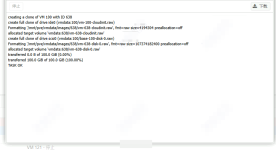
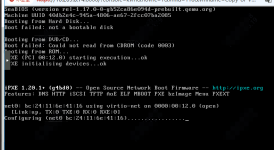
A jump from 0% to 100% with no steps or progress in between usually means empty disk image.
So there is no OS that could be booted.
So there is no OS that could be booted.
Why is that,I am using NFS for storage, and when mounting, I chose version 4.1, but in reality, PVE is still using version 4.2。QEMU relies on SEEK_DATA/SEEK.HOLE to skip empty areas in sparse files when cloning disks to accelerate replication. NAS erroneously reported 'no data for the entire file' in 4.2, causing QEMU to create a 100GB empty qcow2 file, with progress instantly reaching 100%, but the actual data volume is 0.
Why is that,I am using NFS for storage, and when mounting, I chose version 4.1, but in reality, PVE is still using version 4.2。QEMU relies on SEEK_DATA/SEEK.HOLE to skip empty areas in sparse files when cloning disks to accelerate replication. NAS erroneously reported 'no data for the entire file' in 4.2, causing QEMU to create a 100GB empty qcow2 file, with progress instantly reaching 100%, but the actual data volume is 0.A jump from 0% to 100% with no steps or progress in between usually means empty disk image.
So there is no OS that could be booted.

你好,
是否可以分享您的存储配置/etc/pve/storage.cfg?您是否有配置版本,例如pvesm set your_nfs_storage --options vers=4.1?
我在网页界面挂载时选择了4.1版本,但是无法正确克隆虚拟机,经检查发现自动协商达到了4.2版本。后来我在/etc/pve/storage.cfg里自行添加了options vers=4.1,
现在克隆虚拟机就可以正常了。
I chose version 4.1 when mounting the web interface, but I couldn't properly clone the virtual machine. After checking, I found that the automatic negotiation had reached version 4.2. Later, I added options vers=4.1 myself in /etc/pve/storage.cfg, Now, cloning the virtual machine can work normally.
Seems to work now as long as automatic translation did not mess it up.