Create thinpool "Name" and "Volume Group" same. Why?

johnblue

Member
Mar 16, 2024
20
2
8
I read in the admin guide that when creating a thinpool from the command line the name of the thinpool (vmstore) can be different from the Volume Group (vmdata):

1784440314962.png

However, when I create a thinpool from the UI there is no option to choose a thinpool name and a different Volume Group name:
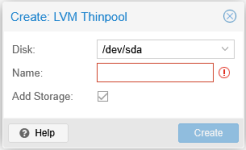
1784440575227.png

Which results in:

1784440513328.png

Am I missing a UI step? Because that is what it feels like however I cannot find (yet .. still looking) in the UI where to create just a Volume Group.
 
Not missing anything. There is no such option in the GUI. I'd create the thin pool via the CLI anyways for reasons. Just out of curiosity, why not ZFS?
Thanks for the link will check that out.

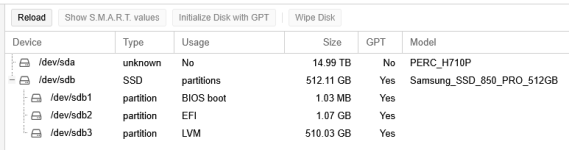
Why not ZFS? Sadly it is because of my lack of knowledge of ZFS. I like to run Dell Poweredge servers and they mostly have PERC H710P Mini controllers in them:1784507941979.png

I took a server and flashed its controller over to LSI IT firmware in an effort to start learning ZFS but ended up flashing it back to stock. My learning curve with PVE is not as steep as when I first started but I decide that I need to get more time with PVE before stirring in ZFS.
 
I actually find ZFS to be a lot simpler and more intuitive to use than LVM(-Thin). It's also more flexible as it can natively do block and file storage so there's no need to allocate/reserve storage specifically for local. But yeah without IT mode you shouldn't.
 
Last edited:
  • Like
Reactions: Johannes S and UdoB