

Hi All
Preface - ive been chatting with a friend who may have set an LXC up with 8mb of ram rather than what he intended and I may have had indulged in a bit too much silly joice in an attempt to stop them being foolish in the future.. but with the aid (or lets not be daft here, complete abuse of...) Gemini I have come up with the below script. Could maybe something like the below be implemented in the future for aid of setting for both RAM and main storage? Obvs do not run this in the main shell without readiing and im sure there are people out there who could make it more efficient etc but with the aid of the dreaded AI I managed to get the image at the bottom to work and it provides the relevant amount fo ram without needing to know the numbers or use a calculator?
cat << 'EOF' > /tmp/install-gb-buttons.sh
#!/bin/bash
cat << 'INNER_EOF' > /usr/share/pve-manager/js/gb-memory-helper.js
// --- NATIVE EXTJS PROXMOX GB MEMORY PATCH ---
Ext.define('PVE.qemu.MemoryInputPanel.GBHelper', {
override: 'PVE.qemu.MemoryInputPanel',
initComponent: function() {
var me = this;
me.callParent();
var options = [
{ text: '1 GB', value: 1024 },
{ text: '2 GB', value: 2048 },
{ text: '4 GB', value: 4096 },
{ text: '8 GB', value: 8192 },
{ text: '16 GB', value: 16384 },
{ text: '32 GB', value: 32768 },
{ text: '48 GB', value: 49152 },
{ text: '64 GB', value: 65536 }
];
var buttonContainer = Ext.create('Ext.container.Container', {
layout: 'hbox',
margin: '10 0 0 0',
defaults: {
xtype: 'button',
margin: '0 5 0 0',
handler: function(btn) {
var memField = me.down('numberfield[name=memory]');
if (memField) {
memField.setValue(btn.memoryValue);
}
}
},
items: options.map(function(opt) {
return {
text: opt.text,
memoryValue: opt.value
};
})
});
me.add(buttonContainer);
}
});
INNER_EOF
if ! grep -q "gb-memory-helper.js" /usr/share/pve-manager/index.html.tpl; then
sed -i '/pvemanagerlib.js/a \ <script type="text/javascript" src="/pve2/js/gb-memory-helper.js?v=2"></script>' /usr/share/pve-manager/index.html.tpl
fi
systemctl restart pveproxy.service
echo "Proxmox GB Memory buttons installed successfully!"
EOF
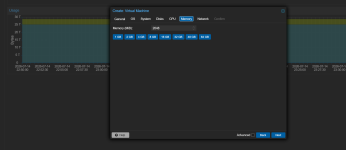
Preface - ive been chatting with a friend who may have set an LXC up with 8mb of ram rather than what he intended and I may have had indulged in a bit too much silly joice in an attempt to stop them being foolish in the future.. but with the aid (or lets not be daft here, complete abuse of...) Gemini I have come up with the below script. Could maybe something like the below be implemented in the future for aid of setting for both RAM and main storage? Obvs do not run this in the main shell without readiing and im sure there are people out there who could make it more efficient etc but with the aid of the dreaded AI I managed to get the image at the bottom to work and it provides the relevant amount fo ram without needing to know the numbers or use a calculator?
cat << 'EOF' > /tmp/install-gb-buttons.sh
#!/bin/bash
cat << 'INNER_EOF' > /usr/share/pve-manager/js/gb-memory-helper.js
// --- NATIVE EXTJS PROXMOX GB MEMORY PATCH ---
Ext.define('PVE.qemu.MemoryInputPanel.GBHelper', {
override: 'PVE.qemu.MemoryInputPanel',
initComponent: function() {
var me = this;
me.callParent();
var options = [
{ text: '1 GB', value: 1024 },
{ text: '2 GB', value: 2048 },
{ text: '4 GB', value: 4096 },
{ text: '8 GB', value: 8192 },
{ text: '16 GB', value: 16384 },
{ text: '32 GB', value: 32768 },
{ text: '48 GB', value: 49152 },
{ text: '64 GB', value: 65536 }
];
var buttonContainer = Ext.create('Ext.container.Container', {
layout: 'hbox',
margin: '10 0 0 0',
defaults: {
xtype: 'button',
margin: '0 5 0 0',
handler: function(btn) {
var memField = me.down('numberfield[name=memory]');
if (memField) {
memField.setValue(btn.memoryValue);
}
}
},
items: options.map(function(opt) {
return {
text: opt.text,
memoryValue: opt.value
};
})
});
me.add(buttonContainer);
}
});
INNER_EOF
if ! grep -q "gb-memory-helper.js" /usr/share/pve-manager/index.html.tpl; then
sed -i '/pvemanagerlib.js/a \ <script type="text/javascript" src="/pve2/js/gb-memory-helper.js?v=2"></script>' /usr/share/pve-manager/index.html.tpl
fi
systemctl restart pveproxy.service
echo "Proxmox GB Memory buttons installed successfully!"
EOF


