Everything working after power outage except one VM which lost internet connection. Different from the other similar issue.

bepstein111

Member
Nov 11, 2023
11
0
6
Hi all, very confused here:
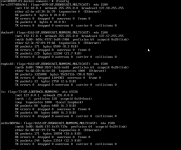
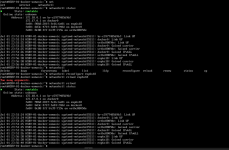
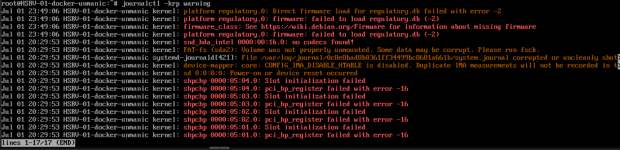
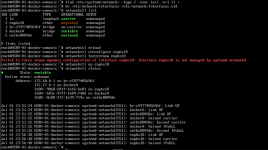
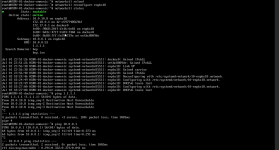
Today my power went out due to the heat, and when it came back on, everything on my proxmox instance looks fine, except for one single VM (which is identical to three others which are all fine) which can no longer connect to the network/internet. No devices changed names. Here's what I've tried:
proxmoxissue1.png
proxmoxissue2.pngproxmoxissue3.pngproxmoxissue4.png

Happy to provide anything else that would be helpful.

Thanks in advance!
 
Provide the vm config:
Code:
qm config [VMID]
code_language.shell:
agent: enabled=1
bios: ovmf
boot: order=scsi0
cores: 24
description: <div align='center'>%0A  <a href='https://Helper-Scripts.com' target='_blank' rel='noopener noreferrer'>%0A    <img src='https://raw.githubusercontent.com/community-scripts/ProxmoxVE/main/misc/images/logo-81x112.png' alt='Logo' style='width%3A81px;height%3A112px;'/>%0A  </a>%0A%0A  <h2 style='font-size%3A 24px; margin%3A 20px 0;'>Docker VM</h2>%0A%0A  <p style='margin%3A 16px 0;'>%0A    <a href='https://ko-fi.com/community_scripts' target='_blank' rel='noopener noreferrer'>%0A      <img src='https://img.shields.io/badge/&#x2615;-Buy us a coffee-blue' alt='spend Coffee' />%0A    </a>%0A  </p>%0A%0A  <span style='margin%3A 0 10px;'>%0A    <i class="fa fa-github fa-fw" style="color%3A #f5f5f5;"></i>%0A    <a href='https://github.com/community-scripts/ProxmoxVE' target='_blank' rel='noopener noreferrer' style='text-decoration%3A none; color%3A #00617f;'>GitHub</a>%0A  </span>%0A  <span style='margin%3A 0 10px;'>%0A    <i class="fa fa-comments fa-fw" style="color%3A #f5f5f5;"></i>%0A    <a href='https://github.com/community-scripts/ProxmoxVE/discussions' target='_blank' rel='noopener noreferrer' style='text-decoration%3A none; color%3A #00617f;'>Discussions</a>%0A  </span>%0A  <span style='margin%3A 0 10px;'>%0A    <i class="fa fa-exclamation-circle fa-fw" style="color%3A #f5f5f5;"></i>%0A    <a href='https://github.com/community-scripts/ProxmoxVE/issues' target='_blank' rel='noopener noreferrer' style='text-decoration%3A none; color%3A #00617f;'>Issues</a>%0A  </span>%0A</div>
efidisk0: zspin:vm-1008-disk-0,size=1M
ide2: none,media=cdrom
localtime: 1
machine: q35
memory: 32768
meta: creation-qemu=9.2.0,ctime=1753401693
name: docker-unmanic
net0: virtio=9A:68:20:16:6E:81,bridge=vmbr0
numa: 0
onboot: 1
ostype: l26
scsi0: ssd-fast:vm-1008-disk-0,discard=on,size=64G,ssd=1
scsihw: virtio-scsi-pci
smbios1: uuid=01819685-1fac-4aa5-b28b-d06589c957dd
sockets: 1
tablet: 0
tags: community-script;debian12;docker;linux
vmgenid: cfa29d55-596a-45b2-990f-2658937ecf83

 
Please attempt on the VM as below:
Code:
~# ip link set enp6s18 down
~# ip link set enp6s18 up
 
The /etc/network/interfaces should not exist with a systemd-networkd setup.
Please try/share this
Bash:
find /etc/systemd/network/ -type f -exec tail -n+1 {} +
rm /etc/network/interfaces
networkctl list
networkctl reload
networkctl reconfigure enp6s18
networkctl force-renew enp6s18
networkctl up enp6s18
networkctl status
Yeah it's a bit much but we'll see what's useful. Your static network config belongs in /etc/systemd/network/. DHCP should work out of the box though.
 
Last edited:
The /etc/network/interfaces should not exist with a systemd-networkd setup.
Please try/share this
Bash:
find /etc/systemd/network/ -type f -exec tail -n+1 {} +
rm /etc/network/interfaces
networkctl list
networkctl reload
networkctl reconfigure enp6s18
networkctl force-renew enp6s18
networkctl up enp6s18
networkctl status
Yeah it's a bit much but we'll see what's useful. Your static network config belongs in /etc/systemd/network/. DHCP should work out of the box though.
Aha! I think we're on to something here! There are no files in /etc/systemd/network/:

proxmoxissue6.png

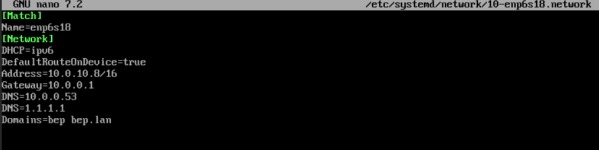
I created a simple file:

proxmoxissue7.png


and I can ping my router now, but no further:
proxmoxissue8.png
 
Got it. Removed the DefaultRouteOnDevice line and all seems well now. Lets see if it survives a reboot though....
Yup. All good. Very weird failure mode. Seems like an update (or multiple updates) was/were applied and removed(?) iproute2 (aka ip command) and caused the switch from using /etc/network/interfaces (which it absolutely was using before) to wanting to use systemd-networkd instead, despite not having config files for it?