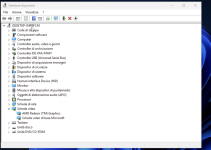
L leviackerman91 Member May 17, 2024 24 0 6 Monday at 14:49 #1 Hi all! I'm running a Windows 11 VM on Proxmox 9.2.3 running kernel: 7.0.12-1-pve. After a few seconds, Windows starts to flicker like in the attached photo. I've already update Windows and AMD drivers (5825u with integrated card). Any idea on how to solve?
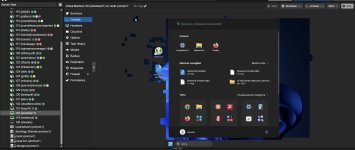
Hi all! I'm running a Windows 11 VM on Proxmox 9.2.3 running kernel: 7.0.12-1-pve. After a few seconds, Windows starts to flicker like in the attached photo. I've already update Windows and AMD drivers (5825u with integrated card). Any idea on how to solve?
dcsapak Proxmox Staff Member Staff member Feb 1, 2016 10,706 1,739 273 37 Vienna Monday at 16:24 #2 Hi, what browser and version do you use? (looks more like a client issue to me)
L leviackerman91 Member May 17, 2024 24 0 6 Monday at 16:49 #3 dcsapak said: Hi, what browser and version do you use? (looks more like a client issue to me) Click to expand... i'm using chrome, latest version, but i have the same issue accessing the VM directly via HDMI
dcsapak said: Hi, what browser and version do you use? (looks more like a client issue to me) Click to expand... i'm using chrome, latest version, but i have the same issue accessing the VM directly via HDMI
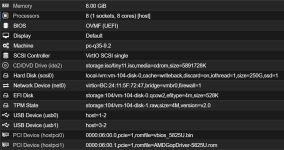
dcsapak Proxmox Staff Member Staff member Feb 1, 2016 10,706 1,739 273 37 Vienna Tuesday at 09:51 #4 leviackerman91 said: i'm using chrome, latest version, but i have the same issue accessing the VM directly via HDMI Click to expand... then it sounds like it to be a guest driver issue? can you post the vm config and what kind of hardware you have?
leviackerman91 said: i'm using chrome, latest version, but i have the same issue accessing the VM directly via HDMI Click to expand... then it sounds like it to be a guest driver issue? can you post the vm config and what kind of hardware you have?
L leviackerman91 Member May 17, 2024 24 0 6 Tuesday at 21:49 #5 This is the VM hardware. Proxmox runs on a AMD 5825U