

All VM can't accessible after kernel UPdate of the nodes?
- Thread starter ArnOCP
- Start date
You are using an out of date browser. It may not display this or other websites correctly.
You should upgrade or use an alternative browser.
You should upgrade or use an alternative browser.


these are still too little facts. how does your setup look like? what do you mean exactly with 'aren't accessible' (not reachable via network?, don't start?) ?
the logs from the two boots would be interesting but the most important part was already mentioned by @UdoB :
the logs from the two boots would be interesting but the most important part was already mentioned by @UdoB :
check your NIC names and verify the network settings.
Hello,
Thx for replies.
The PVE is in 8.4.19 version on the 3 nodes.
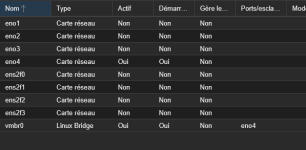
I was surprise that with the kernel 6.8.12-29-pve the troubleshoot occurs despite with the kernel 6.8.12-28-pve all is working?
Regards,
Thx for replies.
I have an 3 nodes architectures and a SAN to hosts VM's attached in ISCSI.how does your setup look like?
The PVE is in 8.4.19 version on the 3 nodes.
The VM are for the essentials Debian web servers, if i start the PVE on the new kernel the vm are shown as started in the PVE GUI but i cannot acces them neither via web, ssh or via the VNC console in the pve gui.what do you mean exactly with 'aren't accessible' (not reachable via network?, don't start?) ?
The NIC names in the PVE are eno1, eno 2...vmbr0 for the bridge. for examplecheck your NIC names and verify the network settings.
I was surprise that with the kernel 6.8.12-29-pve the troubleshoot occurs despite with the kernel 6.8.12-28-pve all is working?
Regards,
you have to boot the server with the not working kernel and run the commands againHere are the boot log of working kernel, i cannot find the not working log ?!?
That's what I was afraid of^^you have to boot the server with the not working kernel and run the commands again
I can't do it right now, because the PvE servers are hosting functional servers.