Ruined my proxmox installation, help please!

carlitos009

New Member
Jun 10, 2024
14
0
1
I have (had) a pc (NAS) with Promox 8.3.0. I used the shell to upgrade but I did it wrong. It was stuck in 8.3.0 telling me that there were 181 for update but apt update would not update anything. A little more research indicated to change the repos from bookworm to Trixie. I did but that make it worst. At some point it the screen indicated the following:
ou are attempting to remove the meta-package 'proxmox-ve'!
I followed the directions because they indicated that I could install promox-ve again with apt install.

I erased it and updated but there were errors. It indicated that I did not have the right repository - it said bookworm was still in use. I checked all the files which had repo information and made it trixie but nothing.

So I think I have to backup some directories and use a USB drive to install promox 9x and then copy back those directories so I do not loose my VMs which include my truenas with all my media.

Any help will be appreciated. Do I do that? backup the config folders and install again? or is there something I can do? It tells me there repo entry is wrong with either bookworm or trixie.

Also, I can only ssh to it now
 
Last edited:
Please share
Bash:
apt update
apt policy proxmox-ve
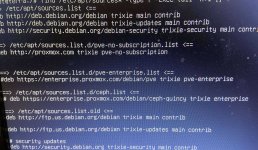
find /etc/apt/sources* -type f -exec tail -n+1 {} +
 
Hello Impact thanks for replying,

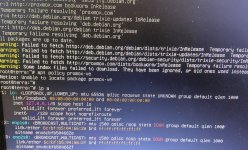
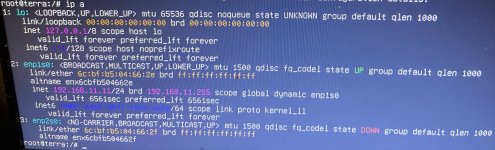
I had the machine off. I turned it on and no ssh access. I put a monitor and keyboard and i ran: ip a
and it shows no ip address

apt update shows errors indicating it cannot resolve deb.debian.org
apt policy promox-ve results in: it cannot locate the proxmox-ve package
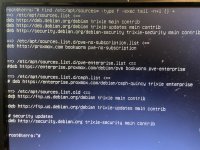
and also the find command results in:
trixie main contrilb
trixi-updates main contrib
trixie-security main controb

it does show no subscription as disabled (#) but it is bookworm
old list also shows trixie.

I had to take pics since it seems I cannot longer ssh to it.
 
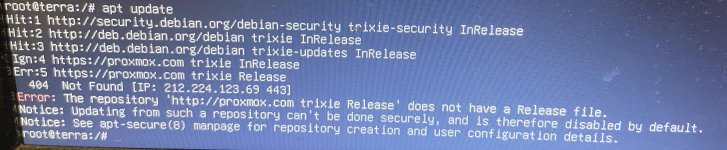
Thank you. I was able to get on lin with the first command and get an IP address. I was then able to run apt update and I attached pictures of results of: "ip a" and "apt update"
 

Attachments

  • apt update.JPG
    apt update.JPG
    558.3 KB · Views: 9
  • ip a.JPG
    ip a.JPG
    625.7 KB · Views: 9
  • sources all trixie verified.JPG
    sources all trixie verified.JPG
    1.2 MB · Views: 9
Delete the enterprise list and that error should be gone, then try apt update && apt full-upgrade. If that works try apt install proxmox-ve to get PVE back.
 
Last edited:
Hello. I just got back to the NAS and I ssh into it. I do run the apt update command and I get the error:
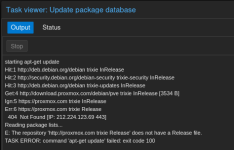
Error: The repository 'http://proxmox.com trixie Release' does not have a Release file.
Notice: Updating from such a repository can't be done securely, and is therefore disabled by default.
Notice: See apt-secure(8) manpage for repository creation and user configuration details.
 
Sorry, I missed that it's supposed to be download.proxmox.com and not just proxmox.com.
The bad repo is configured here. Remove what you added, alter this file and then try again
1780523660025.png
 
Last edited:
Hello. Sorry I just got your message now. About a half hour ago I was able to get the distribution updated and I installed prxmox-ve and I got the GUI again. I still get the error - same as before - but at least I can now properly backup my machines in case I finally decide to wipe this box clean and start fresh.

I am attaching a picture of the error from the GUI.

So I still have to work on this.

I want to say thanks again and is there any way I can repay you in some way, at least something. Please let me know - and if you have any thoughts on how to correct this current problem, I am all ears but I will keep reading
 

Attachments

  • Screenshot from 2026-06-03 18-40-31.png
    Screenshot from 2026-06-03 18-40-31.png
    31.9 KB · Views: 10
You still have the bogus http://proxmox.com repo configured in your files somewhere. Use the find/tail command from earlier again to locate it.
Alternatively you can try searching directly for http://proxmox.com like this
Bash:
grep -sR "http://proxmox.com" /etc/apt/sources*
node > Updates > Repositories in the GUI might also show it.
A re-install should not be necessary :)
 
Last edited: