Best way to migrate a multi-disk VM from LVM to different ZFS Pools for Storage Replication?

WoisWoi

New Member
Jul 6, 2024
7
0
1
Hello everyone,

I am restructuring my 2-node PVE 9.1.x cluster (+ external QDevice) to enable ZFS Storage Replication and High Availability (HA).

I need to migrate a multi-disk VM from its current local LVM configuration to new local ZFS pools on the second node. The difficulty is that the VM's virtual disks must be split across different physical media (NVMe and HDD) on the destination node.

1. Source Architecture (Node 1 - pve)​

The VM (ID 100) has 4 virtual disks using the virtio controller:

  • virtio0, virtio1 & virtio2: Hosted on local local-lvm (NVMe SSD, LVM-Thin).
  • virtio3: 7.5 TB, hosted on local data8tb (8 TB Mechanical HDD, Standard LVM).

2. Target Architecture (Node 2 - pve2)​

The second node has been reinstalled with ZFS. I created the following target storage IDs:

  • nvme-zfs: A 4 TB NVMe pool (ZFS with Thin Provisioning).
  • hdd-zfs: An 8 TB HDD pool (ZFS with Thin Provisioning).

3. The Challenge​

Because of the performance differences between NVMe and HDD, I must ensure that virtio0/virtio1/virtio2 land on the target NVMe pool (nvme-zfs) and virtio3 lands on the target HDD pool (hdd-zfs).

  • The Proxmox Web UI Migrate wizard does not allow mapping virtual disks to different target storages individually; it forces the entire VM onto a single target storage.
  • Restoring a full backup from a Proxmox Backup Server (PBS) via the Web UI or a standard qmrestore also forces a single target storage for all disks.

Do you have any idea how I could deal with this situation ?​


Thank you very much for your help and recommendations!
 
Last edited:
You should be able to move the disc to another storage in the vm settings after migration to the target node.
 
  • Like
Reactions: UdoB
You should be able to move the disc to another storage in the vm settings after migration to the target node.
Of course, but there is not enough space to restore on the HDD. Even the HDD alone, it says it doesn't have enough space; I don't get it.

I went on "my long solution", which is restoring the VM without the "HDD disk" on the NVMe, then restoring within the VM the files of the HDD via Veeam backup & restore.
 
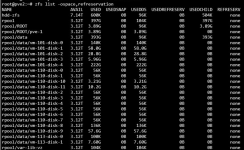
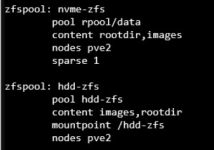
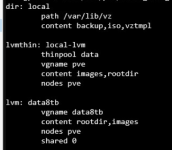
Maybe thin provisioning isn't enabled? Hard to say without more information. zfs list -ospace,refreservation, cat /etc/pve/storage.cfg and the task log would be helpful.
 
Last edited:
Maybe thin provisioning isn't enabled? Hard to say without more information. zfs list -ospace,refreservation, cat /etc/pve/storage.cfg and the task log would be helpful.


Here you go :


1779604874598.png

1779604963644.png
1779604994443.png

As example for the logs : "
new volume ID is 'hdd-zfs:vm-101-disk-0'
temporary volume 'hdd-zfs:vm-101-disk-0' successfully removed
error before or during data restore, some or all disks were not completely restored. VM 101 state is NOT cleaned up.
TASK ERROR: zfs error: cannot create 'hdd-zfs/vm-101-disk-1': out of space"
 
Have you tried qm merge --targetstorage?

https://pve.proxmox.com/pve-docs/qm.1.html

The following command is an example of migrating to a node with the same storage configuration, but it should work if you replace the storage name with the value for your environment.

qm migration 557 pve-handson03 --targetstorage local-lvm:local-lvm,zfs-pool:zfs-pool
No, but I tried qm restore and --targetstorage is an unknown parameter.
 
Can you try to set the Thin Provision option for hdd-zfs and try again? I can't tell how large vm-101-disk-1 is supposed to be.
 
I made a typo — qm migrate is the correct command.
It is neither merge nor restore.

I have not been able to test this in my own environment, but this is a migration from LVM-Thin to ZFS, and from LVM to ZFS. Depending on the difference in storage types, it is possible that qm migrate may not work properly.
 
Can't you change the storage type with `qm migrate`?
I don't think `qm disk move` moves data across nodes.

I think you'll need shared storage, but if you don't have it, wouldn't you need to convert the data before moving it?
 
I have not been able to test this in my own environment, but this is a migration from LVM-Thin to ZFS, and from LVM to ZFS. Depending on the difference in storage types, it is possible that qm migrate may not work properly.

I tried qm migrate. It seems that the --targetstorage option does not allow direct migration from 'lvmthin' on one node to 'zfspool' storage type on another node.


Code:
root@pve-handson03:~# qm migrate 557 handson02 --targetstorage local-lvm:zfs-pool
parse error in '/etc/pve/datacenter.cfg' - 'mac_prefix': invalid format - value is not a valid unicast MAC address prefix

2026-05-24 19:07:23 starting migration of VM 557 to node 'handson02' (192.168.2.42)
2026-05-24 19:07:23 found local disk 'local-lvm:vm-557-disk-0' (attached)
2026-05-24 19:07:23 found local disk 'zfs-pool:vm-557-disk-0' (attached)
2026-05-24 19:07:23 copying local disk images
2026-05-24 19:07:23 ERROR: storage migration for 'local-lvm:vm-557-disk-0' to storage 'zfs-pool' failed - cannot migrate from storage type 'lvmthin' to 'zfspool'
2026-05-24 19:07:23 aborting phase 1 - cleanup resources
2026-05-24 19:07:23 ERROR: migration aborted (duration 00:00:00): storage migration for 'local-lvm:vm-557-disk-0' to storage 'zfs-pool' failed - cannot migrate from storage type 'lvmthin' to 'zfspool'
migration aborted
root@pve-handson03:~#