Proxmox won't boot

What do you mean by "delete the unit file?" Are you referring to deleting /etc/systemd/system/mnt-pve-nvme2tb.mount?


 
@Impact ---OK, progress!! I did zpool import flash then zfs list The subvolumes and associated mountpoints are listed. Furthermore, when I cd into the /flash/subvol-... directories, the expected data is present.
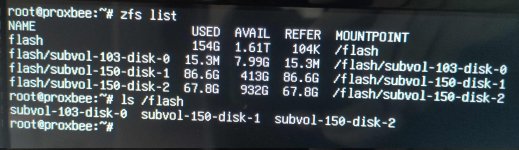
zfs list.jpg

I think this confirms that the drive is functional---something is wrong with the mounting of the drive into Proxmox at boot.

Any idea how to fix this without losing the subvolume mount points or their data?
 
Do a normal reboot after deleting the unit and see if zfs list still shows it. It might get auto imported.
 
ok. just to clarify this out a bit----if I delete the unit file and boot up Proxmox without the 2TB problem drive mounted-----should I then be able to re-add the 2TB nvme drive to the database storage without damaging the subvolume mountpoints that LXC-smb server is configured to have mountpoints to?
 
Ok...so I tried deleting the unit file and rebooting Proxmox with a normal boot. The boot screen passed by without showing any obvious errors and went directly to the Proxmox shell, showing the correct IP address and asking for login.

This screen lasted for about 1 second and then went black.

I tried this twice. Same result.
 
That is very likely unrelated and could have lots of reasons. Can you reach PVE via the browser or SSH?
 
No.
For all of the troubleshooting we were doing earlier, I had the pve box connected to a monitor booted into recovery mode. That is where I observed the straight to black screen.
I just tried reconnecting the pve box to the network. The router does not show any connection, and no response when I ping the pve host.
 
Hmm. I don't see a relation to the data disk and without any way to run commands it's kinda hard to troubleshoot. I suppose you could try to rescue boot or boot another kernel. Do you use any kind of passthrough?
 
I can run commands in recovery mode...
At this point, maybe it is easier to just reinstall Proxmox?

Is there a good way to create backups of Proxmox config files from the recovery mode CLI? I have backups for the VMs and LXCs, and the data on the 2TB drive is intact.

I would need:
1. pve networking config
2. any data stored on the local host
3. some way to remount the 2TB drive from the datacenter without destroying the subvolume mountpoints
4. maybe somethings else?
 
rescue boot does the same thing---boots to login then goes black almost immediately
yes- the Intel iGPU is passed through to a VM using "intel_iommu=on"
 
That would explain your screen blacking out. Disable virtualization in the UEFI. It might stop that. Don't pass your only GPU exclusively to a guest.
 
Ok. I tried:

-boot to recovery mode
-remove "intel_iommu=on" from /etc/default/grub
-# update-grub
-reboot, normal boot

Same result. Boots to login screen, then immediately goes black.

-insert live boot usb
-boot to proxmox rescue boot

Same result. Boots to login screen, then immediately goes black.
 
Proxmox boots, then immediately crashes. The PC does not turn off, it stays running. Recovery mode is functional, rescue boot is not.

Is there a way to disable "start at boot" for the VMs and LXCs from the recovery mode CLI?

That way I could isolate the pve host, see if the issue is cause by a malfunctioning VM.
 
zfs list shows the same as in post #23 (immediately after zpool import flash in recovery mode)

Frustratingly, I am still unable to ping or reach the pve host via browser. There is no recognition of the pve host by the router, all this even though hostname -I indicates the expected IP address.
 
That's good. It means the pool was imported automatically. What's pvesm status say? As for the connectivity let's start with ip a and systemctl status pve-cluster pveproxy.
 
Last edited:
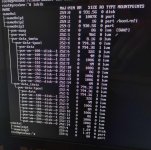
#lsblkin normal boot shows the VMs

lsblk normal boot.jpg

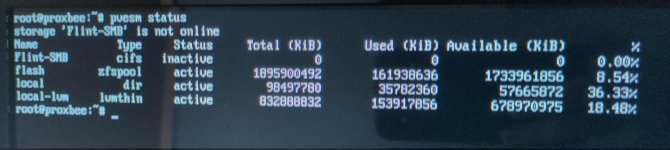
Flint-SMB is the network smb share. Probably shows offline because the PVE box is disconnected from the network. (monitor and router are far apart)

# pvesm status
pvesm status.jpg

ip ashows the primary bridge vmbr0 as UP and the IP address is as expected
systemctl status pve-cluster pveproxy shows all listed parameters as enabled and active (running)