Proxmox 8.4 soon EOL, Do i NEED Px Backup Server?

nadirian

New Member
Apr 29, 2026
10
2
3
Hello, first time post, I hope im at the same spot, and that my question hasnt been asked before :).

So i got an message about 8.4 being EOL soon, and that i should upgrade soon.
So i read the guide, which suggests a "Co-installed Proxmox Backup Server". I understand that i need backups, which i do on a separate machine.
Every sunday i take a snapshot of the vms i have.

Anyway, do i need to get a backup server? I dont have a second machine available, i only do some selfhosting at home.
I installed my proxmox using the proxmox iso, so there "should be no issues" as ive understood..
I for sure can yolo everything and upgrade, but Id rather be "as safe as possible". But i do not have the possibility to setup a backup server.
 
Welcome, @nadirian
Every sunday i take a snapshot of the vms i have.

A snapshot is not a backup.
I.e., a snapshot is not sufficient to save data. If you need your data, you must have backups.

Anyway, do i need to get a backup server?

There are more than one way to create backups. Proxmox Backup Server is one of them and it's a good solution.

I dont have a second machine available,

Ideally, Proxmox Backup Server is a separate physical machine. But it can also be installed in the same physical machine in which Proxmox Virtual Environment is installed. Inside PVE or as one of the virtual machines in this PVE.

I installed my proxmox using the proxmox iso, so there "should be no issues" as ive understood..

Sh*t happens ;-).

I for sure can yolo everything and upgrade, but Id rather be "as safe as possible".

That's the approach I like :).

But i do not have the possibility to setup a backup server.

You do have, probably. Not necessarily as a separate physical machine.
A disk (internal or external) which isn't used by PVE is needed.
And a piece of software.

Have a read: https://pbs.proxmox.com/docs/index.html
 
Last edited:
  • Like
Reactions: Johannes S
Welcome, @nadirian


A snapshot is not a backup.
I.e., a snapshot is not sufficient to save data. If you need your data, you must have backups.


There are more than one way to create backups. Proxmox Backup Server is one of them and it's a good solution.


Ideally, Proxmox Backup Server is a separate physical machine. But it can also be installed in the same physical machine in which Proxmox Virtual Environment is installed. Inside PVE or as one of the virtual machines in this PVE.


Sh*t happens ;-).


That's the approach I like :).


You do have, probably. Not necessarily as a separate physical machine.
A disk (internal or external) which isn't used by PVE is needed.
And a piece of software.

Have a read: https://pbs.proxmox.com/docs/index.html

Hello, and thank you so much!

I tried to read up on PBS yesterday... I couldnt quite figure out if "This is a full blown enterprise large system" or if its simply "Run this in docker and point to a NFS-share and youre good to go!" ...
Also, the VMs and LXCs i have, its not the end of the world if they go corrupt, but it would make my home network happier if they didnt (the people in my home :D )

And yes, shit happens. :) So thats why i hopped on to this forum to check a few stuffs :).

I got a few more warns and fails on the pve8to9-script,


Code:
WARN: Removable bootloader found at '/boot/efi/EFI/BOOT/BOOTX64.efi', but GRUB packages not set up to update it!
Run the following command:
echo 'grub-efi-amd64 grub2/force_efi_extra_removable boolean true' | debconf-set-selections -v -u
Then reinstall GRUB with 'apt install --reinstall grub-efi-amd64'
FAIL: systemd-boot meta-package installed. This will cause problems on upgrades of other boot-related packages. Remove 'systemd-boot' See https://pve.proxmox.com/wiki/Upgrade_from_8_to_9#sd-boot-warning for more information.
First, i take it that the GRUB-command is tried and evaluated? So i mean, its safe to run? Sadly, i do not understand really what it means, the error.
Second, I surely can remove the systemd-boot package, but how do i check if i use it or not? I tried consulting google and LLM to figure it out, i believe i do not use systemd-boot, but, better safe than sorry? :D

Code:
NOTICE: Starting with PVE 9, autoactivation will be disabled for new LVM/LVM-thin guest volumes. This system has some volumes that still have autoactivation enabled. All volumes with autoactivations reside on local storage, where this normally does not cause any issues.
You can run the following command to disable autoactivation for existing LVM/LVM-thin guest volumes:

    /usr/share/pve-manager/migrations/pve-lvm-disable-autoactivation

Is this also, safe to run? :)

Thank you so much for taking your time to answer me ! :)
 
I tried to read up on PBS yesterday... I couldnt quite figure out if "This is a full blown enterprise large system" or if its simply "Run this in docker and point to a NFS-share and youre good to go!" ...

Both, sort of ;-). I don't know if literally in docker, but in a VM is definitely possible.

I got a few more warns and fails on the pve8to9-script,

I can't reliably answer those questions, sorry.
First read carefully https://pve.proxmox.com/wiki/Upgrade_from_8_to_9

If you can't find answers there, search this Forum for the particular error and warning messages - there are quite many posts with questions (and answers) dealing with doubts during the upgrade.

If you really can't find the solution, you can start another thread. (Don't mix issues in the existing thread :) ).
 
Both, sort of ;-). I don't know if literally in docker, but in a VM is definitely possible.


I can't reliably answer those questions, sorry.
First read carefully https://pve.proxmox.com/wiki/Upgrade_from_8_to_9

If you can't find answers there, search this Forum for the particular error and warning messages - there are quite many posts with questions (and answers) dealing with doubts during the upgrade.

If you really can't find the solution, you can start another thread. (Don't mix issues in the existing thread :) ).
Alright, thank you so much for your time! :) I have a PBS in LXC right now, trying to figure out how to share my /dev/sdb (that is on my proxmox ve) to the PBS (its a separated disk, used for the snapshot dumps that i have)
 
I'll have you all know!
That i installed PBS to do my backups instead of Proxmox doing snapshots (i dont really see the difference, but it feeels better).
And i went through my pve8to9 --full script, and ran all the suggestions that were provided there, then i continued following the wiki https://pve.proxmox.com/wiki/Upgrade_from_8_to_9 , and running by step by step (i werent using the CEPH or the enterprise stuff), and eventually ran apt update + apt dist-upgrade, and ... Now im on 9.1.9 :)
 
@nadirian , great! Congratulations! :)
backups instead of Proxmox doing snapshots (i dont really see the difference, but it feeels better).
A snapshot preserves only the difference between the state in the moment of creating it and the current state.
It is useless if you lose the VM/CT.

Contrary, backups are self-sufficient (of course the software to restore them is needed, but it is easily installable from scratch).

Both should be used, but for different purposes.

A snapshot: before the moment you make some change in the VM, which (i.e. a change) may cause some unpredictable or unwanted effect. You are able to quickly revert to the previous state. Then, if for not very long time (hours) nothing bad happens, you can remove the snapshot.

A backup: for longer preserving. Backups should be scheduled and regularly automatically done (of course you may create an additional manual backup, if you want).

Talking about backups: one must remember that a backup is one thing, but a restore is another thing. In fact, a restore is what matters! :)
So one should test his backups (initially - after setting them - and later with some regularity) to verify he is able to properly restore them.

Now, as you have PBS (and backups), you should do a test restore of some VM. Of course without overwriting a working VM. So select other VMUID for a restored VM. And disable the network interface of this new VM before starting it, so that there's no IP address conflict with the working VM. Log in via the console, change the IP address, enable the network interface, verify that the restored machine basically works.

Another test - without restoring VM - is to browse a backup and restore a few example files from it (they will be downloaded to a local machine, where your browser is). This feature is great when you need to restore some deleted or improperly modified files, without losing the current state of the machine. You can't do it from a snapshot. From a backup - you can.

Good luck!
 
@nadirian , great! Congratulations! :)

A snapshot preserves only the difference between the state in the moment of creating it and the current state.
It is useless if you lose the VM/CT.

Contrary, backups are self-sufficient (of course the software to restore them is needed, but it is easily installable from scratch).

Both should be used, but for different purposes.

A snapshot: before the moment you make some change in the VM, which (i.e. a change) may cause some unpredictable or unwanted effect. You are able to quickly revert to the previous state. Then, if for not very long time (hours) nothing bad happens, you can remove the snapshot.

A backup: for longer preserving. Backups should be scheduled and regularly automatically done (of course you may create an additional manual backup, if you want).

Talking about backups: one must remember that a backup is one thing, but a restore is another thing. In fact, a restore is what matters! :)
So one should test his backups (initially - after setting them - and later with some regularity) to verify he is able to properly restore them.

Now, as you have PBS (and backups), you should do a test restore of some VM. Of course without overwriting a working VM. So select other VMUID for a restored VM. And disable the network interface of this new VM before starting it, so that there's no IP address conflict with the working VM. Log in via the console, change the IP address, enable the network interface, verify that the restored machine basically works.

Another test - without restoring VM - is to browse a backup and restore a few example files from it (they will be downloaded to a local machine, where your browser is). This feature is great when you need to restore some deleted or improperly modified files, without losing the current state of the machine. You can't do it from a snapshot. From a backup - you can.

Good luck!
Hi ! Yes , you're right! Silly of me. I got confused about the size of the backup seemed "same as size of the VM".

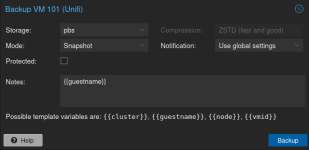
So how do i make a proper backup? I get "Snapshot, Suspend and Stop" as alternatives when i want to "backup" a machine. :)
 
So how do i make a proper backup? I get "Snapshot, Suspend and Stop" as alternatives when i want to "backup" a machine. :)
All of them work they just have different impact on the downtime of said service:
https://pve.proxmox.com/pve-docs/chapter-vzdump.html#_backup_modes

Basically stop mode gives the highest consistency but will introduce a downtime for making the backup. A snapshot mode is exactly the other way round: You have the smallest downtime but a higher (but still small) risc of an inconsistency. The suspend mode isn't recommended for vms anymore but just for backward compatibility. For the details read the pve-docs chapter I referenced above
 
All of them work they just have different impact on the downtime of said service:
https://pve.proxmox.com/pve-docs/chapter-vzdump.html#_backup_modes

Basically stop mode gives the highest consistency but will introduce a downtime for making the backup. A snapshot mode is exactly the other way round: You have the smallest downtime but a higher (but still small) risc of an inconsistency. The suspend mode isn't recommended for vms anymore but just for backward compatibility. For the details read the pve-docs chapter I referenced above
Tried to consult chatgpt; It says that "GO to the VM, chose Backups, Backup Now, choose Snapshot-mode, its the safest recommended option!"... xD
 
Tried to consult chatgpt; It says that "GO to the VM, chose Backups, Backup Now, choose Snapshot-mode, its the safest recommended option!"... xD
Meh. Another example why these "bullshit as a service"-providers are actually not that helpful. Depending on your usecase, regulations and operating systems stop might actually be more safe. Both variants have their own up- and downsides. It boils down to what poison you are willing to drink
 
  • Like
Reactions: UdoB
Meh. Another example why these "bullshit as a service"-providers are actually not that helpful. Depending on your usecase, regulations and operating systems stop might actually be more safe. Both variants have their own up- and downsides. It boils down to what poison you are willing to drink
I only use for home lab :) No production of anything here!
 
Only the first backup.
The next ones in PBS don't occupy so much space, thanks to deduplication.
Skärmbild_20260506_145300.pngHmm This is 2 snapshots + 1"stop" backup of my Unifi-vm... The one today 05-06 14:12, its ran with "Stop" mode. The other 2 are snapshots. All same size?
 
1) These are NOT snapshots. These are backups.
It's not visible in this view, but as you're saying: two of them were created in "snapshot" mode, the third was created in "stop" mode.

2) You are mistaking snapshots and backups. They are very different things. Read the docs :).

3) The size in this view is the same because each of the backups is full - it contains the full machine. But in sum, as I said, in the PBS they don't occupy so much space.
Take a look at the backup "Task" logs in the PVE GUI. You'll see "reused" and percentages etc.
 
  • Like
Reactions: Johannes S
1) These are NOT snapshots. These are backups.
It's not visible in this view, but as you're saying: two of them were created in "snapshot" mode, the third was created in "stop" mode.

2) You are mistaking snapshots and backups. They are very different things. Read the docs :).

3) The size in this view is the same because each of the backups is full - it contains the full machine. But in sum, as I said, in the PBS they don't occupy so much space.
Take a look at the backup "Task" logs in the PVE GUI. You'll see "reused" and percentages etc.
Skärmbild_20260506_172716-1.png
But when you see this, it is hard to believe that the backup is something ELSE than a Snapshot? "Mode = Snapshot, but its not a snapshot, its a backup..." :)
But i agree, when i've worked in XenCenter-environments , snapshots are "incremental" and not a full backup. So yes, this is confusing.
 
@nadirian , great! Congratulations! :)

A snapshot preserves only the difference between the state in the moment of creating it and the current state.
It is useless if you lose the VM/CT.

Contrary, backups are self-sufficient (of course the software to restore them is needed, but it is easily installable from scratch).

Both should be used, but for different purposes.

A snapshot: before the moment you make some change in the VM, which (i.e. a change) may cause some unpredictable or unwanted effect. You are able to quickly revert to the previous state. Then, if for not very long time (hours) nothing bad happens, you can remove the snapshot.

A backup: for longer preserving. Backups should be scheduled and regularly automatically done (of course you may create an additional manual backup, if you want).

Talking about backups: one must remember that a backup is one thing, but a restore is another thing. In fact, a restore is what matters! :)
So one should test his backups (initially - after setting them - and later with some regularity) to verify he is able to properly restore them.

Now, as you have PBS (and backups), you should do a test restore of some VM. Of course without overwriting a working VM. So select other VMUID for a restored VM. And disable the network interface of this new VM before starting it, so that there's no IP address conflict with the working VM. Log in via the console, change the IP address, enable the network interface, verify that the restored machine basically works.

Another test - without restoring VM - is to browse a backup and restore a few example files from it (they will be downloaded to a local machine, where your browser is). This feature is great when you need to restore some deleted or improperly modified files, without losing the current state of the machine. You can't do it from a snapshot. From a backup - you can.

Good luck!
> Another test - without restoring VM - is to browse a backup and restore a few example files from it (they will be downloaded to a local machine, where your browser is). This feature is great when you need to restore some deleted or improperly modified files, without losing the current state of the machine. You can't do it from a snapshot. From a backup - you can

Just to interject, you can restore individual files / directories interactively from a ZFS snapshot. Can even use Midnight Commander as a text-based file manager to cd into the .zfs directory and assist with copying stuff out (F5) without having to revert to the entire snapshot state. The snapshot itself is still immutable so you can't Move things, and only root-access can delete it entirely.

But the overall point is still valid, a snapshot is not a Backup (it's more of a backOUT) and Restores still need to be tested.

I recommend installing PBS on separate hardware 98% so you don't have a single point of failure and your backups are separate. The other 2%, install it as a low-resource VM on another node (quad core, 4GB RAM, virtiofs or connect to shared drive / NAS) so you keep your main hypervisor simple, and upgrading both (separately) is easier. I have 3x unclustered proxmox nodes and each one of them is running a PBS to backup the others; and PBS VM itself is backed up to .tar daily in case PBS needs restoring.
 
PBS hosted on the same pve instance that its serving to back up becomes effectively useless should you brick the host- which I presume is the primary concern this thread is meant to address.

The approach I would suggest in such a case would be use an external drive and use vzdump directly to it as a target store. That way, you can recover from bare metal- just plug in the drive to a fresh pve installation, mount it, and create a backup datastore pointing to it.
 
  • Like
Reactions: Johannes S