Hi all, I've been using Proxmox for a bit over a year and I recently moved to a new house. Apparently while i have been at work, my Proxmox server has been tripping the breaker and restarting. I never had any issues with the host until one day I watched the breaker trip and when i flipped the box back on, my server booted like normal, but then the fans started blasting off like crazy, and never happens on boot. I then went to check the dashboard, but the containers have gray circles where the green circles should be, denoting that they are on. They are still on, and some of them run, like NGINX or uptimekuma. I'm not really sure why its doing this, I've never had any issues like this happen before. I use a Dell Precision T7820 connected to a NetApp DS4246. I can boot into recovery mode for any kernel version and it will work perfectly fine, but any normal kernel will cause the issue with the containers and VM. I will run qm -list which lists my VMS but pct -list hangs and will not list any containers. I tried running update-initramfs -c -k all and update-grub from recovery mode with no avail. I have also tried using a new ISO in debug mode and recovering that way with no avail. I actually encountered a kernel panic at one point but cannot replicate the issue. Does anyone have any solutions I can try?


Proxmox Containers Grayed out
- Thread starter neuterscooter
- Start date
You are using an out of date browser. It may not display this or other websites correctly.
You should upgrade or use an alternative browser.
You should upgrade or use an alternative browser.

my Proxmox server has been tripping the breaker
You obviously have a HW issue related to power draw & apparently do not have an adequate UPS/protection in place.I watched the breaker trip and when i flipped the box back on, my server booted like normal, but then the fans started blasting off like crazy, and never happens on boot
It can be assumed that this sudden host shutdown has caused corruption.
I would first deal with the HW side of things before moving to the SW recovery - as in the current situation this sudden shutdown could happen again, and if that happens during recovery could be catastrophic.
Good luck.
Hi, yeah I'm kind of understanding the issue with my new place, as the outlet was wired for 15A instead of 20A like my old place. I never had power issues before and I have a UPS on the way to resolve any future issues.You obviously have a HW issue related to power draw & apparently do not have an adequate UPS/protection in place.
It can be assumed that this sudden host shutdown has caused corruption.
I would first deal with the HW side of things before moving to the SW recovery - as in the current situation this sudden shutdown could happen again, and if that happens during recovery could be catastrophic.
Good luck.
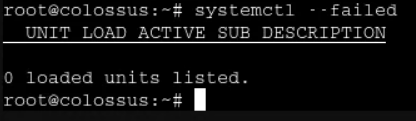
systemctl --failedI'd start with these
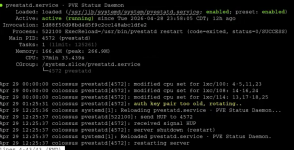
Bash:systemctl --failed systemctl status pve-cluster pvestatd journalctl -f
systemctl status pve-cluster pvestatd
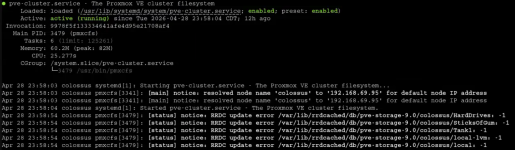
journalctl -f

thx for the commands to troubleshoot, the RRDC update error seems interesting so ill delve into those
hey thanks for a lot of your help, I found an article about the container's statuses not coming online and i restarted some services and now they are visible. Will link it later for anyone who has the issue. Now it is saying that the zfs pool has its I/O suspended, and now that im looking at the DS4246, one of the drives is not lighting up, the issue is that when i go to reseat another one, the one without a light comes on instead. I'm now trying to solve that issue.