

Hello everyone!
My server kept crashing around the same time every month or two. I run unraid as a vm and that's when my automatic parity checks are done so I thought it was some kind of compatibility issue with proxmox and unraid until now. It just happened again so I was going through the system logs, and I found out that just before the crash there were some notice about cron jobs running for root. I never noticed it so I checked it and found out there were these scripts that I never set up myself. It seems like it came with the proxmox installation and one of the hourly jobs says it's doing something like a parity check, and there seems to be many other like it, just references of references of other scripts.
My question is: what are these "factory" cron scripts and is it safe to turn them off? if not, are they all really neccessary?
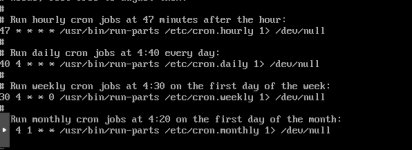
I was about to share one of the actual scripts but on second thought, that didn't seem like a good idea. but in the /etc/cron.hourly script, it references some other script that references some other script, and so on.
the log referencing the cron job I was talking about. read bottom to up, and the [ code ] part is when it stops logging. same pattern every time before crashes:
My server kept crashing around the same time every month or two. I run unraid as a vm and that's when my automatic parity checks are done so I thought it was some kind of compatibility issue with proxmox and unraid until now. It just happened again so I was going through the system logs, and I found out that just before the crash there were some notice about cron jobs running for root. I never noticed it so I checked it and found out there were these scripts that I never set up myself. It seems like it came with the proxmox installation and one of the hourly jobs says it's doing something like a parity check, and there seems to be many other like it, just references of references of other scripts.
My question is: what are these "factory" cron scripts and is it safe to turn them off? if not, are they all really neccessary?
I was about to share one of the actual scripts but on second thought, that didn't seem like a good idea. but in the /etc/cron.hourly script, it references some other script that references some other script, and so on.
the log referencing the cron job I was talking about. read bottom to up, and the [ code ] part is when it stops logging. same pattern every time before crashes:
Code:
Apr 14 16:52:40 node-main smartd[2035]: Device: /dev/sdb [SAT], SMART Usage Attribute: 194 Temperature_Celsius changed from 34 to 35
Apr 14 16:52:40 node-main smartd[2035]: Device: /dev/sdb [SAT], SMART Usage Attribute: 190 Airflow_Temperature_Cel changed from 66 to 65
Apr 14 16:17:01 node-main CRON[1263330]: pam_unix(cron:session): session closed for user root
Apr 14 16:17:01 node-main CRON[1263332]: (root) CMD (cd / && run-parts --report /etc/cron.hourly)
Apr 14 16:17:01 node-main CRON[1263330]: pam_unix(cron:session): session opened for user root(uid=0) by root(uid=0)
Last edited:


