Struggling to Properly Configure Passthrough (I Think?)

Entity5687

New Member
Mar 29, 2026
4
1
3
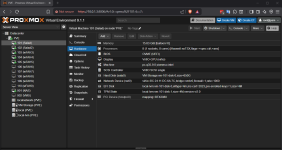
Hi there! I'm brand new to this and trying to figure out how to set up my first homelab. My most immediate goal is to set up a home media server followed by running some Linux instances. I am working on getting ProxMox installed and set up, but think I am making some mistakes and need some support. I'm not sure I even need this stuff, but I think I'd like to have it available unless I don't need it? My immediate objective is to have ProxMox run Jellyfin and use my NAS as the storage system to play from to my TV. I'm not going to use it on other devices at the moment nor do I want any access to this from outside of my home network. However, I will likely want GPU usage for other systems eventually.

The system I am installing this on via a USB stick set up by Rufus is as follows:

  • i7-10700k
  • NVidia GeForce RTX 3070 Ti
  • 32GB DDR4 RAM
  • 2TB M.2 NVMe SSD (Boot Drive)
  • 2TB 3.5" 7200 RPM HDD
  • MSI Z490 Motherboard
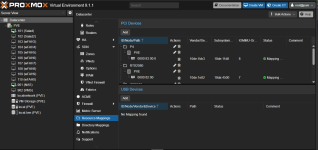
To start off, the GUI install path failed and the first term I saw was nvidiafb, I searched it and installed using the Terminal UI but pressed "e" to add teh nomodeset parameter and it installed successfully. I then tried to follow multiple guides online and it seems that I can successfully get the IOMMU configuration but it fails when I check remapping. The issue I am receiving is:

[0.140478] x2apic: IRQ remapping doesn't support X2APIC mode

Here are the steps I've taken thus far:

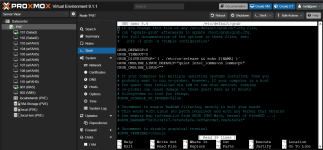
nano /etc/default/grub
GRUB_CMDLINE_LINUX_DEFAULT="quiet intel_iommu=on iommu=pt pcie_acs_override=downstream,multifunction nofb nomodeset video=vesafb:off,efifb:off"

Run update-grub

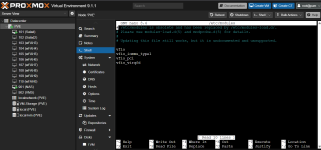
nano /etc/modules
vfio
vfio_iommu_type1
vfio_pci
vfio_virqfd

nano /etc/modprobe.d/iommu_unsafe_interrupts.conf
options vfio_iommu_type1 allow_unsafe_interrupts=1

nano /etc/modprobe.d/kvm.conf
options kvm ignore_msrs=1

nano /etc/modprobe.d/blacklist.conf
blacklist radeon
blacklist nouveau
blacklist nvidia
blacklist nvidiafb

lspci -v (used to capture the GPU numbers)
lspci -n -s
nano /etc/modprobe.d/vfio.conf
options vfio-pci ids=10de:2208,10de:1aef disable_vga=1

update-initramfs -u

If I royally screwed up something here, I can reinstall and start fresh as I have nothing running here yet. Haven't made it past this part sadly.
 
Hi Entity5678,

Welcome to the forums!

Did you have a look in the BIOS/firmware of your motherboard? There's a reddit thread discussing a similar motherboard, and closer to home there's https://forum.proxmox.com/threads/pci-passthrough-iommu-not-enabling.139476/

Before going through with the setup as-is, you might want to check the idle power requirements of especially the GPU if the system is intended to run 24/7.

I recall that using containers instead of VMs, you can easier share resources such as GPUs without pinning them to a specific IOMMU, so that might be a consideration as well.

Good luck!
 
  • Like
Reactions: Entity5687
GRUB_CMDLINE_LINUX_DEFAULT="quiet intel_iommu=on iommu=pt pcie_acs_override=downstream,multifunction nofb nomodeset video=vesafb:off,efifb:off"
Is your Proxmox using GRUB or systemd-boot? Check with the Proxmox manual: https://pve.proxmox.com/pve-docs/pve-admin-guide.html#sysboot
intel_iommu=on is not necessary for some time. video=vesafb:off,efifb:off is wrong and therefore does nothing. Even if you change it to be correct, it does noting on Proxmox.
pcie_acs_override=downstream,multifunction makes the passthrough insecure. Do you really need it?
nofb nomodeset makes me think that this is the only GPU in the system and it is used during boot? If so, and the GPU does not reset properly, then you need a different work-around: https://forum.proxmox.com/threads/problem-with-gpu-passthrough.55918/post-478351 . This makes troubleshooting much harder though as you lose the Proxmox host console and boot logging.
vfio
vfio_iommu_type1
vfio_pci
vfio_virqfd
vfio_virqfd no longer exists. See the current Proxmox manual: https://pve.proxmox.com/pve-docs/pve-admin-guide.html#qm_pci_passthroughnano /etc/modprobe.d/iommu_unsafe_interrupts.conf
blacklist radeon
blacklist nouveau
blacklist nvidia
blacklist nvidiafb

options vfio-pci ids=10de:2208,10de:1aef disable_vga=1
Instead of generic blacklisting irrelevant modules, use only the vfio-pci binding. You might need a softdep to make sure vfio-pci loads before the actual driver. You might also want to passthrough a USB controller to the VM if you want to use it as a full graphical desktop.
If I royally screwed up something here, I can reinstall and start fresh as I have nothing running here yet. Haven't made it past this part sadly.
GPU passthrough to a VM is often difficult and sometimes just does not work. As suggested in the previous reply, maybe running your Linux software in containers is easier. Lots of threads about those on this forum, but then you should not do all the steps above for PCI(e) passthrough) that you did. I have no experience with NVidia as they made GPU passthrough unnecessarily hard in the past (and they didn't provide an open-source driver).
 
  • Like
Reactions: Entity5687
Is your Proxmox using GRUB or systemd-boot? Check with the Proxmox manual: https://pve.proxmox.com/pve-docs/pve-admin-guide.html#sysboot
intel_iommu=on is not necessary for some time. video=vesafb:off,efifb:off is wrong and therefore does nothing. Even if you change it to be correct, it does noting on Proxmox.
pcie_acs_override=downstream,multifunction makes the passthrough insecure. Do you really need it?
nofb nomodeset makes me think that this is the only GPU in the system and it is used during boot? If so, and the GPU does not reset properly, then you need a different work-around: https://forum.proxmox.com/threads/problem-with-gpu-passthrough.55918/post-478351 . This makes troubleshooting much harder though as you lose the Proxmox host console and boot logging.

vfio_virqfd no longer exists. See the current Proxmox manual: https://pve.proxmox.com/pve-docs/pve-admin-guide.html#qm_pci_passthroughnano /etc/modprobe.d/iommu_unsafe_interrupts.conf

Instead of generic blacklisting irrelevant modules, use only the vfio-pci binding. You might need a softdep to make sure vfio-pci loads before the actual driver. You might also want to passthrough a USB controller to the VM if you want to use it as a full graphical desktop.

GPU passthrough to a VM is often difficult and sometimes just does not work. As suggested in the previous reply, maybe running your Linux software in containers is easier. Lots of threads about those on this forum, but then you should not do all the steps above for PCI(e) passthrough) that you did. I have no experience with NVidia as they made GPU passthrough unnecessarily hard in the past (and they didn't provide an open-source driver).
Thank you! I was following a YouTube video and it clearly did not work. I appreciate your help here!
 
Hi Entity5678,

Welcome to the forums!

Did you have a look in the BIOS/firmware of your motherboard? There's a reddit thread discussing a similar motherboard, and closer to home there's https://forum.proxmox.com/threads/pci-passthrough-iommu-not-enabling.139476/

Before going through with the setup as-is, you might want to check the idle power requirements of especially the GPU if the system is intended to run 24/7.

I recall that using containers instead of VMs, you can easier share resources such as GPUs without pinning them to a specific IOMMU, so that might be a consideration as well.

Good luck!
Thank you! This set me on the right path. Solved the issue, solution of which I will post below.
 
Hello - I first want to thank you both tremendously for your feedback, support and insight. I have found the solution and it was rather simple, but something I had overlooked. My motherboard is the MSI Z490-A Pro. There were motherboard configurations that were preventing this functionality from being enabled out of the box. In the event that someone else comes across this for the same motherboard, here is the solution:

  • Enable VT-x: Enter Bios, OC Settings, CPU Features, set Intel Virtualization Tech to Enable.
  • Enable VT-d: Enter BIOS, OC Settings, CPU Features, set Intel VT-d Tech to Enable.
  • Enable SR-IOV Support: Enter BIOS, Settings, Advanced, PCIe Sub-system, SR-IOV Support to Enable.
Not exactly sure which one corrected this, but by enabling these and completing a fresh install, all is functioning as expected now!

Thread can be marked as resolved.

Thank you again to both who supported in answering!
 
  • Like
Reactions: wbk