

I recently made a new installation of PVE (v9.1.6), PBS (v4.1.5) and PDM (v1.0.3) all on the same node, where PVE is baremetal on a zfs root filesystem and the rest are apt installs on top of PVE with no enterprise repos. I would like to use PDM to see the status of my 3 datastores in PBS. The remotes are reachable, but the datastore list shows the remote instead of the datastores:
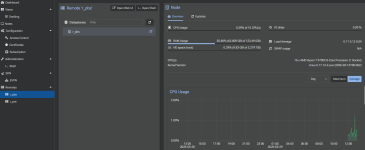
As far as access controls go, I created the following users and tokens, and gave the tokens to PDM:
PVE) user: r_pve@pam, API token name: r_pdm, both have permission role PVEAuditor on /
PBS) user: r_pve@pbs, API token name: r_pdm, both have permission role Audit on /
PDM's connection is via localhost:8006 and localhost:8007.
The path of the datastores is datastore/<name of datastore>, with a few nested namespaces and some backups already in there.
I can see all other info about the nodes and their guests. I figured PDM might need the PBS user to be in the pam realm, but the PBS webGUI doesn't offer an option to use a different realm than pbs. Perhaps I came across a bug?
As far as access controls go, I created the following users and tokens, and gave the tokens to PDM:
PVE) user: r_pve@pam, API token name: r_pdm, both have permission role PVEAuditor on /
PBS) user: r_pve@pbs, API token name: r_pdm, both have permission role Audit on /
PDM's connection is via localhost:8006 and localhost:8007.
The path of the datastores is datastore/<name of datastore>, with a few nested namespaces and some backups already in there.
I can see all other info about the nodes and their guests. I figured PDM might need the PBS user to be in the pam realm, but the PBS webGUI doesn't offer an option to use a different realm than pbs. Perhaps I came across a bug?
Last edited: