

Hi,
I have a Debian Trixie PostgreSQL 17.9 VM running on PVE 9.1.6.
PVE started running a scheduled backup to PBS, which after slowing down and then failing caused I/O stalls and errors to be observed by the PG VM. The other VMs did not experience the stall.
I tried to collect as much information as possible, but I don't get why this happened given the very small load on the server at that time. All VMs have very little load at night, and the PVE backup job and a pgbackrest incremental backup job within the VM are the main resource consumer. Also, squinting at the logs, it looks like writes in the VM may slow down when the PBS backup slows down.
The timeline is as follows:
The PVE machine has two disks, a SAMSUNG MZQL23T8HCLS-00A07 and a Micron_7300_MTFDHBE3T8TDF, which run the ZFS mirror. It's running on PVE 9.1.6 with Kernel 6.17.13-2-pve and zfs-2.4.0-pve1. The PVE machine has a dedicated 1 Gbit/s connection, while the PBS machine only has 100 Mbit/s down, 20 Mbit/s up.
Backup job logs:
PostgreSQL logs: https://gist.github.com/paolobarbolini/158f82b95632c5763305ebfc9ca34b2c
dmesg on the VM also shows the problem: https://gist.github.com/paolobarbolini/c0a49efd8cab4bb348e60ef847330797
No dmesg logs around that date on the PVE host.
zpool status shows no errors (zpool upgrade message is caused by the recent ZFS 2.3 -> ZFS 2.4 upgrade).
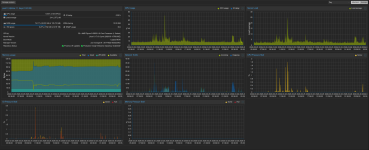
Host graphs (time in GMT):
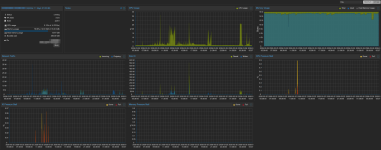
VM graphs (time in GMT):
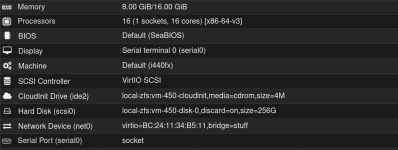
VM hardware config:
Happy to provide more information.
Thanks,
Paolo
I have a Debian Trixie PostgreSQL 17.9 VM running on PVE 9.1.6.
PVE started running a scheduled backup to PBS, which after slowing down and then failing caused I/O stalls and errors to be observed by the PG VM. The other VMs did not experience the stall.
I tried to collect as much information as possible, but I don't get why this happened given the very small load on the server at that time. All VMs have very little load at night, and the PVE backup job and a pgbackrest incremental backup job within the VM are the main resource consumer. Also, squinting at the logs, it looks like writes in the VM may slow down when the PBS backup slows down.
The timeline is as follows:
- 02:30:02 a scheduled backup job started taking the backup of the PG VM on PBS. The PVE machine and the PBS machine are talking to each other via Wireguard.
- 02:39:25 the application started experiencing timeouts accessing the PostgreSQL server.
- 02:40:51 two commits in the postgresql VM have just taken 48s to run. Other simple write queries have also taken 45-80s to finish
- 02:41:08 the application timeouts went away.
- 02:43:30 the PBS machine completely lost internet connectivity.
- 03:00:42 the backup job failed. At that exact same time the PostgreSQL process experienced an fdatasync failure and crashed. It recovered successfully afterwards.
- 03:00:42 PVE tries to backup the rest of the VMs, but fails after 10s with error
command 'backup' failed - backup connect failed: command error: client error (Connect)
The PVE machine has two disks, a SAMSUNG MZQL23T8HCLS-00A07 and a Micron_7300_MTFDHBE3T8TDF, which run the ZFS mirror. It's running on PVE 9.1.6 with Kernel 6.17.13-2-pve and zfs-2.4.0-pve1. The PVE machine has a dedicated 1 Gbit/s connection, while the PBS machine only has 100 Mbit/s down, 20 Mbit/s up.
Backup job logs:
Code:
2026-03-26 02:30:02 INFO: Starting Backup of VM 450 (qemu)
2026-03-26 02:30:02 INFO: status = running
2026-03-26 02:30:02 INFO: VM Name: REDACTED
2026-03-26 02:30:02 INFO: include disk 'scsi0' 'local-zfs:vm-450-disk-0' 256G
2026-03-26 02:30:02 INFO: backup mode: snapshot
2026-03-26 02:30:02 INFO: bandwidth limit: 409600 KiB/s
2026-03-26 02:30:02 INFO: ionice priority: 7
2026-03-26 02:30:02 INFO: creating Proxmox Backup Server archive 'vm/450/2026-03-26T02:30:02Z'
2026-03-26 02:30:02 INFO: issuing guest-agent 'fs-freeze' command
2026-03-26 02:30:05 INFO: issuing guest-agent 'fs-thaw' command
2026-03-26 02:30:05 INFO: started backup task '4ba9b6b9-2c3a-431e-81d5-5631d5c9202e'
2026-03-26 02:30:05 INFO: resuming VM again
2026-03-26 02:30:05 INFO: scsi0: dirty-bitmap status: OK (45.4 GiB of 256.0 GiB dirty)
2026-03-26 02:30:05 INFO: using fast incremental mode (dirty-bitmap), 45.4 GiB dirty of 256.0 GiB total
2026-03-26 02:30:08 INFO:   0% (240.0 MiB of 45.4 GiB) in 3s, read: 80.0 MiB/s, write: 72.0 MiB/s
2026-03-26 02:30:23 INFO:   1% (508.0 MiB of 45.4 GiB) in 18s, read: 17.9 MiB/s, write: 17.9 MiB/s
2026-03-26 02:30:38 INFO:   2% (1020.0 MiB of 45.4 GiB) in 33s, read: 34.1 MiB/s, write: 23.5 MiB/s
2026-03-26 02:30:56 INFO:   3% (1.4 GiB of 45.4 GiB) in 51s, read: 21.6 MiB/s, write: 21.1 MiB/s
2026-03-26 02:31:07 INFO:   4% (1.9 GiB of 45.4 GiB) in 1m 2s, read: 48.0 MiB/s, write: 31.6 MiB/s
2026-03-26 02:31:16 INFO:   5% (2.4 GiB of 45.4 GiB) in 1m 11s, read: 52.4 MiB/s, write: 43.6 MiB/s
2026-03-26 02:31:23 INFO:   6% (2.7 GiB of 45.4 GiB) in 1m 18s, read: 56.6 MiB/s, write: 42.9 MiB/s
2026-03-26 02:31:31 INFO:   7% (3.2 GiB of 45.4 GiB) in 1m 26s, read: 59.5 MiB/s, write: 31.5 MiB/s
2026-03-26 02:31:41 INFO:   8% (3.7 GiB of 45.4 GiB) in 1m 36s, read: 52.8 MiB/s, write: 48.4 MiB/s
2026-03-26 02:31:50 INFO:   9% (4.2 GiB of 45.4 GiB) in 1m 45s, read: 52.9 MiB/s, write: 52.9 MiB/s
2026-03-26 02:31:59 INFO:  10% (4.7 GiB of 45.4 GiB) in 1m 54s, read: 57.8 MiB/s, write: 56.4 MiB/s
2026-03-26 02:32:06 INFO:  11% (5.1 GiB of 45.4 GiB) in 2m 1s, read: 60.6 MiB/s, write: 56.0 MiB/s
2026-03-26 02:32:14 INFO:  12% (5.5 GiB of 45.4 GiB) in 2m 9s, read: 46.5 MiB/s, write: 41.0 MiB/s
2026-03-26 02:32:22 INFO:  13% (6.0 GiB of 45.4 GiB) in 2m 17s, read: 70.0 MiB/s, write: 68.5 MiB/s
2026-03-26 02:32:30 INFO:  14% (6.4 GiB of 45.4 GiB) in 2m 25s, read: 48.0 MiB/s, write: 42.0 MiB/s
2026-03-26 02:32:42 INFO:  15% (6.9 GiB of 45.4 GiB) in 2m 37s, read: 39.7 MiB/s, write: 18.7 MiB/s
2026-03-26 02:32:52 INFO:  16% (7.3 GiB of 45.4 GiB) in 2m 47s, read: 42.0 MiB/s, write: 22.4 MiB/s
2026-03-26 02:32:59 INFO:  17% (7.8 GiB of 45.4 GiB) in 2m 54s, read: 77.7 MiB/s, write: 40.0 MiB/s
2026-03-26 02:33:29 INFO:  18% (8.2 GiB of 45.4 GiB) in 3m 24s, read: 14.9 MiB/s, write: 8.8 MiB/s
2026-03-26 02:33:43 INFO:  19% (8.8 GiB of 45.4 GiB) in 3m 38s, read: 40.9 MiB/s, write: 19.1 MiB/s
2026-03-26 02:33:52 INFO:  20% (9.2 GiB of 45.4 GiB) in 3m 47s, read: 47.6 MiB/s, write: 22.7 MiB/s
2026-03-26 02:34:02 INFO:  21% (9.6 GiB of 45.4 GiB) in 3m 57s, read: 39.6 MiB/s, write: 15.2 MiB/s
2026-03-26 02:34:13 INFO:  22% (10.1 GiB of 45.4 GiB) in 4m 8s, read: 44.4 MiB/s, write: 19.3 MiB/s
2026-03-26 02:34:26 INFO:  23% (10.7 GiB of 45.4 GiB) in 4m 21s, read: 45.5 MiB/s, write: 21.8 MiB/s
2026-03-26 02:34:30 INFO:  24% (10.9 GiB of 45.4 GiB) in 4m 25s, read: 61.0 MiB/s, write: 39.0 MiB/s
2026-03-26 02:34:44 INFO:  25% (11.4 GiB of 45.4 GiB) in 4m 39s, read: 36.6 MiB/s, write: 17.4 MiB/s
2026-03-26 02:34:51 INFO:  26% (11.8 GiB of 45.4 GiB) in 4m 46s, read: 62.3 MiB/s, write: 28.0 MiB/s
2026-03-26 02:35:00 INFO:  27% (12.3 GiB of 45.4 GiB) in 4m 55s, read: 56.4 MiB/s, write: 28.9 MiB/s
2026-03-26 02:35:13 INFO:  28% (12.8 GiB of 45.4 GiB) in 5m 8s, read: 38.8 MiB/s, write: 20.9 MiB/s
2026-03-26 02:35:34 INFO:  29% (13.2 GiB of 45.4 GiB) in 5m 29s, read: 20.2 MiB/s, write: 20.2 MiB/s
2026-03-26 02:35:58 INFO:  30% (13.7 GiB of 45.4 GiB) in 5m 53s, read: 22.2 MiB/s, write: 22.2 MiB/s
2026-03-26 02:36:20 INFO:  31% (14.1 GiB of 45.4 GiB) in 6m 15s, read: 19.1 MiB/s, write: 17.3 MiB/s
2026-03-26 02:36:36 INFO:  32% (14.6 GiB of 45.4 GiB) in 6m 31s, read: 27.8 MiB/s, write: 12.0 MiB/s
2026-03-26 02:36:44 INFO:  33% (15.0 GiB of 45.4 GiB) in 6m 39s, read: 57.5 MiB/s, write: 56.0 MiB/s
2026-03-26 02:37:00 INFO:  34% (15.5 GiB of 45.4 GiB) in 6m 55s, read: 32.5 MiB/s, write: 31.8 MiB/s
2026-03-26 02:37:10 INFO:  35% (15.9 GiB of 45.4 GiB) in 7m 5s, read: 35.6 MiB/s, write: 23.6 MiB/s
2026-03-26 02:37:28 INFO:  36% (16.4 GiB of 45.4 GiB) in 7m 23s, read: 28.7 MiB/s, write: 27.6 MiB/s
2026-03-26 02:37:48 INFO:  37% (16.8 GiB of 45.4 GiB) in 7m 43s, read: 22.2 MiB/s, write: 22.2 MiB/s
2026-03-26 02:38:05 INFO:  38% (17.4 GiB of 45.4 GiB) in 8m, read: 33.6 MiB/s, write: 33.6 MiB/s
2026-03-26 02:40:53 INFO:  39% (17.8 GiB of 45.4 GiB) in 10m 48s, read: 2.5 MiB/s, write: 2.5 MiB/s
2026-03-26 02:41:12 INFO:  40% (18.2 GiB of 45.4 GiB) in 11m 7s, read: 21.7 MiB/s, write: 21.7 MiB/s
2026-03-26 02:41:32 INFO:  41% (18.7 GiB of 45.4 GiB) in 11m 27s, read: 27.8 MiB/s, write: 27.8 MiB/s
2026-03-26 02:41:45 INFO:  42% (19.1 GiB of 45.4 GiB) in 11m 40s, read: 25.5 MiB/s, write: 25.5 MiB/s
2026-03-26 02:43:22 INFO:  43% (19.6 GiB of 45.4 GiB) in 13m 17s, read: 5.5 MiB/s, write: 5.5 MiB/s
2026-03-26 03:00:42 INFO:  43% (19.9 GiB of 45.4 GiB) in 30m 37s, read: 295.4 KiB/s, write: 295.4 KiB/s
2026-03-26 03:00:42 ERROR: backup write data failed: command error: protocol canceled
2026-03-26 03:00:42 INFO: aborting backup job
2026-03-26 03:00:42 INFO: resuming VM again
2026-03-26 03:00:42 ERROR: Backup of VM 450 failed - backup write data failed: command error: protocol canceled
PostgreSQL logs: https://gist.github.com/paolobarbolini/158f82b95632c5763305ebfc9ca34b2c
dmesg on the VM also shows the problem: https://gist.github.com/paolobarbolini/c0a49efd8cab4bb348e60ef847330797
No dmesg logs around that date on the PVE host.
zpool status shows no errors (zpool upgrade message is caused by the recent ZFS 2.3 -> ZFS 2.4 upgrade).
Code:
zpool status -v
  pool: rpool
 state: ONLINE
status: Some supported and requested features are not enabled on the pool.
        The pool can still be used, but some features are unavailable.
action: Enable all features using 'zpool upgrade'. Once this is done,
        the pool may no longer be accessible by software that does not support
        the features. See zpool-features(7) for details.
  scan: scrub repaired 0B in 00:13:17 with 0 errors on Thu Mar 26 03:57:59 2026
config:

        NAME           STATE     READ WRITE CKSUM
        rpool          ONLINE       0     0     0
          mirror-0     ONLINE       0     0     0
            nvme0n1p3  ONLINE       0     0     0
            nvme1n1p3  ONLINE       0     0     0

errors: No known data errors
Host graphs (time in GMT):
VM graphs (time in GMT):
VM hardware config:
Happy to provide more information.
Thanks,
Paolo
Last edited:


