[SOLVED] Get my VM back

digamman

New Member
Nov 11, 2025
3
1
3
Hi this evening my network port have burn, so my Proxmox server wont connect anymore even if i use a usb Ethernet adapter.

But after using another disk ( a brand new one) i managed to install proxmox back on the machine using the famous usb adapter.

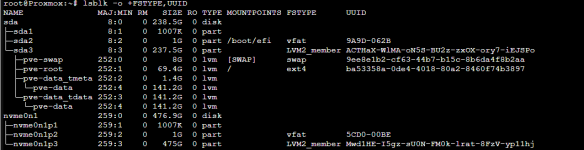
now i want to get back my vm's and i dont really know how to proceed, i see the disk and the partitions btw
1773430988777.png

so the new disk is sda and the old one nvme0n1

what is the procedure to mount my old nvme0n1p3 to get backups and all the rest ?
 
Hi digamman,

Welcome to the forums!

That must have been quite a scare, good that your storage survived!

Some questions:

  • Why did you need to reinstall Proxmox after losing the network?
  • I guess your original install was on LVM on nvme0n1p3
    • Do you have experience with LVM?
    • If not:
      • run pvs to list physical devices (should show nvme0n1p3 and sda3
      • run vgchange -ay , and lvchange -ay to bring your previous installation 'online'
        • seeing it is a default install, it could be there is a namespace collision, with LVM refusing to activate the volumes. It may become necessary to rename something
      • run lvs to list logical volumes , on which the filesystems are created. I expect them to be named pve-root and pve-data; you can find the device nodes in /dev/mapper/....
      • mount your old root mount /dev/mapper/pve-root /mnt/pve_old , and the same for pve-data on another mount point
  • All configuration is in /etc/pve; so after copying things from /mnt/pve_old/etc/pve/ to the new /etc/pve, your configuration is back. Depending on the situation, you can copy whole files or need to copy specific text from one file to another
Easiest is if you can boot straight into your old installation of course! If
  • your old installation is still bootable
  • but (only) does not have networking
  • and your new installation does have network
then you can compare the network settings in the new /etc/network/interfaces with that of your old /mnt/pve_old/etc/network/interfaces

If you need more help, please provide the output of
Code:
# pvscan && vgscan && lvscan
# vgchange -ay && lvchange -ay
# pvs && vgs && lvs
Please also use the editor to mark up the output instead of pasting screenshots. Screenshots are not accessible for indexing, and won't help the next person with the same problem. It is also inconvenient for people trying to help, as they have to manually type details from the screenshot instead of copy/paste the text.

You can format such output as code with the buttons on top; </> opens a popup where you can paste the output of the commands.

Good luck solving the puzzle!
 
  • Like
Reactions: Onslow and UdoB
Why did you need to reinstall Proxmox after losing the network?
Because nothing was accesible on the server, it boots and screen goes black when arriving at login page (no signal)

similar to this case but no gpu from my side only intel igpu

https://forum.proxmox.com/threads/proxmox-crash-right-after-displaying-login-screen.107713/

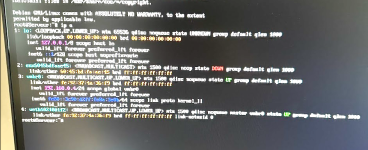
After searching a little it seems that it completely lost is interface cfg in nano etc interfaces,

enven the IP has change but for a strange one :/ 192.168.0.6 the previous one was 192.168.0.4 so it's not the job of the dhcp.

I'll first try to recover the main disk and after i'll trys your suggestion
 
  • Like
Reactions: wbk
Ok found the issue, as the eth interface disapear, my network cfg was wrong, so i change the eth interface in etc network interfaces with the right one and everything boot upd like a charm :)

1773475165619.png