

can't open '/sys/fs/cgroup/qemu.slice/2113.scope//memory.current' - No such file or directory (500)
- Thread starter RootS3c
- Start date
You are using an out of date browser. It may not display this or other websites correctly.
You should upgrade or use an alternative browser.
You should upgrade or use an alternative browser.

When I apply this patch
https://git.proxmox.com/?p=qemu-server.git;a=commitdiff;h=61d76518025f0ef3f7c5e6525af0f68e11bfee60
it works on qm list but doesnt work in proxmox manager it stucks with same error
https://git.proxmox.com/?p=qemu-server.git;a=commitdiff;h=61d76518025f0ef3f7c5e6525af0f68e11bfee60
it works on qm list but doesnt work in proxmox manager it stucks with same error

the patch is already applied, so it will be included in the next bump for qemu-server
when you manually apply patches you have to reload/restart pveproxy & pvedaemon, so they load the perl libraries againWhen I apply this patch
https://git.proxmox.com/?p=qemu-server.git;a=commitdiff;h=61d76518025f0ef3f7c5e6525af0f68e11bfee60
it works on qm list but doesnt work in proxmox manager it stucks with same error
We encountered this during a restore of a VM with Veeam. All the other VMs became with status unknown in the GUI. qm list was failing as wellthe patch is already applied, so it will be included in the next bump for qemu-server
when you manually apply patches you have to reload/restart pveproxy & pvedaemon, so they load the perl libraries again
After applying the fix, the error is now reported only for that vmid, and the rest of the vms listed correctly in both GUI and qm list.
However we are seeing these new errors
Code:
Mar 05 11:37:37 tst01pvepoc01 pvestatd[62833]: qemu status update error: can't open '/sys/fs/cgroup/qemu.slice/122.scope//memory.current' - No such file or directory
Mar 05 11:37:45 tst01pvepoc01 pvedaemon[124152]: unable to get memory stat for 122 - can't open '/sys/fs/cgroup/qemu.slice/122.scope//memory.current' - No such file or directory
Mar 05 11:37:45 tst01pvepoc01 pvedaemon[124152]: Use of uninitialized value in multiplication (*) at /usr/share/perl5/PVE/QemuServer.pm line 2599.
Mar 05 11:37:45 tst01pvepoc01 pvedaemon[124152]: Use of uninitialized value in multiplication (*) at /usr/share/perl5/PVE/QemuServer.pm line 2600.
Mar 05 11:37:45 tst01pvepoc01 pvedaemon[124152]: Use of uninitialized value in multiplication (*) at /usr/share/perl5/PVE/QemuServer.pm line 2601.
Mar 05 11:37:45 tst01pvepoc01 pvedaemon[124152]: Use of uninitialized value in multiplication (*) at /usr/share/perl5/PVE/QemuServer.pm line 2602.
Mar 05 11:37:45 tst01pvepoc01 pvedaemon[124152]: Use of uninitialized value in multiplication (*) at /usr/share/perl5/PVE/QemuServer.pm line 2603.
Mar 05 11:37:45 tst01pvepoc01 pvedaemon[124152]: Use of uninitialized value in multiplication (*) at /usr/share/perl5/PVE/QemuServer.pm line 2604.We encountered this during a restore of a VM with Veeam. All the other VMs became with status unknown in the GUI. qm list was failing as well
After applying the fix, the error is now reported only for that vmid, and the rest of the vms listed correctly in both GUI and qm list.
However we are seeing these new errors
Code:Mar 05 11:37:37 tst01pvepoc01 pvestatd[62833]: qemu status update error: can't open '/sys/fs/cgroup/qemu.slice/122.scope//memory.current' - No such file or directory Mar 05 11:37:45 tst01pvepoc01 pvedaemon[124152]: unable to get memory stat for 122 - can't open '/sys/fs/cgroup/qemu.slice/122.scope//memory.current' - No such file or directory Mar 05 11:37:45 tst01pvepoc01 pvedaemon[124152]: Use of uninitialized value in multiplication (*) at /usr/share/perl5/PVE/QemuServer.pm line 2599. Mar 05 11:37:45 tst01pvepoc01 pvedaemon[124152]: Use of uninitialized value in multiplication (*) at /usr/share/perl5/PVE/QemuServer.pm line 2600. Mar 05 11:37:45 tst01pvepoc01 pvedaemon[124152]: Use of uninitialized value in multiplication (*) at /usr/share/perl5/PVE/QemuServer.pm line 2601. Mar 05 11:37:45 tst01pvepoc01 pvedaemon[124152]: Use of uninitialized value in multiplication (*) at /usr/share/perl5/PVE/QemuServer.pm line 2602. Mar 05 11:37:45 tst01pvepoc01 pvedaemon[124152]: Use of uninitialized value in multiplication (*) at /usr/share/perl5/PVE/QemuServer.pm line 2603. Mar 05 11:37:45 tst01pvepoc01 pvedaemon[124152]: Use of uninitialized value in multiplication (*) at /usr/share/perl5/PVE/QemuServer.pm line 2604.
We are having the exact same issue restoring from Veeam. Running Proxmox 9.1.6 with the enterprise repository.
Funny thing is this error occurs only on our Dell R7525 hosts with AMD CPUs, and not on our dev servers which are Dell R730 hosts which have Intel CPUs in them.
To work around it I'm having to restore to our dev environment and then I am using Proxmox Datacenter Manager to migrate from the dev cluster to the production cluster.
we have the same problem with Proxmox 9.1.6 and VEEAM 13 on an HPE DL360Gen11 Server
After Veeam restore all VM Guest are appear with an "?"
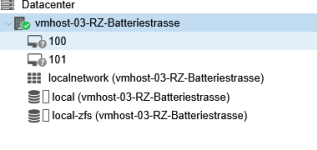
After Veeam restore all VM Guest are appear with an "?"
Last edited:
when will this available?the patch is already applied, so it will be included in the next bump for qemu-server
when you manually apply patches you have to reload/restart pveproxy & pvedaemon, so they load the perl libraries again
We're seeing exactly the same thing when restoring a VMware vm to proxmox using Veeam. Server is a Dell Poweredge R740 with intel CPU's.
After the attempted restore all VM's in the list show with a ?
Veeam restore fails and the restored VM wont start with the same error.
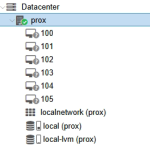
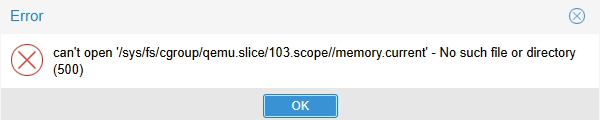
After the attempted restore all VM's in the list show with a ?
Veeam restore fails and the restored VM wont start with the same error.
Yes - I resolved display issues by patching the perl in QemuServer.pm.Proxmox 9.1.4–9.1.6 shows memory.current errors after Veeam restore. Patch exists, but you need to restart pveproxy and pvedaemon after applying. Workarounds: downgrade to 9.1.3, restore on a dev cluster then migrate, or wait for the next qemu-server update. Mostly affects AMD hosts.
Restore still failed with Veeam backups vmware > Prox however. The only way i could get this to work was to upgrade Veaam to version 13 (we were on 12) after which everything worked as it should.
we have manually installed the Proxmox patch and can restore with VEEAM 12.3 to patched Proxmox 9.1.6 on HPE DL360Gen11 Server
Last edited:
after spending a few hours trying to track this down i found this thread - i was able to confirm that qemu-server 9.1.3 works and 9.1.4 is the version that causes the crash when doing Veeam restores
for anyone else looking for the exact command - i was not sure how to apply the patch in the link above, i dont see any fix in 9.1.5 test either
apt-get install qemu-server=9.1.3
for anyone else looking for the exact command - i was not sure how to apply the patch in the link above, i dont see any fix in 9.1.5 test either
apt-get install qemu-server=9.1.3

Hi @gasherbrum,
did you actually test 9.1.5? The fix is in there:
did you actually test 9.1.5? The fix is in there:
Code:
qemu-server (9.1.5) trixie; urgency=medium
  ...
  * vm status: guard memory stat collection with eval to avoid breaking the
whole VM status API call or pvestatd collection if it fails.Hi @fiona and @gasherbrum - would you help a newbie? When I attempt
apt-get install qemu-server=9.1.5
I get "Version '9.1.5' for 'qemu-server' was not found. I can find older versions however.
Thanks so much!
-tj
apt-get install qemu-server=9.1.5
I get "Version '9.1.5' for 'qemu-server' was not found. I can find older versions however.
Thanks so much!
-tj
you have to enable the test repository for 9.1.5, i think its not available yet on no-subscriptionHi @fiona and @gasherbrum - would you help a newbie? When I attempt
apt-get install qemu-server=9.1.5
I get "Version '9.1.5' for 'qemu-server' was not found. I can find older versions however.
Thanks so much!
-tj
Hi, im in the same boat. Evaluating if we might switch to Proxmox but the fact that we may are not able to recover our backups because of this for such a long time is a "no go". And we are absolutely nailed on Veeam for many reasons. So Veeam will stay, but if Proxmox is not able to handle such an issue faster than this it's not good tbh...