

You are using an out of date browser. It may not display this or other websites correctly.
You should upgrade or use an alternative browser.
You should upgrade or use an alternative browser.
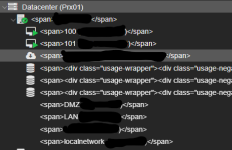

Hey Dakralex,Hi!
Could you try force refreshing the web interface withCtrl+F5orCtrl+Shift+R? Which version ofpve-manageris running on the node?
Running 9.1.6 (latest patched) and the 2 options you proposed did not work.
Last edited:

root@node01:~# journalctl --unit pveproxy --bootHey, maybe you could share your:
Code:journalctl --unit pveproxy --boot
Maybe we find some errors in there...
Mar 09 08:32:35 node01 systemd[1]: Starting pveproxy.service - PVE API Proxy Server...
Mar 09 08:33:01 node01 pveproxy[2747]: Using '/etc/pve/local/pveproxy-ssl.pem' as certi>
Mar 09 08:33:01 node01 pveproxy[2888]: starting server
Mar 09 08:33:01 node01 pveproxy[2888]: starting 3 worker(s)
Mar 09 08:33:01 node01 pveproxy[2888]: worker 2889 started
Mar 09 08:33:01 node01 pveproxy[2888]: worker 2890 started
Mar 09 08:33:01 node01 pveproxy[2888]: worker 2891 started
Mar 09 08:33:01 node01 systemd[1]: Started pveproxy.service - PVE API Proxy Server.
Mar 09 08:36:39 node01 systemd[1]: Stopping pveproxy.service - PVE API Proxy Server...
Mar 09 08:36:40 node01 pveproxy[2888]: received signal TERM
Mar 09 08:36:40 node01 pveproxy[2888]: server closing
Mar 09 08:36:40 node01 pveproxy[2890]: worker exit
Mar 09 08:36:40 node01 pveproxy[2888]: worker 2890 finished
Mar 09 08:36:40 node01 pveproxy[2888]: worker 2891 finished
Mar 09 08:36:40 node01 pveproxy[2888]: worker 2889 finished
Mar 09 08:36:40 node01 pveproxy[2888]: server stopped
Mar 09 08:36:41 node01 pveproxy[4913]: got inotify poll request in wrong process - disa>
Mar 09 08:36:41 node01 pveproxy[4912]: got inotify poll request in wrong process - disa>
Mar 09 08:36:41 node01 pveproxy[4912]: worker exit
Mar 09 08:36:41 node01 pveproxy[4913]: worker exit
Mar 09 08:36:41 node01 systemd[1]: pveproxy.service: Deactivated successfully.
Mar 09 08:36:41 node01 systemd[1]: Stopped pveproxy.service - PVE API Proxy Server.
Mar 09 08:36:41 node01 systemd[1]: pveproxy.service: Consumed 2.617s CPU time, 409M mem>
Mar 09 08:36:42 node01 systemd[1]: Starting pveproxy.service - PVE API Proxy Server...
lines 1-24...skipping...
Mar 09 08:32:35 node01 systemd[1]: Starting pveproxy.service - PVE API Proxy Server...
Mar 09 08:33:01 node01 pveproxy[2747]: Using '/etc/pve/local/pveproxy-ssl.pem' as certi>
Mar 09 08:33:01 node01 pveproxy[2888]: starting server
Mar 09 08:33:01 node01 pveproxy[2888]: starting 3 worker(s)
Mar 09 08:33:01 node01 pveproxy[2888]: worker 2889 started
Mar 09 08:33:01 node01 pveproxy[2888]: worker 2890 started
Mar 09 08:33:01 node01 pveproxy[2888]: worker 2891 started
Mar 09 08:33:01 node01 systemd[1]: Started pveproxy.service - PVE API Proxy Server.
Mar 09 08:36:39 node01 systemd[1]: Stopping pveproxy.service - PVE API Proxy Server...
Mar 09 08:36:40 node01 pveproxy[2888]: received signal TERM
Mar 09 08:36:40 node01 pveproxy[2888]: server closing
Mar 09 08:36:40 node01 pveproxy[2890]: worker exit
Mar 09 08:36:40 node01 pveproxy[2888]: worker 2890 finished
Mar 09 08:36:40 node01 pveproxy[2888]: worker 2891 finished
Mar 09 08:36:40 node01 pveproxy[2888]: worker 2889 finished
Mar 09 08:36:40 node01 pveproxy[2888]: server stopped
Mar 09 08:36:41 node01 pveproxy[4913]: got inotify poll request in wrong process - disa>
Mar 09 08:36:41 node01 pveproxy[4912]: got inotify poll request in wrong process - disa>
Mar 09 08:36:41 node01 pveproxy[4912]: worker exit
Mar 09 08:36:41 node01 pveproxy[4913]: worker exit
Mar 09 08:36:41 node01 systemd[1]: pveproxy.service: Deactivated successfully.
Mar 09 08:36:41 node01 systemd[1]: Stopped pveproxy.service - PVE API Proxy Server.
Mar 09 08:36:41 node01 systemd[1]: pveproxy.service: Consumed 2.617s CPU time, 409M mem>
Mar 09 08:36:42 node01 systemd[1]: Starting pveproxy.service - PVE API Proxy Server...
Mar 09 08:36:43 node01 pveproxy[4942]: Using '/etc/pve/local/pveproxy-ssl.pem' as certi>
Mar 09 08:36:43 node01 pveproxy[4943]: starting server
Mar 09 08:36:43 node01 pveproxy[4943]: starting 3 worker(s)
Mar 09 08:36:43 node01 pveproxy[4943]: worker 4944 started
Mar 09 08:36:43 node01 pveproxy[4943]: worker 4945 started
Mar 09 08:36:43 node01 pveproxy[4943]: worker 4946 started
Mar 09 08:36:43 node01 systemd[1]: Started pveproxy.service - PVE API Proxy Server.
Mar 09 08:43:54 node01 systemd[1]: Stopping pveproxy.service - PVE API Proxy Server...
Mar 09 08:43:55 node01 pveproxy[4943]: received signal TERM
lines 1-33...skipping...
Mar 09 08:32:35 node01 systemd[1]: Starting pveproxy.service - PVE API Proxy Server...
Mar 09 08:33:01 node01 pveproxy[2747]: Using '/etc/pve/local/pveproxy-ssl.pem' as certificate for the web interface.
Mar 09 08:33:01 node01 pveproxy[2888]: starting server
Mar 09 08:33:01 node01 pveproxy[2888]: starting 3 worker(s)
Mar 09 08:33:01 node01 pveproxy[2888]: worker 2889 started
Mar 09 08:33:01 node01 pveproxy[2888]: worker 2890 started
Mar 09 08:33:01 node01 pveproxy[2888]: worker 2891 started
Mar 09 08:33:01 node01 systemd[1]: Started pveproxy.service - PVE API Proxy Server.
Mar 09 08:36:39 node01 systemd[1]: Stopping pveproxy.service - PVE API Proxy Server...
Mar 09 08:36:40 node01 pveproxy[2888]: received signal TERM
Mar 09 08:36:40 node01 pveproxy[2888]: server closing
Mar 09 08:36:40 node01 pveproxy[2890]: worker exit
Mar 09 08:36:40 node01 pveproxy[2888]: worker 2890 finished
Mar 09 08:36:40 node01 pveproxy[2888]: worker 2891 finished
Mar 09 08:36:40 node01 pveproxy[2888]: worker 2889 finished
Mar 09 08:36:40 node01 pveproxy[2888]: server stopped
Mar 09 08:36:41 node01 pveproxy[4913]: got inotify poll request in wrong process - disabling inotify
Mar 09 08:36:41 node01 pveproxy[4912]: got inotify poll request in wrong process - disabling inotify
Mar 09 08:36:41 node01 pveproxy[4912]: worker exit
Mar 09 08:36:41 node01 pveproxy[4913]: worker exit
Mar 09 08:36:41 node01 systemd[1]: pveproxy.service: Deactivated successfully.
Mar 09 08:36:41 node01 systemd[1]: Stopped pveproxy.service - PVE API Proxy Server.
Mar 09 08:36:41 node01 systemd[1]: pveproxy.service: Consumed 2.617s CPU time, 409M memory peak.
Mar 09 08:36:42 node01 systemd[1]: Starting pveproxy.service - PVE API Proxy Server...
Mar 09 08:36:43 node01 pveproxy[4942]: Using '/etc/pve/local/pveproxy-ssl.pem' as certificate for the web interface.
Mar 09 08:36:43 node01 pveproxy[4943]: starting server
Mar 09 08:36:43 node01 pveproxy[4943]: starting 3 worker(s)
Mar 09 08:36:43 node01 pveproxy[4943]: worker 4944 started
Mar 09 08:36:43 node01 pveproxy[4943]: worker 4945 started
Mar 09 08:36:43 node01 pveproxy[4943]: worker 4946 started
Mar 09 08:36:43 node01 systemd[1]: Started pveproxy.service - PVE API Proxy Server.
Mar 09 08:43:54 node01 systemd[1]: Stopping pveproxy.service - PVE API Proxy Server...
Mar 09 08:43:55 node01 pveproxy[4943]: received signal TERM
Mar 09 08:43:55 node01 pveproxy[4943]: server closing
Mar 09 08:43:55 node01 pveproxy[4945]: worker exit
Mar 09 08:43:55 node01 pveproxy[4944]: worker exit
Mar 09 08:43:55 node01 pveproxy[4943]: worker 4945 finished
Mar 09 08:43:55 node01 pveproxy[4943]: worker 4944 finished
Mar 09 08:43:55 node01 pveproxy[4943]: worker 4946 finished

Did you try this already?
Yeah, you need to do apt dist-upgrade, apt upgrade is too conservative and does not update all dependencies => Which could lead to such issues.
Continue and test again. Send pveversion -v output afterwards.
EDIT: Update over webui does perform apt dist-upgrade as well.
Continue and test again. Send pveversion -v output afterwards.
EDIT: Update over webui does perform apt dist-upgrade as well.
did not fix it. but thanks for the info.Did you try this already?
Yeah, you need to do apt dist-upgrade, apt upgrade is too conservative and does not update all dependencies => Which could lead to such issues.
Continue and test again. Send pveversion -v output afterwards.
EDIT: Update over webui does perform apt dist-upgrade as well.

Your System is up-to-date for the "pveupdate; pveupgrade"What didpveupdate; pveupgradesay? If incognito mode/different browser doesn't help either can you check this?
Bash:apt install -y debsums debsums -as
ran the other commands and still not fixed. this is only happening on the main 1 node. the other 2 if you log in do not have this issue. very strange.
command 'apt-get update' failed: exit code 100
Starting system upgrade: apt-get dist-upgrade
Reading package lists... Done
Building dependency tree... Done
Reading state information... Done
Calculating upgrade... Done
The following packages were automatically installed and are no longer required:
libpython3.13 libsqlite3-mod-ceph python3-cheroot python3-cherrypy3 python3-dateutil
python3-jaraco.collections python3-legacy-cgi python3-logutils python3-natsort python3-packaging
python3-pecan python3-portend python3-simplegeneric python3-tempora python3-webob python3-werkzeug
python3-zc.lockfile sudo
Use 'apt autoremove' to remove them.
0 upgraded, 0 newly installed, 0 to remove and 0 not upgraded.
Your System is up-to-date
Starting system upgrade: apt-get dist-upgrade
Reading package lists... Done
Building dependency tree... Done
Reading state information... Done
Calculating upgrade... Done
The following packages were automatically installed and are no longer required:
libpython3.13 libsqlite3-mod-ceph python3-cheroot python3-cherrypy3 python3-dateutil
python3-jaraco.collections python3-legacy-cgi python3-logutils python3-natsort python3-packaging
python3-pecan python3-portend python3-simplegeneric python3-tempora python3-webob python3-werkzeug
python3-zc.lockfile sudo
Use 'apt autoremove' to remove them.
0 upgraded, 0 newly installed, 0 to remove and 0 not upgraded.
Your System is up-to-date

What about the
Also this doesn't look good and is exactly why the output is so important
debsums -as output?Also this doesn't look good and is exactly why the output is so important
command 'apt-get update' failed: exit code 100
apt update might give us a hint what's wrong.
apt updateWhat about thedebsums -asoutput?
Also this doesn't look good and is exactly why the output is so important
apt updatemight give us a hint what's wrong.
Hit:1 http://deb.debian.org/debian trixie InRelease
Hit:2 http://deb.debian.org/debian trixie-updates InRelease
Hit:3 http://security.debian.org/debian-security trixie-security InRelease
Hit:4 http://download.proxmox.com/debian/ceph-squid trixie InRelease
Err:5 https://enterprise.proxmox.com/debian/pve trixie InRelease
401 Unauthorized [IP: 66.70.154.82 443]
Error: Failed to fetch https://enterprise.proxmox.com/debian/pve/dists/trixie/InRelease 401 Unauthorized [IP: 66.70.154.82 443]
Error: The repository 'https://enterprise.proxmox.com/debian/pve trixie InRelease' is not signed.
Notice: Updating from such a repository can't be done securely, and is therefore disabled by default.
Notice: See apt-secure(8) manpage for repository creation and user configuration details.
Warning: Target Packages (pve-enterprise/binary-amd64/Packages) is configured multiple times in /etc/apt/sources.list.d/pve-enterprise.sources:1 and /etc/apt/sources.list.d/pve-enterprise.sources:2
Warning: Target Packages (pve-enterprise/binary-all/Packages) is configured multiple times in /etc/apt/sources.list.d/pve-enterprise.sources:1 and /etc/apt/sources.list.d/pve-enterprise.sources:2
Warning: Target Translations (pve-enterprise/i18n/Translation-en) is configured multiple times in /etc/apt/sources.list.d/pve-enterprise.sources:1 and /etc/apt/sources.list.d/pve-enterprise.sources:2
root@txprx01n01:~#
Well that expalins it. Disable the enterprise and configure the no-subscription repos, then try
There should be absolutely no errors or warnings. Please don't quote every message.
apt update && apt dist-upgrade again.There should be absolutely no errors or warnings. Please don't quote every message.
Last edited:
pt update; apt dist-upgradeWell that expalins it. Disable the enterprise and configure the no-subscription repos, then tryapt update && apt dist-upgradeagain.
There should be absolutely no errors or warnings. Please don't quote every message.
bash: pt: command not found
The following packages were automatically installed and are no longer required:
libpython3.13 python3-dateutil python3-natsort python3-simplegeneric python3-zc.lockfile
libsqlite3-mod-ceph python3-jaraco.collections python3-packaging python3-tempora sudo
python3-cheroot python3-legacy-cgi python3-pecan python3-webob
python3-cherrypy3 python3-logutils python3-portend python3-werkzeug
Use 'apt autoremove' to remove them.
Summary:
Upgrading: 0, Installing: 0, Removing: 0, Not Upgrading: 0
You mistyped this.pt update; apt dist-upgrade
bash: pt: command not found
apt update ; apt-dist-upgradeEdit: sorry! This time I mistyped!
apt dist-upgrade
Last edited:
apt update ; apt-dist-upgrade
Hit:1 http://deb.debian.org/debian trixie InRelease
Hit:2 http://security.debian.org/debian-security trixie-security InRelease
Hit:3 http://deb.debian.org/debian trixie-updates InRelease
Hit:4 http://download.proxmox.com/debian/pve trixie InRelease
All packages are up to date.
Hit:1 http://deb.debian.org/debian trixie InRelease
Hit:2 http://security.debian.org/debian-security trixie-security InRelease
Hit:3 http://deb.debian.org/debian trixie-updates InRelease
Hit:4 http://download.proxmox.com/debian/pve trixie InRelease
All packages are up to date.