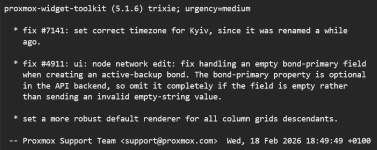
Hello, on some training-vms I upgraded to PVE 9.1.6 and Im having some weird issues atm I cant track down. Im not sure if it is related to the 9.1.6 upgrade.
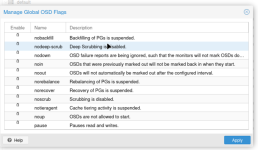
* Ceph -> OSD -> Global-Flags: Ceph Global Flags Show Integers "0" or "1" instead of Checkbox
** this makes it hard to use and multiple flags cant be selected at once anymore
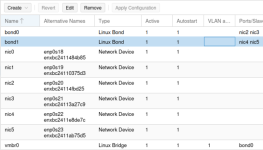
* Host -> System -> Network: Show Integers on Autostart and Active, instead of yes/no
** No impact on usage for me at least
And something Im not sure if it is related to, since 9.1.6 some VMs (not all) do not show a display output anymore, do not show guest-agent communication anymore, although agent is enabled and installed. Also VMs are not responding anymore and stopping / starting them do not bring back the console again.
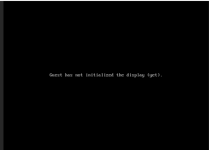
not all vms have this issue, but multiple. Migrating the vm to another host, does not change anything. stopping and starting it also does not. Downgrading pve-qemu-kvm:amd64 (10.1.2-6, 10.1.2-7) to 10.1.2-6 again, does also not change the problem.
Maybe its something else?
Edit 1: This are the apt changes from 9.1.5 to 9.1.6 for me:
Reverting all those packages with allow-downgrade does "fix" the integer thing (looks like its intended) but some of my vms are still black and unresponsive. Its all just demo enviroment and nested pve-vms.
Edit 2: Might be related to: https://bugzilla.proxmox.com/show_bug.cgi?id=3726 or https://bugzilla.proxmox.com/show_bug.cgi?id=3825 but changing to i440fx and removing hotplug did not help. The strange thing is, that the vm did work normally before and suddenly stopped giving a display output.
Edit 3: Did remove efi disk, added it again and added efi boot entries via vm-bios - now its working again with EFI, Q35 (VM 1804)
Edit 4: On VM 1800 (config from above no changes) it did work by just removing the efi disk and adding it again (without re-setting the efi-string in the bios) - so it seems like its related to UEFI/EFI Disk?
* Ceph -> OSD -> Global-Flags: Ceph Global Flags Show Integers "0" or "1" instead of Checkbox
** this makes it hard to use and multiple flags cant be selected at once anymore
* Host -> System -> Network: Show Integers on Autostart and Active, instead of yes/no
** No impact on usage for me at least
And something Im not sure if it is related to, since 9.1.6 some VMs (not all) do not show a display output anymore, do not show guest-agent communication anymore, although agent is enabled and installed. Also VMs are not responding anymore and stopping / starting them do not bring back the console again.
Code:
root@pve-5:~# qm config 1800
agent: 1,fstrim_cloned_disks=1
bios: ovmf
boot: order=scsi0;ide2;net0
cores: 2
cpu: x86-64-v3
efidisk0: vm_nvme:vm-1800-disk-1,efitype=4m,ms-cert=2023w,pre-enrolled-keys=1,size=528K
hotplug: disk,network,usb,memory,cpu
ide2: nfs:iso/debian-13-net-h.iso,media=cdrom,size=754M
machine: q35
memory: 2048
meta: creation-qemu=10.1.2,ctime=1771855722
name: debian
net0: virtio=BC:24:11:1B:64:10,bridge=vmbr0,firewall=1
numa: 1
onboot: 1
ostype: l26
scsi0: vm_nvme:vm-1800-disk-0,discard=on,iothread=1,size=20G,ssd=1
scsihw: virtio-scsi-single
smbios1: uuid=39c2f151-060e-4ec6-970d-a7fb500640f5
sockets: 1
vcpus: 1
vmgenid: 86695a8a-7970-420e-925a-0abf5f884b65
not all vms have this issue, but multiple. Migrating the vm to another host, does not change anything. stopping and starting it also does not. Downgrading pve-qemu-kvm:amd64 (10.1.2-6, 10.1.2-7) to 10.1.2-6 again, does also not change the problem.
Maybe its something else?
Edit 1: This are the apt changes from 9.1.5 to 9.1.6 for me:
Code:
Start-Date: 2026-02-25  11:17:21
Commandline: apt-get dist-upgrade
Upgrade: proxmox-widget-toolkit:amd64 (5.1.5, 5.1.6), pve-firmware:amd64 (3.17-2, 3.18-1), pve-qemu-kvm:amd64 (10.1.2-6, 10.1.2-7), proxmox-backup-file-restore:amd64 (4.1.2-1, 4.1.4-1), pve-container:amd64 (6.1.1, 6.1.2), proxmox-backup-client:amd64 (4.1.2-1, 4.1.4-1), pve-manager:amd64 (9.1.5, 9.1.6)
End-Date: 2026-02-25  11:17:45
Reverting all those packages with allow-downgrade does "fix" the integer thing (looks like its intended) but some of my vms are still black and unresponsive. Its all just demo enviroment and nested pve-vms.
Edit 2: Might be related to: https://bugzilla.proxmox.com/show_bug.cgi?id=3726 or https://bugzilla.proxmox.com/show_bug.cgi?id=3825 but changing to i440fx and removing hotplug did not help. The strange thing is, that the vm did work normally before and suddenly stopped giving a display output.
Edit 3: Did remove efi disk, added it again and added efi boot entries via vm-bios - now its working again with EFI, Q35 (VM 1804)
Edit 4: On VM 1800 (config from above no changes) it did work by just removing the efi disk and adding it again (without re-setting the efi-string in the bios) - so it seems like its related to UEFI/EFI Disk?
Last edited: