SAS pool on one node, SATA pool on the other

karlm

New Member
Jan 8, 2025
18
1
3
I just built a new server with 12 8TB SAS drives. My original has 10 4TB SATA drives. I noticed on the new server I was getting lots o log errors about SATApool not being on the node. Can I name the pools the same without issue since they are different drives and sizes? And then move guests between them?
I'd name the pools something like SpinningPool
 
Feb 19 13:56:21 node2 pvestatd[1638]: could not activate storage 'SataPool', zfs error: cannot import 'SATAPool': no such pool available
Feb 19 13:56:31 node2 pvestatd[1638]: zfs error: cannot open 'SATAPool': no such pool

I meant Node1 currently has SATAPool and on Node2 I created SASPool - different servers in the same datacenter
 
Node2 :
root@node2:~# zpool list
NAME SIZE ALLOC FREE CKPOINT EXPANDSZ FRAG CAP DEDUP HEALTH ALTROOT
rpool 3.62T 2.59G 3.62T - - 0% 0% 1.00x ONLINE -

root@node2:~# zpool import
no pools available to import - I assume as I deleted the SASPool?

I had deleted the pool SASPool earlier as one of the drives had issues, so I am ready to add a new one,


Node (Currently named PVE - I want to change it though)

root@pve:~# zpool list
NAME SIZE ALLOC FREE CKPOINT EXPANDSZ FRAG CAP DEDUP HEALTH ALTROOT
SATAPool 18.2T 649G 17.6T - - 13% 3% 1.00x ONLINE -
rpool 1.81T 1.75T 59.6G - - 31% 96% 1.00x ONLINE -

no pools available to import
 
All I did was build the pool, and then shut down.
Amaon finally got me the parts I needed to gt the build done yesterday and 8 of my SAS drives were not showing when I went to add the pool so I unplugged one at a time until I found the 4 that were and then pout the other 8 on the table to test, finding out that they had partitions, which I deleted. So, I built the pool and shutdown right away as I knew I needed to put the drives in and recable today
 
I am completely confused.

If the drives that host saspool are NOT PRESENT, then its a foregone conclusion that a defined store looking for the filesystem is going to error... what are you asking?

lets start over.

do you have the drives plugged in, and can you see them in lsblk?
 
Yes and yes.

The error is for SATAPool which is not and never has been on Node2

Node2 only had SASPool with the 12 SAS and rpool with two nVme

PVE only has SATAPool with 10 Sata drives and rpoop with two nVme which are identical to the two on NODE2
 
lets only discuss the node in question, since the other one is working. I assume that the end result here is a zpool named saspool?

if so, zpool create SASPool [raidtype] [device list]

If something else, please note what your desired end result is.
 
The end result I am looking for is to not get errors for a non existnt pool, and to be able to move gueste from node one to node two.
 
How?

Node2:
root@node2:~# df -h
Filesystem Size Used Avail Use% Mounted on
udev 16G 0 16G 0% /dev
tmpfs 3.2G 1.8M 3.2G 1% /run
rpool/ROOT/pve-1 3.6T 2.7G 3.6T 1% /
tmpfs 16G 66M 16G 1% /dev/shm
tmpfs 5.0M 0 5.0M 0% /run/lock
tmpfs 16G 0 16G 0% /tmp
tmpfs 1.0M 0 1.0M 0% /run/credentials/systemd-journald.service
rpool 3.6T 128K 3.6T 1% /rpool
rpool/var-lib-vz 3.6T 128K 3.6T 1% /var/lib/vz
rpool/ROOT 3.6T 128K 3.6T 1% /rpool/ROOT
rpool/data 3.6T 128K 3.6T 1% /rpool/data
/dev/fuse 128M 88K 128M 1% /etc/pve
tmpfs 1.0M 0 1.0M 0% /run/credentials/getty@tty1.service
tmpfs 3.2G 4.0K 3.2G 1% /run/user/0

Node1 (PVE Still)

root@node2:~# df -h
Filesystem Size Used Avail Use% Mounted on
udev 16G 0 16G 0% /dev
tmpfs 3.2G 1.8M 3.2G 1% /run
rpool/ROOT/pve-1 3.6T 2.7G 3.6T 1% /
tmpfs 16G 66M 16G 1% /dev/shm
tmpfs 5.0M 0 5.0M 0% /run/lock
tmpfs 16G 0 16G 0% /tmp
tmpfs 1.0M 0 1.0M 0% /run/credentials/systemd-journald.service
rpool 3.6T 128K 3.6T 1% /rpool
rpool/var-lib-vz 3.6T 128K 3.6T 1% /var/lib/vz
rpool/ROOT 3.6T 128K 3.6T 1% /rpool/ROOT
rpool/data 3.6T 128K 3.6T 1% /rpool/data
/dev/fuse 128M 88K 128M 1% /etc/pve
tmpfs 1.0M 0 1.0M 0% /run/credentials/getty@tty1.service
tmpfs 3.2G 4.0K 3.2G 1% /run/user/0

 
pvesm remove SATAPool

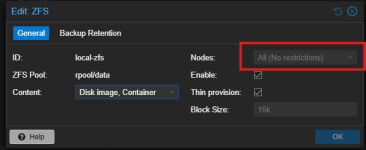
out of curiosity- why do you keep bringing up the other node? are they clustered? if clustered, dont delete the store; you need to go to datacenter-storage and make sure you EXCLUDE the node that doesnt have that pool in it from the store definition or unmark shared.
 
Last edited:
  • Like
Reactions: karlm