

PVE networking freezes when adding IP address to vmbr1

PaulR1

Active Member
Aug 9, 2018
11
1
43
Hello all, I have an issue that I can’t seem to resolve and hope that somebody can give me some pointers to get this resolved.

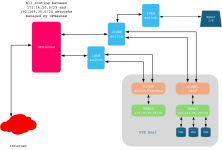
I’m running PVE 9.1.5 with kernel 6.8.12-6-pve. The management interface of PVE is on a separate subnet (172.16.20.0/25) to that which is used by VMs to communicate with each other and the outside world. The management subnet has a bonded interface comprising 2 x 1GbE links as active/passive serving vmbr0. There is an additional, separate bond pair comprising 2 x 10GbE links as an LACP pair, which in turn is connected to vmbr1. VMs are connected to vmbr1. The LACP setup is working fine and VMs using this can access other VMs and the outside world, including the PVE management interface on the 172.16.20.0/25 subnet. There are no VLANs specified anywhere.

Routing is through an OPNsense router/firewall. OPNsense is running on a standalone system with 24Gb memory and an i5-7500 CPU @ 3.40GHz, so it has plenty of processing power.

Everything works fine with this setup. However, when I add an IP address to vmbr1 to enable migrations across the 10GbE links, the system freezes. The etc/network/interfaces file is attached as a PDF and a diagram of the physical connections is below.

Does anyone have any pointers which can help please? I'm grateful for any help with this!

Drawing1.png
 

Attachments

Hello Paul,


Could you please run the following commands from the PVE console (or SSH if still accessible) after adding the IP address to vmbr1, and share the output?

Code:
ip -4 route
ip rule show
cat /etc/network/interfaces
cat /proc/net/bonding/bond1
 
Here you go Nico - any help you can give will be greatly appreciated!

Code:
root@host5:~# ip -4 route
default via 172.16.20.126 dev vmbr0 proto kernel onlink
172.16.20.0/25 dev vmbr0 proto kernel scope link src 172.16.20.55
192.168.35.0/24 dev vmbr1 proto kernel scope link src 192.168.35.155


root@host5:~# ip rule show
0:      from all lookup local
32766:  from all lookup main
32767:  from all lookup default

Code:
root@host5:~# cat /etc/network/interfaces

# network interface settings; autogenerated
# Please do NOT modify this file directly, unless you know what
# you're doing.
#
# If you want to manage parts of the network configuration manually,
# please utilize the 'source' or 'source-directory' directives to do
# so.
# PVE will preserve these directives, but will NOT read its network
# configuration from sourced files, so do not attempt to move any of
# the PVE managed interfaces into external files!


auto lo

iface lo inet loopback

auto eno1
iface eno1 inet manual

auto eno2

iface eno2 inet manual

iface eno3 inet manual

iface eno4 inet manual

iface enx0a94ef5d9067 inet manual

auto ens5f0

iface ens5f0 inet manual

auto ens5f1

iface ens5f1 inet manual


auto bond0
iface bond0 inet manual
bond-slaves eno1 eno2
bond-miimon 100
bond-mode active-backup
bond-primary eno1
#Mgmnt bond


auto bond1
iface bond1 inet manual
bond-slaves ens5f0 ens5f1
bond-miimon 100
bond-mode 802.3ad
bond-xmit-hash-policy layer3+4


auto vmbr0
iface vmbr0 inet static
address 172.16.20.55/25
gateway 172.16.20.126
bridge-ports bond0
bridge-stp off
bridge-fd 0
#Mgmnt


auto vmbr1
iface vmbr1 inet static
address 192.168.35.155/24
bridge-ports bond1
bridge-stp off
bridge-fd 0
#VM traffic

source /etc/network/interfaces.d/*

Code:
root@host5:~# cat /proc/net/bonding/bond1

Ethernet Channel Bonding Driver: v6.17.2-1-pve
Bonding Mode: IEEE 802.3ad Dynamic link aggregation
Transmit Hash Policy: layer3+4 (1)
MII Status: up
MII Polling Interval (ms): 100
Up Delay (ms): 0
Down Delay (ms): 0
Peer Notification Delay (ms): 0

802.3ad info
LACP active: on
LACP rate: slow
Min links: 0
Aggregator selection policy (ad_select): stable
System priority: 65535
System MAC address: 00:0e:1e:83:9b:70
Active Aggregator Info:
Aggregator ID: 1
Number of ports: 2
Actor Key: 15
Partner Key: 3
Partner Mac Address: 78:9a:18:cc:eb:2f

Slave Interface: ens5f0
MII Status: up
Speed: 10000 Mbps
Duplex: full
Link Failure Count: 0
Permanent HW addr: 00:0e:1e:83:9b:70
Slave queue ID: 0
Aggregator ID: 1
Actor Churn State: none
Partner Churn State: none
Actor Churned Count: 0
Partner Churned Count: 0
details actor lacp pdu:
system priority: 65535
system mac address: 00:0e:1e:83:9b:70
port key: 15
port priority: 255
port number: 1
port state: 61
details partner lacp pdu:
system priority: 32768
system mac address: 78:9a:18:cc:eb:2f
oper key: 3
port priority: 32768
port number: 3
port state: 61

Slave Interface: ens5f1
MII Status: up
Speed: 10000 Mbps
Duplex: full
Link Failure Count: 0
Permanent HW addr: 00:0e:1e:83:9b:72
Slave queue ID: 0
Aggregator ID: 1
Actor Churn State: none
Partner Churn State: none
Actor Churned Count: 0
Partner Churned Count: 0
details actor lacp pdu:
system priority: 6553
system mac address: 00:0e:1e:83:9b:70
port key: 15
port priority: 255
port number: 2
port state: 61
details partner lacp pdu:
system priority: 32768
system mac address: 78:9a:18:cc:eb:2f
oper key: 3
port priority: 32768
port number: 5
port state: 61

root@host5:~#
 
  • Like
Reactions: Brethsteallar
This usually happens because the host starts using vmbr1 for routing once you give it an IP. You now have two active networks and Linux may choose the wrong outbound path, which looks like a freeze.

Do not add a gateway to vmbr1. Keep the gateway only on vmbr0. If you need migration over vmbr1, set the migration network explicitly in Datacenter → Migration or add a static route instead of letting it become a default path.

Also confirm your switch LACP config matches exactly. A mismatch can drop traffic the moment the bridge becomes layer-3.
 
This usually happens because the host starts using vmbr1 for routing once you give it an IP. You now have two active networks and Linux may choose the wrong outbound path, which looks like a freeze.

Do not add a gateway to vmbr1. Keep the gateway only on vmbr0. If you need migration over vmbr1, set the migration network explicitly in Datacenter → Migration or add a static route instead of letting it become a default path.

Also confirm your switch LACP config matches exactly. A mismatch can drop traffic the moment the bridge becomes layer-3.
Thanks for your reply. There is no gateway address allocated to vmbr1 - fundamentally because PVE won’t allow this as a default gateway exists on the 172.16.20.0/25 network. I cannot set the migration network to anything apart from the 172.16.20/25 network. If vmbr1 has an IP address assigned it shows up as an option for migration in Datacentre | Migration; if no IP address is allocated to vmbr1, it is not available to use as the migration subnet.
 
Hello Paul,

Before troubleshooting further, I think it’s important to step back and look at the design.

According to Proxmox recommendations, VM bridges should remain pure Layer-2. Assigning an IP address to vmbr1 turns it into a Layer-3 interface for the host, which changes traffic patterns and can introduce asymmetric routing or unexpected behavior, especially with 802.3ad bonds.

Code:
auto vmbr1
iface vmbr1 inet static
    address 192.168.35.155/24
    bridge-ports bond1
    bridge-stp off
    bridge-fd 0

Recommended approach:
  • Keep VM bridges pure L2 (no IP on them).
  • Use a dedicated network (or VLAN) for migration traffic.
  • Ensure every node has an IP in the migration subnet.
  • Configure the migration network explicitly in Datacenter → Migration.
In prod, we separe everything using VLAN over the bond : management/gui, vm, corosync, ceph (if exist).
 
Last edited:
Hello Paul,

Before troubleshooting further, I think it’s important to step back and look at the design.

According to Proxmox recommendations, VM bridges should remain pure Layer-2. Assigning an IP address to vmbr1 turns it into a Layer-3 interface for the host, which changes traffic patterns and can introduce asymmetric routing or unexpected behavior, especially with 802.3ad bonds.

Code:
auto vmbr1
iface vmbr1 inet static
    address 192.168.35.155/24
    bridge-ports bond1
    bridge-stp off
    bridge-fd 0

Recommended approach:
  • Keep VM bridges pure L2 (no IP on them).
  • Use a dedicated network (or VLAN) for migration traffic.
  • Ensure every node has an IP in the migration subnet.
  • Configure the migration network explicitly in Datacenter → Migration.
In prod, we separe everything using VLAN over the bond : management/gui, vm, corosync, ceph (if exist).
Hello Nico, I've created a separate, isolated network/subnet (10.10.20.0/25) connected to eno3, added an IP address, (10.10.20.5) selected the 10.10.20.5/25 address in Datacenter | Migration and everything is working fine. Stepping back, as you suggested helped me, and allowed me to see what was actually happening and causing the issues and rethink . Thank you for helping!