[SOLVED] No such logical volume pve/data

Hi @McJameson,
the partitioning of your disk looks like what ZFS does. What do zpool list, zfs list and zpool import say? Your boot log also shows that ZFS is used.

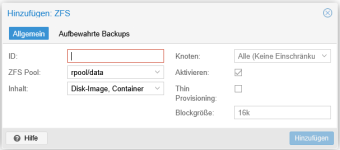
Going to Datacenter > Storage > Add > ZFS and selecting rpool/data might already solve part of your issue.
 
Hi @fiona ,
thanks for the quick reply.
Here ist the info you asked for:
Code:
root@pve-universe-server:~# zpool list
NAME               SIZE  ALLOC   FREE  CKPOINT  EXPANDSZ   FRAG    CAP  DEDUP    HEALTH  ALTROOT
Universe-Storage  21.8T  13.8T  8.06T        -         -     3%    63%  1.00x    ONLINE  -
rpool              928G  22.5G   905G        -         -     5%     2%  1.00x    ONLINE  -

Code:
root@pve-universe-server:~# zfs list
NAME               USED  AVAIL  REFER  MOUNTPOINT
Universe-Storage  9.17T  5.24T  9.17T  /Universe-Storage
rpool             22.5G   877G   104K  /rpool
rpool/ROOT        5.01G   877G    96K  /rpool/ROOT
rpool/ROOT/pve-1  5.01G   877G  5.01G  /
rpool/data          96K   877G    96K  /rpool/data
rpool/var-lib-vz  17.4G   877G  17.4G  /var/lib/vz

Code:
root@pve-universe-server:~# zpool import
no pools available to import

I looked into Datacenter > Storage > Add > ZFSand selecting rpool/data, but I am not sure what to put into ID:
1770660254855.png
Thanks again for your help!
 
The name for a standard ZFS-based Proxmox VE installation is local-zfs. But it seems like there are no guest volumes on there, so if nothing references that name, you can choose another one too. If you also want to use the Universe-Storage pool as a storage in Proxmox VE, you can add it too.
 
I tried this and successfully created the ZFS pool. Unfortunately, the system is still missing the VG pve or any other VG. LVS, PVS and VGS show no result ! Thus, it would not let me create a LWM-Thin pool nor let me access my UniverseStorage which is holding the big storage disks.
I deleted the LVM-Thin pool
Code:
root@pve-universe-server:~# cat /etc/pve/storage.cfg
dir: local
        path /var/lib/vz
        content iso,vztmpl,rootdir,backup
        shared 0

cifs: UniverseServer
        path /mnt/pve/UniverseServer
        server 192.168.1.11
        share NetBackup
        content backup
        prune-backups keep-all=1
        subdir /Proxmox
        username PvE

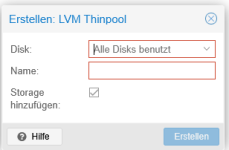
I was hoping I could create a new one, but it won't show me any disks I could use.
1770748838014.png

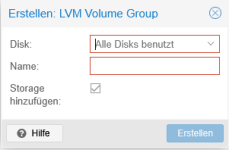
When I try creating VG it also tells me all disks are allocated:
1770748668479.png

Any ideas other then re-installing the whole system anew?
 
I tried this and successfully created the ZFS pool. Unfortunately, the system is still missing the VG pve or any other VG.
Proxmox VE supports many different storage layouts. You used ZFS to install this node and that is perfectly fine. If you want LVM and there is no data on the additional disks with ZFS, you can wipe them and afterwards create a new LVM storage. Your root partition will still be ZFS, changing that would really require a re-install (and selecting ext4 or xfs in the installer)
 
Proxmox VE supports many different storage layouts. You used ZFS to install this node and that is perfectly fine. If you want LVM and there is no data on the additional disks with ZFS, you can wipe them and afterwards create a new LVM storage. Your root partition will still be ZFS, changing that would really require a re-install (and selecting ext4 or xfs in the installer)
I am using ZFS for running the node, which consists of two NVME-disks in RAID1 configuration. The Universe storage resides on three SSDs using LVM thin for VMs and LXCs and LVM for data storage using OMV
The issue at hand is that the VG pve is gone in Proxmox, but the SSDs are still allocated (activated, but not active). Thus, cannot access/install LVMs and LVM Thins anymore.
So, I guess the question at hand is: How to get the VG pve back?
According to the manual, Proxmox is setting the VG pve up during installation. Is there a repair mode I can run it thru?
 
You can use
Code:
zpool status -v 
lsblk -f
to check, but it really seems like the Universe storage is formatted for ZFS right now, not LVM.

Again, you can wipe the disks and re-create an LVM storage using these disks if that's what you want.

Proxmox VE creates a volume group pve when it's originally installed as LVM (when selecting ext4 or xfs in the installer), not when using ZFS. When using ZFS for installation, rpool/data is created which serves the same purpose.
 
I thought I installed my 2nd server the same way I did my 1st one, but I might have chosen ZFSinstead of LVM; even though the concept of Thin Provisioning sounded interesting to me.
This output of the two commands:
Code:
root@pve-universe-server:~# zpool status -v
  pool: Universe-Storage
 state: ONLINE
status: One or more devices are configured to use a non-native block size.
        Expect reduced performance.
action: Replace affected devices with devices that support the
        configured block size, or migrate data to a properly configured
        pool.
  scan: scrub repaired 0B in 08:20:34 with 0 errors on Sun Feb  8 08:44:35 2026
config:

        NAME              STATE     READ WRITE CKSUM
        Universe-Storage  ONLINE       0     0     0
          raidz1-0        ONLINE       0     0     0
            sdb           ONLINE       0     0     0  block size: 512B configured, 4096B native
            sda           ONLINE       0     0     0  block size: 512B configured, 4096B native
            sdc           ONLINE       0     0     0  block size: 512B configured, 4096B native

errors: No known data errors

  pool: rpool
 state: ONLINE
  scan: scrub repaired 0B in 00:00:23 with 0 errors on Sun Feb  8 00:24:52 2026
config:

        NAME                                                 STATE     READ WRITE CKSUM
        rpool                                                ONLINE       0     0     0
          mirror-0                                           ONLINE       0     0     0
            nvme-eui.e8238fa6bf530001001b448b4a4db67f-part3  ONLINE       0     0     0
            nvme-eui.e8238fa6bf530001001b448b4a4a8c01-part3  ONLINE       0     0     0

errors: No known data errors

Code:
root@pve-universe-server:~# lsblk -f
NAME        FSTYPE     FSVER LABEL            UUID                                 FSAVAIL FSUSE% MOUNTPOINTS
sda                                                                                             
├─sda1      zfs_member 5000  Universe-Storage 16718780042310814824                             
└─sda9                                                                                         
sdb                                                                                             
├─sdb1      zfs_member 5000  Universe-Storage 16718780042310814824                             
└─sdb9                                                                                         
sdc                                                                                             
├─sdc1      zfs_member 5000  Universe-Storage 16718780042310814824                             
└─sdc9                                                                                         
nvme1n1                                                                                         
├─nvme1n1p1                                                                                     
├─nvme1n1p2 vfat       FAT32                  DB89-B392                                         
└─nvme1n1p3 zfs_member 5000  rpool            9676188165576106775                               
nvme0n1                                                                                         
├─nvme0n1p1                                                                                     
├─nvme0n1p2 vfat       FAT32                  DB89-4632                                         
└─nvme0n1p3 zfs_member 5000  rpool            9676188165576106775

I am wondering though where the lwmthincame from:
Code:
root@pve-universe-server:~# cat /etc/pve/storage.cfg
dir: local
        path /var/lib/vz
        content iso,backup,rootdir,vztmpl
        shared 0

lvmthin: local-lvm
        thinpool data
        vgname pve
        content images,rootdir

cifs: UniverseServer
        path /mnt/pve/UniverseServer
        server 192.168.1.11
        share NetBackup
        content backup
        prune-backups keep-all=1
        subdir /Proxmox
        username PvE
 
Last edited:
See: https://pve.proxmox.com/pve-docs/chapter-pvecm.html#pvecm_join_node_to_cluster
All existing configuration in /etc/pve is overwritten when joining a cluster. In particular, a joining node cannot hold any guests, since guest IDs could otherwise conflict, and the node will inherit the cluster’s storage configuration. To join a node with existing guest, as a workaround, you can create a backup of each guest (using vzdump) and restore it under a different ID after joining. If the node’s storage layout differs, you will need to re-add the node’s storages, and adapt each storage’s node restriction to reflect on which nodes the storage is actually available.
 
I guess I should have read the "fine print" instead if relying on the GUI.
It would be very helpfull, if the setttings would be backed up automatically before being overwritten! Or at least a warning could pop up referring to your link above.
Anyways, thanks for ypur support!

I will be busy now backing up some more information, establishing a backup procedure for Proxmox itsself and re-installing everything...
 
Last edited: