MEMORY PROXMOX 9.0

Feb 3, 2026
2
0
1
Hi everyone,
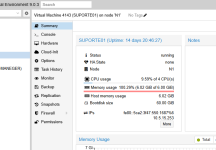
some time ago I updated my Proxmox host and noticed a strange behavior related to memory usage.


Even when using VirtIO (balloon/IO), the host shows the memory as almost fully used, while inside the VM the memory usage does not exceed 30%.


Has anyone experienced this issue or knows how to fix this memory behavior?


Would upgrading to Proxmox 9.1 solve this memory reporting/management issue?Captura de tela 2026-02-03 065910.png
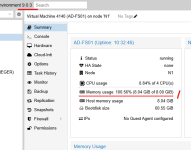
 
https://pve.proxmox.com/wiki/Upgrade_from_8_to_9#VM_Memory_Consumption_Shown_is_Higher

If this is a Windows machine, make sure that the Balloon Device is enabled (Hardware -> Memory, in the advanced part) and that the driver for that device as well as the "Balloon Service" is installed and running. Only then can Proxmox VE know the usage from within the VM.

And while I am at it, you should install the VirtIO drivers and the guest agent. https://pve.proxmox.com/wiki/Windows_VirtIO_Drivers
Then you can also enable the guest agent in the Options panels of the VM.
 
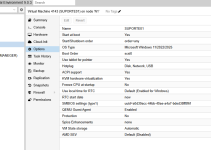
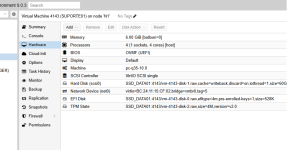
I understand. I have another VM that I installed recently, and everything seems to be configured correctly, including the drivers and the guest agent enabled. However, it still shows the memory as fully used . I’ll try upgrading to version 9.1 to see if this resolves the issue.Captura de tela 2026-02-03 072240.pngCaptura de tela 2026-02-03 072317.pngCaptura de tela 2026-02-03 072338.png
 
According to the last screenshot, the ballooning device is disabled.
Memory consumption is not queried via the guest agent, but via the ballooning device, and for Windows, the Balloon Service. Other operating systems handle that communication via the balloon device directly in the kernel (e.g. Linux).

To post a VMs config, run the command qm config XXX on the CLI/Shell of the host and copy and paste the output within [code][/code] tags in the forum. Or use the buttons at the top of the editor (</>) to format the output correctly. That makes it a lot easier to check the config of the VM :)
 
  • Like
Reactions: _gabriel
I have the same behaviour. Do you know of a documentation or known limitations link for that?
No but it depends on OS, ballooning, PCI passthrough, etc. For example linux guests usually report cache as used memory. Windows usually reports what you see in the Task Manager if configured properly but it sometimes zeroes all the memory (check with RAMMap) making it show as fully used. With PVE 9 you now also have information about Host Memory Usage. Many variables. Much potential for confusion.
 
Last edited:
  • Like
Reactions: Johannes S