LXC installation fails due to DNS issue with raw.githubusercontent.com

Hamed Roshan

New Member
Jan 22, 2026
8
0
1
Hello,
I am experiencing an issue while installing an LXC container on Proxmox VE.
Environment:
Proxmox VE: 9.1.4
Kernel: 6.17.4-2-pve
Container OS: Debian 13 (unprivileged)
Network: IPv4 working, IPv6 disabled/not used
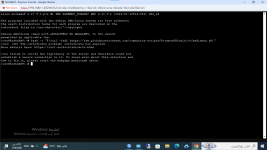
Problem: The container is created successfully and has IPv4 connectivity, but the installation script fails when trying to access GitHub raw content.
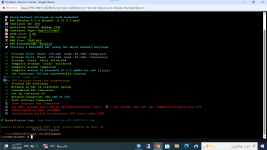
Output excerpt:

IPv4 Internet Connected
Git DNS:
github.com: ✓
api.github.com: ✓
git.community-scripts.org: ✓
raw.githubusercontent.com: ✗

Installation failed (exit code: 130)
The script hangs while accessing raw.githubusercontent.com, leading to a manual interrupt (SIGINT).
Notes:
DNS appears to be the issue, not general connectivity
Public DNS servers (1.1.1.1 / 8.8.8.8) were tested
Other GitHub domains resolve correctly
Question: Is there a recommended Proxmox or LXC DNS configuration to avoid issues accessing raw.githubusercontent.com during automated installations?
Thank you.
 
Last edited:
How are you installing these containers? The output looks a lot like some 3rd party community scripts not provided by Proxmox. So I would ask there why things might be failing. As it could very well be something going wrong there and not on the container side.
 
  • Like
Reactions: news and Johannes S
How are you installing these containers? The output looks a lot like some 3rd party community scripts not provided by Proxmox. So I would ask there why things might be failing. As it could very well be something going wrong there and not on the container side.


Thanks for the clarification.
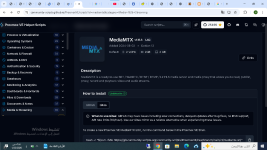
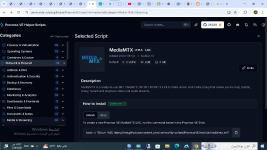
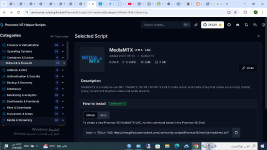
Yes, the containers are being installed using the community helper scripts (MediaMTX LXC), not official Proxmox tools.

I’ve confirmed that the container itself has working IPv4 connectivity and DNS, and the failure consistently occurs when the script tries to access raw.githubusercontent.com, which appears to be blocked or unstable on my network.

Using the official Gitea mirror provided by the community-scripts project resolves the issue, so it does not seem to be a Proxmox or LXC configuration problem.
 

Attachments

  • لقطة الشاشة 2026-01-22 062748.png
    لقطة الشاشة 2026-01-22 062748.png
    84.7 KB · Views: 5
  • لقطة الشاشة 2026-01-22 061832.png
    لقطة الشاشة 2026-01-22 061832.png
    141.4 KB · Views: 5
Reproduce the DNS issue with standard linux tools in a manually created debian CT, share pct config CTIDHERE and we can help you.
 
  • Like
Reactions: Johannes S
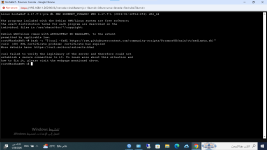
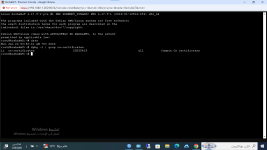
When running a GitHub helper script, curl fails with SSL certificate problem: certificate has expired while accessing raw.githubusercontent.com, indicating an SSL/CA or host-side configuration issue rather than a script issue.

I also created a Debian 13 container manually and verified connectivity with ping 8.8.8.8, which works fine. This confirms that basic network connectivity is functional
 

Attachments

  • لقطة الشاشة 2026-01-26 033257.png
    لقطة الشاشة 2026-01-26 033257.png
    134.5 KB · Views: 3
  • لقطة الشاشة 2026-01-26 033124.png
    لقطة الشاشة 2026-01-26 033124.png
    78.7 KB · Views: 3
Reproduce the DNS issue with standard linux tools in a manually created debian CT, share pct config CTIDHERE and we can help you.
When running a GitHub helper script, curl fails with SSL certificate problem: certificate has expired while accessing raw.githubusercontent.com, indicating an SSL/CA or host-side configuration issue rather than a script issue.

I also created a Debian 13 container manually and verified connectivity with ping 8.8.8.8, which works fine. This confirms that basic network connectivity is functional
 

Attachments

  • لقطة الشاشة 2026-01-26 033257.png
    لقطة الشاشة 2026-01-26 033257.png
    134.5 KB · Views: 1
  • لقطة الشاشة 2026-01-26 033124.png
    لقطة الشاشة 2026-01-26 033124.png
    78.7 KB · Views: 1
Does wget say the same? What if you open the file in your browser? Also try
Bash:
curl -Lkv https://raw.githubusercontent.com/community-scripts/ProxmoxVE/main/ct/mediamtx.sh
 
Last edited:
Does wget say the same? What if you open the file in your browser? Also try
Bash:
curl -Lkv https://raw.githubusercontent.com/community-scripts/ProxmoxVE/main/ct/mediamtx.sh
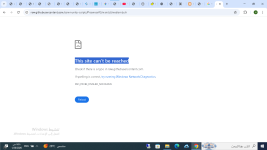
when open the file in the browser "This site can’t be reached"
 

Attachments

  • لقطة الشاشة 2026-01-26 114833.png
    لقطة الشاشة 2026-01-26 114833.png
    76.5 KB · Views: 7
You didn't answer all my questions but that means that it's not PVE related. Please show me what running this in the windows terminal shows.
Bash:
nslookup raw.githubusercontent.com
nslookup raw.githubusercontent.com 1.1.1.1
No need to full quote a post that is directly above yours.
 
Last edited:
  • Like
Reactions: Johannes S
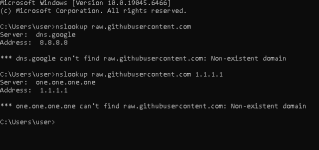
Running the same test from a Windows 10 on the same network:

nslookup raw.githubusercontent.com
nslookup raw.githubusercontent.com 1.1.1.1


Both return Non-existent domain, even when querying Google (8.8.8.8) and Cloudflare (1.1.1.1) DNS directly.
 

Attachments

  • لقطة الشاشة 2026-01-26 222748.png
    لقطة الشاشة 2026-01-26 222748.png
    8.1 KB · Views: 3
I'm guessing something is intercepting the request. I'll leave this to the real network debugging experts to help you solve.