

stuck in emergency mode /etc/fstab wont save changes
- Thread starter PuffX
- Start date
You are using an out of date browser. It may not display this or other websites correctly.
You should upgrade or use an alternative browser.
You should upgrade or use an alternative browser.


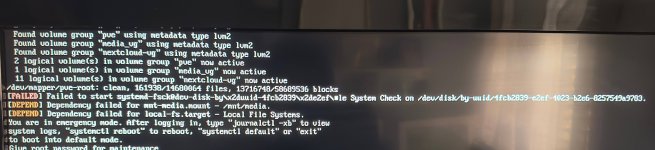
After doing systemtcl default it asks for the password, stays in emergency mode. Can’t get it to boot with and without no fail addedWhat if you usesystemctl defaultthere as it suggests and edit the fstab after it's booted? To avoid this issue you can addnofailoption to the mount options.
Could it be that the ssd with proxmox got corrupted or stuck? I faintly remember a long time ago I tried adding a VM in and after a reboot it was gone(long time ago)
also tryed mount -o remount,rw / with no change
Last edited:
Maybe, but I'd expect it to show something different.
Was this perhaps a mount unit? PVE creates those if you format a disk via
if not try
What does
Was this perhaps a mount unit? PVE creates those if you format a disk via
Disks > Directory for example.systemctl default after logging in with root password or simply CTRL+D should still work.if not try
systemctl mask mnt-media.mount or systemctl disable mnt-media.mount after logging in.What does
cat /etc/fstab and find /etc/systemd -name "*.mount" or systemctl list-units --type=mount look like?
Last edited:
il be honest i dont have any idea what im doing...Perhaps but I'd expect it to show something different.
Was this perhaps a mount unit? PVE creates those if you format a disk viaDisks > Directoryfor example.
systemctl defaultafter logging in with root password or simplyCTRL+Dshould still work. What doescat /etc/fstablook like?
i cant remember if its a mount unit
i can tell you that its a mix of 2 hard drives i merged to get more storage i unmounted them from proxmox and gave them to a vm i made after i rebooted i got in this pickle
when i do systemctl default in the emergency mode the only thing that happens is that it asks for the root password once more
im afried i dont have enough tech knowledge to concatenation the problem
im willing to give you any information you need to help me resolve the problem
thank you for taking the time to hhelp me understand what i broke and how lol
Dude thank you so much! I got past the emergency mode thank you so very much!systemctl defaultcomes AFTER entering the password. I've since edited my post with more information that will hopefully help.
ctrl d brings me straight to emergency mode immediately
I got into proxmox by doing as followed:
Entering the password
Doing the mask mint-media command then ctrl d and it boots into proxmox
Thing is when I reboot once more it goes back into emergency mode and I have to do the steps all over again(maybe a mask thing il learn about it)
From here on I think il manage by myself il try to debug it and learn a bit more about proxmox
Once again I’m really greatfull for your help! I was really worried.. if I won’t be able to resolve this issue on my own I’ll contact you. Main thing is I’m in proxmox