LXC Containers keep restarting

merkelbeek

New Member
Jan 21, 2026
5
0
1
Hi all,

Im fairly new to Proxmox.
I have a prodesk 400 G8 (16GB ram/1TB M2 SDD)
I run a couple of LXC Containers (Unifi, Wallos, n8n, meshcentral, Shinobi and Dispatcharr)
All my containers keep restarting on a random interval, sometimes that are up for 30 minutes and than all of the restart, it also happends sometimes after 5 minutes or longer then an hour.

I checkd the load if its maybe over performing. that is not the case
28% ram usage and 3% CPU usage.

I already asked chatgpt, it said watchdog could be the problem. so i already disabled that but the random reboot/restarts keep happening.

I checks the uptime of the PVE node it also has the same uptime as my lxc containers, so it seems the PVE node is restarting/rebooting
 
So which is it? Are the containers restarting, which is typically caused by monitoring software and/or scripts run from the internet (since this is not standard Proxmox behavior: it does not restart stuff unless HA is configured) or the Proxmox host restarting, which is typically caused by external factors, hardware issues or BIOS incompatibilities?
 
So which is it? Are the containers restarting, which is typically caused by monitoring software and/or scripts run from the internet (since this is not standard Proxmox behavior: it does not restart stuff unless HA is configured) or the Proxmox host restarting, which is typically caused by external factors, hardware issues or BIOS incompatibilities?
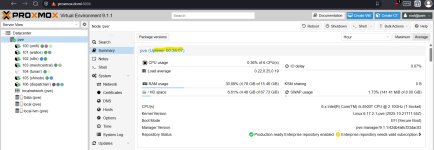
I think the Proxmox host is restarting (see attachment)
 

Attachments

  • uptime.png
    uptime.png
    135.6 KB · Views: 8
I think the Proxmox host is restarting

Did you take a look into the journal? No hints?

journalctl -b -1 -e = show the end (-e) of the previous (-1) boot. "-2" for the one before the last one and so on. man journalctl tells you more.

If there is no sign of the shutdown sequence then it may be a hardware problem...
 
Last edited:
Did you take a look into the journal? No hints?

journalctl -b -1 -e = show the end (-e) of the previous (-1) boot. "-2" for the one before the last one and so on. man journalctl tells you more.

If there is no sign of the shutdown sequence then it may be a hardware problem...
i attached the export of it
 

Attachments

Code:
Jan 22 20:23:18 pve login[22321]: pam_unix(login:session): session closed for user root
Jan 22 20:23:18 pve pvedaemon[1082]: <root@pam> end task UPID:pve:0000571A:0004ED89:697277C1:vncshell::root@pam: OK
Jan 22 20:23:18 pve systemd[1]: session-78.scope: Deactivated successfully.
Jan 22 20:23:18 pve systemd-logind[730]: Session 78 logged out. Waiting for processes to exit.
Jan 22 20:23:18 pve systemd-logind[730]: Removed session 78.
Jan 22 20:23:29 pve systemd[1]: Stopping user@0.service - User Manager for UID 0...
Jan 22 20:23:29 pve systemd[22329]: Activating special unit exit.target...
Jan 22 20:23:29 pve systemd[22329]: Stopped target default.target - Main User Target.
Jan 22 20:23:29 pve systemd[22329]: Stopped target basic.target - Basic System.
...
Jan 22 20:23:29 pve systemd[22329]: Reached target shutdown.target - Shutdown.

Das ist anscheinend kein Crash, sondern ein angeforderter Shutdown. Leider kann ich (wie so oft) nicht die Ursache erkennen.

Ist auf diesem System irgendetwas installiert, das Strom sparen will (und 'runterfährt wenn niemand mehr angemeldet ist)? Sind sonstige externe Scripte installiert? (Auf meinen PVEs gibt es beispielsweise keinen keyboxd und auch keinen gpg-agent.)

Sorry, keine gute Antwort...


Edit: ooops! English ;-)

This does not look like a crash but like a shutdown-request. Unfortunately I can no see the initiator / the reason.

Is something else installed on this PVE, which might want to safe power (and shuts down when the last user logs out)? Are any other scripts installed? (On my PVE there is not keyboxd and not gpg-agent, for example.)

Sorry, not really helpful an answer...
 
Last edited:
  • Like
Reactions: Johannes S
I just did a fresh installed and installed proxmox barematel and installed a new ssd.
Also replaced the 2x 8GB DDR 4 Dimss with 2x 16GB DDR 4.
And i am using a new power supply
only motherboard and CPU is still the same.

creating the containers now. let's see if it still crashes or not....

So far so good, installed even a couple of extra containers;
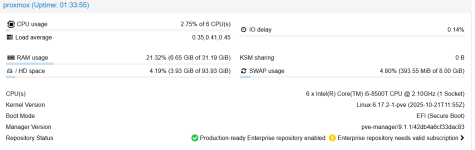
uptime is 1,30 hours now...
Schermafbeelding 2026-01-23 203706.png
 
Last edited: